





Fffrank
Members
-
Joined
-
Last visited
Everything posted by Fffrank
-
Further investigation of logs makes this look even more likely: Nov 16 02:43:00 Hippo smbd[1668]: [2022/11/16 02:43:00.249990, 0] ../../source3/smbd/server.c:1741(main) Nov 16 02:43:00 Hippo smbd[1668]: smbd version 4.17.2 started. Nov 16 02:43:00 Hippo smbd[1668]: Copyright Andrew Tridgell and the Samba Team 1992-2022 Nov 16 02:43:00 Hippo nmbd[1673]: [2022/11/16 02:43:00.283325, 0] ../../source3/nmbd/nmbd.c:901(main) Nov 16 02:43:00 Hippo nmbd[1673]: nmbd version 4.17.2 started. Nov 16 02:43:00 Hippo nmbd[1673]: Copyright Andrew Tridgell and the Samba Team 1992-2022 ... Nov 17 00:15:38 Hippo smbd[22786]: [2022/11/17 00:15:38.152578, 2] ../../source3/smbd/open.c:1678(open_file) Nov 17 00:15:38 Hippo smbd[22786]: admin opened file SERVER/FOO/file.mkv read=No write=No (numopen=2) Nov 17 00:15:38 Hippo smbd[22786]: [2022/11/17 00:15:38.167282, 3] ../../source3/smbd/smb2_trans2.c:6834(smbd_do_setfilepathinfo) Nov 17 00:15:38 Hippo smbd[22786]: smbd_do_setfilepathinfo: file SERVER/FOO/file.mkv (fnum 1321203594) info_level=1013 totdata=1 Nov 17 00:15:38 Hippo smbd[22786]: [2022/11/17 00:15:38.175453, 2] ../../source3/smbd/close.c:830(close_normal_file) Nov 17 00:15:38 Hippo smbd[22786]: admin closed file file SERVER/FOO/file.mkv (numopen=0) NT_STATUS_ACCESS_DENIED Nov 17 00:15:38 Hippo smbd[22786]: smbd_smb2_request_error_ex: smbd_smb2_request_error_ex: idx[1] status[NT_STATUS_ACCESS_DENIED] || at ../../source3/smbd/smb2_close.c:111 status[NT_STATUS_ACCESS_DENIED]Nov 17 00:15:38 Hippo smbd[22786]: [2022/11/17 00:15:38.175530, 3] ../../source3/smbd/smb2_server.c:3955(smbd_smb2_request_error_ex)
-
I think this is a samba issue and is related to the file managers that are failing using gvfs as the library to access. Plenty of bug reports related to this for version 4.17.0 but supposedly resolved with 4.17.2 (although obviously still some issues.) https://bugzilla.samba.org/show_bug.cgi?id=15195 https://gitlab.gnome.org/GNOME/gvfs/-/issues/649 I do not believe there is a utility in unRAID to downgrade a specific package?
-
I am having the exact same problem. Individual files result in an error (yet still delete) but directories or selections with multiple files simply fail as "access denied." Have removed shares and readded .... Created new users. Triple checked permissions. Tried public vs secure but it's all the same result when browsing SMB on Android. Super weird.
-
All my Dockers disappeared after reboot. I was able to reinstall from Previous Apps page and with a few tweaks it seems like they all came back fine. It wasn't a major panic as I do have daily backups of my appdata. Would be nice in the future for an automated function to backup docker settings (auto start, start delay, etc.) Diagnostic attached from before I reinstalled all the apps in case it helps chase this bug. hippo-diagnostics-20221116-0840.zip
-
Same issue. I'll work on it tomorrow and post a diagnostics. First time I've ever had an issue with an upgrade.
-
Has anyone ever figured this out? My system appears to be getting worse. I download and process on my cache drives (4x 240gb SSD.) Then the data is moved to my media share (which also uses the cache.) During these operations my system comes to a standstill. Anything streaming off the array chokes, my Dockers become unresponsive, VMs time out and I even get ssh shells dropped. It's a dual Xenon 5660 w/ 96gb of RAM. htop doesn't show anything out of the ordinary but the unRAID Dashboard shows cpu use through the roof. I finally stumbled upon this thread and it seems I have the same iowait issues. I've got my dockers all pinned to limit what they can use. I have my docker image on the cache as well as my appdata share. Very frustrating!
-
FWIW the binhex container version doesn't seem to have any issues.
-
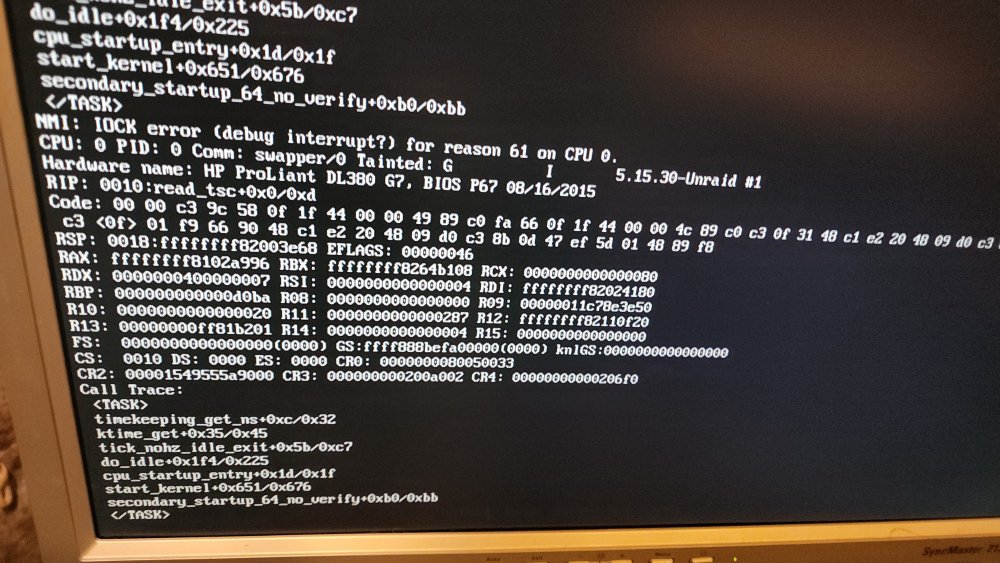
Photo of the error is attached. This only happens on a reboot - if I cold boot it boots correctly. Any ideas?
-
I export an NFS share that I have mounted on a linux client (Vero 4k running Debian.) Since upgrading to RC2, my NFS shares on that client are going "stale" if they're allowed to sit idle. Once the client reboots it works fine until it goes idle again. This is a new issue. Here's my fstab config on the client: osmc@osmc:/mnt$ cat /etc/fstab 192.168.1.10:/mnt/user/media /mnt/dietpi nfs noauto,x-systemd.automount,_netdev 0 0 Diagnostics attached. hippo-diagnostics-20211111-1145.zip
-
HP DL380 G7 w/ dual Xeon X5660 and 96gb of RAM. Trying to install Windows 11 but any time I try to boot w/ OVMF (or OVMF-TPM) it just drops me to the shell> prompt. Have tried both Q35-6.1 and i440fx-6.1 If I use Seabios it works fine (but I'm not able to emulate TPM to install Windows 11.)
-
Can't figure this out for the life of me. My resource monitor does not seem to indicate a memory shortage, I have plenty of overhead with my processors. Other VMS work just fine. I've reinstalled Windows 10 (over the top of the current install so that I didn't lose anything) and it also didn't make a difference. Reinstalled Virtio drivers, removed a bunch of programs, checked my startup logs and event viewer and can't find anything making it slow. Any one have any other ideas of things I could try? Really trying to avoid wiping the entire vdisk and starting over.
-
I installed Docker for Windows on a Win10VM. It required a restart and immediately after restarting the performance felt sluggish. I've since uninstalled it but my Windows instance is still struggling. Is there some settting or add-on that Docker could have installed that might have caused this?
-
Solved my own problem and wanted to post the solution. I added the if statement for exclusion to the awk routine rather than asking asking the rm command to ignore. du /mnt/user/media/Movies/ | awk '{ if ( $1 <= 300000 && $2 != "/mnt/user/media/Movies/.stfolder" ) print "rm -rf -v \"" substr($0, length($1)+2) "\"" }' | sh
-
Trying to run a script that deletes all folders under a certain size (which works perfectly) but I need to exclude 1 folder and I can't get the syntax right. Help? #!/bin/bash shopt -s extglob du /mnt/user/media/Movies/ | awk '$1 <= 300000 { print "rm -rf -v \"" substr($0, length($1)+2) "\" !(".stfolder")"}' | sh awk: cmd. line:1: $1 <= 300000 { print "rm -rf -v \"" substr($0, length($1)+2) "\" !(".stfolder")"} awk: cmd. line:1: ^ syntax error
-
I'm having an issue trying to synch a 2+ tb folder. It runs the scan and then 3 times now the "source" docker running on unraid displays a message that the folder marker is missing and it stops. I have added the UMASK_SET 000 variable to my docker and no change. The .stfolder does seem to be missing but I can't figure out why syncthing cannot write to that directory. It is owned by "nobody" and seems to have correct perms: drwxrwxrwx 1 nobody users 4096 Nov 18 04:40 xxxxxxxxx/ Any ideas?
-
I'd love some kind of swarm management. I haven't experimented with any other systems but I can picture a world where Unraid deploys docker containers to nodes based on what their CPU utilization is and intelligently manages/balances them. I'd love to mothball my big server, fire up Unraid on a low-power device with a big stack of drives and have it spool up and down nodes as docker containers require them.
-
Is anyone else having trouble with deluge? Looks like it was updated 2-days ago and mine is putting a strangle-hold on my resources. CPUs are all pinned and the system is bogged down. If I kill that docker it goes back to working normally.
-
I have a really weird issue -- Home Assistant is polling Unifi to see what devices are connected. If my docker daemon restarts or my server restarts, the connection from HA to Unifi-Controller times out. If I manually restart my HA service it connects just fine. I've tried increasing the delay of the HA server to 10m after the Unifi-Controller starts but it still times out when trying to connect. Anyone have any ideas what else I can try? (Posting here because there isn't a support thread for the HA container -- which is likely the problem.)
-
Upgraded from 6.6.7 without any major issues and only one minor one. The upgrade took all my services offline but then never rebooted. I was able to ssh in and manually reboot and everything came back up fine (so far.)
-
Was able to connect to iLo3. It was a bit of a headache as the firmware as at 1.15 which only supported TLS1.0 (which has been dropped from every current web browser.) I finally was able to install Firefox 23 and then enable TLS1.0 and SSL3 in order to connect and update to 1.20 and then 1.90 firmwares. Cool! Next question -- how can I update the system BIOS either remotely or from UnRaid. HPE only makes available RPM packages and Windows packages. Doesn't look like UnRaid can install RPMs. I tried to flash via a Windows VM and it couldn't detect the system. My server is headless so I don't believe I can do it via USB..... thoughts?
-
Got it -- I'll try this over the weekend. I can watch the DHCP server on my pfsense for a new ethernet assignment (assuming that my server iLo uses DHCP, anyway.)
-
I've got an HP hba card and an expander. Bios info: <description>BIOS</description> <vendor>HP</vendor> <physid>0</physid> <version>P67</version> <date>08/16/2015</date> I actually have no idea how to login to iLo. Do I need to connect another Ethernet cable?
-
I've got a HP DL380G7 -- it's up and running and has been relatively trouble free. But last night I rebooted and the fans now won't quiet down. Rebooted again and same issue. I know this is a tricky and probably bios related problem but all my drives are showing in SMART and 25-30C. System temps are all low. System is basically at idle. Thoughts on things I could try to quiet it down? It's in my basement so it doesn't need to be silent.... but it's gone from a negligible amount of noise to an annoying amount.
-
The umask issue was unrelated. Fixed that and still couldn't connect to the daemon. Rolled back to version 79 (I'm using the aarch64 builds) and it works again. I wish there was a way to flag a docker image as broken.
-
Recently my deluge instance quit connecting to the daemon. Log is here: https://pastebin.com/F16zrHF7 ./run umask is failing but I'm not sure what that means?

