





bubbadk
Members
-
Joined
-
Last visited
Everything posted by bubbadk
-
That did the trick. Thank you so kindly
-
i just looked at my upload script log. it apparently not uploading to google. can any1 see why what files and logs do you need. 06.05.2023 09:30:03 INFO: *** Rclone move selected. Files will be moved from /mnt/user/local/gdrive_vfs for gdrive_vfs *** 06.05.2023 09:30:03 INFO: *** Starting rclone_upload script for gdrive_vfs *** 06.05.2023 09:30:03 INFO: Exiting as script already running. Script Finished May 06, 2023 09:30.03 Full logs for this script are available at /tmp/user.scripts/tmpScripts/rclone_upload/log.txt
-
nope. i just made it at the time. image..do you mean bacula
-
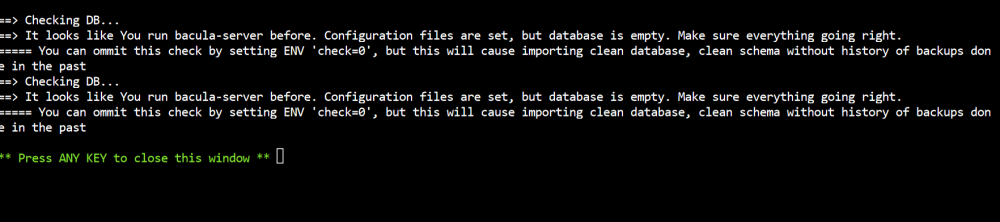
did all from post 1. using postgresql 15
-
uninstalled and it worked. installed rc5 and my disks said it was incompatible. went back to 6.11 and everything works again. using btrfs. don't know if that's the problem
-
well these worked fine : intel_gpu_top drm:/dev/dri/card0 intel_gpu_top drm:/dev/dri/renderD128 just not single output : intel_gpu_top attached diagnostics tower-diagnostics-20230503-0706.zip
-
Wonder if the programmers of unraid knows about this. I dread everytime I need to reboot on what had been broken.. I'm on 6.11 and don't have the nerves to upgrade.
-
I reinstalled unraid because I thought it was a one time incident. But yesterday I rebooted unraid, and the error was there again. Segment fault. Hw transcode still works though.. But not Intel_gpu_top
-
I had to change the port 13378 to port 1700 for it to work in nginx proxy manager
-
Is there a admin to the app. I could only use it if i added a new user. And that user only has 500 MB to work with. Is there a default admin login
-
Is there a manual way to do it. I have no vm and don't want any. I shut the vm off. I have docker and no shares (at the moment. My question is : If I want to reboot manually, then what is the procedure ( like 1,2,3 etc) I'm dreadful everytime I need to make a reboot. Because every time I need to run the rclone mount and it has to install the fuse plugin everytime. And my igpu stops working everytime with a segment fault. Is it because I had an unclean shutdown everytime. I thought that unraid was halted and I shut it down with power off button. Now I have read this and I need to have more patience I can see. But I need to reboot manually and how to do it so I don't mess up my system. Regards from Denmark 🙂
-
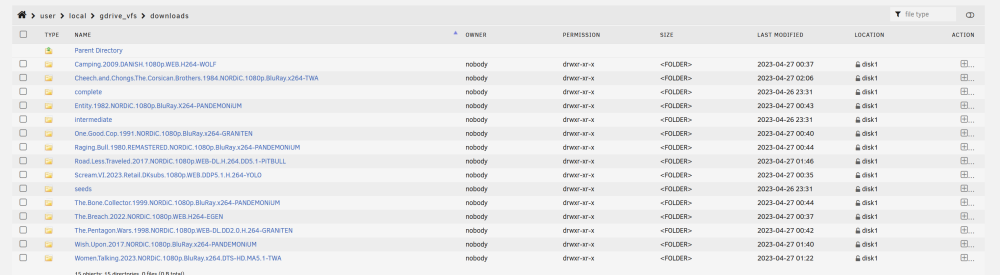
Had to edit the script from gdrive_upload_vfs to gdrive_vfs it works now Hi again. a new install on an Intel Nuc 11 i7 when i try to make an upload. nothing happens. I'm not sure if i'm making any mistakes. the picture shows i have something in my folders that are ready to upload Script location: /tmp/user.scripts/tmpScripts/rclone_upload/script Note that closing this window will abort the execution of this script 27.04.2023 02:07:58 INFO: *** Rclone move selected. Files will be moved from /mnt/user/local/gdrive_vfs for gdrive_upload_vfs *** 27.04.2023 02:07:58 INFO: *** Starting rclone_upload script for gdrive_upload_vfs *** 27.04.2023 02:07:58 INFO: Script not running - proceeding. 27.04.2023 02:07:58 INFO: Checking if rclone installed successfully. 27.04.2023 02:07:58 INFO: rclone installed successfully - proceeding with upload. 27.04.2023 02:07:58 INFO: Uploading using upload remote gdrive_upload_vfs 27.04.2023 02:07:58 INFO: *** Using rclone move - will add --delete-empty-src-dirs to upload. 2023/04/27 02:07:58 INFO : Starting transaction limiter: max 8 transactions/s with burst 1 2023/04/27 02:07:58 DEBUG : --min-age 15m0s to 2023-04-27 01:52:58.840599861 -0700 PDT m=-899.967713461 2023/04/27 02:07:58 DEBUG : rclone: Version "v1.62.2" starting with parameters ["rcloneorig" "--config" "/boot/config/plugins/rclone/.rclone.conf" "move" "/mnt/user/local/gdrive_vfs" "gdrive_upload_vfs:" "--user-agent=gdrive_upload_vfs" "-vv" "--buffer-size" "512M" "--drive-chunk-size" "512M" "--tpslimit" "8" "--checkers" "8" "--transfers" "4" "--order-by" "modtime,ascending" "--min-age" "15m" "--exclude" "downloads/**" "--exclude" "*fuse_hidden*" "--exclude" "*_HIDDEN" "--exclude" ".recycle**" "--exclude" ".Recycle.Bin/**" "--exclude" "*.backup~*" "--exclude" "*.partial~*" "--drive-stop-on-upload-limit" "--bwlimit" "01:00,off 08:00,15M 16:00,12M" "--bind=" "--delete-empty-src-dirs"] 2023/04/27 02:07:58 DEBUG : Creating backend with remote "/mnt/user/local/gdrive_vfs" 2023/04/27 02:07:58 DEBUG : Using config file from "/boot/config/plugins/rclone/.rclone.conf" 2023/04/27 02:07:58 DEBUG : Creating backend with remote "gdrive_upload_vfs:" 2023/04/27 02:07:58 Failed to create file system for "gdrive_upload_vfs:": didn't find section in config file 27.04.2023 02:07:58 INFO: Not utilising service accounts. 27.04.2023 02:07:58 INFO: Script complete
-
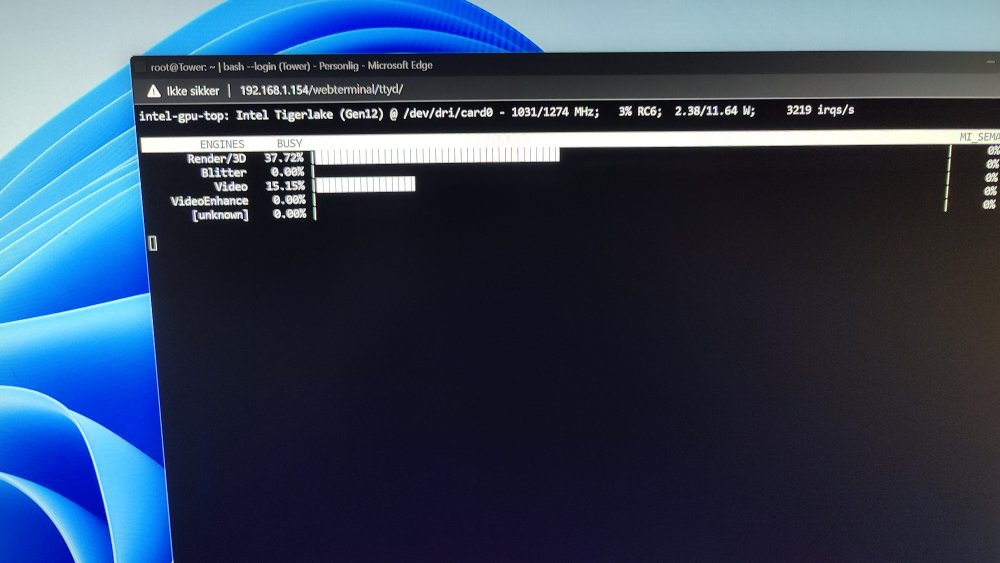
hi gang. Nevermind. made a complete reinstall Im on a intel nuc generation 11 i7 the first time i installed intel gpu top everything worked fine. Then i rebooted and i get ithis error. as you can see i have /dev/dri and everything is thee. but i can't seem to getting it work root@Tower:~# intel_gpu_top Failed to detect engines! (No such file or directory) (Kernel 4.16 or newer is required for i915 PMU support.) Segmentation fault root@Tower:~# cd /dev/dri root@Tower:/dev/dri# ls by-path/ card0 card1 card2 renderD128 renderD129 renderD130 root@Tower:/dev/dri# the picture is from fresh install without the first boot
-
Thanks. Now I think I got the hang of it. Thank you very very much
-
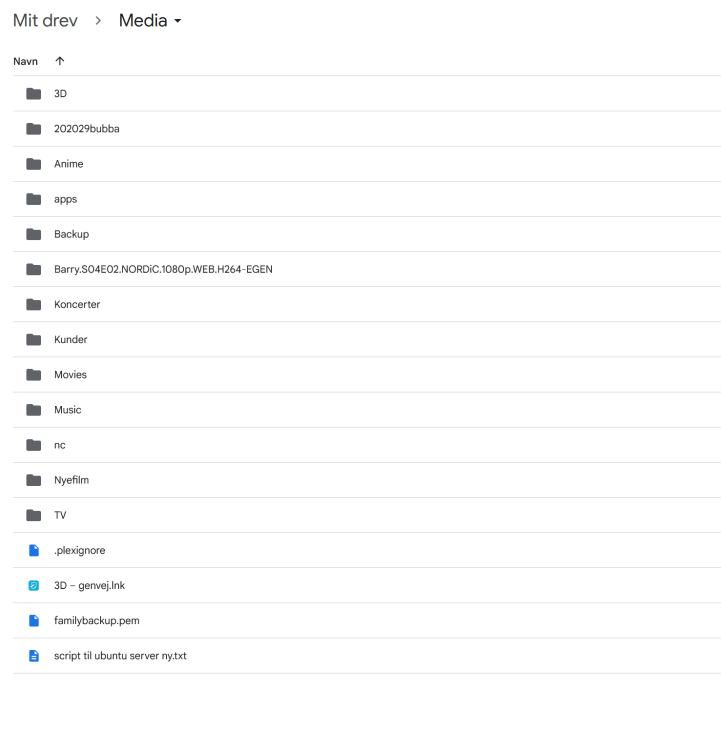
ok the plex part. i have my files (movies etc..) on my google at (see picture) should they be moved to another location
-
holy monkey...u are a god.. it worked. when i download. where do i point to. and what directory do i point plex too
-
didn't work i'm really lost here
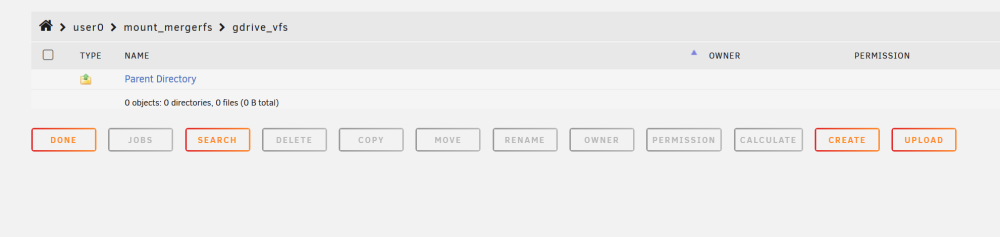
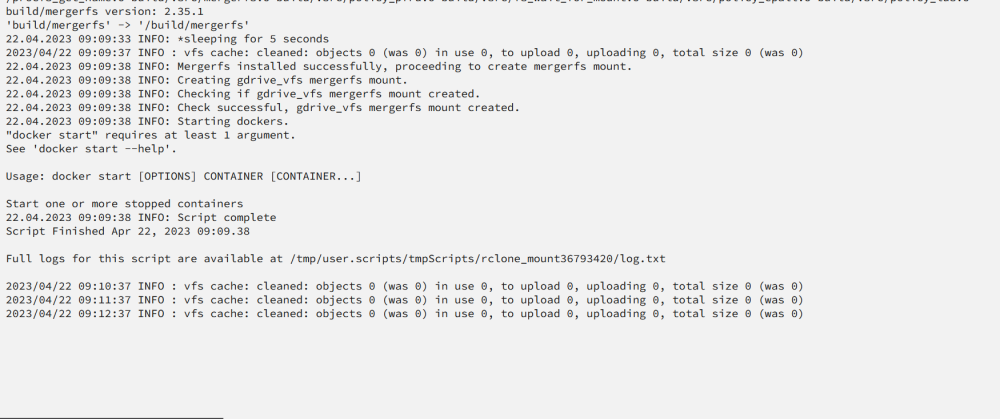
-
ahh ok. well i'm running the script now. made sure all was deleted before running the script. crossing fingers. i have run the script 20 times now. all with the same output. no mount.
-
ok just to be clear. when i use the script from here. I can't see my gdrive. what does it do to be exact. does it make directories on my google drive. am i suppose to move my existing folders with movies and tv to another directory or ?!?!? i'm a bit confused as what it does.
-
ok.. this is odd.. when i do this : rclone mount --allow-other --buffer-size 256M --dir-cache-time 720h --drive-chunk-size 512M --fast-list --log-level INFO --vfs-read-chunk-size 128M --vfs-read-chunk-size-limit off --vfs-cache-mode writes gdrive_vfs: /mnt/user/mount_rclone/google_vfs & then i can see it. but the script does nothing for me. then i can't use the script and all the features...bummer
-
###################### #### Mount Script #### ###################### ## Version 0.96.9.3 ## ###################### ####### EDIT ONLY THESE SETTINGS ####### # INSTRUCTIONS # 1. Change the name of the rclone remote and shares to match your setup # 2. NOTE: enter RcloneRemoteName WITHOUT ':' # 3. Optional: include custom command and bind mount settings # 4. Optional: include extra folders in mergerfs mount # REQUIRED SETTINGS RcloneRemoteName="gdrive_vfs" # Name of rclone remote mount WITHOUT ':'. NOTE: Choose your encrypted remote for sensitive data RcloneMountShare="/mnt/user/mount_rclone" # where your rclone remote will be located without trailing slash e.g. /mnt/user/mount_rclone RcloneMountDirCacheTime="720h" # rclone dir cache time LocalFilesShare="/mnt/user/local" # location of the local files and MountFolders you want to upload without trailing slash to rclone e.g. /mnt/user/local. Enter 'ignore' to disable RcloneCacheShare="/mnt/user0/mount_rclone" # location of rclone cache files without trailing slash e.g. /mnt/user0/mount_rclone RcloneCacheMaxSize="40G" # Maximum size of rclone cache RcloneCacheMaxAge="336h" # Maximum age of cache files MergerfsMountShare="/mnt/user/mount_mergerfs" # location without trailing slash e.g. /mnt/user/mount_mergerfs. Enter 'ignore' to disable DockerStart="" # list of dockers, separated by space, to start once mergerfs mount verified. Remember to disable AUTOSTART for dockers added in docker settings page MountFolders=\{"downloads/complete,downloads/intermediate,downloads/seeds,movies,tv"\} # comma separated list of folders to create within the mount # Note: Again - remember to NOT use ':' in your remote name above # OPTIONAL SETTINGS # Add extra paths to mergerfs mount in addition to LocalFilesShare LocalFilesShare2="ignore" # without trailing slash e.g. /mnt/user/other__remote_mount/or_other_local_folder. Enter 'ignore' to disable LocalFilesShare3="ignore" LocalFilesShare4="ignore" # Add extra commands or filters Command1="--rc" Command2="--allow-non-empty" Command3="" Command4="" Command5="" Command6="" Command7="" Command8="" CreateBindMount="N" # Y/N. Choose whether to bind traffic to a particular network adapter RCloneMountIP="192.168.1.234" # My unraid IP is 172.30.12.2 so I create another similar IP address NetworkAdapter="eth0" # choose your network adapter. eth0 recommended VirtualIPNumber="2" # creates eth0:x e.g. eth0:1. I create a unique virtual IP addresses for each mount & upload so I can monitor and traffic shape for each of them ####### END SETTINGS ####### ############################################################################### ##### DO NOT EDIT ANYTHING BELOW UNLESS YOU KNOW WHAT YOU ARE DOING ####### ############################################################################### ####### Preparing mount location variables ####### RcloneMountLocation="$RcloneMountShare/$RcloneRemoteName" # Location for rclone mount LocalFilesLocation="$LocalFilesShare/$RcloneRemoteName" # Location for local files to be merged with rclone mount MergerFSMountLocation="$MergerfsMountShare/$RcloneRemoteName" # Rclone data folder location ####### create directories for rclone mount and mergerfs mounts ####### mkdir -p /mnt/user/appdata/other/rclone/remotes/$RcloneRemoteName # for script files mkdir -p $RcloneCacheShare/cache/$RcloneRemoteName # for cache files if [[ $LocalFilesShare == 'ignore' ]]; then echo "$(date "+%d.%m.%Y %T") INFO: Not creating local folders as requested." LocalFilesLocation="/tmp/$RcloneRemoteName" eval mkdir -p $LocalFilesLocation else echo "$(date "+%d.%m.%Y %T") INFO: Creating local folders." eval mkdir -p $LocalFilesLocation/"$MountFolders" fi mkdir -p $RcloneMountLocation if [[ $MergerfsMountShare == 'ignore' ]]; then echo "$(date "+%d.%m.%Y %T") INFO: Not creating MergerFS folders as requested." else echo "$(date "+%d.%m.%Y %T") INFO: Creating MergerFS folders." mkdir -p $MergerFSMountLocation fi ####### Check if script is already running ####### echo "$(date "+%d.%m.%Y %T") INFO: *** Starting mount of remote ${RcloneRemoteName}" echo "$(date "+%d.%m.%Y %T") INFO: Checking if this script is already running." if [[ -f "/mnt/user/appdata/other/rclone/remotes/$RcloneRemoteName/mount_running" ]]; then echo "$(date "+%d.%m.%Y %T") INFO: Exiting script as already running." exit else echo "$(date "+%d.%m.%Y %T") INFO: Script not running - proceeding." touch /mnt/user/appdata/other/rclone/remotes/$RcloneRemoteName/mount_running fi ####### Checking have connectivity ####### echo "$(date "+%d.%m.%Y %T") INFO: *** Checking if online" ping -q -c2 google.com > /dev/null # -q quiet, -c number of pings to perform if [ $? -eq 0 ]; then # ping returns exit status 0 if successful echo "$(date "+%d.%m.%Y %T") PASSED: *** Internet online" else echo "$(date "+%d.%m.%Y %T") FAIL: *** No connectivity. Will try again on next run" rm /mnt/user/appdata/other/rclone/remotes/$RcloneRemoteName/mount_running exit fi ####### Create Rclone Mount ####### # Check If Rclone Mount Already Created if [[ -f "$RcloneMountLocation/mountcheck" ]]; then echo "$(date "+%d.%m.%Y %T") INFO: Success ${RcloneRemoteName} remote is already mounted." else echo "$(date "+%d.%m.%Y %T") INFO: Mount not running. Will now mount ${RcloneRemoteName} remote." # Creating mountcheck file in case it doesn't already exist echo "$(date "+%d.%m.%Y %T") INFO: Recreating mountcheck file for ${RcloneRemoteName} remote." touch mountcheck rclone copy mountcheck $RcloneRemoteName: -vv --no-traverse # Check bind option if [[ $CreateBindMount == 'Y' ]]; then echo "$(date "+%d.%m.%Y %T") INFO: *** Checking if IP address ${RCloneMountIP} already created for remote ${RcloneRemoteName}" ping -q -c2 $RCloneMountIP > /dev/null # -q quiet, -c number of pings to perform if [ $? -eq 0 ]; then # ping returns exit status 0 if successful echo "$(date "+%d.%m.%Y %T") INFO: *** IP address ${RCloneMountIP} already created for remote ${RcloneRemoteName}" else echo "$(date "+%d.%m.%Y %T") INFO: *** Creating IP address ${RCloneMountIP} for remote ${RcloneRemoteName}" ip addr add $RCloneMountIP/24 dev $NetworkAdapter label $NetworkAdapter:$VirtualIPNumber fi echo "$(date "+%d.%m.%Y %T") INFO: *** Created bind mount ${RCloneMountIP} for remote ${RcloneRemoteName}" else RCloneMountIP="" echo "$(date "+%d.%m.%Y %T") INFO: *** Creating mount for remote ${RcloneRemoteName}" fi # create rclone mount rclone mount \ $Command1 $Command2 $Command3 $Command4 $Command5 $Command6 $Command7 $Command8 \ --allow-other \ --umask 000 \ --dir-cache-time $RcloneMountDirCacheTime \ --attr-timeout $RcloneMountDirCacheTime \ --log-level INFO \ --poll-interval 10s \ --cache-dir=$RcloneCacheShare/cache/$RcloneRemoteName \ --drive-pacer-min-sleep 10ms \ --drive-pacer-burst 1000 \ --vfs-cache-mode full \ --vfs-cache-max-size $RcloneCacheMaxSize \ --vfs-cache-max-age $RcloneCacheMaxAge \ --vfs-read-ahead 1G \ --bind=$RCloneMountIP \ $RcloneRemoteName: $RcloneMountLocation & # Check if Mount Successful echo "$(date "+%d.%m.%Y %T") INFO: sleeping for 5 seconds" # slight pause to give mount time to finalise sleep 5 echo "$(date "+%d.%m.%Y %T") INFO: continuing..." if [[ -f "$RcloneMountLocation/mountcheck" ]]; then echo "$(date "+%d.%m.%Y %T") INFO: Successful mount of ${RcloneRemoteName} mount." else echo "$(date "+%d.%m.%Y %T") CRITICAL: ${RcloneRemoteName} mount failed - please check for problems. Stopping dockers" docker stop $DockerStart rm /mnt/user/appdata/other/rclone/remotes/$RcloneRemoteName/mount_running exit fi fi ####### Start MergerFS Mount ####### if [[ $MergerfsMountShare == 'ignore' ]]; then echo "$(date "+%d.%m.%Y %T") INFO: Not creating mergerfs mount as requested." else if [[ -f "$MergerFSMountLocation/mountcheck" ]]; then echo "$(date "+%d.%m.%Y %T") INFO: Check successful, ${RcloneRemoteName} mergerfs mount in place." else # check if mergerfs already installed if [[ -f "/bin/mergerfs" ]]; then echo "$(date "+%d.%m.%Y %T") INFO: Mergerfs already installed, proceeding to create mergerfs mount" else # Build mergerfs binary echo "$(date "+%d.%m.%Y %T") INFO: Mergerfs not installed - installing now." mkdir -p /mnt/user/appdata/other/rclone/mergerfs docker run -v /mnt/user/appdata/other/rclone/mergerfs:/build --rm trapexit/mergerfs-static-build mv /mnt/user/appdata/other/rclone/mergerfs/mergerfs /bin # check if mergerfs install successful echo "$(date "+%d.%m.%Y %T") INFO: *sleeping for 5 seconds" sleep 5 if [[ -f "/bin/mergerfs" ]]; then echo "$(date "+%d.%m.%Y %T") INFO: Mergerfs installed successfully, proceeding to create mergerfs mount." else echo "$(date "+%d.%m.%Y %T") ERROR: Mergerfs not installed successfully. Please check for errors. Exiting." rm /mnt/user/appdata/other/rclone/remotes/$RcloneRemoteName/mount_running exit fi fi # Create mergerfs mount echo "$(date "+%d.%m.%Y %T") INFO: Creating ${RcloneRemoteName} mergerfs mount." # Extra Mergerfs folders if [[ $LocalFilesShare2 != 'ignore' ]]; then echo "$(date "+%d.%m.%Y %T") INFO: Adding ${LocalFilesShare2} to ${RcloneRemoteName} mergerfs mount." LocalFilesShare2=":$LocalFilesShare2" else LocalFilesShare2="" fi if [[ $LocalFilesShare3 != 'ignore' ]]; then echo "$(date "+%d.%m.%Y %T") INFO: Adding ${LocalFilesShare3} to ${RcloneRemoteName} mergerfs mount." LocalFilesShare3=":$LocalFilesShare3" else LocalFilesShare3="" fi if [[ $LocalFilesShare4 != 'ignore' ]]; then echo "$(date "+%d.%m.%Y %T") INFO: Adding ${LocalFilesShare4} to ${RcloneRemoteName} mergerfs mount." LocalFilesShare4=":$LocalFilesShare4" else LocalFilesShare4="" fi # make sure mergerfs mount point is empty mv $MergerFSMountLocation $LocalFilesLocation mkdir -p $MergerFSMountLocation # mergerfs mount command mergerfs $LocalFilesLocation:$RcloneMountLocation$LocalFilesShare2$LocalFilesShare3$LocalFilesShare4 $MergerFSMountLocation -o rw,async_read=false,use_ino,allow_other,func.getattr=newest,category.action=all,category.create=ff,cache.files=partial,dropcacheonclose=true # check if mergerfs mount successful echo "$(date "+%d.%m.%Y %T") INFO: Checking if ${RcloneRemoteName} mergerfs mount created." if [[ -f "$MergerFSMountLocation/mountcheck" ]]; then echo "$(date "+%d.%m.%Y %T") INFO: Check successful, ${RcloneRemoteName} mergerfs mount created." else echo "$(date "+%d.%m.%Y %T") CRITICAL: ${RcloneRemoteName} mergerfs mount failed. Stopping dockers." docker stop $DockerStart rm /mnt/user/appdata/other/rclone/remotes/$RcloneRemoteName/mount_running exit fi fi fi ####### Starting Dockers That Need Mergerfs Mount To Work Properly ####### # only start dockers once if [[ -f "/mnt/user/appdata/other/rclone/remotes/$RcloneRemoteName/dockers_started" ]]; then echo "$(date "+%d.%m.%Y %T") INFO: dockers already started." else # Check CA Appdata plugin not backing up or restoring if [ -f "/tmp/ca.backup2/tempFiles/backupInProgress" ] || [ -f "/tmp/ca.backup2/tempFiles/restoreInProgress" ] ; then echo "$(date "+%d.%m.%Y %T") INFO: Appdata Backup plugin running - not starting dockers." else touch /mnt/user/appdata/other/rclone/remotes/$RcloneRemoteName/dockers_started echo "$(date "+%d.%m.%Y %T") INFO: Starting dockers." docker start $DockerStart fi fi rm /mnt/user/appdata/other/rclone/remotes/$RcloneRemoteName/mount_running echo "$(date "+%d.%m.%Y %T") INFO: Script complete" exit that's the script. i'm using the standard directories the script make
-
i'm going crazy here.. i followed every step. i don't use crypted because i have movies and tv shows at google. first time it worked. then i ghad to reboot. now nothing works. i tried deleting everything that had to do with rclone. every directories. i can do a rclone lsd gdrive: every directories show up. but when i run the script no mount's now... i don't get it
-
Thank you for the answer
-
can i use this in plex and emby at the same time. or will it crash unraid :)
-
it works for me and i don't know a thing about programming and scripting





