





jbartlett
Community Developer
-
Joined
-
Last visited
Everything posted by jbartlett
-
I assume it would. I've just started moving stuff off my youngest drive which will take a couple of days so I haven't run it yet. If it runs like the old version did, it starts a parity scan which starts at the start of each drive. The optimal settings would be with all existing drives and may not be optimized once you get past the slower drives. If there's a means of starting a sync at a given spot, you can start past the smaller drives to see how things would go. Took me over a year to replace nine 4TB Seagate consumer drives to 6TB WD Red Pros for that reason. 1 or 2 drives every month or two.
-
Sweet! With the new Controller Benchmark added to my DiskSpeed app, I discovered that I'm saturating my motherboard 8 port SATA controller and getting less performance with all attached spinners being read simultaneously (similar to a parity scan). I'm going to run this test with the system as-is and then when I remove one of the drives out to be used as a hot spare which should take it under the threshold to see if there is a difference in recommended settings.
-
Sorry, I don't. I'm barely pushing the need of 9 drives in my rig and lying to myself that they're needed.
-
If it does have 16 drives on one drive controller, the graph will look a wee bit cramp since the height is fixed If you have the new card now, you'll probably beat the next version. I plan on adding logic to set the height based on the number of drives attached.
-
Good question. You'll have to look up the specs on the new controller to look for hints. It likely will have two controllers which handle 8 drives each. You're currently using 1.7GB/sec which is significantly less than the bandwidth of 7.88GB/sec available - so you're not likely to exceed that with spinners but there might be an internal limit to a controller. If I would hazard a guess, I would guess a sixteen drive SAS controller would be up to the task.
-
You'll need another computer to send out a WOL to it. So your script will need to communicate to some process on another PC to send a WOL in x seconds. For example, call a php page on another PC on your LAN that sleeps for a few seconds and then sends out a WOL.
-
0%-10%
-
For some reason, I added a save path in the drive latency check script which overrode where it was saving the benchmark log files. This affects everyone on yesterday's update. I didn't notice because I had previous scans and I just saw a graph and figured it ok. I'll add temp code to version 2.1 which will clean up those files though they're harmless as-is. A clean reset will also remove them. Version 2.1 or 2.2 will introduce the ability to restore previous benchmarks and selectively remove existing ones as well as removing the Average line. Thank you. I'll get a fix for this in version 2.1
-
@Niklas - Please update the DiskSpeed docker app and try again.
-
I've been able to duplicate this. Working on a fix.
-
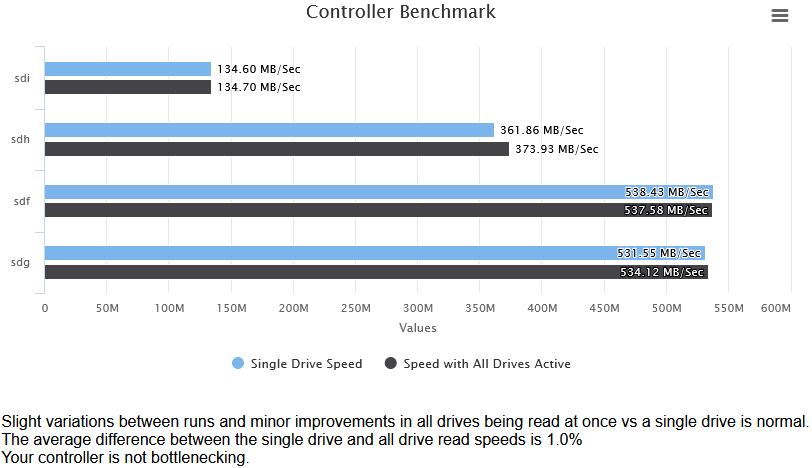
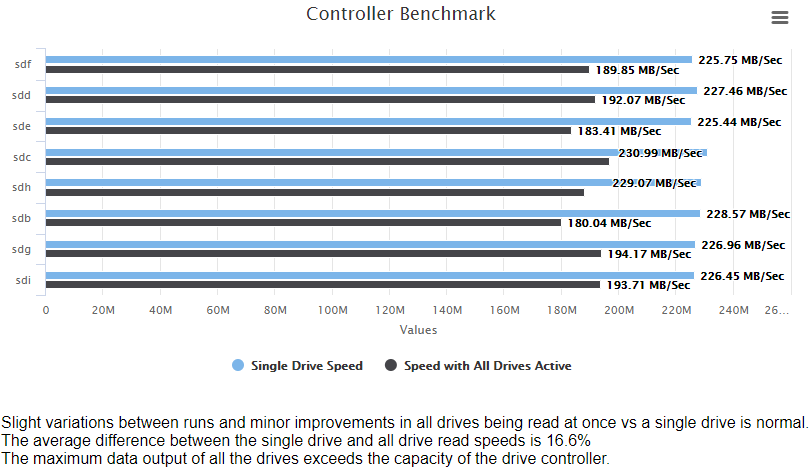
I'm taking this application out of BETA status. Version 2.0 has been released. Release 2.0 Added progress bars to the drive benchmarking Rewrote the Controller Benchmark to better test multi-drive performance Disabled drive activity monitor until cosmetic issues with rotated drive images is resolved Redesigned how the application aborts disk scans if the page is refreshed or otherwise left the page doing the scan For the Controller Benchmark, the application performs a read of each drive attached to the controller in sequence for 15 seconds each. Then all drives are read simultaneously for 15 seconds. If the sum of the percentage difference between all of the drives exceeds 5%, your controller bandwidth is likely being saturated and you're not getting the full possible performance (such as during a Parity check). This can help you plan your drive to controller assignment. Example of a Controller's bandwidth not being saturated: Here's my main rig with 8 WD Red Pro 6TB's attached and saturating the controller
-
Seeing MHDD's limitations on SATA/etc drives is what lead to me creating this App. I also hope to add a heat map of read speeds that is reflected in MHDD and broken down to individual platters.
-
I've moved to WD after less than stellar results from Seagate's Barracude line.
-
Assuming worst case scenario here, something is failing and you may have a limited number of reads left. What I would do is put in another 3TB drive, mount & format it using Unassigned Devices, then use MC to copy all of the files off of Drive 2 to the new drive. Then pull Drive 2 out and create a new config and assign the existing Drive 1 & new Drive 2.
-
Back in active development. Currently rewriting the Controller Benchmark where it displays a graph of each drive being read on it's own and while it and all the other drives are also being read from. Helps to identify if the controller is a bottleneck where it can't handle the full read capacity of all drives. Next release will take this Docker out of Beta status. Controller & Drive detection seems to be fairly solid.
-
Apologies that this slipped through the cracks. Does unRAID return the Serial Numbers for the drives?
-
"Speed Gap" is what I call the distance between the slowest read and the fastest read. If it exceeds a threshold (45MB by default), it retries that block. Typically, a larger gap means that the drive was being accessed by some other task which would affect the results but could also be due to the drive accessing remapped sectors or having trouble reading a given spot. Consistent SpeedGap detections, especially in the same spot, is a sign of a failing drive. A gap of 174MB is pretty significant.
-
No feedback yet on @mucflyer's request but are you able to pass the graphics card through without using pcie_acs_override? Enabling that is known to cause lag.
-
@Georg 1. OS updates are outside the scope of unraid as you would still face them if you built a bare metal system. In the case of Windows 10, you can "defer" updates for up to three months with Windows Pro. 2. Intel has handicaps too. You can expect to lose a few FPS running a gaming rig as a VM but not anywhere near you'd be able to notice assuming your video card is sufficiently powerful. I have not noticed any video performance drops if the video card & pinned CPU's aren't on the same NUMA node but I did see a CPU hit. 3. I haven't check for new BIOS updates in the past month or so but there was no option to select which PCIe slot the BIOS used for it's primary video card. I would believe that if you could change it, you would still experience the same thing but with whatever slot is given. Note: This is a known issue with nVidia cards, I have not tried any AMD video cards. The problem is that the nVidia driver can detect that the card was in an active state when it took over and then is coded to not load (Error 43) 4. You still need a video card in PCIe #1 for the BIOS to bind to. Omitting a video card in that slot would just cause the BIOS to bind to the next available slot with a video card.
-
I had this exact same issue. Putting the USB drive in my Windows box, I was quickly notified that the USB drive needed scanning. It didn't find any issues to fix but the unraid server booted after when it wouldn't prior. I'm assuming some "dirty bit" was clogging things up.
-
I didn't do any memory placement testing, just loaded up one VM with 8 GB of RAM assigned to it. This strikes me as how the vast majority of people will launch their VM's letting KVM do the memory assignments.
-
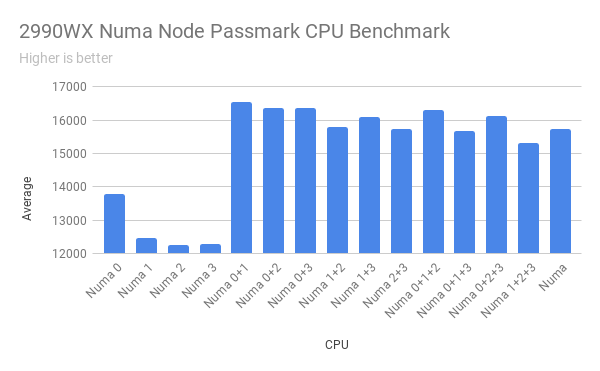
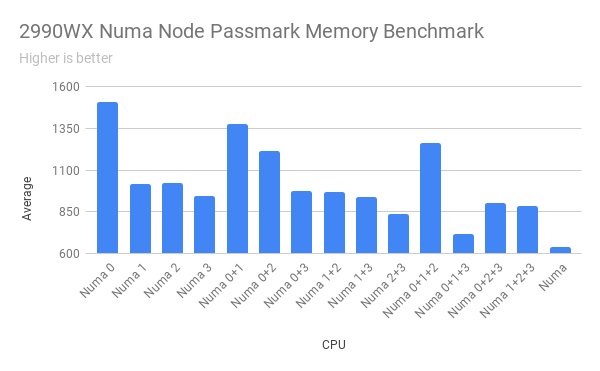
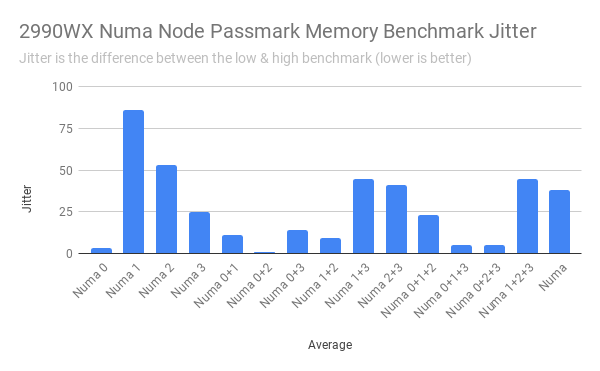
I benchmarked a Win10 VM with PassMark's PerformanceTest assigned to the different Numa nodes on the 2990WX, separately and different combinations. The last column was truncated, it's all four numa nodes except CPU 15/47. Each test was repeated five times and the results averaged.
-
Not all video cards can be passed through. I have a GTX 1050 that doesn't like it.
-
Sorry, I haven't done anything with passing multiple GPU's to a VM before.
-
The issues with the CA were resolved long ago. You can use it to install the docker app.



