





gacpac
Members
-
Joined
-
Last visited
Everything posted by gacpac
-
Let's try to confirm Go to canyouseeme.org and check for port 80 also the 443 just in case Sent from my Pixel 2 XL using Tapatalk
-
It's doing that because of the redirect inside the nextcloud configuration set previously during configuration. But its okay, hit continue and it should go through even if you don't have the certificate valid yet Sent from my Pixel 2 XL using Tapatalk
-
Now it looks like it's hitting let's encrypt but you are missing the certificate Sent from my Pixel 2 XL using Tapatalk
-
PM me Sent from my Pixel 2 XL using Tapatalk
-
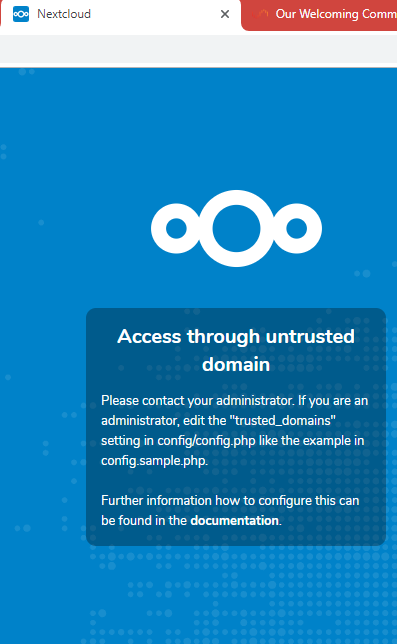
Honestly, Check both config files. Because it's redirecting somewhere else. If I go to the website it redirects me to https://nextcloud-eleanor.ddns.net:80/login But If I type your public IP address in the browser. (Which I'm not going to type for security) I get this I think you gotta fix some security issues in your router, my friend. That should be hitting the nginx webserver built in let's encrypt not straight to your nextcloud. Please someone correct me if I'm wrong. I might be mistaken
-
Cool. So we are im busines now. Look at the link you have. It's https but then going to port 80. Is wrong Sent from my Pixel 2 XL using Tapatalk
-
I think that's forwarding to your unraid server directly? Sent from my Pixel 2 XL using Tapatalk
-
Let me know if you get how too Sent from my Pixel 2 XL using Tapatalk
-
Also, shouldn't you be using TCP instead of UDP [emoji848]? Sent from my Pixel 2 XL using Tapatalk
-
How can I test if the cache plugin is working as supposed to? If the drive is not spinning and the cache is working. I should be able to browse my shares. At least the top folder, right? Sent from my Pixel 2 XL using Tapatalk
-
I think that makes more sense. I know ISP can do it as long you use their router. But if you say nextcloud works using port 443. Maybe force let's encrypt to redirect traffic to 443 only? I did it by going to the appdata/letsencrypt/nginx/site-confs/ And edit the default The setting is already there is just enabling it. I'm just guessing right now because is really specific Sent from my Pixel 2 XL using Tapatalk
-
Sorry for the late reply. I fixed it Sent from my Pixel 2 XL using Tapatalk
-
What I still don't get is that port 80 is not open when you check canyouseeme.org mine is open. And it has to be open for the container to work properly. Maybe I'm wrong, just let me know Sent from my Pixel 2 XL using Tapatalk
-
This is a dejavu, i was having issues today after setting my first pfsense router. My question is, was this working before? Because if it was it could be network issue. In my case what solved the problem was removing a setting in my WAN interface called "block private networks and loopback addresses" I'm have a double NAT situation as well. Also go to the website canyouseeme.org and check if the port is actually open. Also, follow the instructions from @CHBMB maybe that's all you need. Sent from my Pixel 2 XL using Tapatalk
-
Ne, I'm not. Just trying to be helpful. It's cool as long as we problem is solved.
-
I really meant to send that to you when I quoted. So you knew what that error was and get an idea on how to go from there.
-
Those error are relating sudo, there's a thread in askubuntu here, see if you can troubleshoot from there because that shouldn't happen https://askubuntu.com/questions/637432/sudo-comes-up-with-an-error-cannot-run-anything-as-root
-
I see it works too. @OOmatrixOO please type the command, don't copy and paste

-
@OOmatrixOO like this

-
try without the sudo. Maybe you don't need to use it. remove the abc -u abc, just do sudo touch /config/log/nextcloud.log
-
Sorry I had a brain fart I missed a "," 'logfile' => '/config/log/nextcloud/nextcloud.log',
-
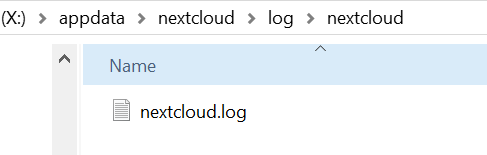
Thanks for the assist. I've been doing a lot of reading now that you say this. @OOmatrixOO I think I found a simpler solution for you. First, turn off your docker just in case. Go to your config.php and look for a setting 'logfile' => '/var/log/nextcloud.log', Change that to the location you want, like @CHBMBsaid '/config/log/nextcloud/nextcloud.log' what I did now was. I manually created the location and the nextcloud.log You can add more settings, I followed the instructions in the config.sample.php located in the config folder. I'll upload them so you can have a look. At the end my configuration look like this. The explanation is in the sample.php that I've attached. And no command line needed. Test and let us know 'logfile' => '/config/log/nextcloud/nextcloud.log' 'logfile' => '/config/log/nextcloud/nextcloud.log', 'log_type' => 'file', 'logtimezone' => 'America/New_York', 'logdateformat' => 'F d, Y H:i:s', 'log_rotate_size' => 100 * 1024 * 1024, 'logfilemode' => 0660, 'loglevel' => 0, FYI: I'm using the logfilemode 0660 because there that was a recommendation in the github of nextcloud. https://github.com/nextcloud/server/pull/8282 config.sample.php
-
Thanks Everyone for your ideas. I found the problem was clearly the nextcloud logs going to a share instead of the cache. Also, the transmission docker container constantly reading the transmission.log and blocklist.bin from the array. The solution was to move the /data from transmission to the cache by mapping. Also checking with krusader that the files were properly in cache nothing left in the array. As for the nextcloud I had to recreate the nextcloud.log using the console of the docker container. I added the log to the /var directory, but I believe it can be created somewhere else. Anyhow, the commands are sudo touch /var/log/nextcloud.log sudo chown abc /var/log/nextcloud.log I explained that in the link
-
I need to say thanks for this amazing community and everyone that helped.@clowrym it's working perfectly right now. The /data location is set to cache /download location is set to array /incomplete location is set to array The problem was the transmission.log and the blocklist.bin somehow still in the array. I manually deleted the file using krusader, and they got recreated in the right place. I used to confirm the files were not in use with the "open files" plugin and the "file activity" plugin. I really thought I was going crazy. I'll do an additional reboot of the server just in case. Sent from my Pixel 2 XL using Tapatalk
-
LOL, I think I got it now. I changed my location to /cache instead of /user Also I noticed that some files were left behind in my disk1 by checking with the plugin "open files". I'll keep checking see if it comes back up or not. I've been messing with the folder caching app as well so. This has been all try and error.


