





rutherford
Members
-
Joined
-
Last visited
Everything posted by rutherford
-
Couple questions. 1. what's the difference between Binehex "minecraft" and "mineos-node"? Why have both? 2. just installed Paper minecraft jar (papermc.io), it says Will an updated version of Java be shipped with the docker when appropriate? Or is that something I need to do? 3. on Logging > log/latest.log, would it be possible to get rid of that "browser over run, reload page" error, and have the logs auto-scroll from the top, instead of fly by and go down below? thanks!d
-
It is for sure. Ya know, I did a little googling, and nothing applicable came up right away. Weird. This video from Shockbyte has the meat and potatoes of the backup process using an FTP browser. The link starts at 0:54 You didn't mention what sort of server, or service you're coming from. But the steps are generally: 1. shut down old server 2. (optional) compress server files to single zip or tar.gz files 3. download world, world_nether, and world_the_end (where server.properties "level-name" is "world") 4. create new server 5. upload files (un-compress if necessary) 6. be sure the prefix "world" matches server.properties "level-name" 7. start server This doesn't include the plugin folder, or other weird stuff: only the backed up world files, which includes playernames stats and inventories I think. I've had great luck with DrivebackupV2 backing up my server files to Google Drive account on a periodic rolling basis. https://dev.bukkit.org/projects/drivebackupv2 My binhex server files are actually located in /mnt/user/appdata/binhex-mineos-node/mineos/games/servers/neverland where my server.properties level-name is "neverland" so the three folders I have are neverland/, neverland_nether/, and neverland_the_end/.
-
Don't worry about the ssl certificate. It's a self signed thing, so it will throw an error. But you still get the SSL connection. Ah, go to the bottom, look for Advanced or something, then hit continue anyways. If you're still having issues there, try restarting the binhex-mineos-node docker. It doesn't come with an instance, that will automatically generate a new world when you first run the program. If you don't have a Start server button, I suspect you haven't initialized the MineOS software yet. Here's the author going through those steps on a youtube Yes, watch this. It will get you going.
-
[SOLVED] changed docker to run in Privileged: ON, compile worked. [original post below] I'm getting errors when compiling spigot_1.16.5.jar, and not compiling the file. At the end of the process, there is no completed jar file. I tried downloading the pre-compiled jar file, but I get errors then too when trying to run the server. The vanilla server runs OK. The JAVA_HOME environment variable is not defined correctly This environment variable is needed to run this program NB: JAVA_HOME should point to a JDK not a JRE https://pastebin.com/3AwK2ppV Error message when trying to run with downloaded pre-compiled jar [01:36:32] ain/INFO]: Environment: authHost='https://authserver.mojang.com', accountsHost='https://api.mojang.com', sessionHost='https://sessionserver.mojang.com', servicesHost='https://api.minecraftservices.com', name='PROD' [01:36:32] ain/FATAL]: Failed to start the minecraft server java.lang.RuntimeException: java.nio.file.FileSystemException: .: Operation not permitted at net.minecraft.server.v1_16_R3.Convertable.<init>(Convertable.java:42) ~[spigot-1.16.5.jar:2991-Spigot-018b9a0-f3f3094] at net.minecraft.server.v1_16_R3.Convertable.a(Convertable.java:50) ~[spigot-1.16.5.jar:2991-Spigot-018b9a0-f3f3094] at net.minecraft.server.v1_16_R3.Main.main(Main.java:96) [spigot-1.16.5.jar:2991-Spigot-018b9a0-f3f3094] at org.bukkit.craftbukkit.Main.main(Main.java:202) [spigot-1.16.5.jar:2991-Spigot-018b9a0-f3f3094] Caused by: java.nio.file.FileSystemException: .: Operation not permitted at sun.nio.fs.UnixException.translateToIOException(UnixException.java:91) ~[?:1.8.0_282] at sun.nio.fs.UnixException.rethrowAsIOException(UnixException.java:102) ~[?:1.8.0_282] at sun.nio.fs.UnixException.rethrowAsIOException(UnixException.java:107) ~[?:1.8.0_282] at sun.nio.fs.UnixPath.toRealPath(UnixPath.java:837) ~[?:1.8.0_282] at net.minecraft.server.v1_16_R3.Convertable.<init>(Convertable.java:40) ~[spigot-1.16.5.jar:2991-Spigot-018b9a0-f3f3094] ... 3 more
-
Just for anyone having errors building Spigot, specifically, on the Spigot section, "Download latest BuildTools.jar" button. It does download a file, but it's an empty file. I was getting some error there. If you navigate to your appdata/binhex-mineos-node/mineos/games/profiles/BuildTools-latest, check out that file. The BuildTools.jar file should be about 4MB. Mine was 1KB or something. Also in that console, you can manually grab the BuildTools.jar file: https://www.spigotmc.org/wiki/buildtools/ has a link to the latest buildtools.jar file, at this time it's: https://hub.spigotmc.org/jenkins/job/BuildTools/lastSuccessfulBuild/artifact/target/BuildTools.jar So in that console you'd type wget https://hub.spigotmc.org/jenkins/job/BuildTools/lastSuccessfulBuild/artifact/target/BuildTools.jar and it'll show up. Now when you click the green "Build Spigot" button in MineOS GUI, scroll to the bottom, and you should see action in the build screen. PS: there's an action window at the bottom of that long page! (I'm getting other errors, but I recall this "solution" working previously...)
-
I'm curious what settings folks are using to optimize the server for running mineos, and smooth server gameplay. Privileged: off added port: 19132 UDP (for Geyser bedrock crossplay) (manually) fetched and compiled Spigot-1.16.5.jar Memory Footprint (from Server Status) 2.33GB Java Settings Memory Allocation (Heapsize) -Xmx 4048MB, -Xms <blank>
-
And to get both udp and tcp you added two port entries in the docket config? Ah, and set port forwarding on router to both. it was my understanding that Java uses 25565 tcp, and bedrock uses 19132 udp. Geyser sits between them - and yet, it ain’t working! So I’m certainly doing something wrong. I’ll try two docker entries for both 19132 tcp and 19132 udp. Thanks!
-
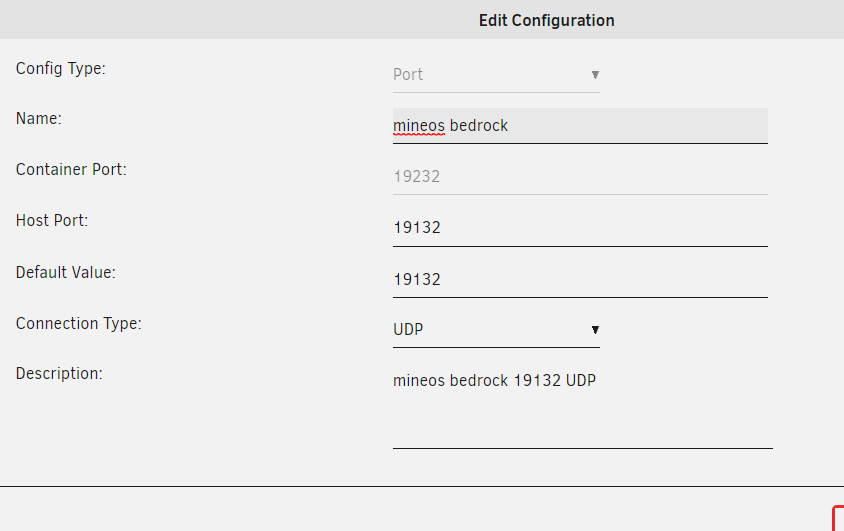
[SOLVED] Typo, user error: 19132 for a 19123 or something. Gahhh!! Trying to get GeyserMC plugin going. I'm close... I get the "unable to connect to world." I have gotten this working on other servers, ones I pay for (Shockbyte hosting). But I'm trying to make this one work inside unRaid Docker. 1. added Port for the Docker config, 19132 UDP (see attached) 2. forwarded 19132 UDP on router to unRaid box added Geyser-spigot.jar to plug-ins folder. Restarted server. https://geysermc.org/ added Floodgate authentication https://github.com/GeyserMC/Geyser/wiki/Floodgate Made change to Geyser-Spigot/config.yml remote: auth-type: floodgate reviewed some Common Problems https://github.com/GeyserMC/Geyser/wiki/Common-Issues Any ideas on where to look next? Perhaps some better logging somewhere? Thanks! I was able to test if the port was open using https://check-host.net/check-udp?host=minecraft.mydomain.com:19132 The UDP port is coming back Closed, or not listening. I'm sure this has something to do with it.
-
I installed last night (3/25/21). Other than a hiccup with pulling buildtools.jar for spigot (had to do this part manually), it's up and running no issues. Yet. Previously I had some out-of-memory errors. I'm hopeful they will have magically sorted them selves out.
-
There may already be a post about this: but why are you guys over here instead of on the Mineos docker? I installed last night, and other than a few minor hiccups, it went swimmingly.
-
curious if appdata/swag/crontabs file is set to run periodic renewals or not? # do daily/weekly/monthly maintenance # min hour day month weekday command */15 * * * * run-parts /etc/periodic/15min 0 * * * * run-parts /etc/periodic/hourly 0 2 * * * run-parts /etc/periodic/daily 0 3 * * 6 run-parts /etc/periodic/weekly 0 5 1 * * run-parts /etc/periodic/monthly # renew letsencrypt certs I didn't see any mention of SWAG or certbot in any /etc/cron.*/<files>
-
@CmdrKeen I like that you might be onto something there. From the looks of this thread it might be a bios memory compatibility issue that I'm getting. I didn't see a place in the unRaid that I can simply change the number to a larger "memory available" number. Thanks for giving me something to chew on! On further examination, it looks like unRaid can access the full 80GB of ram, I'm not sure why htop only says 15.7G root@rubble:~# free -mh total used free shared buff/cache available Mem: 15Gi 10Gi 264Mi 1.1Gi 4.8Gi 3.7Gi Swap: 0B 0B 0B
-
Server was glitching out again this morning. After a bit of research, I found the system memory is at 100%, and it looks like it's the minecraft server that's using it all. Here's the htop screen, sorted by memory percentage. Any ideas on where to look for memory related docker issues? thanks! The processors are getting slammed too, but that's a high-def Plex movie getting transcoded.
-
Been having a few issues with stability over a few days. The backend, mineos control (:8443), becomes suuuuuuper slow. Players ping-out pretty bad. Once I restart the docker, all is aok again for another few days. The docker log is pretty unhelpful. Any other places to look? Created by... ___. .__ .__ \_ |__ |__| ____ | |__ ____ ___ ___ | __ \| |/ \| | \_/ __ \\ \/ / | \_\ \ | | \ Y \ ___/ > < |___ /__|___| /___| /\___ >__/\_ \ \/ \/ \/ \/ \/ https://hub.docker.com/u/binhex/ 2021-02-18 21:47:11.222936 [info] System information Linux c324ee2c7d27 4.19.107-Unraid #1 SMP Thu Mar 5 13:55:57 PST 2020 x86_64 GNU/Linux 2021-02-18 21:47:11.259820 [info] OS_ARCH defined as 'x86-64' 2021-02-18 21:47:11.296765 [info] PUID defined as '0' 2021-02-18 21:47:11.335427 [info] PGID defined as '0' 2021-02-18 21:47:11.439276 [info] UMASK defined as '000' 2021-02-18 21:47:11.465531 [info] Permissions already set for volume mappings 2021-02-18 21:47:11.558937 [info] Deleting files in /tmp (non recursive)... 2021-02-18 21:47:11.594801 [info] WEBUI_PASSWORD defined as 'XXXXXXXXXXXXXXXX' New password: Retype new password: passwd: password updated successfully 2021-02-18 21:47:11.802766 [info] Starting Supervisor... 2021-02-18 21:47:12,224 INFO Included extra file "/etc/supervisor/conf.d/mineos-node.conf" during parsing 2021-02-18 21:47:12,224 INFO Set uid to user 0 succeeded 2021-02-18 21:47:12,227 INFO supervisord started with pid 6 2021-02-18 21:47:13,230 INFO spawned: 'mineos-node' with pid 62 2021-02-18 21:47:13,230 INFO reaped unknown pid 7 (exit status 0) 2021-02-18 21:47:14,231 INFO success: mineos-node entered RUNNING state, process has stayed up for > than 1 seconds (startsecs) 2021-02-18 21:47:34,199 DEBG 'mineos-node' stdout output: [info] Starting MineOS-node... 2021-02-18 21:47:34,454 DEBG 'mineos-node' stdout output: Starting mineos daemon... 2021-02-18 21:47:35,417 DEBG 'mineos-node' stdout output: mineos daemon started. PID: 72 2021-02-18 21:47:35,421 DEBG 'mineos-node' stdout output: [info] MineOS-node started
-
Mapping two locations to /music is probably the issues. Just map to another folder. For instance: 1. music 2/ > /music 2. music (Blu-ray)/ > /music2 Then, in Roon, simply point it at BOTH /music and /music2
-
Of course!
-
You update it through any Roon client. Maybe the docker, but Roon client > Settings > Update (or something real similar) will work great.
-
@steve1977 The docker runs the "roon core" on your unRaid box so you don't need another computer running 24/7. Yes, must be used with a paid subscription, they are $120/year. No, you don't need Windows software to use it. You can use it with endpoints, then control it via something else, like your phone or tablet or whatever. Probably can't run two instances with one subscription. The folks there are pretty connected with their subscriptions. Sounds like you don't know a lot about it: check out youtube, try their free trial. Mess around with it for a while and see if it fits your lifestyle. For me, it almost doesn't because I spend so much time away from home. The streaming, when you're not at home, is pretty non-existent. And even when you do get it working, it's shaky at best.
-
But there's so much fun info in here! <shrug> Maybe it'll help someone else who's buried in who knows what. But for everyone else, the good will be above the fold. Glad you found it helpful.
-
Yup, that’s it. You can ignore all the stuff below DEPRECIATED yes, short and sweet. I wish all posts were more like that. Better yet, I could bury the whole depreciated section under a plus or triangle menu or something. They are different people. Afaik
-
I decided to give a different docker, binhex-mineos-node a shot, and for whatever reason, it was much more straight forward for me. Thanks for your time @CorneliousJD!
-
derp. That's probably it. Rooting while tired, oh no! I have a couple other questions: Adding another port. Under the Docker Setup for AMP, "Add another Path, Port, Variable, Label or Device" at the bottom, then I have to choose TCP or UDP. Defaults Java version is TCP, vs Bedrock is UDP (from github page). I believe @CorneliousJD was going to post some screenshots, but I didn't see any yet! So here's one... I did notice on unRaid > Docker tab 172.17.0.4:25349/TCP192.168.11.53:25349 172.17.0.4:25565/TCP192.168.11.53:25348 So something about that isn't quite getting forwarded correctly. Looks like it's listening on the right ports root@rubble:~# lsof -i -P -n | grep LISTEN | grep 253 docker-pr 4314 root 4u IPv6 745985546 0t0 TCP *:25348 (LISTEN) docker-pr 4329 root 4u IPv6 745990325 0t0 TCP *:25349 (LISTEN) Tried changing host type, from Bridge to Host, got error /usr/bin/docker: Error response from daemon: conflicting options: mac-address and the network mode. The mac-address thing is important. I wonder why that was a problem.
-
@xthursdayx and @mikela on it! Thanks for all your hard work. Got an email a big Roon update was coming next month. Good test for all our systems 🤗 Done. See what you think. I should be able to give other users MOD access to these things. I think that'd be real helpful. <shrug> Interested to see what 1.8 brings for us, and, of course, how the update goes!
-
wrestling with this thing - I can't get connected to the server I've got. In unRaid docker setup, under Game Port I've specified 25348. Under AMP, I clicked Edit Ports, and that looks correct Here's the unRaid piece It's says make additional ports if needed, and ask support thread (here right?!???) for help. I saw you'd mentioned it above to another post, that you'd share some screen shots. Ah, and on the first instruction piece of this thread, you mention specifying TCP or UDP. I don't see where to do that anywhere! Except when forwarding ports on my router, I chose BOTH. The Console in AMP seems to be okay - I can see it's running. But I just get no joy trying to connect to the server. This feels like that old EULA problem I was having - is that taken care of here, or is that file still floating around somewhere? Where should I start troubleshooting this? thanks!
-
@CorneliousJD ahhhh. That worked great. I didn't have a world worth backup up anyhow. It took me a minute to dig around in there: get the instance going, I did get an error that I was able to fix up so had to get into /mnt/user/appdata/amp/instances/prospectbasement/AMPConfig.conf change line 52 from Login.AuthServerURL=http://localhost:8084/ to Login.AuthServerURL=http://192.168.11.53:8084/ that worked. I think someone may have had that issue before, something about br0 being static? My eth0 is static. Alright, now that I've got this thing: what can I do with it?! Make managing the minecraft server easier I hope. I want to jam a few mods in there to make it prettier: Optifine, and some shaders (Sildurs Enhanced Default & Vibrant Shader VanillaPlus Continuum 2.1 - Chocapic13 - Simplicissimus - UShader - Voyager Shader - . SEUS PTGI - https://www.patreon.com/sonicether) I should do some youtube watchin'. fun!


