





rutherford
Members
-
Joined
-
Last visited
Everything posted by rutherford
-
It's a really great piece of software - damn near identical on iphone and android, and I appreciate that too. Worth the couple bucks it costs for sure, if you're curious of going that route: simply copying pictures from your phone to a NAS.
-
This blog entry I wrote is a little dated at this point, but I detail the setup process for another photo stream management technique using Photosync, https://www.photosync-app.com/home.html https://kerlee.com/blog/?p=404 Long and short is you can specify "get home" location trigger, or wifi name trigger, folders and more to just copy pics and videos across your wifi when you're home. I use 2022-03/all pics in here sort of scheme and it works swimmingly. PhotoSync can also do the sync over cell data if you don't visit home often enough and still want redundant photo storage from your regular smart phone cloud storage option.
-
Got a bit of a surprise here, I reached out to getmonument.com and they got back to me saying they were interested in getting their software dockerized and probably monitized. Anyone know a reputable unRaid Docker author that might run point on this? I've had great luck with @binhex with their stuff. I'll shoot them a message now. thanks!
-
I ended up bailing on the project! I did manage to switch my email over to fastmail from gmail, so I got a little something to thumb at big-tech. I needed an iPhone app, decent sharing capabilities, and sync. I vaguely recall there was only two solutions that had those items, and both were a no go for me. I have used that getmonument product before. I’d be way more keen on it if it could use a network share on my unRaid server. Years ago, when I was using their v1.0 box it did not have that capability. I’ve emailed them before to see about releasing a dockerized version of their hardware - I’d subscribe for it too. Radio silence. But, they might be worth another look at. app is updated a week ago (3/14/22) https://apps.apple.com/us/app/monument-photo-management/id1134022786 Monument 2, $180 https://www.indiegogo.com/projects/monument-2-smart-photo-storage-and-organization#/ It will do additional mirrored backup to external NAS https://help.getmonument.com/article/40-backup-to-a-nas
-
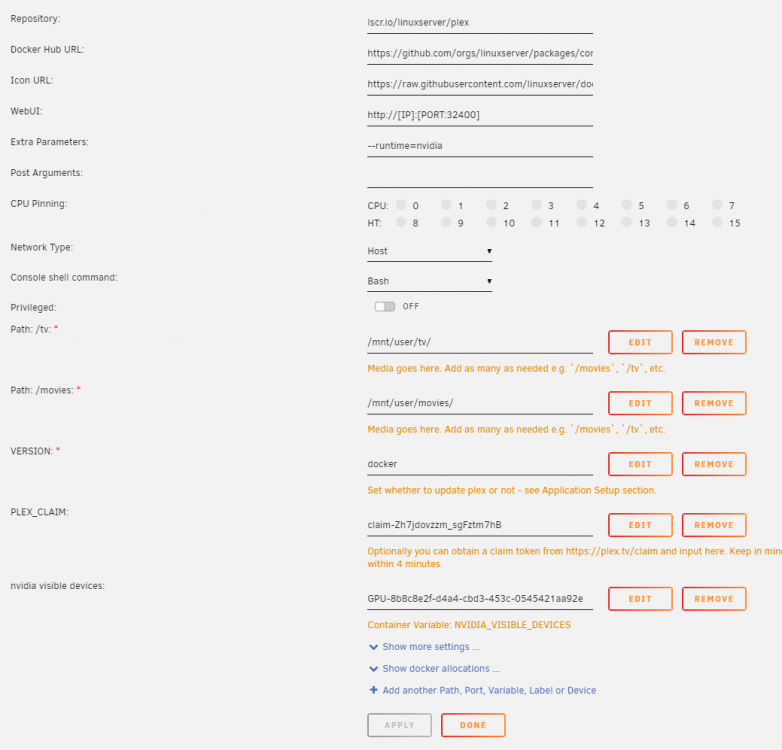
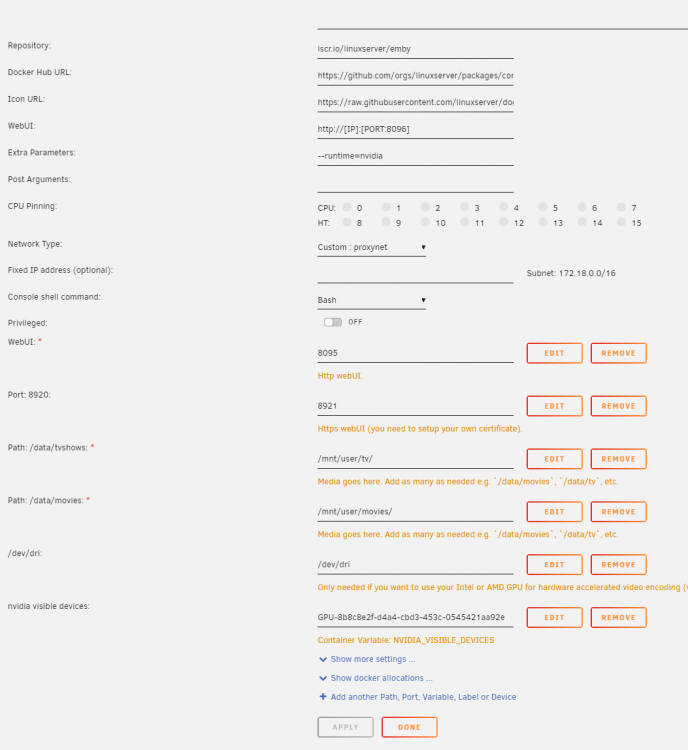
Curious if anyone else is experiencing total shut down and failure of Plex (or Emby) offline sync? I have both running in a linuxserver.io dockers hardware encoding with NVIDIA GeForce GTX 750 Ti syncing to iPhone SWAG reverse proxy on Emby, seems like Plex takes care of this itself Regular playback works great, both direct, and transcoded - but the offline sync does nothing, while it was working about four months ago. Where do I start looking at fixing that? Am I alone here? My daughters old Galaxy TabA android still sync's fine. So I'm thinking this might be an iPhone issue....
-
How can I re-install Nextcloud, and restore/recreate same users, and re-index all the existing files to their accounts? I think I'm on my third Nextcloud installation now. What happened this time is database corruption, I think, in oc_filecache table or something like that. I tried several things to fix it, but was spending way too much time doing that when I could just nuke it and re-install. Here's the issue: I want old users, and their files restores. Each time, when I go to re-install, I have a "you can't use that name because files exist." my two users are drew and anne. I end up making drew2, or drew2admin, or admin2, or admindrew2, etc just to get through the installation. Now I have several of these junk folders in my appdata/nextcloud/files/<user>, that are a reminder of my laziness. This screen shot is of the usershare "nextcloud" that I use for all the nextcloud user data.

-
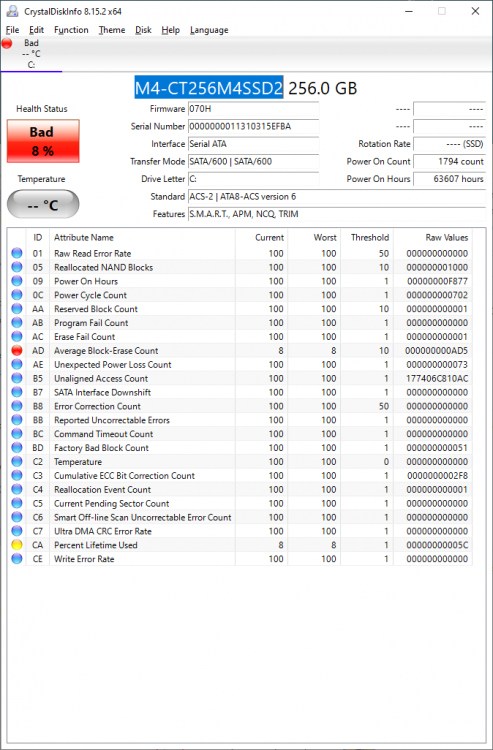
I've got this 256GB ssd that SMART reports as failing. I'll attach a screen shot from CrystalDiskInfo. Would it be a horrible idea to use it as a second cache drive or something?
-
Starlink!!?? Tesla internet is out in the wild??!
-
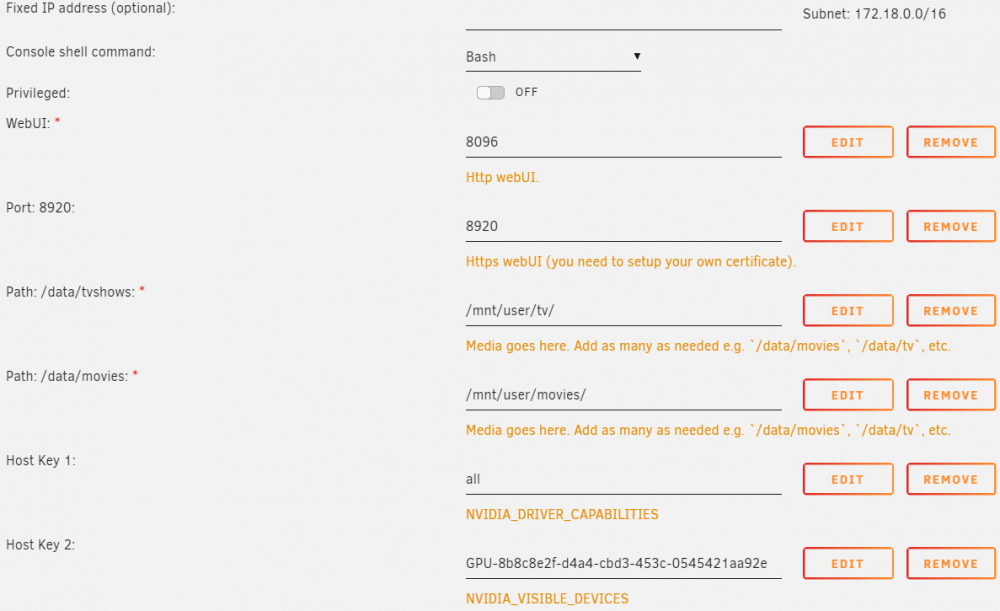
The directions are a little different for nVidia GPUs for sure. Let's see how much of this I can remember: the binhex-emby docker didn't work with hardware encoding. I ended up using linuxserver.io emby There are two spaceinvader videos, I used both: https://www.youtube.com/watch?v=VkC5Hi-rO2c&t=13m41s 3/2/21, Ed goes a bit off the rails here with an nVidia commercial; but he's also chosen to detail the process for "unlocking" consumer nVidia GPUs for multiple encoding threads, which I also did. I left a time-code in the URL to get to the meat and potatoes. The docker he uses here (linuxserver.io emby) has also been changed. I had to Remove the raspberryPi encoding items, they were giving me errors. https://www.youtube.com/watch?v=GOhHiFAXwOE&t=6m14s 2/12/19, also helpful. Here he goes into the Advanced tab of the docker, adds three items (extra parameters, and two variables), all of which I had to add to get it all working nVidia drivers shows up in Apps, but then lives inside Settings rather than a Docker. It's the ich777 nvidia driver package. added GPU getting SWAG passthrough working for a docker, Ed's nextcloud video is good https://youtu.be/id4GcVZ5qBA?t=830 As I recall there: I had to put the name of the docker into the conf file, "emby" (ya know, that might be the default now that I think about it) I created a subdomain CNAME in my webhost, emby.mysite.com added the subdomain, "emby" to the subdomains to pass through on SWAG container Edit. I'll slap a pic of my docker settings in here. You can't see the linuxserver name, but that's what it is, the Rpi stuff is gone, and the two Variables are at the bottom, cribbed from Spaceinvader video up top. I installed GPU Statistics, that's been nice to have. It doesn't entirely work with emby (no icon for "active applications") but it does have threads and usage and it's right there on the main page where things like that should be. The reason I've been through this Emby stuff is because Plex totally stopped Sync'ing for me. I switched to an iPhone, that may have something to do with it. Plex removed the old Sync option, and came out with their new version, which was wonky at the beginning, then totally stopped working. I don't have too much to complain about, I bought the lifetime pass about five years ago, and I think I've more than gotten my value out of it. I've also used Plex to share my library with family - I think the pricing scheme for Emby won't allow me to get away with that as affordably as Plex has. I think each user needs a premium membership to sync. For parents: you want sync for car and airplane trips, fer sure.
-
This is excellent thanks! I had a change from the above: Edit SWAG container, scroll down to Subdomains, add the subdomain from step 1 into the list. Restart SWAG. For getting SWAG setup, the video/instructions from Spacedinvader are excellent. I've got an AMD CPU and motherboard, and NVIDIA GeForce GTX 750 Ti, so these hardware transcoding steps didn't work. Nice write up thanks!!!
-
@xrqpthat was a typo VON=VPN yeah, my lossless file was WAY longer than the Apple lossless file. Perhaps it was that there was a different sample rate, and both are still lossless. Roon from work is def not designed with that in mind. I’m super happy it works, but listening to music uses as much bandwidth as watching 1080p movies non stop! Vs Apple Music Lossless IS designed to stream. I’m just happy there aren’t nearly as many flaming hoops one has to jump through to make it work while at work, away from home.
-
Just a curious FYI. Did a short experiment with some lossless files. The track is 14MB flac. VPN reports 32MB used for the song via Roon and WireGuard VPN. I played the same song, purportedly lossless via Apple Music ALAC format, and VPN reports using only the 5MB. huh 🤷♀️
-
@jj_uk did you try googling it yet? <wink> the broad strokes are: download the 1.18 Minecraft jar (I think either paper version or official vanilla), I like to rename that jar to xxxx-1.18.jar, update the server settings to the new server jar file name, restart the server. As the logs are flipping by, you’ll see 1.18 server. Once it’s started, the status will show 1.18.
-
@mrvilla You need to run 1.17 Minecraft client in your launcher. First, try to hit the drop down to the left of the big green PLAY button. If 1.17 isn't listed in there, then at the TOP of the launcher hit the "Installations" tab. Hit New Installation. Drop down to a version 1.17 and install that. Then you can launch Minecraft client 1.17 and play your un-upgraded world.
-
I put the brakes on the self hosted option, and moved to Protonmail. There are finer points of email that I'm only just now becoming aware of; SPF records for instance. Senders need to have verified (?) IP addresses and URL for messages that arrive to get to inboxes smoothly. I have a hunch a self-hosted server would encounter delivery horrors of SPAM folders etc. So Protonmail. They've been pretty darn good. Had to upgrade storage a bit, and the iPhone app leaves a little to be desired, but it ain't bad. Been chugging away with this setup for a few months. I'm happy, and partially away from the Googles. Re SPF records. I have a custom domain, and needed to make sure my domain's single SPF record was up to snuff. For me, that was (someone let me know if I should not post actual numbers. I think it's all public domain anyhow. Like the stupid thumb over license plates on craigslist cars) v=spf1 include:_spf.protonmail.ch +a +mx +ip4:192.232.219.222 +include:spf.websitewelcome.com +include:spf2.websitewelcome.com ~all https://www.dmarcanalyzer.com/spf/checker/
-
There’s also been some movement on the Crafty version they released with info in their Discord. I’ll copy paste.
-
Pretty sure that’s what Duplicati will do.
-
By and large these apps do go for "easy off site backup" but what I'm thinking is a slick active interface, that can ALSO simply sync with a local USB drive. I bet one of them can simply do that. But maybe there's a solution inside the Unraid ecosystem, like RAID 1 mirror of a user share.? JohnathanM is a heavy hitter around the forums, he recommended Duplicati as being able to do it all. And the backup should be as physically far away as possible: not in the same case, not on the same power supply. Good points. https://forums.unraid.net/topic/72167-mirroring-shares-on-multiple-drives/?do=findComment&comment=663460 I'm thinking an external USB drive on my desktop computer that's usually on. Share that over the network, and see if I can get Duplicati to sync several critical user shares to that drive.
-
I'm sure one of these would fit the bill. binhex-urbackup http://www.urbackup.org/ https://forums.unraid.net/topic/82198-support-binhex-urbackup/ binhex-resilio-sync https://www.resilio.com/individuals/ https://forums.unraid.net/topic/103784-support-binhex-resilio-sync/ resilio-sync https://www.resilio.com https://github.com/linuxserver/docker-resilio-sync/issues/new/choose duplicati https://www.duplicati.com/ https://github.com/linuxserver/docker-duplicati/issues/new/choose syncthing https://syncthing.net/ https://github.com/linuxserver/docker-syncthing/issues/new/choose
-
any movement on this? First thing that popped up for my search. I was thinking an external USB drive with some sort of auto-copy thing plugged into server. Or even a different, un-assigned internal disk in the server would do the trick too.
-
Just like we already look for existing help (hopefully), we continue to. But specific issues with one Docker, like an update to 7.16 can have its own thread. vs some usability issue of themes not working, sure, someone starts another thread inside that forum. it would be a support forum, instead of a support thread.
-
When a thread reaches some threshold of posts, it gets a dedicated Forum section. spaceinvader macinabox is https://forums.unraid.net/topic/84601-support-spaceinvaderone-macinabox/ it’s a post, under topic/84601 vs ”Docker containers” that is forum/47, and that contains topics. https://forums.unraid.net/forum/47-docker-containers/ so I suggest for let’s say Nextcloud Docker, gets it’s own forum address like forum/67-Nextcloud and that forum contains topics.
-
There are a few docker container support threads that are... 200+ pages long. I'd like to suggest that for those support threads that are so long, get their own sub-forum. Rather than having to read through 200 pages, break it up a little. example: Nextcloud support
-
Been trying to update my install to the latest version and have managed to muck it all up. I'd like to just start over - don't want to lose too much data and user preferences. Are there any instructions for performing a re-install without losing too much? thanks. update: I’ll go for this regular backup and restore. https://docs.nextcloud.com/server/stable/admin_manual/maintenance/backup.html
-
https://arstechnica.com/gadgets/2021/06/the-big-alternatives-to-google-photos-showdown/ Oh, and one of my favorite kickstarters that’s now a company, getmonument.com Good read. From there photoprism seemed the most slick, while Librephotos connected to Nextcloud also has one eye brow up.




