





rutherford
Members
-
Joined
-
Last visited
Everything posted by rutherford
-
Welcome Jake! I think we'll get on famously.
-
I love our forums, and our community. It's what steered me to unraid on day one from a couple other options at the time. AND: no shade to our newly formed paid experts! I've used them once before and it was 100% worth it. You know when you're using chatgpt or claude, you can tell it to "remember this conversation"? What if we had our own claude/chatgpt that remembered everything from all the users talking with it. It would know all the official docs, and put much more weight on the official docs, less weight on the wiki, and less weight again on other forum entries. it can point directly to other users or posts that have had this problem too maintain it's own documentation for those who'd like the written word vs the interactive type suggest edits to the wiki and official documentation (a wish for all chatbots) get to a point where it would say "we're diving too deep into configuration modification. I suggest you make a post on the forums and wait for a human to get back to you. Here's the meat and potatoes of what we've been working on [code data]." Something like unraid.claude.ai that users can share in the cost; or maintain that free query/day thing. Or better yet, robochat.unraid.com for a self-hosted thing!
-
I'd put all that hardware into pcpartpicker and see if it flags any compatibility stuff. Also do a search on pcpartpicker for anyone who's built a computer into that Jonsbo chassis. They'll frequently write up issues they had with the build, things to look out for. I'd get a better power supply. Something more name brand. https://www.newegg.com/p/pl?d=500+watt+psu Seasonic, Thermaltake, and Corsair all jump out at me from this US based place. RAM pricing is stupid right now. How about building for DDR4? Three windows 11 VMs, wow! I've never put my system through that kind of ringer. This will be your primary machine I take it? I couldn't say how the CPU will hold up. When it comes to power requirements, I think pcpartpicker has that built in. But it wouldn't hurt to check it. Make sure your added up wattage comes to something like 80% of what that PSU can handle. There is probably a more smart percentage to work with, you'd have to google that. Post some pics when it's done!
-
@bmartino1 I appreciate your efforts in this community. I'm positive your contributions have helped a lot of folks.
-
I don't think this works for the machine learning OCR right? That has different steps over here: https://docs.immich.app/features/ml-hardware-acceleration/
-
Run to failure? I do have one extra SATA wire coming off my HBA I could swap. SMART Attributes Data Structure revision number: 10 Vendor Specific SMART Attributes with Thresholds: ID# ATTRIBUTE_NAME FLAGS VALUE WORST THRESH FAIL RAW_VALUE 1 Raw_Read_Error_Rate POSR-- 078 064 044 - 63435056 3 Spin_Up_Time PO---- 091 089 000 - 0 4 Start_Stop_Count -O--CK 099 099 020 - 2029 5 Reallocated_Sector_Ct PO--CK 100 100 010 - 0 7 Seek_Error_Rate POSR-- 086 060 045 - 386327305 9 Power_On_Hours -O--CK 066 066 000 - 30394 10 Spin_Retry_Count PO--C- 100 100 097 - 0 12 Power_Cycle_Count -O--CK 100 100 020 - 70 18 Head_Health PO-R-- 100 100 050 - 0 187 Reported_Uncorrect -O--CK 100 100 000 - 0 188 Command_Timeout -O--CK 100 100 000 - 0 190 Airflow_Temperature_Cel -O---K 053 044 040 - 47 (Min/Max 40/48) 192 Power-Off_Retract_Count -O--CK 100 100 000 - 92 193 Load_Cycle_Count -O--CK 054 054 000 - 93516 194 Temperature_Celsius -O---K 047 056 000 - 47 (0 15 0 0 0) 195 Hardware_ECC_Recovered -O-RC- 009 001 000 - 63435056 197 Current_Pending_Sector -O--C- 100 100 000 - 0 198 Offline_Uncorrectable ----C- 100 100 000 - 0 199 UDMA_CRC_Error_Count -OSRCK 200 200 000 - 142 200 Pressure_Limit PO---K 100 100 001 - 0 240 Head_Flying_Hours ------ 100 253 000 - 7667h+33m+43.187s 241 Total_LBAs_Written ------ 100 253 000 - 18003672784 242 Total_LBAs_Read ------ 100 253 000 - 1269847927595 ||||||_ K auto-keep |||||__ C event count ||||___ R error rate |||____ S speed/performance ||_____ O updated online |______ P prefailure warning mayorgoodway-diagnostics-20251126-1052.zip
-
I've got a pikvm hooked up via HDMI to an Sparkle Intel Arc A310 ECO. The BIOS post works, I changed a few settings in the BIOS set to make this happen: Primary video: IGFX Video Integrated Graphics: Force UMA Frame Buffer: 1G When it was posting I could see BOTH the pikvm and H5Viewer. As soon as unRaid started to boot and go through it's flipping text stuff, H5Viewer went black, but the pikvm kept showing stuff. I made it to the command line, but I can only see the prompt on the pikvm, nothing on the IPMI H5Viewer. Oddly, it will take my keystrokes, I can see evidence of that on the pikvm going to next line with empty input for login: The CPU is AMD Ryzen 7 7700 8-Core. I wanted to check here with humans before going down the AI rabbit hole with editing odd files forcing this thing to display on the right internal GPU. root@mayorgoodway:~# lspci -nnk | grep -i vga -A3 07:00.0 VGA compatible controller [0300]: Intel Corporation DG2 [Arc A310] [8086:56a6] (rev 05) Subsystem: Device [172f:4019] Kernel driver in use: i915 Kernel modules: i915, xe -- 0a:00.0 VGA compatible controller [0300]: ASPEED Technology, Inc. ASPEED Graphics Family [1a03:2000] (rev 52) Subsystem: ASPEED Technology, Inc. ASPEED Graphics Family [1a03:2000] Kernel driver in use: ast Kernel modules: ast -- 11:00.0 VGA compatible controller [0300]: Advanced Micro Devices, Inc. [AMD/ATI] Raphael [1002:164e] (rev c5) Subsystem: ASUSTeK Computer Inc. Device [1043:8877] Kernel driver in use: amdgpu Kernel modules: amdgpu root@mayorgoodway:~# ls /dev/dri by-path/ card0 card1 card2 renderD128 renderD129 root@mayorgoodway:~# mayorgoodway-diagnostics-20251123-1444.zip
-
I'm also looking into this. How about offloading that to an Intel ARC A310... looks like it should work! https://www.reddit.com/r/unRAID/comments/1n2m7h7/comment/nbc5phh/
-
@Cuissedemouche figure out what the name of the owner of that process is and do a chown on the folder. sudo chown -R postgres_user:postgres_user $PGDATA/globalIt's odd that it didn't initialize correctly - was it running fine for a while, but then started throwing this error? Or has it been this error since the beginning? Might be worth backing up the database, deleting the /mnt/user/appdata/immich folder, then reinstalling the docker and postgres database. Are you running two dockers: Immich and the PostgresDB docker? Shouldn't the PostgresDB docker have it's appdata in a different folder from the immich appdata folder?
-
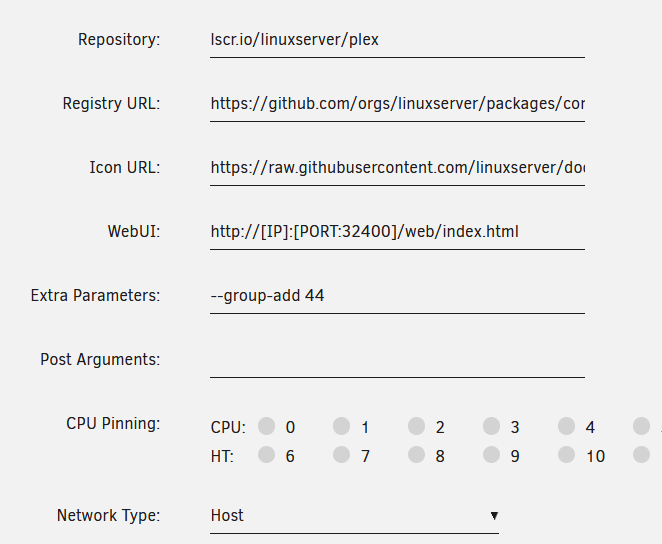
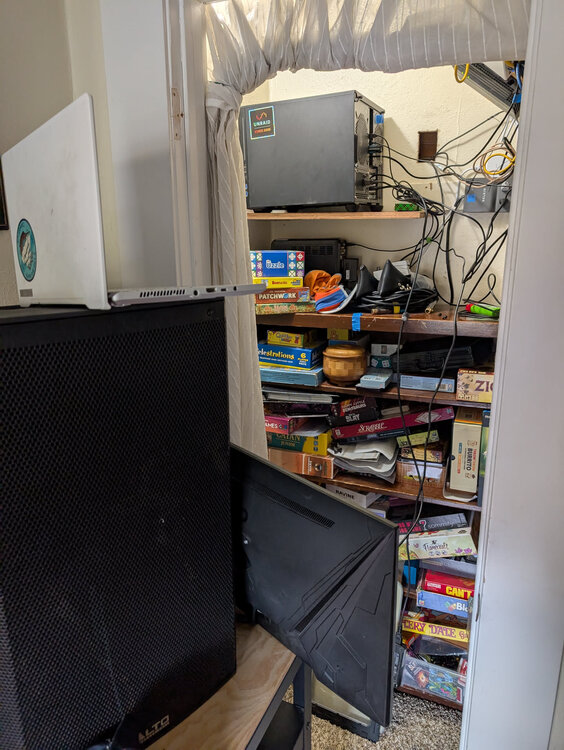
AI pulled me through this one. For those of you who hate it (I almost do hate it!) Here's what I did to make it start working. I was coming from an nvidia gpu. When I pulled the card, Plex docker (lscr.io/linuxserver/plex) stopped working. I had to remove all the custom entries I'd put in years ago for that nvidia card - including a --runtime=nvidia thing that was behind the Advanced toggle. AI wanted me to change my Network from Host to Bridge. That broke port forwarding and I couldn't connect to my Plex server, so I changed that back to Host. I had to add two Devices to the docker template. Add another Path, Port, Variable, Label or Device Select Device Name: /dev/dri/card0 Value: /dev/dri/card0 If you want to make sure these things are present, like I did, you can run: root@mayorgoodway:~# ls -la /dev/dri total 0 drwxrwxrwx 3 root root 100 Oct 1 03:42 ./ drwxr-xr-x 17 root root 4080 Oct 1 10:46 ../ drwxrwxrwx 2 root root 80 Oct 1 03:42 by-path/ crw-rw---- 1 root video 226, 0 Oct 1 10:44 card0 crwxrwxrwx 1 root video 226, 128 Oct 1 03:42 renderD128 root@mayorgoodway:~#(formatting blah) (formatting blah) (formatting blah) I did add this into Extra-parameters "--group-add 44". This is what AI said about it: C. Add the video Group Access Docker containers often need to be part of the correct host group to access the GPU device nodes. Since your ls -la output shows the devices belong to the video group, you must grant the Plex container access to this group. AI asked me to double check I had some boxes ticked in the Plex settings. They were already checked because of the previous nvidia stuff I had in there. They were: Go to Settings (wrench icon) → Transcoder. Check the box for "Use hardware acceleration when available". Check the box for "Use hardware-accelerated video encoding". Click Save Changes. I put on a South Park, forced it to transcode, and badda bing: (HW) showed up and I could see the card doing it's thing. Doing it's thing. I optionally installed a Community Apps > "Intel-GPU-TOP; ich777" This added a command line interface program called intel_gpu_top. That was slick for watching the card do it's thing. it cal also give you a list of your available devices. Here's mine root@mayorgoodway:~# intel_gpu_top -L card0 Intel Dg2 (Gen12) pci:vendor=8086,device=56A6,card=0 └─renderD128 root@mayorgoodway:~# So anyhow, no really biggie. Ah another slightly unrelated thing. I have a PiKVM v3 Pre-assembled to help manage this headless server. Because my CPU has no onboard GPU, the HDMI on my motherboard is dead. When I put the new Sparkle Intel Arc A310 ECO in there, and it detected there was no monitor attached: no POST/boot. I had to swipe the monitor mouse and keyboard from my gaming rig to get the unraid server to BOOT. I ordered one of those dummy HDMI things. I also posted over at pishop.com forums about WTH. I'll probably end up buying the V4 of the PiKVM so I can still remote access this puppy.
-
any updates here @Jltoro ??
-
I was looking all over the place for where to post this comment and even here, doesn't seem like quite the right spot. I don't particularly want to participate in the YouTube comments, reddit is fine, these forums are better. Tiffany Jones said she wanted to hear from us if we liked this content and I wanted to say Yes! Inlike this content! I enjoy listening to you guys while I'm out for runs, then I'll swap over to some Zeppelin on the way back home. I've been with you guys for years and years. It's been refreshing to see new faces. I like and agree with the direction you're taking the company. Spending some time doing things like this, IMO, is a correct way to spend some of your time. I'm excited to continue to see the software refined, simplified and enhanced. I use it daily so it's a big deal! How about some stats on which dockers are the most popular? How about exploring some coordinated relationship with those popular, or cool, or interesting would be partners? Then again, maybe that's the beauty of docker 😉 Keep em coming, One of your fans, drew
-
Crowdsourced encrypted anonymous backup. Right now I share GB of storage with a buddy of mine who also has a NAS. We use syncthing to server back and forth, and I think it works swimmingly. Not everyone has a buddy like that: crowd-source anonymous backup. This could be implemented in several ways: small payments to people hosting your encrypted data. This would have to be truly anonymous, maybe a reason for a foray to Bitcoin? a whuffie reputation based system participating in: forums discord r/unraid offering storage for anonymous data striped data across several anonymous servers in case one is unreachable I have many TB of extra space sitting in my server right now that could be chock-a-block full of who-knows-what. Monthly, daily, hourly, or some sort of priority based bandwidth limiting (plex friends usually between certain hours) Concerns or problems: Is there any chance in hell that some anonymous data becomes dangerous on my server? Is the encrypted data illegal in some way? If it's encrypted, I should not be able to tell no matter what. If it is, am I responsible for physically having it?
-
placeholder
-
We recently had some of those ol' Breaking Changes to our immich installations (immich 1.133.0). Funny thing: they don't actually break it, but they also don't do the background upgrade (immich>postgres+extension) to reap the benefits of the faster/different postgres extension "vectorchord." They will eventually break it when the immich team drops support for the older postgres extension "pgvector." I waited for a while to do this upgrade. I wanted to see if anything easier came up. I finally decided to put on my big-boy pants and move over to the Docker-compose method that the immich team prefers. Unraid does have that capability, it's a little clunky, but it's there. Here are the general steps I took to make this all happen. I'll fill out more details as I can on this initial post with some screen shots so you can mirror this setup if you want. I've never relied so heavily on chatgpt for this stuff: it's a pretty decent tool for operating at a higher level than you're capable of, so that's fun. Enough rambling! sources https://immich.app/docs/install/unraid#docker-compose-method-official I'm not going to re-type the excellent guide for Unraid at immich.app, but I will pepper it with my own experience. Get Docker Compose Manager by dcflachs. It's in the Community Apps tab. I think you can unraid > Docker > (scroll to bottom) Immich > Compose Up. But we're going to nuke parts of it here anyhow. We need to slam that old database into it. This will make four generic dockers show up under unraid > Docker tab: immich_machine_learning, immich_postgres, immich_redis, and immich_server. Get the old database I had followed Spaceinvaders youtube instructions, and was using his postgres immich docker from CA (Community Applications). Get into the CLI (command line interface) and head to /boot/config/plugins/compose.manager/projects/Immich/, or whatever you called this docker-compose-immich. Bring that thing back down with the CLI command: Running this command in this folder, unraid will know which docker you're talking about. Then wipe the old database (do not drink beer while issuing rm -rf commands) That should remove everything that was in that folder that immich populated on it's own when it first started. Head over to your .env file. That's in unraid > Docker > (scroll to bottom) gear > edit stack > ENV FILE make sure these three lines are in there: Now we're going to bring up ONLY the database with these environmental variables. Create some database stuff Then while in the psql promt, paste and run this stuff in there: Ahh, I should mention: you want to stick with the same stuff as you had on your previous installation. You can see what I was using, and am going to use for this new one as well. Now go back to .env file and change it to this: There might be some other stuff in there as well, I leave that alone. Restore old database to new database You shouldn't see any errors flying by, only successful looking things. Once that completes, bring stack down, then back up again. (running these from that /boot/config/plugins/compose.manager/projects/Immich/ folder again) While I was watching that crap fly by, I noticed a few things about Reindexing clip_index Reindexing face_index clustering: iteration X... . Outstanding. At this point I'm able to get into the immich webgui, and login with my old credentials. Still busted thumbnails. Made sure my UPLOAD_LOCATION in the .env file was: (not the best folder I'd say, but it's what I was using before, and moving entire immich libraries is a whole 'nuther can-o-worms) Edit /boot/config/plugins/compose.manager/projects/Immich/docker-compose.override.yml, and added compose down, compose up: booya, thumnails and images. Here's my whole override.yml file. Some of these things we'll add later in this post. Now to replace the old immich with the new hot-rod-immich I use nginx proxy manager NPM. For my dockers to show up as available to NPM, they have to be on a custom network. Mine's called proxynet (old callout there to Spaceinvader and reverse proxy video). Shut down old immich and associated postgres docker. uncheck auto-start on them. Get back into /boot/config/plugins/compose.manager/projects/Immich/docker-compose.override.yml, add: also slap this on the end of the file: Finally make sure immich_server joined with a valid IP Get into NPM, change the port to the port this new immich uses, for me that was/is 2283. You can get this from the yaml (unraid > dockers > gear on Immich > Edit Stack > Compose File. Bob's your uncle. I'll mention here on the importance of backups. While Immich does have some database dump stuff built in, I couldn't really verify if it was working. On one of my previous posts, scroll down to "Below is old stuff." and I have my latest backup script that is pretty slick IMO. It uses smtp2go, and curl to send myself emails for the backups.
-
hey @mackid1993 thanks for the fork and the updated stuff! I see a couple of modifications you mention in your post: photon os, and better memory usage: that's great. I thought containers would continue to deliver the latest version of software, and only needed to be maintained if there was a problem. If the suggestions you've got are good, send them over to Steef guy, and see if he will mix it right in. That change would certainly hit everyone right away. Or maybe there's a reason it hasn't been done already. I'm a know-nothing when it comes to this stuff, so forgive my ignorance! I appreciate you guys who can make dockers!
-
I was chatting with chatgpt this evening on some stuff, and asked about that Cloudflare 100MB post limit that's been bugging me with both Immich and now Seafile. There's something called cloudflared where I don't have to open any ports, I handle it through some yaml. It will handle all my services: plex, immich, bitwarden, and seafile, no open ports. Except minecraft which does still need an open port. Not too shabby! Before I dive down chatgpt insanity hole, I wanted to check with humans: anyone else tried this yet? Couple of other things I found below. https://github.com/aeleos/cloudflared
-
Also, when I did those changes, I lost the webgui. It's like the -e 'WEBUI_PORT'='8083' (this was from docker success run page where we briefly see the docker command details) was doign nothing, and I had to readd the port below -p '8083:8083/tcp' <shrug> works now; webgui and torrenting port. Totally weird.
-
I figured this out (me and chatgpt). qbittorrent was running in Network type: Host, I changed that to Bridge. Which apparently gives more control over ports. Then I had to re-add the specific port I wanted in the Docker template for qbittorrent, both tcp and udp, to entries. That brought a good response back from windows powershell command: PS C:\Users\drew> Test-NetConnection -ComputerName 192.168.11.2 -Port 58846 ComputerName : 192.168.11.2 RemoteAddress : 192.168.11.2 RemotePort : 58846 InterfaceAlias : Ethernet SourceAddress : 192.168.11.25 TcpTestSucceeded : True Now canyouseeme.org 58846 returns a success. Geees, this has been broken for months. derp.
-
The docker specific help links over to github, which is fine, but it isn't unraid CA docker specific stuff. qbittorrent docker settings has several ports as part of it (I'm on Repository lscr.io/linuxserver/qbittorrent:5.0.3) webui: 6881 port 6881 TCP: 6881 port 6881 UDP: 22000 webui port: 8083 torrening port: 58846 I think (?) that the port specified on the Docker Settings aren't being opened, or for some reason just aren't getting through. I want that 58846 to be open so I can forward that port only through the router. Right? Checking on my local network via Windows Powershell: PS C:\Users\me> Test-NetConnection -ComputerName 192.168.11.2 -Port 8083 ComputerName : 192.168.11.2 RemoteAddress : 192.168.11.2 RemotePort : 8083 InterfaceAlias : Ethernet SourceAddress : 192.168.11.25 TcpTestSucceeded : True PS C:\Users\me> Test-NetConnection -ComputerName 192.168.11.2 -Port 58846 WARNING: TCP connect to (192.168.11.2 : 58846) failed ComputerName : 192.168.11.2 RemoteAddress : 192.168.11.2 RemotePort : 58846 InterfaceAlias : Ethernet SourceAddress : 192.168.11.25 PingSucceeded : True PingReplyDetails (RTT) : 0 ms TcpTestSucceeded : False
-
Hey @foraye don’t give up to easily! Especially if you built a full server for this. I plugged your screen shot into ChatGPT: Thanks — I can see the log clearly. From the screenshot, it looks like your RoonServer Docker container is caught in a repeated cycle of: Initializing Started Not responding Error Some things worth noting: • There’s a ps: command not found error in /app/RoonServer/Server/RoonServer line 56. This could be important — it may indicate the container environment is missing basic utilities (like procps or ps), which the app might expect. • The repeated logs like GetLockFile, Nope, we are the only one running, etc., suggest the container is trying to start but crashing or hanging before fully coming up. Suggestions to try: 1. Recreate the container (without deleting the app data): • Stop the container. • Remove it (but do not delete the RoonServer appdata directory). • Re-pull or reinstall the container from Community Applications or Docker templates. • Check that your volume mappings (especially /app and /tmp) are correct. 2. Check your RoonServer appdata directory (likely /mnt/user/appdata/RoonServer/): • Sometimes corrupted settings or cache files can cause startup crashes. • You could try moving that directory temporarily and letting it create a fresh one: mv /mnt/user/appdata/RoonServer /mnt/user/appdata/RoonServer_backup Then restart the container to see if it behaves better. 3. Inspect resource usage: • Is your system low on RAM or CPU? • Run htop or check the Unraid dashboard to make sure the system isn’t choking when RoonServer tries to start. 4. Make sure nothing else is binding to the same ports that RoonServer uses. It may look like it’s “running,” but failing to bind might cause it to crash silently. 5. Try running ps inside another container: If ps is missing in this container’s base image, you might try running a quick container like alpine or debian and checking if ps is available. It may help confirm if the base image is stripped too lean. Want me to help you write a quick shell command to backup your appdata and try a fresh start? Or want to dig into the Roon forums to see if others hit this exact bug recently? I am not a software programmer or expert in these things. But I can try to help. Does your docker settings screen look similar to the settings on page one? Did you do any searches on the Roon forums? Have you tried nuking it and starting over?
-
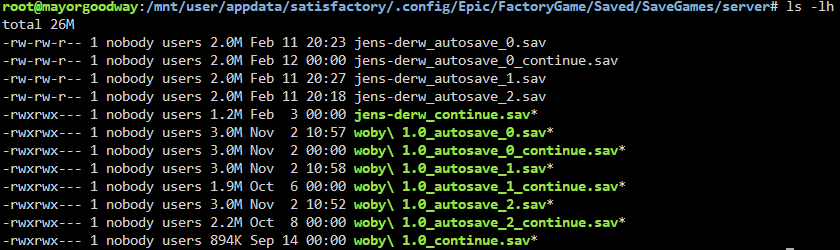
Satisfactory save games. I had a helluva time finding them! They're in /mnt/user/appdata/satisfactory/.config/Epic/FactoryGame/Saved/SaveGames/server It was the DOTconfig/ that got me. Doesn't show up unless you do an ls -a, otherwise stuff preceeded with a period is hidden.
-
remove the entire folder /mnt/user/appdata/immich
-
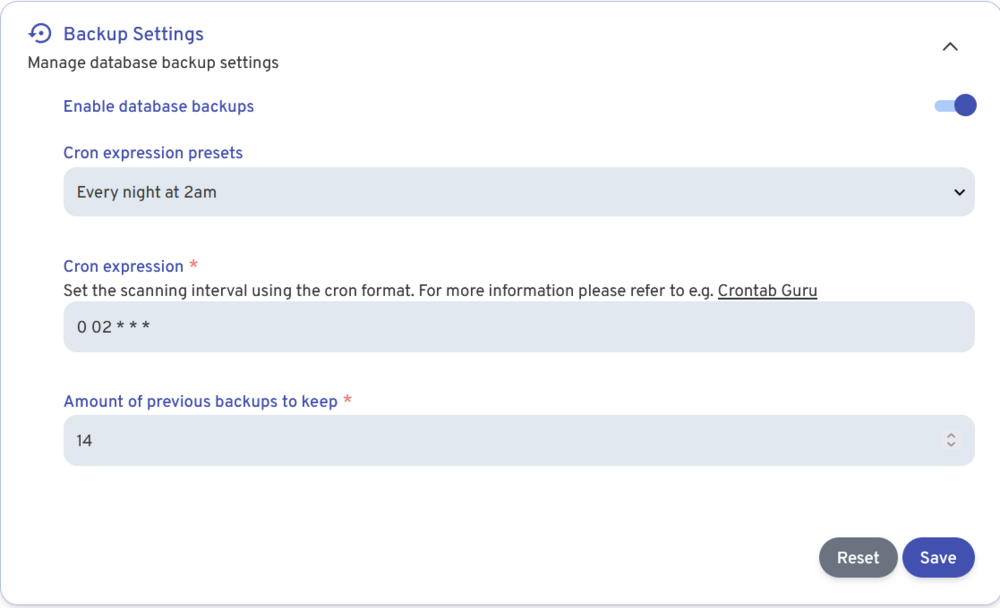
@berka There are two things about backups: the database (holds structure, metadata, search data, etc.), the assets (pics, videos JPG MOV etc.). We're focusing on the database part of it for the moment. Log into the Admin account > Settings > Administration > Backup Settings. I'm not sure what the default settings are here. I don't remember messing with my settings, and this was what was in there: Not sure where the backups live. I'd get into your command line and start poking around in the directories. https://immich.app/docs/administration/backup-and-restore/ Oh, cool there it is:
-
@berka look like it had a bad shut down, got corrupted and now you need to restore it. https://stackoverflow.com/questions/66140309/using-docker-what-triggered-panic-could-not-locate-a-valid-checkpoint-record if you have a backup great. If you don’t, you’ll need to rebuild the whole thing.




