Niklas
Members
-
Joined
Everything posted by Niklas
-
If using the link to open the ui from Unraid you may need to change the port in the template (turn on advanced view) Edit: you only changed the host port, not the container port, right?

-
No clue. Mine looks like this:

-
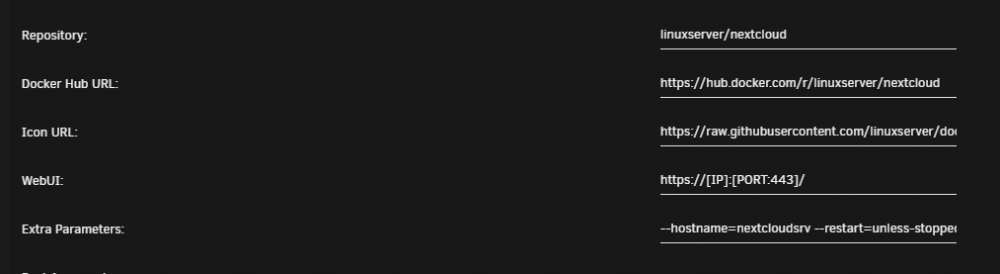
Add "--hostname=xxxxxx" in "Extra Parameters" for the container ("ADVANCED VIEW" on)
-
The deconz plugin need the request library to work. Could it be added to the container please? 2019-12-19 21:04:57.206 Error: (Deconz) Your pyton version miss requests library 2019-12-19 21:04:57.206 Error: (Deconz) To install it, type : sudo -H pip3 install requests | sudo -H pip install requests Edit: "pip3 install requests" in container will make the plugin work. Guess it will work until any re-installation of the continer?
-
Since the docker image has been updated with the fix I just deleted /config/nginx/site-confs/default and restarted the container. The container will recreate it with the fixes in place.
-
The changes to the config files will not be needed when the php package gets updated, right?
-
It shows version 17.0.0 and "your version is updated" Edit: Looked in the update log. It used https://download.nextcloud.com/server/releases/nextcloud-17.0.0.zip So, it used the stable 17.0.0. I did this 2019-10-06. I don't know if there is some new beta out since then.
-
I just switched to beta and upgraded. Then I switched back to stable.
-
Yes. The warning is gone after applying fix again. Thanks!
-
pihole Edit: I see "pihole template" and "pihole" in apps. I use the pihole one (setup months ago)
-
Small small thing: "Fix Common Problems: Warning: Template URL for docker application x is not the as what the template author specified." Edit: Selecting "Apply fix" tells me "Fix applied successfully!" but the problem is still there after rescan.
-
Even with the linuxserver docker, my Nextcloud container reads/writes to the data share every 10 minutes (could be a client checking in). I can't remember the files it accessed but you could log them using the File Activity plugin. Nextcloud has it's own appdata folder in the same folder as data. People have asked the devs for the option to separate them https://github.com/nextcloud/server/issues/3034
-
I see the same. It is reported in various threads here and one over at linuxservers forum.
-
With this PR merged, latest works again. https://github.com/linuxserver/docker-duplicati/pull/31
-
I don't think the users know. You need to understand the smart values and monitor them. Also, people need to understand the "limited" warranty. 3-5 years might sound like much but i think people don't know that the TBW is a big factor and will void your warranty very early if you have lots of terabytes written in short amount of time. I don't know if the encryption makes any difference. We need to hear from more users before drawing any conclusions...
-
40TB! That's crazy. Do you use mover? 20TB a month will give you a total of 7.5 months of warranty with the 860 EVO.. I have moved to IronWolf 110 SSD. 5 years or 435TBW. Gives me some peace of mind. I have not found the culprit. "inotifywait -r -e modify,delete,create,close_write -m /var/lib/docker" gives no big clues.
-
Works. Thanks! One small thing, when you change the vendor name for SSD's, pressing "Save" result in this:

-
Ran purge everything and start over. I benchmarked all of my drives including ssd. When returning to the start screen after the test was done, I can't see any graphs if selecting any of the drives. I see the drive info and image but no graph under it. Also happens if i benchmark one drive at a time. The controller benchmark saves and displays as it should.
-
Just want to say thanks! Working great. The new controller benchmark is much easier to understand and overview. My rig gives me average difference 0.1%
-
You're right! Sorry! Added OneDrive to my post. I have not tested all the other providers. At least, OneDrive does not work. Posted the error log over there.
-
Yep. Rolling back works. The packages upgraded in the latest tag should be reverted or Duplicati needs to update and bring support for the new mono packages. For now, this docker will not work for new users using "latest" (if using OneDrive v2, at least) or old user that upgrade soon. People that hasn't configured notifications when stuff go wrong will not know that the backups fail if they don't monitor Duplicati in som way. I have configured mail and got the warning via mail after upgrade on "latest".
-
Since last update, my backups to OneDrive stopped working. Getting this when testing the connection: "Error Failed to connect: Only 'http' and 'https' schemes are allowed. Parameter name: requestUri" mono problem? I saw the bot was updating lots of mono packages. I don't know if the problem is duplicati itself or this container (guess container since only packages got upgraded) The backup jobs ends with errors:
-
I've had that message about integrity check. Fixed it by removing and reinstalling the apps/plugins.
-
Is domoticz in this container started with -daemon added to the command line? If not, should it be added? Maybe with "-log /config/domoticz.log"? The logging is filling the logfile for the container itself. It could be several lines every second added to the log file for the container itself.
-
I see several gigabytes of data written to cache ssd every hour. The server is almost idle. "docker stats" looks good. BLOCK I/O show low values. Some megabytes written at most. The containers are not doing the writing. Using "iotop -ao" (install using Nerd Tools plugin if interested) for some time to get an aggregated summary of disk IO show "[loop2]" doing gigabytes of disk writing in no time (running for like 15-20 minutes show loop2 writing almost 3GB). This seem to be where all the writing comes from. With df I can see /dev/loop2 40G 24G 15G 63% /var/lib/docker What is it writing? 🤨 Check your smart value "Total_LBAs_Written" (calculator) if you are using ssd's. It could show quite high values for others here too? It will eat up the warranty of consumer ssd's fast. My Samsung 860 EVO has 5 years OR 150 TBW. With 5-6 TB of writing every month, the warranty will be void after ~2 years. Edit: 5.08 GB written in ~30-40 min. Continuously writing data. If it was usable data, the free space would drop the same amount(?), it does not. Where does all the written data go? Some form of temporary data not stored? Edit2: ~90G written in 24h.