





.jpg.d757706408bd5d9cc2d812316893081e.jpg)
Unraid-arr
Members
-
Joined
Everything posted by Unraid-arr
-
@Kameleon83 - Quick Question; Is there a way to select Containers to show, instead of all of them? I do see 2 categories - Docker App Running/Not Running, However I do not see any way to disable some to remove them from both those lists. As always, Appreciate your good work! Thanks. Cheers!
-
This issue is supposedly fixed. Please check the link below. Cheers!
-
Thanks. Your prompt response is much appreciated. Cheers!
-
Hey, Thanks for the update, however if there is a way to turn this feature off or have a toggle that would be much appreciated. It gets annoying real fast on mobile-UI to use this and in my use case I don't need this functionality. This is adding complexity to something simple for a lot of folks. I do have external links through NPM but I am not using your application externally so, on LANI dont need this functionality. Also, as an example now my Krusader docker shows LAN -> <IP>:<port> and WAN says <ip>:<port>?vnc=<gobbledygook>. The WAN link opens Krusader, LAN link takes me to ftp kinda page. It was fine before. Also, I haven't been able to figure out how to configure the links for LAN/WAN for each application. If you could make it more intuitve that would be great. Hope this feedback makes sense. Its great for someone who needs it and applause on the great functionality and your hard work. Cheers!
-
Is there a 6.10.3 update expected which fixes all the issues? I am hesitant to upgrade my server from 6.9.2 running on Dell R720xd. Thanks in Advance. Cheers!
-
No worries mate, you've done a great job. This was a minor annoyance. Cheers!
-
Waited for Favicon for quite a while... much appreciated. Cheers!
-
Try opening in Incognito mode or clear cache etc. set the DNS/DYNDNS and UNRAID_IP variables correctly. If that dont work try deleting the container and removing the image and reinstall fresh. Hope that helps. Cheers!
-
Hey, Sorry for the late response, per my understanding you are using UNRAID_IP to match in the docker container's webui link and if it matches you replace it with DNS/DYNDNS so it works if I have a hostname (Ex: unraid.duckdns.org) mapped so it works across networks/internet. If the url for ui does not match the UNRAID_IP you know it is a separate ip for host so you do not change the path to webui which restricts it to LAN only. I am not a native english speaker myself, but I hope this explaination helps someone. Hopefully I am correct in assuming what is going on in the code. Cheers!
-
Thanks for the update, much appreciated. Regarding the Host and Unraid_IP - From comments I am not sure if the description is clear for other folks, but I am able to get it now. Have a good day! Cheers!
-
Hey, thanks for the active work on this Web-App I would like to understand more on what these variables are doing internally. I have them both set to the local IP address of server. Some more context may be better for understanding. Also, how can I change the title of your page "Docker Web UI" to what I want to? as I keep this tab open all the time and would like to rename to something I can quickly get to. Thanks for the app again. Cheers!
-
Thanks very much, just tested. Works perfect now.
-
Thanks for the update very much. Appreciate the job you have done. Bug - The URL is messed up for some dockers, I think it is being run through urlencode/urldecode functions. The & is changed to & in the example below for binhex-krusader - http://IP:PORT/vnc.html?resize=remote&host=192.168.0.4&port=6080&autoconnect=1
-
How do I scale the page smaller, it is too big and I would like all the containers dynamically adjusted to fit in 1 page. Thanks. If I use the Ctrl + (+/-) on browser then it also affects other pages with the same IPaddress/domain. I would rather just have this app be able to do it. Also, how can I link domain address instead of local IP:port. Thanks.
-
Oh, thanks a bunch. Is it a paid service as I only have a free account to tinker with. I went to that site and it asks to create a domain and stuff. Just want to know what I am getting into. Much Appreciated.
-
Hello @Djoss/Folks, I wanted to Set up authenticated origin pulls from CA, any help would be highly appreciated. I am not able to figure out what files need to to change. Here is the link from Cloudflare and What it says: Cloudflare Setup link 1. Install the above certificate at the origin web server to authenticate all connections. - What location to place the cert ? 2. For this example, you would have saved the certificate to /etc/nginx/certs/cloudflare.crt. - Which file to change for this ? ssl_client_certificate /etc/nginx/certs/cloudflare.crt; ssl_verify_client on; Thanks in advance.
-
Hey guys, Was going through the same trouble and stumbled on this post. Issue is resolved with using subdomains as others have mentioned. Cannot use the CNAME - WWW (www.yourdomain.com). Also, you cannot use CNAME with nothing mapped to it. It will give the same error. For now version 2021.10.3 works as well. Question - What application is this in the screenshot above? Please comment. Thanks in advance
-
Hi guys, Currently I am running 6.8.3. What is the current recommendation for Stable 24x7 running version. (I am running the Unraid Nvidia build, so direct upgrade is not possible and I would need to start from scratch.) Is waiting for 6.10.x worth it (to me it looks like it is around the corner) or should I make the leap to 6.9.2? Thanks for your thoughts.
-
Thanks for the response, but it does not connect to the server as well. Screenshots Attached.
.thumb.png.edd4f320cd3403201e95e2693a8bf304.png)
.thumb.png.05393ff2f829239b1dbc32547a23d286.png)
-
*1 recv() failed (104: Connection reset by peer) while reading response header from upstream, client: 192.168.0.50, server: , request: "GET /movies/dupes HTTP/1.1", upstream: "uwsgi://unix:///tmp/uwsgi.sock:", host: "192.168.0.4:5000", referrer: "http://192.168.0.4:5000/" Getting this error in app logs. Any clue? Thanks
-
Much Thanks for this. Was going crazy with this as I am on 6.8.3 as well. Issue started yesterday for me as well. This needs to be escalated more so it is updated in the official releases.
-
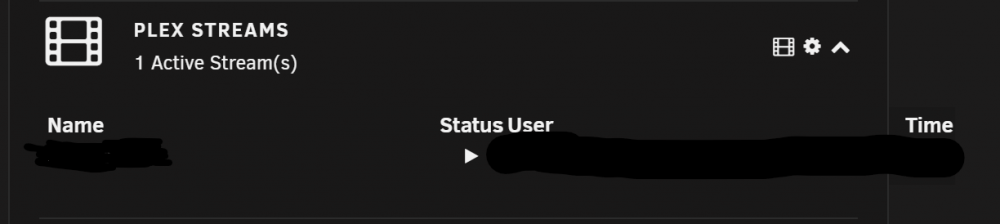
Hey @dorgan, Running 2020.07.23 and that issue is resolved. I see others were having this issue as well. So that should help them as well. My recommendation would be to keep Name & Status in one line and User & Time in next line for better readability purposes and that would also give enough room to display complete names instead of cutting them off. Thanks for the update though! Cheers! -Shomil Saini
-
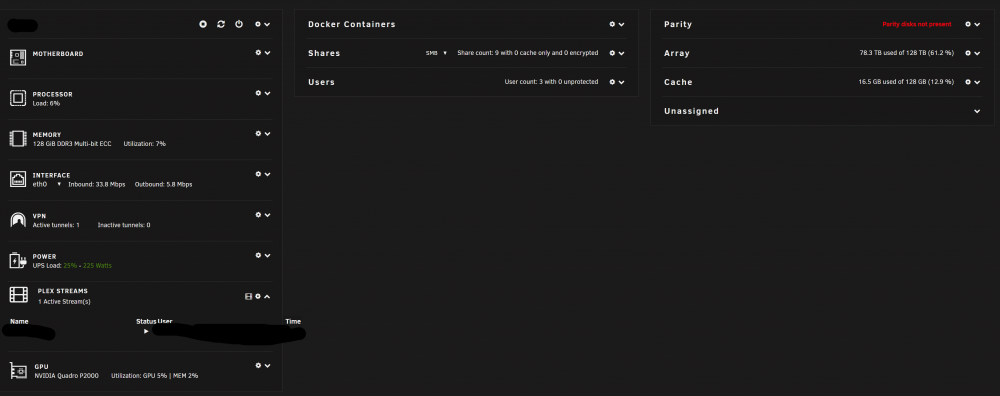
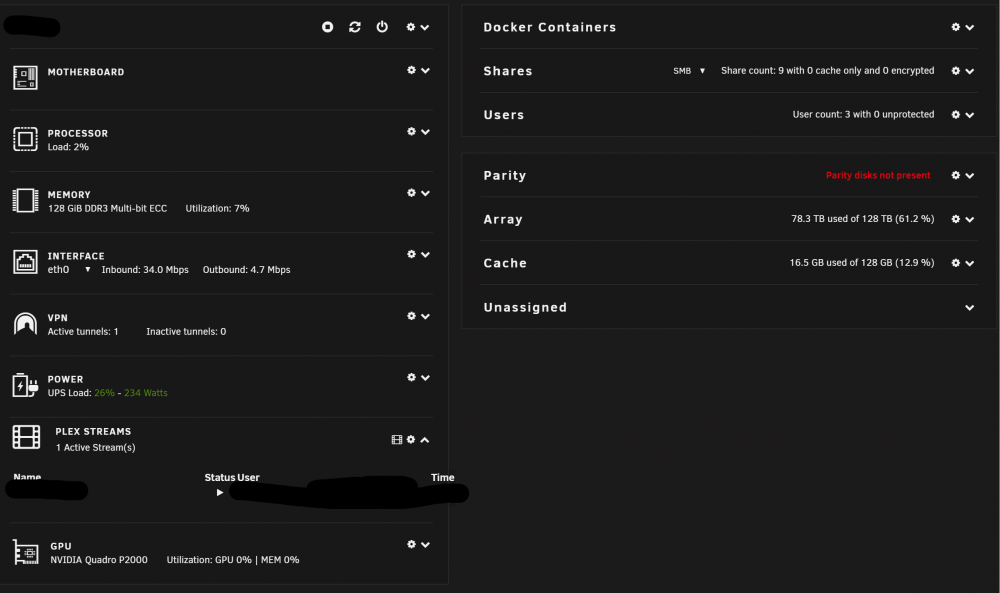
Hey @dorgan, Thanks for the update, Sorry I just saw your comment today after an update was pushed. Unfortunately the Dashboard Widget still is not in bounds of widget. Upon further Inspection, the widget is out of bounds on 3 column or 1 column layout width. On 2 column layout it is OK for the most part. Below are 2 screenshots for clarity. - 3-column layout - For 2 column layout wider than this the widget is OK. This is the boundary case. The Warning issue was actually not visible now on the NAVBAR page, so that may have fixed. Cheers on the good work!
-
Hi @Ockingshay, Go to Settings > Network. This is the setting you might want to look into 👇, please use your own network address range. This is my test server settings which work great. I am showing here as an example the VLAN range and Docker LAN range. Also, This👇


-
I am having the same error on the server - "ERROR: Could not open the input file (No such file or directory)". I have seen 9-10 times in quick succession. I am actually getting the error when plex is trying to ingest a newly imported file. like creating chapter thumbnails etc. I am guessing it is permission issue. I did run "New Docker Safe Permissions" lets see if that helps. My major concern though is that Remote streams are buffering @720P and @Direct Play-4k though I have bandwidth to upload and play @ 4K easily. This is not for every file so I am a bit relieved. Specifically issues is seen playing remote on Samsung TV QN65Q65FN - stream of 53.32GB source file H265 HDR-2160p TrueHD-Atmos 7.1. My best guess is that TV cannot handle H265 that well.
.thumb.jpg.d74871f2737d625ddd6091e019824d83.jpg)

.png.57efc8da9be4c4a3138463ae3015b81b.png)
.png.d49fca06dcb65114e3f24dfbcbdc4499.png)


