





rragu
Members
-
Joined
-
I followed the IBRACORP guide to setting up Tailscale. I then tried accessing the unRAID web UI from my iPhone to test after turning off WiFi. When on LTE and connected to Tailscale, I can successfully ping 100.x.y.z. When I try to navigate to 100.x.y.z in Safari, I get redirected to "xxxxx.unraid.net". But, the request times out before I can actually access the login page. I deleted the My Servers plugin from unRAID and turned off SSL for the web UI in Settings/Management Access. And then I was able to access the unRAID dashboard on my phone via Tailscale while on LTE. My questions are: 1) Is turning off SSL for the web UI required to be able to access the dashboard via Tailscale? If not, I'd be interested to hear if you had to do anything special to get the web UI SSL and Tailscale to play nicely together. 2) Assuming I only access the web UI remotely via Tailscale (i.e. NOT via exposing directly to internet or reverse proxy), is using SSL on the web UI even necessary? 3) Would I be missing out on something by not using SSL (other than a nice lock icon in the browser)? Is there any appreciable security risk (either in theory or in practice)? Thanks!
-
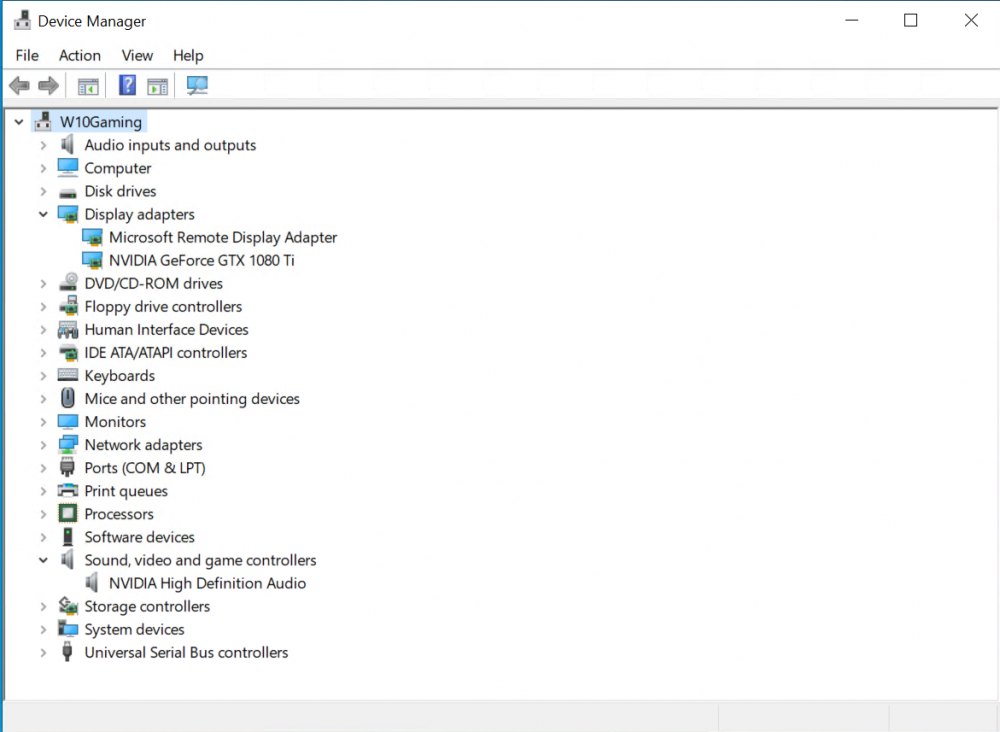
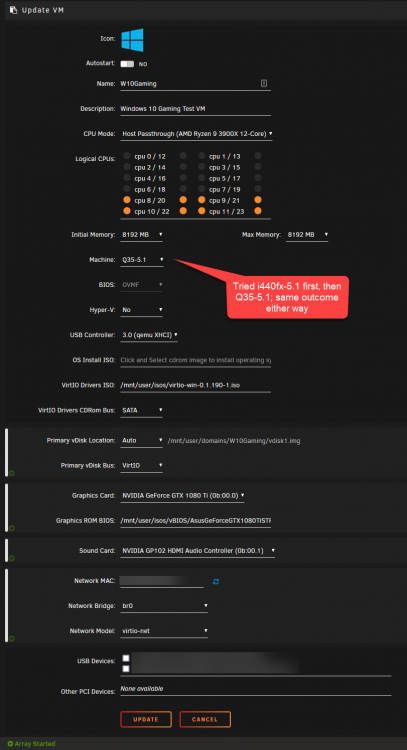
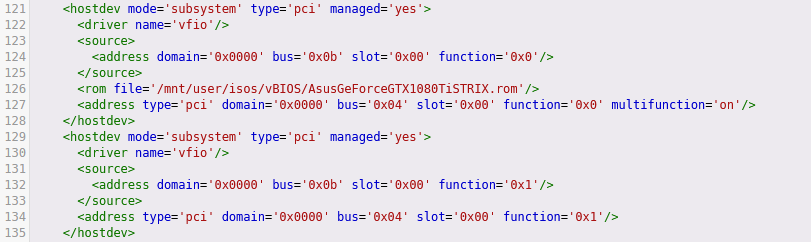
EDIT: SOLVED Looks like my vBIOS was the issue! Despite following SpaceInvaderOne's video/script to dump the vBIOS from my card, that vBIOS doesn't appear to work. it was only after I used one of the compatible vBIOSes from TechPowerUp that I was able to see the following in the VM's Device Manager: I also undid the ACS override and stuck with i440fx as Machine Type
-
As with DemoRic above, I get the following error: "Fatal error: Cannot redeclare _() (previously declared in /usr/local/emhttp/plugins/parity.check.tuning/Legacy.php:6) in /usr/local/emhttp/plugins/dynamix/include/Translations.php on line 19" although I get it once the Array is started and I'm logged into the dashboard (not only when the array is stopping). I don't think I got it before installing v2021.09.10.
-
I've been trying and failing to get my graphics card passed through to a Windows 10 VM for a few hours now no matter what I try. I'm going to need some help to go any further. I've been largely following this guide on setting up remote gaming Details/Settings: GTX 1080 Ti is in the motherboard's top slot (so I guess that makes it the primary GPU?) ACS override: set to Both VFIO: Both graphics and sound devices stubbed via Tools>System Devices Boot: Legacy boot After adding the graphics card with settings as detailed above and booting the VM, Device Manager doesn't recognize any nVidia card as being installed. All I see under Display Driver in Device Manager is Microsoft Basic Display Adapter and Microsoft Remote Display Adapter. If I go ahead install the nVidia drivers anyway, I then get Code 43 (which I suppose isn't surprising at all if Windows doesn't recognize the GPU in the first place). Ideas on how to move forward from here would be very much appreciated. Thanks!
-
First off, thank you @Sycotix for your Authelia CA container as well as your video series on YouTube. Very helpful and detailed! I've set up Authelia using a combination of your video and this blog post by Linuxserver. I mostly followed your video except for the end where I used SWAG instead of NPM. I've tested Authelia by protecting two endpoints: Syncthing and Tautulli. A few questions: 1) When I go to https://syncthing.mydomain.com, I get a distorted Authelia login page (please see attached images), whereas when I go to https://tautulli.mydomain.com, I get the usual Authelia login page. This is the case on desktop Firefox, Chrome, and Edge. I don't suppose you've seen this before? Any ideas as to why this might be? The distorted page is still functional (just not as pretty). EDIT: tried on mobile Chrome (iOS) and mobile Safari. For both mobile browsers, both Syncthing and Tautulli give me the distorted Authelia page. 2) In any case, once I login, I get to another login prompt. Obviously this is from the authentication I enabled before Authelia was set up. So, now that Authelia is protecting these services, am I good to just disable the "internal" (for lack of a better word) authentication for these services? 2a) I disabled the basic GUI auth for Syncthing. And while Authelia of course still protects Syncthing, I do now get a bright red warning message from Syncthing that I need to set GUI authentication. Is there any way to make Syncthing aware of Authelia or link them in some way so that the warning message goes away? 3) For the majority of my reverse-proxied services, I will probably be the only one who needs to access them. But for certain services (e.g. Ombi) where I would have multiple users, how do I set it up such that userX and userY logging in via Authelia automatically signs in userX and userY, respectively, to the desired service? Thanks for any and all help!
-
rragu changed their profile photo
-
Sorry, just to make sure I'm understanding you right: I don't need to do anything to the 1080 Ti primary GPU other than bind it to VFIO via System Devices? I don't need to specify the vBIOS in the W10 VM's config/XML etc.?
-
Thanks! Are there any possible issues that could occur as a result of stubbing the primary GPU (just wondering if there is something to look out for)?
-
Hi, not entirely sure if this is the right place to post this but here goes: My setup: - CPU: R9 3900X - Motherboard: Asus Crosshair VIII Hero - PCIe x16 Top Slot: GTX 1080 Ti - PCIe x16 Second Slot: Quadro P2000 - PCIe x16 Third Slot: LSI 9207-8i - Running unRAID 6.9.2 What I want to accomplish: - Pass through the primary GPU (1080Ti) for a W10 VM for gaming - Use the secondary GPU (P2000) for Plex/Emby hardware transcoding From what I understand, I need to: 1) Dump the vBIOS (following SpaceInvaderOne's video) for the 1080Ti since it's an nVidia GPU in the primary slot 2) Install this nVidia plugin to use the P2000 for hardware transcoding in Docker My question is: Apart from 1 & 2 above, is there anything special I need to do to accomplish my goals (e.g. stubbing the primary GPU or something like that)? N.B.: if switching the GPUs (i.e. put the P2000 in the primary slot) would somehow make things easier, unfortunately I can't. My 1080Ti is a 2.5 slot card and there isn't enough clearance between the second PCIe slot and the LSI HBA in the third PCIe slot.
-
Thanks! I lowered the checkers to 2 and transfers to 1. Combined with a chunk-size of 256M, I get the same ~80MBps with half the CPU utilization as before, even without --ignore checksum
-
Just tried out "rclone copy"....the difference is night and day Test files: 4 files (total of 12.3 GB; between 2.3-3.6GB each) Average transfer speed using rclone mount: 19.4MB/s Average transfer speed using "rclone copy": 60.9MB/s Average transfer speed using "rclone copy" and chunk-size 256M: 78.1MB/s The only drawback is heightened CPU/RAM usage but I'm sure I can manage that with a script like you mentioned. Thanks very much for all your help!
-
Thanks! I'll look into the resources you posted. As for not writing to the rclone Google Drive mount, (1) it's a slightly more widely known tip now 😅, (2) while I'll switch to using "rclone copy", is there any particular negative effect to transferring data to Google Drive in the way I've been doing (e.g. data loss/corruption) or is it just lower performance?
-
Hi, I recently set up rclone with Google Drive as a backup destination using SpaceInvaderOne's guide. While archiving some files, I noticed that my files were being uploaded at around 20MBps despite having a gigabit FiOS connection. Based on some Googling, I'm thinking increasing my chunk size might improve speeds. But how do I go about increasing the chunk size? I've attached my rclone mount script if that's of any help. Also, how does this affect the items I have already uploaded (if it affects them at all)?
-
My standard disclaimer: I only know enough to break things that I don't know how to fix... I've written my go file such that at boot, I get my array passphrase via AWS Secrets Manager and write it to /root/keyfile. unRAID then uses /root/keyfile to unlock/startup my array. I've been manually deleting my keyfile after startup. The aws-cli command I use for the procedure above retrieves a string, not a file. So, is it possible to use the output of this command as the passphrase rather than writing it to a keyfile first? Thanks!
-
Thanks! EDIT: Solved both issues as described in my post above.
-
@saarg Thanks! uBlock Origin was the culprit. Apparently, it's not a fan of duckdns.org? I had planned to switch from duckdns to cloudflare-ddns anyway. After doing so, the site is working properly in Firefox with uBlock Origin still enabled.




