xlucero1
Members
-
Joined
-
Last visited
Everything posted by xlucero1
-
I believe the way to upgrade your cache pool on 6.10.0+ via the GUI is instructed by the video posed in this thread. Luckily I am on 6.10.3 & I will be doing this method this weekend.
-
The wiki is no longer available. But the video posted in this thread looks to be the right way to upgrade cache pool.
-
Came from Intel Legacy and unRAID 6.8.3. The network config files were a good idea but that didn’t work for my upgrade. I came off of legacy boot. I changed the EFI- to EFI (without the dash) and that didn’t work. Possible plugins were preventing boot. Nothing really worked. I had to backup UNRAID folder from USB to computer and reinstall new 6.10 OS. It worked. I had to redo cache and dockers and redo VMs. It was a pain to figure out. Might be easier to go this route if nothing seems to work. Here’s the stuff to move over to new USB install: https://wiki.unraid.net/Files_on_v6_boot_drive dont forget your .key
-
This might not be your guys' issue but: 1) I dumped the vbios and added it in passing thru GPU, using SpaceInvader video. [Still getting blank screen; so... 2) Double check your logs and your VM logs for signs of issue. I was getting: "BAR 0: CAN'T RESERVE" issue. This thread helped me resolve it.
-
Right click My PC> Manage. On the left drop down Storage> Disk Management> Right click the Unallocated space. And it give you option to run "New Simple Volume Wizard". It'll ask you the size you want to format it to (NTFS is default). And run. Restart. I was able to finish installing drivers You can also change the default installation location from you main 😄 drive to your new partition: https://winbuzzer.com/2020/07/01/how-to-change-the-default-app-install-location-in-windows-10-xcxwbt/
-
Thanks for responding. I mean, I can’t find out how to even build the VM. Sorry if I hijacked the thread but is there a video guide or anything to help with building a Win 10 VM? [I seen @SpaceInvaderOne videos (which helped me when I built on 6.8) but nothing really works and I’m not sure where to begin]. Thank you 🙏🏽 UPDATE: the documents pertaining to VM's on Unraid are here: https://wiki.unraid.net/Manual under VM Management & VM Guest Support
-
@JorgeB can you please link post/lead for me how to build Win 10 VM. I’m on 6.10.3 using 12900k with 690 mobo. I built old vm in 6.8 and it doesn’t work with new build. Kinda desperate here lol 🍔
-
Great to hear @snazz, keep us updated please [btw I have a very similar build as you do!] I am hoping someone can help post a guide to building a VM on this Alderlake. I am having a very tough time with simultaneous hardware and OS transition from 6.8.3 thank you all very much.
-
I found @chrishorton7 solution to be the best for me for transitioning to new motherboard Asus z690 E 12900k. Also coming off of 6.8.3 and loading a fresh USB creation to the latest version 6.10.3 in UEFI mode. The transition worked. IP was assigned. New hardware build , also going from Intel legacy boot in bios to Intel UEFI boot in bios( because I read my motherboard does not like legacy boot, so I will UEFI for now just to get it running). The transition was not easy at all. The new build IP : not set occurred, disallowing me to upgrade unRAID to another version (deleting network.cnfg files didn’t work). Since I had transferred all my drives already, little change could be made. I was able to restore backup USB on old motherboard & processor to verify there it got assigned an IP and there were no network issues (I made sure on router to remove reserved IP address for Tower). I also verified the boot in bios (indeed it was Legacy, non UEFI). Here are the files and folders you want to transfer from your USB backup to the new clean USB install: https://wiki.unraid.net/Files_on_v6_boot_drive there are some things like the “.key” file for instance that are important to move over that aren’t mentioned in op previous post, so check the link. It says appdata is not necessary to move over on USB; I did move it over, but it doesn’t matter; because I believe the appdata is on the array, not on USB… plus you need to recreate/format cache pools (for me only possibly since I was coming off of 6.8.3, I don’t know if you have to if you were on 6.9). THEN I believe you can move over your app data backup to the new location. I am working on this and VM recreation now. If I don’t post results feel free to ask.
-
I made a new Win10 VM reusing all the old info and files (same machine, ISO, virtio, manually chose old vdisk, and same network Mac), and it booted up!! I didn't even have to modify the XML file and paste old info in, it just created it and booted. Now the truth is if it will keep working going forward after shutdown. Any input or ideas? Thank you for responses
-
Thank you for reminding me about that feature. Should the vdisk location be set to use cache "only"? Also I set the VM to be 70G, now it seems to have exceeded 70G now it is 75Gb... Do you think this is why it's not booting; if so, how can I fix/resolve this to get back into my VM? or what stands out to you that might be the issue? Thank you again
-
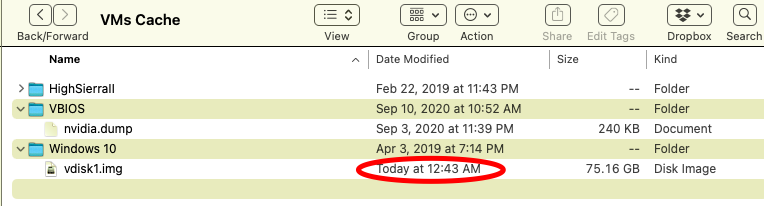
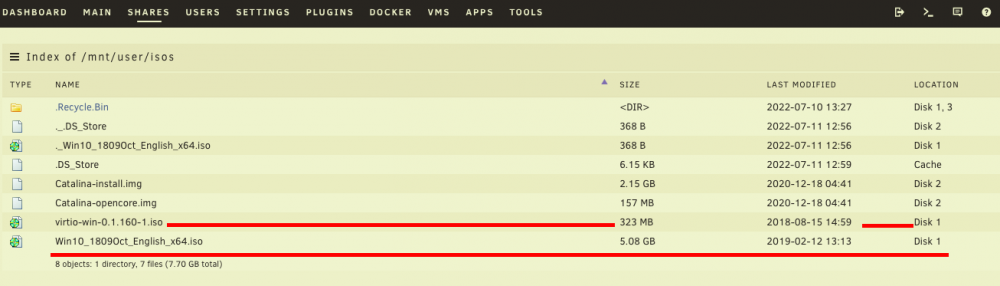
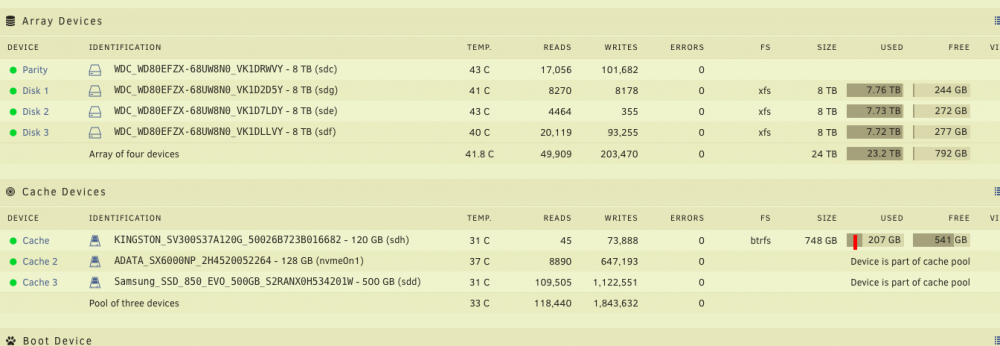
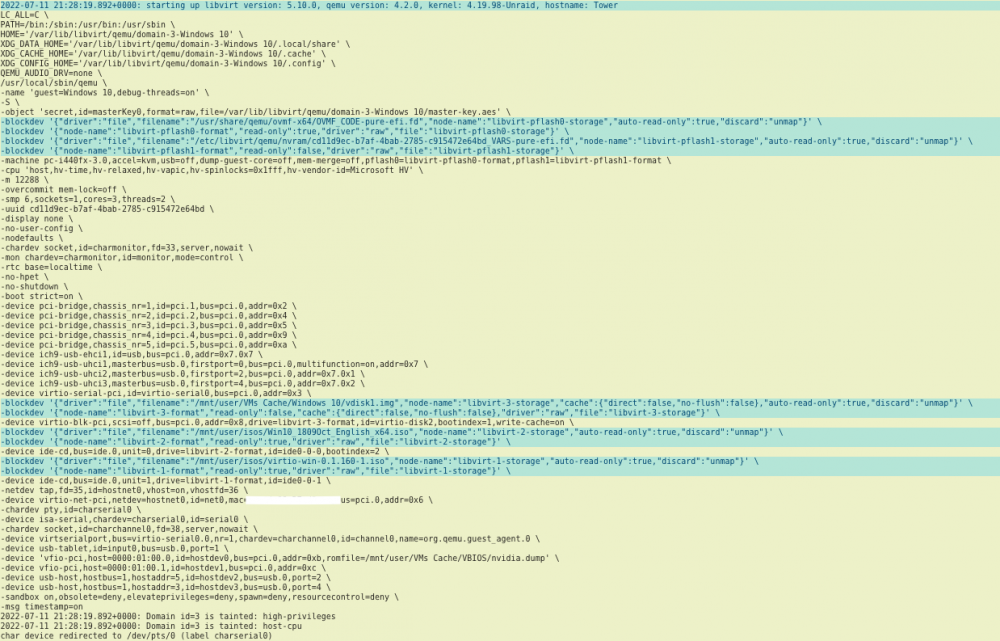
I haven't upgraded to 6.9 and 6.10 yet because I use the VM for work & worry about nextcloud data, passwords & losing photos. I can, and plan to upgrade soon, especially if this is the easiest solution. - My server was maxed out on storage last night; so I was using the VM to clean the server/media/array (working fine). - I cleared the Recycle Bin plugin which had over 100GB of data. (maybe I deleted something in here, yet was working fine before) - *The vdisk1.img I noticed is using used 75gb, even though I only allocated 70gb to it originally. (suspect. I turned off VM around 1230ish). - I am noticing my "isos" and "vdisk" shares are set "yes" to use cache, but they seem to be in the array (disk 1). - My cache pool is a little more fuller than usual as well. (invoking mover did nothing, before and after long shutdown and reset). - Lastly, I get no errors when I start the VM, here is the VM log from when I click start, no force close. The keyboard is not even allowing me to turn on LED on it, although the keyboard works in the GUI. The Unraid login script goes away on the display when I start VM, but no sign of VM life whatsoever on display. Thank you all who help build an amazing community! ps note: my diagnostics posted were pulled after several resets. Unfortunately I have a bad habit of restarting before pulling them. I have pasted a copy of the working XML into the advanced settings; also turning off and on VM manager, and nothing. tower-diagnostics-20220711-1408 copy.zip


-
Seems kind of painful just to recover my audiobook. If anyone ever needs to recover a deleted file you should make vid & post it! That would be awesome! :D
-
Beast. You saved me a huge headache. Thank you!
-
Mapped drives and symlinks link that was posted in the YouTube vid seems to lead me to a Download Archive and I cant figure out how to download like Spaceinvader One did. Any advice? http://dirlinker.codeplex.com/
-
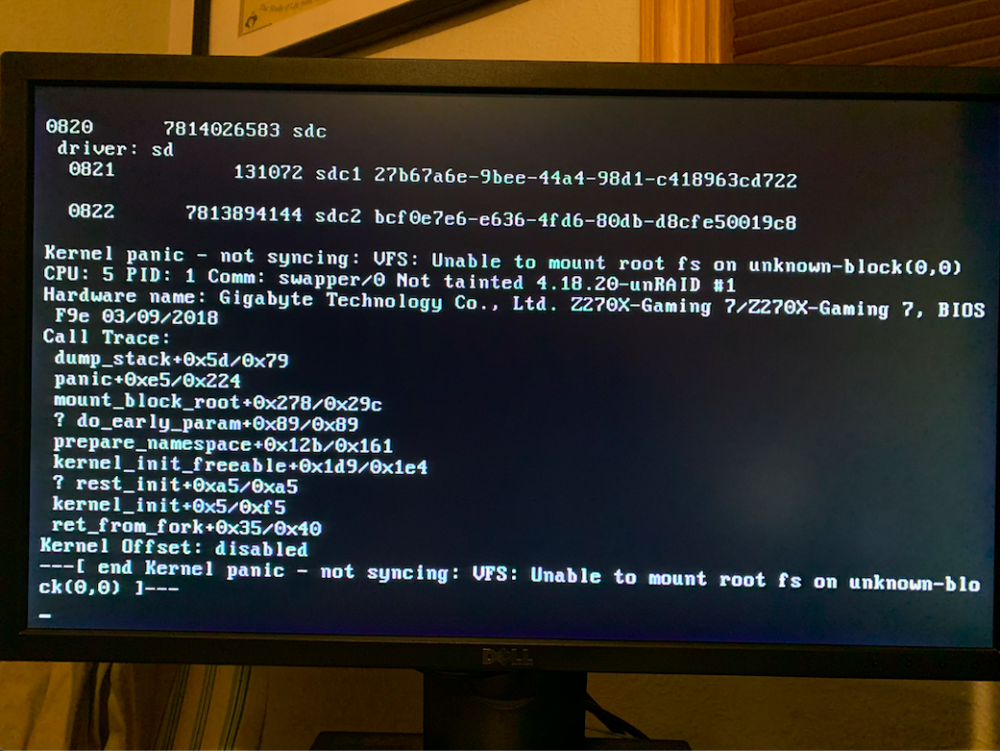
@bastl Hey thank you I found it, edited it, and it did not work. it was : default menu.c32 menu title Lime Technology, Inc. prompt 0 timeout 50 label Unraid OS menu default kernel /bzimage append pcie_acs_override=downstream,multifunction vfio_iommu_type1.allow_unsafe_interrupts=1 initrd=/bzroot label Unraid OS GUI Mode kernel /bzimage append pcie_acs_override=downstream,multifunction vfio_iommu_type1.allow_unsafe_interrupts=1 initrd=/bzroot,/bzroot-gui label Unraid OS Safe Mode (no plugins, no GUI) kernel /bzimage append initrd=/bzroot unraidsafemode label Unraid OS GUI Safe Mode (no plugins) kernel /bzimage append vfio_iommu_type1.allow_unsafe_interrupts=1 initrd=/bzroot,/bzroot-gui unraidsafemode label Memtest86+ I changed this section to : label Unraid OS menu default kernel /bzimage append pcie_acs_override=downstream,multifunction and also tried : label Unraid OS menu default kernel /bzimage pcie_acs_override=downstream,multifunction Neither of them worked and did not boot. I got this error during boot: i have attached the HEIC picture here. I went into safemode and modified the 'flash' to what it originally was and it booted (no gui) fine. Any idea what i might be doing wrong? Thank you for still helping.
-
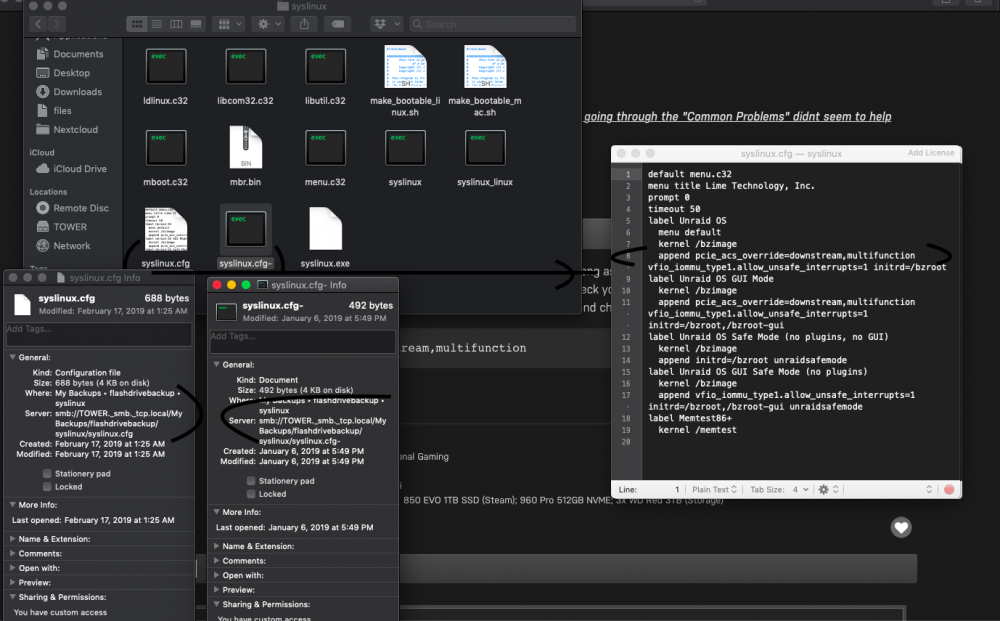
Ok after checking: 1: It seems I do not have and accessible 'flash'. Under /main/flash I get a message: "The operation can’t be completed because the original item for “flash” can’t be found". 2: I recently had put in a new cache, and it formatted on my raid0 and idk if I lost a bunch of files; I am wondering if that is why I get this message above ^^^ *3*: Attached screenshot shows that pcie_acs_override=.... is (notice: this is in the backups folder for 'flash') already presented in the text. Yet my system devices was as is in my previous screenshot. Is there anything else that may have prevented group 15 to separate? Thank you very much for your guidance and help!
-
+++ I have an error: ( I see 'group 15 is not viable' and that group has 4 things on it, i am not sure what to modify to get group 15 to work correctly. IOMMU group 15:[8086:a2c5] 00:1f.0 ISA bridge: Intel Corporation 200 Series PCH LPC Controller (Z270) [8086:a2a1] 00:1f.2 Memory controller: Intel Corporation 200 Series/Z370 Chipset Family Power Management Controller [8086:a2f0] 00:1f.3 Audio device: Intel Corporation 200 Series PCH HD Audio [8086:a2a3] 00:1f.4 SMBus: Intel Corporation 200 Series/Z370 Chipset Family SMBus Controller ). internal error: qemu unexpectedly closed the monitor: us=virtio-serial0.0,nr=1,chardev=charchannel0,id=channel0,name=org.qemu.guest_agent.0 -device vfio-pci,host=01:00.0,id=hostdev0,x-vga=on,bus=pci.0,addr=0x5,romfile=/mnt/user/domains/AsusGTX1060.dump -device vfio-pci,host=01:00.1,id=hostdev1,bus=pci.0,addr=0x6 -device vfio-pci,host=00:1f.3,id=hostdev2,bus=pci.0,addr=0x8 -sandbox on,obsolete=deny,elevateprivileges=deny,spawn=deny,resourcecontrol=deny -msg timestamp=on 2019-02-17 10:11:35.391+0000: Domain id=15 is tainted: high-privileges 2019-02-17 10:11:35.391+0000: Domain id=15 is tainted: host-cpu 2019-02-17T10:11:35.975898Z qemu-system-x86_64: -device vfio-pci,host=00:1f.3,id=hostdev2,bus=pci.0,addr=0x8: vfio error: 0000:00:1f.3: group 15 is not viable Please ensure all devices within the iommu_group are bound to their vfio bus driver. ---- I have PCIe ACS override set to "Both" ---- Here are my 'System Devices': IOMMU group 0:[8086:591f] 00:00.0 Host bridge: Intel Corporation Xeon E3-1200 v6/7th Gen Core Processor Host Bridge/DRAM Registers (rev 05) IOMMU group 1:[8086:1901] 00:01.0 PCI bridge: Intel Corporation Xeon E3-1200 v5/E3-1500 v5/6th Gen Core Processor PCIe Controller (x16) (rev 05) IOMMU group 2:[8086:1905] 00:01.1 PCI bridge: Intel Corporation Xeon E3-1200 v5/E3-1500 v5/6th Gen Core Processor PCIe Controller (x8) (rev 05) IOMMU group 3:[8086:1911] 00:08.0 System peripheral: Intel Corporation Xeon E3-1200 v5/v6 / E3-1500 v5 / 6th/7th Gen Core Processor Gaussian Mixture Model IOMMU group 4:[8086:a2af] 00:14.0 USB controller: Intel Corporation 200 Series/Z370 Chipset Family USB 3.0 xHCI Controller IOMMU group 5:[8086:a2ba] 00:16.0 Communication controller: Intel Corporation 200 Series PCH CSME HECI #1 IOMMU group 6:[8086:a282] 00:17.0 SATA controller: Intel Corporation 200 Series PCH SATA controller [AHCI mode] IOMMU group 7:[8086:a2e7] 00:1b.0 PCI bridge: Intel Corporation 200 Series PCH PCI Express Root Port #17 (rev f0) IOMMU group 8:[8086:a2e9] 00:1b.2 PCI bridge: Intel Corporation 200 Series PCH PCI Express Root Port #19 (rev f0) IOMMU group 9:[8086:a2eb] 00:1b.4 PCI bridge: Intel Corporation 200 Series PCH PCI Express Root Port #21 (rev f0) IOMMU group 10:[8086:a290] 00:1c.0 PCI bridge: Intel Corporation 200 Series PCH PCI Express Root Port #1 (rev f0) IOMMU group 11:[8086:a291] 00:1c.1 PCI bridge: Intel Corporation 200 Series PCH PCI Express Root Port #2 (rev f0) IOMMU group 12:[8086:a292] 00:1c.2 PCI bridge: Intel Corporation 200 Series PCH PCI Express Root Port #3 (rev f0) IOMMU group 13:[8086:a294] 00:1c.4 PCI bridge: Intel Corporation 200 Series PCH PCI Express Root Port #5 (rev f0) IOMMU group 14:[8086:a298] 00:1d.0 PCI bridge: Intel Corporation 200 Series PCH PCI Express Root Port #9 (rev f0) IOMMU group 15:[8086:a2c5] 00:1f.0 ISA bridge: Intel Corporation 200 Series PCH LPC Controller (Z270) [8086:a2a1] 00:1f.2 Memory controller: Intel Corporation 200 Series/Z370 Chipset Family Power Management Controller [8086:a2f0] 00:1f.3 Audio device: Intel Corporation 200 Series PCH HD Audio [8086:a2a3] 00:1f.4 SMBus: Intel Corporation 200 Series/Z370 Chipset Family SMBus Controller IOMMU group 16:[8086:15b8] 00:1f.6 Ethernet controller: Intel Corporation Ethernet Connection (2) I219-V IOMMU group 17:[10de:1c03] 01:00.0 VGA compatible controller: NVIDIA Corporation GP106 [GeForce GTX 1060 6GB] (rev a1) IOMMU group 18:[10de:10f1] 01:00.1 Audio device: NVIDIA Corporation GP106 High Definition Audio Controller (rev a1) IOMMU group 19:[10ec:5760] 02:00.0 Non-Volatile memory controller: Realtek Semiconductor Co., Ltd. Device 5760 (rev 01) IOMMU group 20:[1912:0014] 06:00.0 USB controller: Renesas Technology Corp. uPD720201 USB 3.0 Host Controller (rev 03) IOMMU group 21:[1969:e0b1] 08:00.0 Ethernet controller: Qualcomm Atheros Killer E2500 Gigabit Ethernet Controller (rev 10) IOMMU group 22:[8086:15d3] 09:00.0 PCI bridge: Intel Corporation JHL6540 Thunderbolt 3 Bridge (C step) [Alpine Ridge 4C 2016] (rev 02) IOMMU group 23:[8086:15d3] 0a:00.0 PCI bridge: Intel Corporation JHL6540 Thunderbolt 3 Bridge (C step) [Alpine Ridge 4C 2016] (rev 02) IOMMU group 24:[8086:15d3] 0a:01.0 PCI bridge: Intel Corporation JHL6540 Thunderbolt 3 Bridge (C step) [Alpine Ridge 4C 2016] (rev 02) IOMMU group 25:[8086:15d3] 0a:02.0 PCI bridge: Intel Corporation JHL6540 Thunderbolt 3 Bridge (C step) [Alpine Ridge 4C 2016] (rev 02) IOMMU group 26:[8086:15d4] 40:00.0 USB controller: Intel Corporation JHL6540 Thunderbolt 3 USB Controller (C step) [Alpine Ridge 4C 2016] (rev 02) CPU Thread Pairings Pair 1:cpu 0 / cpu 4 Pair 2:cpu 1 / cpu 5 Pair 3:cpu 2 / cpu 6 Pair 4:cpu 3 / cpu 7 USB Devices Bus 001 Device 001:ID 1d6b:0002 Linux Foundation 2.0 root hub Bus 001 Device 002:ID 0bda:5411 Realtek Semiconductor Corp. Bus 001 Device 003:ID 0bc2:ab34 Seagate RSS LLC Backup Plus Bus 001 Device 004:ID 258a:0001 Bus 001 Device 005:ID 093a:2521 Pixart Imaging, Inc. Optical Mouse Bus 001 Device 006:ID 0bc2:ab44 Seagate RSS LLC Bus 001 Device 007:ID 1b1c:0c15 Corsair Bus 002 Device 001:ID 1d6b:0003 Linux Foundation 3.0 root hub Bus 002 Device 002:ID 0bda:0411 Realtek Semiconductor Corp. Bus 002 Device 003:ID 0bc2:ab45 Seagate RSS LLC Bus 002 Device 004:ID 0bc2:ab38 Seagate RSS LLC Backup Plus Hub Bus 003 Device 001:ID 1d6b:0002 Linux Foundation 2.0 root hub Bus 003 Device 002:ID 0930:6544 Toshiba Corp. TransMemory-Mini / Kingston DataTraveler 2.0 Stick Bus 004 Device 001:ID 1d6b:0003 Linux Foundation 3.0 root hub Bus 005 Device 001:ID 1d6b:0002 Linux Foundation 2.0 root hub Bus 006 Device 001:ID 1d6b:0003 Linux Foundation 3.0 root hub SCSI Devices [0:0:0:0]disk Kingston DataTraveler 2.0 1.00 /dev/sda 15.5GB [3:0:0:0]disk ATA WDC WD80EFZX-68U 0A83 /dev/sdd 8.00TB [4:0:0:0]disk ATA Samsung SSD 850 2B6Q /dev/sde 500GB [5:0:0:0]disk ATA WDC WD80EFZX-68U 0A83 /dev/sdf 8.00TB [6:0:0:0]disk ATA WDC WD80EFZX-68U 0A83 /dev/sdg 8.00TB [7:0:0:0]disk ATA WDC WD80EFZX-68U 0A83 /dev/sdh 8.00TB [8:0:0:0]disk ATA KINGSTON SV300S3 BBF0 /dev/sdi 120GB [12:0:0:0]disk Seagate Backup+ Hub BK D781 /dev/sdn 8.00TB [13:0:0:0]disk Seagate Backup+ Desk 040B /dev/sdl 6.00TB ---- I have been trying to get this figured out for a couple weeks now going through the "Common Problems" didnt seem to help from the guide. Any help would be awesome, thanks again!!
-
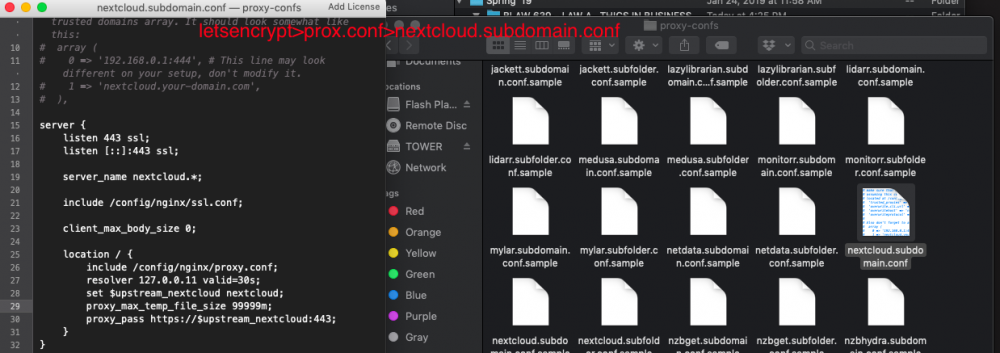
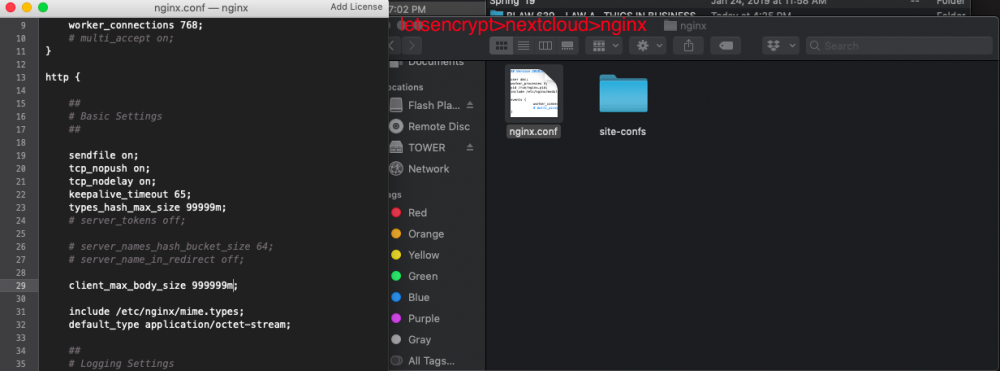
Hey did this ever work? or did you find a resolution? I am getting 413 error on mobile client, and 'entity too large' on Mac local file sync client/app. Still trying to find a solution. Been struggling for a week or so now. Thank you, thank you thank you.