





mikeydk
Members
-
Joined
-
Last visited
Everything posted by mikeydk
-
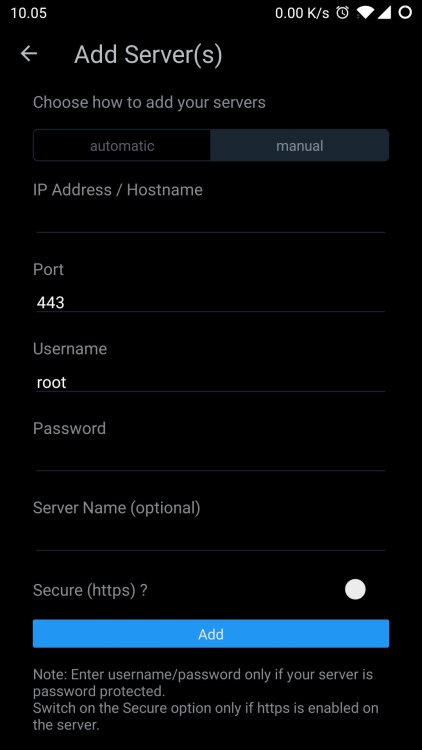
I am not guessing or making assumptions, I am looking at what the app is offering, and it got a field for username and password. But no matter what you put into the username field, it still use root. All I need, is to use the field, with the username I put into it. This would give the app permission to access unraid, just as if it was on my local network.
-
I have set up a custom schedule (* * * * *) to run my script every minute. In this script I got a loop, which will make the script run until xx:xx:55 and then exit out of it. But after that, the script isnt started up again at the next full minute, it will have to wait 65 seconds, and then it will get started on the next full minute again. If I set it to end at xx:xx:50 it will only have to wait 10 seconds to get started again... Is it on purpose scripts can't get started again only 5 seconds after ending?
-
I am logging in through nginx, which then handle the user logging in. So instead of me exposing unraid directly to the internet, I got nginx in between. This allow me to both use other users, have fail2ban, and other security measures on top. This is also why I need another user to log in (the app also got fields for username and password), because I would never use root as username for something online, that would be way too easy.
-
I am trying to add my server manually, using the external url I have set up with nginx. I can see in the log it is trying to connect, but it always try to auth as "root" and that isn't what I am putting into the username field.
-
Fixed it for me! 😍
-
OpenTTD works! 😁
-
Thank you for your work, I will test it as soon as I get home 😁
-
Installing it now, I am still at work, so I have to wait to test it until I get home. When I installed it, it had a steamcmd parameter in the template, what is that used for? Is it using steam in some way? (Update, I just did a quick test, the game still said the server was a different version, even when both say they are 1.9.1)
-
Thank you, can't wait to see what you come up with
-
I would love to see an OpenTTD docker. I tried to make it myself, but so far I have failed to do so. 😥 The current version is 1.9.1, and on the download page https://www.openttd.org/downloads/openttd-releases/latest.html there are files both linux and windows. I found a docker with version 1.8, and I got it to start up and could also find it in game, but being an older version, I could not connect to it.
-
I solved the problem, I had to run the docker as host.
-
Hi, I just started using this container, and I got some problems. I installed the MQTT service, and it works great. However, I cant get influxdb and the mysql service to work. Influxdb [ERROR] [.internal.InfluxDBPersistenceService] - database connection error No route to host (Host unreachable) MySQL [ERROR] [sql.internal.MysqlPersistenceService] - mySQL: Failed connecting to the SQL database using: driverClass=com.mysql.jdbc.Driver, url=jdbc:mysql://192.168.1.100:3306/openhab_selina?serverTimezone=Europe/Copenhagen, user=openhab2 I have verified both are up and running, and can be reached with the credentials provided. Do you have the same issues, or a fix to that?
-
1. I installed the docker with Community Applications, and didn't change anything, so I think I have started from scratch with the library. However, I have tried to install and remove it quite a few times now, could that reuse a previous library? And if so, how do I remove it and start over again? 2. The default "/mnt/user/appdata/binhex-plexpass" 3. No, I do not have a cache drive, would that help with this?
-
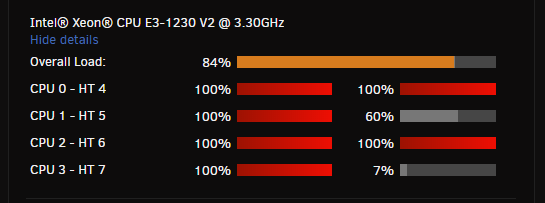
I am using the binhex-plexpass, but it is VERY slow. The CPU is running at 84%, and it takes ages for it to even get the server started, to actually access the GUI can easy take 5 minutes before it responds. Before switching to unraid I had Plex running on a debian install, and that was very fast, and I also got unraid with plex on a way smaller computer, and that is also pretty fast. The log I got is 2019-02-04 14:55:52.341710 [info] System information Linux Fiona 4.19.17-Unraid #1 SMP Thu Jan 24 13:07:56 PST 2019 x86_64 GNU/Linux 2019-02-04 14:55:54.744284 [info] PUID defined as '99' 2019-02-04 14:56:34.696991 [info] PGID defined as '100' 2019-02-04 14:56:35.429279 [info] UMASK defined as '000' 2019-02-04 14:56:35.457489 [info] Setting permissions recursively on volume mappings... 2019-02-04 14:56:35.567571 [info] TRANS_DIR defined as '/config/transcode' 2019-02-04 14:56:35.675825 [info] Starting Supervisor... 2019-02-04 14:56:37,028 INFO Included extra file "/etc/supervisor/conf.d/plexmediaserver.conf" during parsing 2019-02-04 14:56:37,028 INFO Set uid to user 0 succeeded 2019-02-04 14:56:37,054 INFO supervisord started with pid 6 2019-02-04 14:56:38,056 INFO spawned: 'plexmediaserver' with pid 59 2019-02-04 14:56:38,057 INFO reaped unknown pid 7 2019-02-04 14:56:39,057 INFO success: plexmediaserver entered RUNNING state, process has stayed up for > than 1 seconds (startsecs) 2019-02-04 14:56:42,754 WARN received SIGTERM indicating exit request 2019-02-04 14:56:42,754 DEBG killing plexmediaserver (pid 59) with signal SIGTERM 2019-02-04 14:56:42,754 INFO waiting for plexmediaserver to die 2019-02-04 14:56:42,755 DEBG fd 8 closed, stopped monitoring <POutputDispatcher at 22740442744880 for <Subprocess at 22740442745960 with name plexmediaserver in state STOPPING> (stdout)> 2019-02-04 14:56:42,755 DEBG fd 10 closed, stopped monitoring <POutputDispatcher at 22740442792160 for <Subprocess at 22740442745960 with name plexmediaserver in state STOPPING> (stderr)> 2019-02-04 14:56:42,755 INFO stopped: plexmediaserver (terminated by SIGTERM) 2019-02-04 14:56:42,755 DEBG received SIGCLD indicating a child quit Created by... ___. .__ .__ \_ |__ |__| ____ | |__ ____ ___ ___ | __ \| |/ \| | \_/ __ \\ \/ / | \_\ \ | | \ Y \ ___/ > < |___ /__|___| /___| /\___ >__/\_ \ \/ \/ \/ \/ \/ https://hub.docker.com/u/binhex/ 2019-02-04 14:57:21.798281 [info] System information Linux Fiona 4.19.17-Unraid #1 SMP Thu Jan 24 13:07:56 PST 2019 x86_64 GNU/Linux 2019-02-04 14:57:21.826586 [info] PUID defined as '99' 2019-02-04 14:57:21.856274 [info] PGID defined as '100' 2019-02-04 14:57:24.043298 [info] UMASK defined as '000' 2019-02-04 14:57:24.072917 [info] Permissions already set for volume mappings 2019-02-04 14:57:24.101753 [info] TRANS_DIR defined as '/config/transcode' 2019-02-04 14:57:24.214273 [info] Starting Supervisor... 2019-02-04 14:57:24,358 INFO Included extra file "/etc/supervisor/conf.d/plexmediaserver.conf" during parsing 2019-02-04 14:57:24,359 INFO Set uid to user 0 succeeded 2019-02-04 14:57:24,360 INFO supervisord started with pid 6 2019-02-04 14:57:25,362 INFO spawned: 'plexmediaserver' with pid 47 2019-02-04 14:57:25,363 INFO reaped unknown pid 7 2019-02-04 14:57:26,364 INFO success: plexmediaserver entered RUNNING state, process has stayed up for > than 1 seconds (startsecs) 2019-02-04 14:57:33,446 DEBG 'plexmediaserver' stderr output: Error in command line:the argument for option '--serverUuid' should follow immediately after the equal sign Crash Uploader options (all are required): --directory arg Directory to scan for crash reports --serverUuid arg UUID of the server that crashed --userId arg User that owns this product --platform arg 2019-02-04 14:57:33,446 DEBG 'plexmediaserver' stderr output: Platform string --url arg URL to upload to --help show help message --version arg Version of the product does that give you any usable information to what can be going on?
-
As also reported in version 6.6.6 auto complete on image selection can pop up over the list of images. Adding autocomplete="off" to the <input> makes it so the browser won't suggest anything, and only show the list. <input type="text" autocomplete="off" data-pickcloseonfile="true" data-pickfilter="iso" data-pickmatch="^[^.].*" data-pickroot="/mnt/user/isos/" name="media[cdrom]" class="cdrom" value="" placeholder="Click and Select cdrom image to install operating system">
-
I just installed the Unifi controller docker, but how do I update it? The controller is currently at 5.9.29, but the docker is only at 5.6.37
-
I just tried to browse a hdd mounted by UD, from the main page in unraid 6.7.0-rc1, I found the folders I expected, text files, when clicking the files it allowed me to download them, then I found a php file and clicked it, but instead of downloading or showing me the content, it got executed. Could that not lead to some problems, if an unexpected file got executed inside unraid?
-
Not sure if this is a unraid or Unassigned Devices problem, but I just tried to browse a hdd mounted by UD, from the main page in unraid 6.7.0-rc1, I found the folders I expected, text files, when clicking the files it allowed me to download them, then I found a php file and clicked it, but instead of downloading or showing me the content, it got executed. Could that not lead to some problems, if an unexpected file got executed inside unraid?
-
I only just started trying unraid, and so far it looks like I will purchase a key. But something driving me insane, is when I am about to select the image to use in a VM. Chrome keeps suggesting a Windows10 image, which I have used before, but now I want to use a debian image which is also in the list, but I can't easy get to it, because the suggested Windows10 image is on top of the list.



