





mr-hexen
Members
-
Joined
-
Last visited
Everything posted by mr-hexen
-
Actually I just ran into this problem and there is a simple work-around (instead of creating a VM). Here's what I did: 1. navigate to the VM Manager tab, enable VM's and hit apply. 2. disable VM's and hit apply. 3. restart the deluge docker. voila.
-
Well, the verdict is in.. rtorrent is a touch faster, but the speed difference (+0.3MB/s) is surely in the range of peer performance variation.


-
Houston, we have lift off Thanks binhex.. so far so good. Now to do a direct deluge / rtorrent comparo. ...stay tuned.
-
Same error here on 6.1.9. Tried changing network type from bridge to host, not tower completely inaccessible.
-
Bad regex, will fix this today, watch out for an update Thanks man. I will do a back to back comparison of speed using PIA for these two programs and report back.
-
Hoping to get this working for a speed increase from deluge... currently capped at 1.2-1.3 MB/s in deluge, internet is 100mbps and speed tests show full speed... Anyways, I got it all setup but when i navigate to the webui on port 9080 i get the webui but it says no connection to rtorrent yet and never connects. the docker log has this: 2016-04-08 17:24:42,141 DEBG 'webui-script' stderr output: 2016/04/08 17:24:42 [error] 636#0: *4 FastCGI sent in stderr: "PHP message: PHP Parse error: syntax error, unexpected 'be' (T_STRING), expecting ')' in /etc/webapps/rutorrent/conf/config.php on line 44" while reading response header from upstream, client: 192.168.1.123, server: localhost, request: "GET /php/getplugins.php HTTP/1.1", upstream: "fastcgi://127.0.0.1:7777", host: "192.168.1.2:9080", referrer: "http://192.168.1.2:9080/" binhex, did you accidentally fat finger something???
-
LOL my /transcode and /config mappings were pointing to the same folder anyhow since the RAM issue borked the original /transcode idea.
-
I'm a PlexPass subscriber, but not for the server software, but for the apps. I do however want to remain logged in (so as to ensure remote streaming) and I do want to remain on the latest public release. My understanding that VERSION=latest will give me the latest plexpass version, is this correct? If correct, how can I achieve my desired outcome?
-
Try setting up Labels and assign the folder mappings to a label. I do this for manually added torrents, works fine for me.
-
Start deluge, set things up, then stop the deluge docker. This should write the config to the appdata folder. Perhaps you've got it all setup and are not writing the settings from RAM to Disk as a result of the hard reboot.
-
It's probably a permissions issue...
-
Here's how mine works with Deluge/CP/Sonarr.
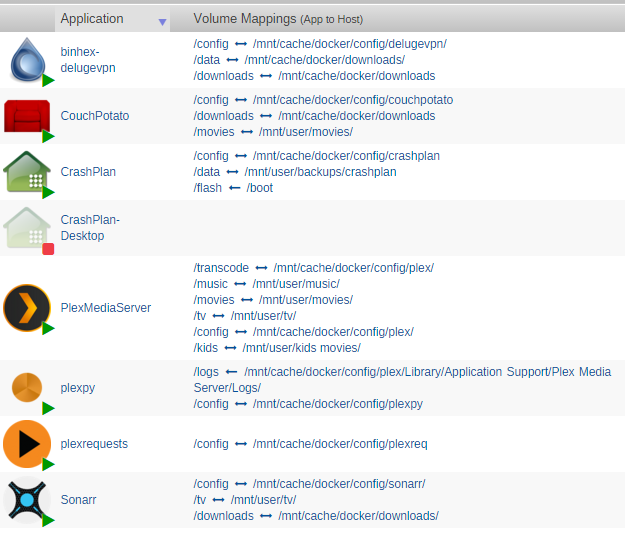
-
If you mean mover as in the unRAID script for use of the cache drive, it cannot move specific files only at this time. If you mean CP's renamer, there's a few files that need to stay with the movie for proper sorting, identifications, etc.
-
Also. You have the wrong vpn provider set.
-
There's two ports really. The container port (which will ALWAYS be default, in this case 5050) and the Host port, or the port you access it through the unRAID IP at. Post a screen shot of the docker config for CP (folder and port mappings).
-
There's got to be more than that. How does it know where the tv shows are supposed to go?
-
did you change the LAN_RANGE variable in advanced view to LAN_NETWORK ? Also, did you update the value of said variable to your LAN, i.e. 192.168.x.0/24, where 'x' matches your network config?
-
Please post a screen shot of your Sonarr docker setup for folder mappings. I would manually move them to the user share folders, then I would ensure the cache disk does not have a TV Shows folder and if it did, make sure it's empty and remove it. Afterwards, make sure your settings for Sonarr are not pointing to /mnt/cache/TV Shows/ at all. Then, see if it happens again. The thing is, if the cache drive has a share folder on it, the system may (or does) act like it's set to cache-yes.
-
If you think cache is set to 'no' be sure because a 6.2 install could have reverted that setting.
-
Try FAT instead? Can you relax the ram timings in the BIOS? Have you run the 24hour memtest yet? When you remove some of the ram and it "works" are you always removing the same sticks?
-
What did you format it as? FAT? FAT32? Try swapping
-
Something is up with you flash drive. Run chkdsk on it in a windows PC or try another.
-
Make it transcode to the cache drive and try again.
-
Are you transcoding to RAM?
-
You've got the user name or password wrong. Try creating your own simple password.


