






TDA
Members
-
Joined
-
Last visited
Everything posted by TDA
-
Hi, I just added the app , but in the template there is no "Post Arguments" section.
-
Hello, Can someone tell me how to renew the LETSENCRYPT cert? Thanks a lot
-
No Problem at all, thanks for fixing 🙂
-
Hello, For a couple of weeks now, every time I go to the VMs tab I receive following warning: "read_folders error looks like migration is running wild. Please report this on the forums" Could someone help me please? 🙂
-
In which one exactly?
-
Yes it does.
-
Was this supposed to be an answer to my question? If yes. As said, the only thing that doesn't work anymore is internal (.lan) websites. I can reach the NPM, my external website are working. Only my internal one are refusing connectino.
-
Hello Everyone, Since update (yesterday or the day before), I'm not able anymore to get to my internal resources. The configuration hasn't changed so for example: on the pfsense firewall there is a rule in the DNS which : IF : dashboard.lan --> unraid server ip then I've configured in the proxy manager a rule that if there is a request for dashboard.lan it have to redirect to : unraidserver:port It has worked flawlessly before the update, now the connection is refused Can someone please help?
-
Other Docker haven't this problem - so I didn't think that this could be the problem.
-
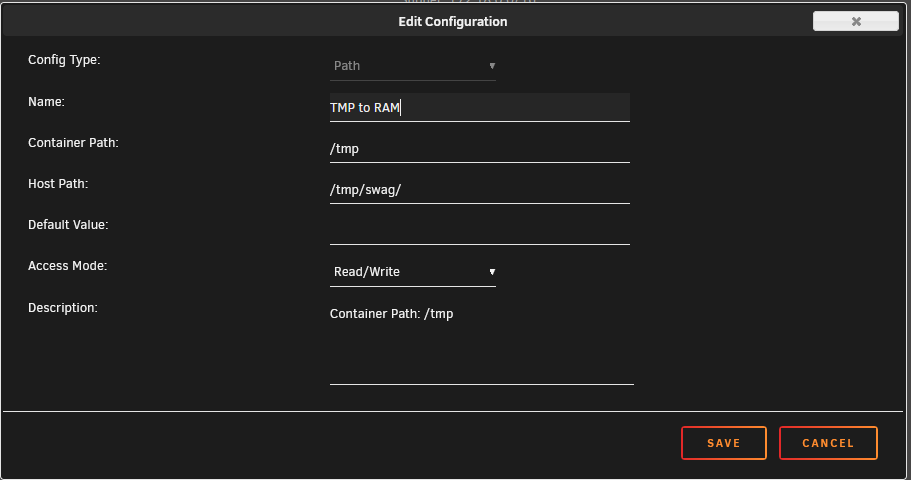
I solved it. I had configured following inside the docker: TMP to RAM /tmp = /tmp/swag/ Now it has worked for quite long time - no idea why it wasn't working anymore. Maybe the upgrade to 6.9.1 is the culprit, I don't know.
-
hm... perfect...
-
Also the data isn't a share itself. I find the tool quite bad if you cannot select the correct folders...
-
I can't select only my NEXTCLOUD data and config with the "NEW PERMISSION". Since they /config for example, isn't a share, but under APPDATA. It's under /mnt/user/appdata/nextcloud/ So the only option seems to be to select the APPDATA correct?
-
I will try, but I changed nothing 😐 Really strange
-
Hello, I saw alot of: Wed Mar 17 06:55:00 2021 (392): Fatal Error Unable to create lock file: Bad file descriptor (9) In the docker log. What could it be? Any help is really appreciated.
-
Hello Everyone, I've a strange problem. I can't login into Nextcloud anymore. Last week it was working, and now - when I try to login, i get back to the login screen (Without error or something). I have 2FA on NextCloud. Do someone has an idea, or knows where to start looking? Thanks alot.
-
My Unraid is already configured with SSH Key. So VirtManager don't work when you have this setup. Ok good to know will then uninstall it.
-
Hello, I've configured SSH Key to connect to my UNRAID Server. How/where do I have to put my SSH Key? Because I can't connect.
-
I will try later - but I've set NEXTCLOUD to go to the TEMP because I want it in the ram, not on my slow disks. And I don't plan to upload a 100GB File - so I can't really fill up my ram with an upload.
-
Hi, I've set it so:
-
Ok thx . . . still not solving the issue since it's filling up the docker.img.
-
So you think that the guide which I linked is incorrect? (There it tells that you have to do the change on the NextCloud docker container AND the PROXY)
-
Hello, I've a problem with NGINX PROXY MANAGER and Nextcloud. When I upload something - the files are temporary written in the docker.img. I saw that we could change this behavoir: Problem is, I don't know where the temp folder of Nginx Proxy Manager is. Any help would be appreciated ^^
-
Same problem 😞 Is there any reliable solution?
-
Unfortunately not - still struggling, what about you? Also I've bought a NZXT GRID PLUS v3, but also this solution isn't perfect since I've installed a W10 VM to control it... but it doesn't "always" work (sometimes fan settings isn't passed). Maybe someone else has a hint on how to manage fans speeds with this mainboard? As SVR MB is still a rock and works really good - but this FAN Problem is really annoying (and possibly dangerous).


