






TDA
Members
-
Joined
-
Last visited
-
It seems better in the way I configured it, but still problem when JDownloader extract rars. The CPU spikes to 100% till isn't finished. I also tried to allocate 4specific CPUs to the docker, but it doesn't make any difference.
-
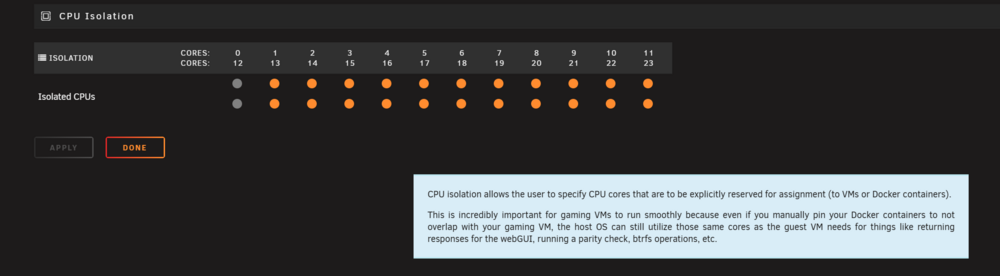
Made the setting you suggested, and it seems that with this configuration - if you don't explicitly set the CPU PIN, only the 0-1 is used. But according to the "help" Meaning (from my understanding) if you isolate the CPUs apart of the one of the I want to be used by Unraid has the effect, that ALL is using only the unpinned CPUs. Meaning, all dockers with unpinned CPUs are using the 0. Which is exactly the opposite I wanted, so I think I have to try the other way around (selecting only the 0-12 in my case).
-
Hello, Since I don't have pinned any Docker till now (and VM are explicitly setup to NOT use the core0+HV) I think I'll try it and get back to you in a few days :-) Thanks for the hint! P.S: Is this the best practices to let Unraid use his preferred CPU? (so the 0 ? ) AFAIK - if unraid need more CPUs, it will in any case use what he needs. But not the other way around with your suggestion right?
-
Hello Everyone, I wanted to ask if is there a setting, where you can isolate core0 to be exclusively used by UnRaid, without having to configure every docker and VM to use specific cores, since when core0 hits 100% the whole thing is stuck. It would be if it would be possible to just exclude the core0. Thanks for any advice.
-
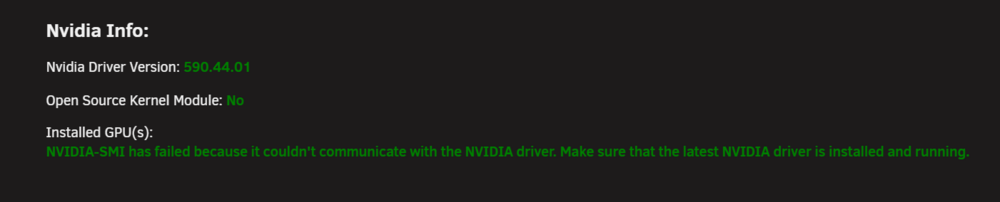
Hello everyone, I'm having an issue with the latest driver version: I tried to revert back to the older version, which was running (580.105.08), and my TeslaP4 is back up and running. Is there some problem with the latest driver or what?
-
Hello, I'm a little bit lost with Matrix template. I starte it one time, then I made the chown, but still not starting. Saying it cannot write to the folder. I'm missing something here for sure, but I can't get what.
-
Hello, in my case all of sudden InfluxDB stopped to work, and of course my "Grafana-Unraid-Stack" is now death. Strange enough command "docker logs InfluxDB" doesn't return anything. When I try to start the docker I got: Execution error Server ERROR. Has someone any advice? Thanks
-
Yes.
-
Hello, Sorry for the late answer. Yes I saw the topic, but I had the same issue with my old server which was with 2x Intel Xeon, so I don't think is related.
-
Hello, I don't really get how to get this docker up and running. Normally when I have to get internet faced docker container, I'm using Traefik. I've tried to set the variable to let Traefik create an https cert (which is working), and to set the docker variable NTFY_BASE_URL: ntfy.mydomain Also for me it's not totally clear the point: "By default, the ntfy server is open for everyone, meaning everyone can read and write to any topic (this is how ntfy.sh is configured). To restrict access to your own server, you can optionally configure authentication and authorization using NTFY_AUTH_FILE and NTFY_AUTH_DEFAULT_ACCESS. After that, simply create an admin user: ntfy user add --role=admin phil password: mypass confirm: mypass user phil added with role admin Once you've done that, you can publish and subscribe using Basic Auth with the given username/password." I created the user&pwd in any case, becasue i want only my service to be able to publish and send things through my server of course. I don't know what I'm missing here :-) Does it have to be externally accessible at all? If yes, how? Thanks in advance
-
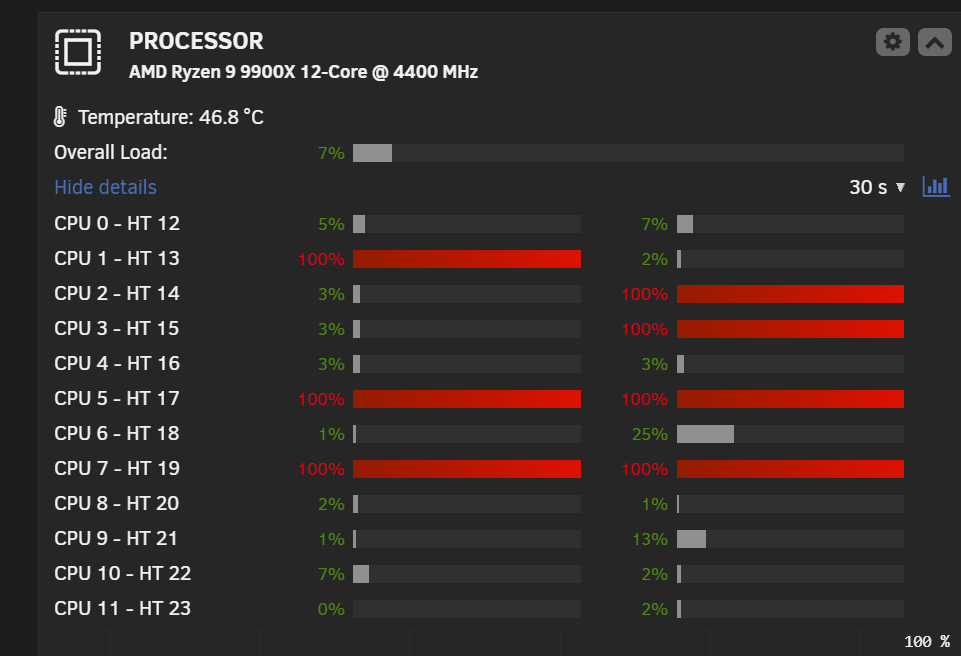
Hello Everyone, I've a recurrent problem since using Unraid (I started like 5years ago). As soon as some of the CPUs hits 100% (mostly due to either unzipping or SMB transfer), the whole server freezes: I don't know if I've missed some setting. Is also strange that only a couple of cores are so busy when extracting a .rar/.zip for example (which normally happens trough a Docker container / JDownloader) Any advice is appreciated.
-
Yes it's disabled indeed. I've upgraded the BIOS and will fire up the VM again - let's see if it will run without issues or not :-)
-
ACS PCIe override? Sorry for my newbiness but I don't get what it should be :-) In any case - the VM which was running - was without any passhtroughs.
-
I have a VM which has a passthrough on an NVME SSD. But this particular VM was turned off - I used one which was hosted on the cache disk
-
Hi Jorge, I'll try to update the BIOS. What's "odd" if you want - is that the time it was good for almost 2weeks, no VM were running. When it started again to do "stupid things", VM were running. But I'll update the BIOS as first thing now :-) Thanks again for your support!


