






Toobie
Members
-
Joined
-
Last visited
Everything posted by Toobie
-
Ok, seems to be a DOA. I switched back to the old card now. Sent from my MI 9 using Tapatalk
-
Ok, I switched to the second port, but the bios is saying there is no card in the PCI slot.. The blue one I tried first, now it's on the black. Sent from my MI 9 using Tapatalk
-
The cables im using are these: https://www.amazon.de/gp/product/B00S7KU0VO/ref=ppx_yo_dt_b_asin_title_o07_s00?ie=UTF8&psc=1 Diagnostics are attached now. t30.unraid-diagnostics-20200119-1323.zip
-
Ok, this is absolutely new for me. The HBA Bios is the Bios from the Controller? If yes, how do I get into this Bios?
-
Hi there. I switched from a Syba SI-PEX40064 to a LSI SAS 9207-8i (bought on ebay, should be already on it-mode as it was in the headline) But after switching on my system, the disks are not showing up in unraid, so the card is not working proberly or? Or is just the it-mode not working? Im a bit helpless at this point - thought it would be a plug & play switch only.
-
A bit difficult or? But yes, worked. Thx.
-
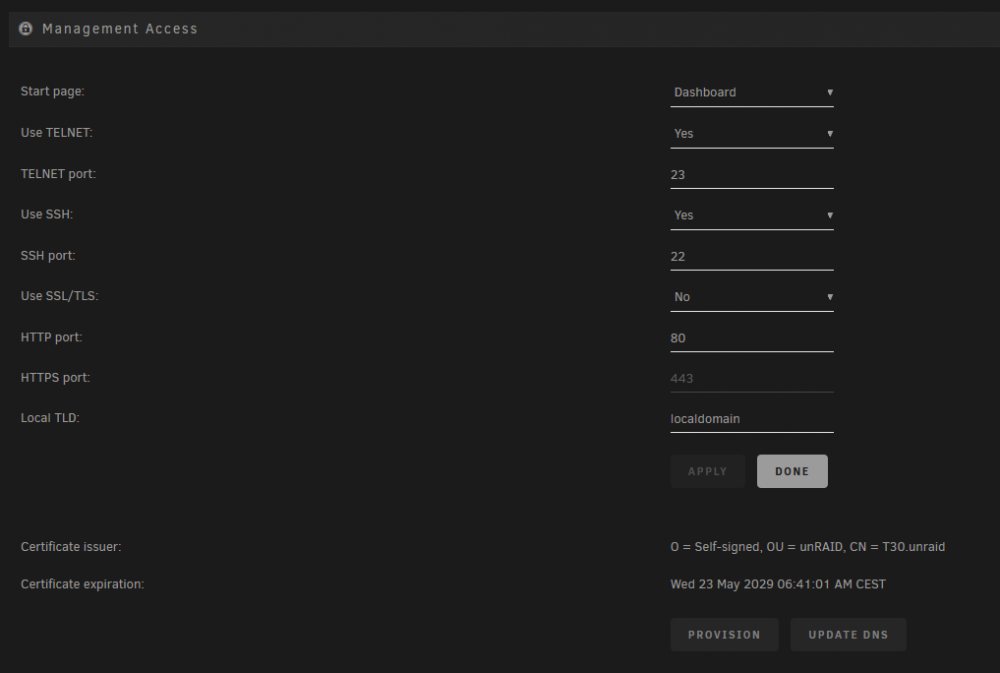
Hi @ljm42 - thanks for the plugin. I wanted to test this but of course, as may a lot of users, my upnp client is disabled. The hint with the management page is good, but I dont have any upnp options in there?! Im using 6.8.0.
-
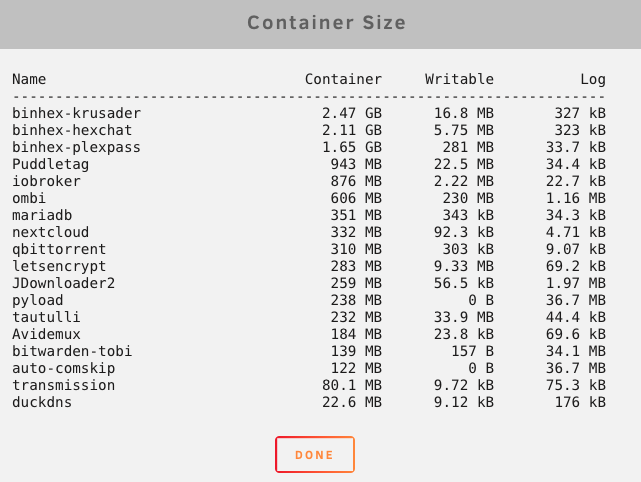
Ok thanks for the explanation. But - im using 3 of your docker images (at this point, thanks for the work) and they are all a bit "huge" So, is there a way to optimize this or this already optimised as written above?
-
Hi there. Im using this docker image only to chat in 2 channels on one server. Actually the Size of this docker is quite huge. Im wondering if there is any way to shrink this? I dont understand why a irc client needs 2GB of Space?
-
It should of course!
-
Unfortunately my live TV/DVR stops running. Does anybody else having these problems? Ok, removed the DVR and started from scratch... I had to go through the whole setup routine but it is working now.
-
Hi, question to the bitwarden docker. Has anybody got the email stuff working? Like written here: https://github.com/bitwarden/server/issues/237 My Container works great but it is not sending out any emails.
-
Did you disabled the proxy conf files? Sent from my MI 6 using Tapatalk (paid twice for vip, thx Tapatalk)
-
Sorry for the false alarm. It turned out, that all the files on this disk were corrupt. The SMART values of the disk were fine. New files which I copied to this disk are playing correctly. I have no idea how this could happen (2TB of movies are trash now) but it is so.. So I just have to reorganize these files.
-
Yes, sorry. The device is showing up in Plex. I could add the movies on this device into Plex, so I can see that they are listed in their categories. But I cannot start one of those movie's. It's just giving me a black screen and the time remains at 0:00. I recently also restarted the server as the disk was not showing under unassigned device's under the main tab. But the movies are still not playable. Attached are they as RW/Slave. Sent from my MI 6 using Tapatalk (paid twice for vip, thx Tapatalk)
-
Ok, but I mounted the drive in slave mode as written above. Sent from my MI 6 using Tapatalk (paid twice for vip, thx Tapatalk)
-
Ok, haven't check the logs yet. I'm able to list the files in Plex but the won't start playing. Could this be something with the access mode? Sent from my MI 6 using Tapatalk (paid twice for vip, thx Tapatalk)
-
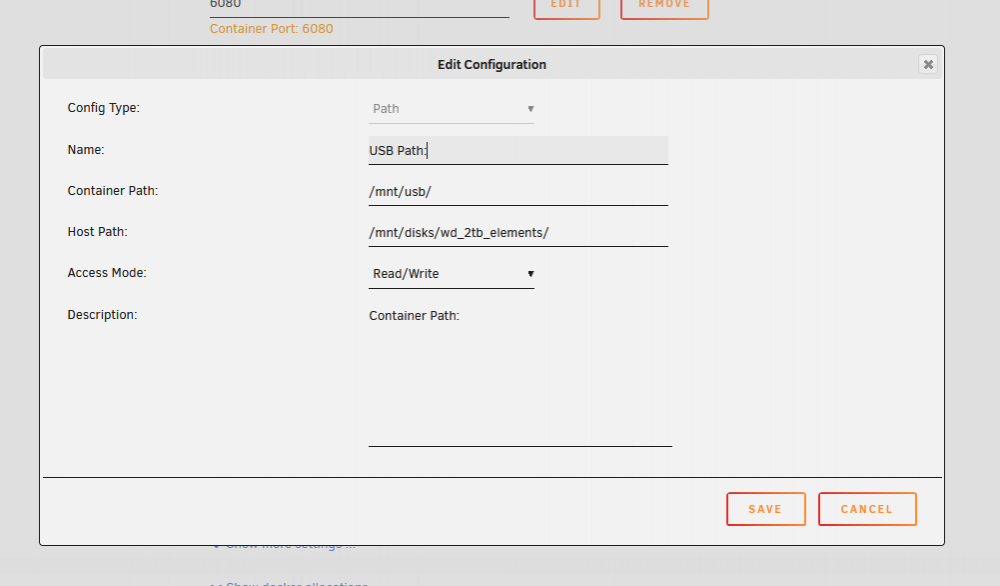
Ok got it. As Path (not device) it is working as shown below. Thanks for the advice!
-
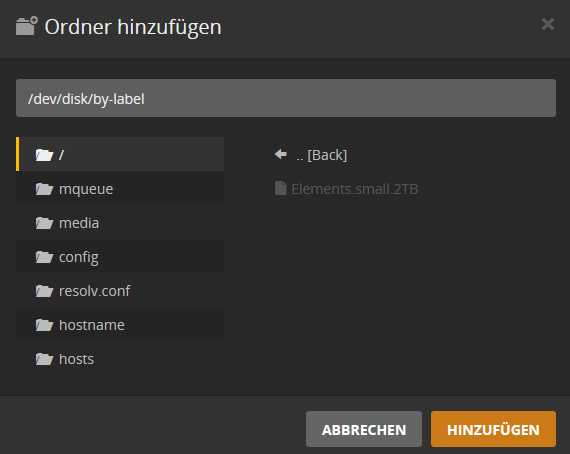
If I add them as a device in the docker configuration (/dev/disk/by-label/Elements.small.2TB)- I don't have access to these shares. The last step is grey and I cannot see the files.
-
I didn't get this, can you please explain it a bit more? Sent from my MI 6 using Tapatalk (paid twice for vip, thx Tapatalk)
-
Question, I added two usb drives as sdb & sdk. NTFS, automount. Is there a possebility to see this disks in krusader or at least use them in plex? I can "only" access this shares on my windows machine. The point is, I have movies on one of these drives and wanted to add this in plex.
-
Sorry my fault. I'm running pihole on a pi and predicted that it should be run dedicated. Sent from my MI 6 using Tapatalk
-
Or at least check the query log. If the pihole is correctly configured, everything on the network goes over the pihole. So may the letsencrypt servers are blacklisted. Sent from my MI 6 using Tapatalk
-
All of this is written here in this thread. Sent from my MI 6 using Tapatalk
-
Havent heard about any problems you mentioned. My Docker is running smooth - you may check your drives.


