






Toobie
Members
-
Joined
-
Last visited
Everything posted by Toobie
-
Try it with lower peer connection in the next tab.
-
Ok and what is your question now? Or how can we help you? I think that your T420 is powerful enough to do your needs. What and how much rum do you want to use? Should be ECC ram.. If you use 12TB Data drives you need at least one 12TB Parity drive. So far.
-
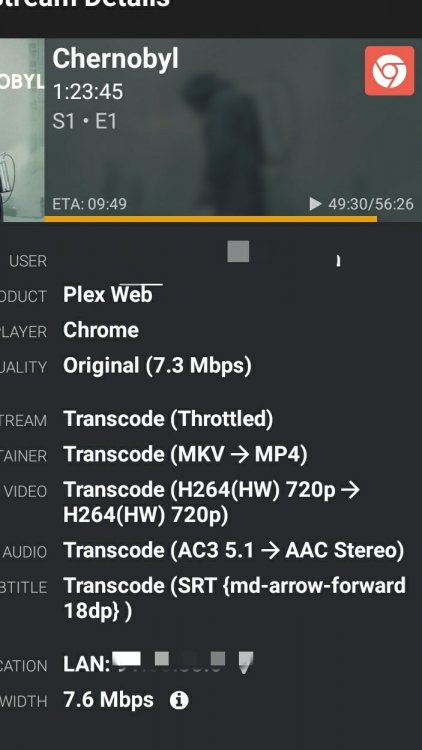
Just to double check - is my hardware transcoding really working?
-
Ok than but I also think you are in the wrong config file. My nextcloud installation is on port 444 - my config (the same you posted above) is still with port 443. You may change the port in the docker configuration / unraid webgui ?
-
Iam not 100% sure but I think you are on the wrong way. If your router is on port 53444 you have to forward the port 53444 to 443. I my configuration iam using 1443 as mentioned in one of spaceinvaders video. But the config file is still with 443.
-
appreciate it and I will not update my docker at the moment or at least only with a working backup. [emoji16] Sent from my MI 6 using Tapatalk
-
16GB ECC
-
Hi there, my DVR is failing since a couple of days. Tells me "Unable to load DVRs" Is there anybody else facing such experiences? Edit: Seems to be a Plex Problem: https://forums.plex.tv/t/plex-1-16-2-unable-to-load-dvrs-after-1-july-hangs-when-trying-to-add-new-dvr/430071/5
-
Yes to point 1 and point 2. Sent from my MI 6 using Tapatalk
-
Works fine! Thank you!
-
Hi there - my duckdns docker runs smooth since yesterday or the last update? not sure exactly. At the moment im getting a "Something went wrong, please check your settings Tue Jul 16 15:00:06 CEST 2019" I didnt change anything in the settings so Im a bit confused about that.
-
Hi there, I tried to get this tool/docker working but unfortunately iam failing everytime Iam getting a black screen with these logs: [app] starting intel-gpu-tools... [app] starting intel-gpu-tools... Failed to connect to session manager: Failed to connect to the session manager: SESSION_MANAGER environment variable not defined
-
Seems so - yes. Thank you.
-
I found the client_max_body_size 0; in two files: letsencrypt/nginx/nginx.conf letsencrypt/nginx/proxy-confs/nextcloud.subdomain.conf The value 10m was set in the proxy.conf - changed now to 0. client_body_buffer_size 128k is also written there - does changing this value have any affect?
-
Question - Nextcloud related: I made a share folder for some friends to drop me a couple of files. The maximum of filesize he can upload is about 10mb, not more. Is this a normal limit or can I amend this somewhere? Sent from my MI 6 using Tapatalk
-
Do you mean appdata/nextcloud/nginx/nginx.conf ? I already have the same value there..
-
I also remember that there was an option, I also looked through the settings without success
-
found it, already set to 10G - so thats not the right one.
-
Worked - thanks mate. Another questions, I know it may already asked but I cannot find it in my configuration. I wanted to change the background and nextcloud is giving me "upload_max_filesize" error In which file do I have to make changes?
-
Worked - thanks. Another questions, I get this highlighted: The "Strict-Transport-Security" HTTP header is not set to at least "15552000" seconds. For enhanced security, it is recommended to enable HSTS as described in the security tips ↗. How can I adjust this? Regards
-
Hi there, iam new in the unraid game (coming from xigmanas/nas4free and started now also with a new hardware setup). I installed mariadb and nextcloud with your wunderfull instruction - thanks for that! Just a quick question after install, nextcloud has some warnings for me and I have now idea why, how and whatever Can somebody please assist? There are some warnings regarding your setup. The "Strict-Transport-Security" HTTP header is not set to at least "15552000" seconds. For enhanced security, it is recommended to enable HSTS as described in the security tips ↗. Your web server is not properly set up to resolve "/.well-known/caldav". Further information can be found in the documentation. Your web server is not properly set up to resolve "/.well-known/carddav". Further information can be found in the documentation.
-
Damn.. ok. I need to copy 2*2TB before linking into my array. Sent from my MI 6 using Tapatalk
-
hi there, i tried to mount a ufs device with this plugin, to copy my data into the array. unfortunately it seems that my drives are unmountable? Nothing happens after pressing the mount button Is there any step which i may need to take before? regards Tobias.




