





emod
Members
-
Joined
-
Last visited
Everything posted by emod
-
These solutions are extremely confusing!!!!! First there was a recommendation to follow: https://github.com/linuxserver/docker-nextcloud/issues/288 This recommendation did NOT work because the person forgot to state that MAINTENANCE MODE MUST be turned off. (And the person failed to state how to do that) Then I followed subsequent recommendations and changed docker container to lscr.io/linuxserver/nextcloud:25.0.2 Then, I disabled MAINTENANCE MODE. So now things work Question: (1) Where EXACTLY in nextcloud user interface do you DISABLE auto-updates? (2) What now? Eeveryone will be stuck using "lscr.io/linuxserver/nextcloud:25.0.2" and we can NEVER AGAIN upgrade to a newer Nextcloud vesion? In nextcloud GUI->Administration->Overview I see under "Update" section following: "A new version is available: Nextcloud 26.0.2"....What now? Should I "Open Updater" and update, or do nothing??? Should I chang docker image to something eslese BEFORE update or not? Thx
-
I think you are correct. Mobo was getting hot, and might have triggered some safety mechanism. I left the server overnight in OFF position. Turned it back in the morning, and literally everything was working fine. Even the mover moved everything (including Apps backup) from CACHE to array. Scary experience but a good lesson. I have had issues with MOVER not working since Sept 2021, and after upgrading UNRAID OS to the next development branch, it suddenly started to work again (that was a pleasant surprise).
-
I cannot access GUI - CACHE M2 drive is likely dead, USB might be as well - NOW what? (specific questions are further below) I think this time, something really bad went wrong on my UNRAID server. I need help in identifying how to find where the problem is. I appreciate help. UNRAID basic config: 1 Parity drive, 2 HDDs, 1 M.2 SSD (cache), on latest development branch: 6.10.0-rc2 -CACHE drive contains apps, and some other data....but all personal data was on arrays and parity. I have a backup of USB BOOT, but not CACHE. Here is what happened (I'll give all info to the best of my knowledge): During copying 25GB data (Resilio sync and Plex indexing) on my UNRAID box...CACHE drive got hot to over 67C for 5mins or so, CPU temps went to 100C for same amount of time. I used "Edust for electronics" duster to try to move air, cool down motherboard and remove some excess dust. I was unable to access Docker to shut down the offending processes (Resilio sync and Plex) I was unable to reboot from within GUI I then turned off the server (directly on the box) I restarted the server but cannot access GUI (browser said "Problem loading page") I could not PING server from my PC. On my router I saw that Ethernet link to UNRAID is UP. I thought USB might be dead, I created a new UNRAID USB boot drive (from UNRAID website), and switched it with the old one -> restarted UNRAID -> still cannot access GUI. I connected mini-monitor, keyboard and mouse directly to the server; then restarted the server On the monitor I saw an error saying :"CPU FAN failure, press F1 - I did to no avail" I open server case and notice that CPU fan is not moving at all. I touched it a bit, and it started working (there was some dust around the propeler so that might have prevented normal function) I reboot the server, and now server enters BIOS mode (by itself). I exited BIOS, and the server restarted on its own and reenters the BIOS. I enter BIOS and notice that: Parity drive and 2 array drives are identified M.2 slot (where SSD cache is): says N/A CPU is running, CPU fan is running Memory sticks are identified. All other Hardware readings, incl. temperatures for CPU and MoBo seem normal. MY ASSUMPTIONS: M.2 SSD CACHE drive is dead Bootable USB might be dead too -> I assume that only bootable USB is required to bring system up (even without CACHE)...but when I inserted a brand new USB with fresh UNRAId, the system still wasn't accessible via GUI or via monitor. The fact that server, when turned on, goes instantly into BIOS mode, and when I exit BIOS mode, the server restarts into BIOS again - tells me there is something wrong going on but I cannot figure out whether it's USB, motherboard, or SSD CACHE? QUESTIONS: I assume CACHE is dead. How do I verify that? For example, can UNRAID GUI start with USB only (without CACHE) Is it possible that even some components on motherboard are dead? If CACHE is dead, and once I buy a new CACHE, what is the process for installing it (I assume I'll have to reinstall all apps, since nothing from CACHE was backed up on array) Do I just switch the old for new, and restart the server? Is there some hardware or tool I can buy to try to recover data from CACHE? Thanks.
-
How do I enable AUTO-SYNC? Thanks for guide. Very helpful. Got it all working. It appears that Bitwarden (iOS, Mac, Firefox extensions) are NOT AUTO-syncing with db. I have to manually push "SYNC NOW" every time I want data to be updated. For example, when I input data onto BItwarden website (hosted on my server) - then I have to manually sync on iPhone to get all updates. Is this a bug or is there a workaround? (Btw for others who have issues, make sure your OS and all apps on all devices are up to date. That was major issue in my case. Also make sure you add bitwarden. subdomain to Letsencrypt's->edit docker-> "Subdomains" field.
-
How do you set up VPN for some interfaces?
-
Hello, Can you help me answer 4 critical questions to decide whether to install this mail server? 1. Can I register >1 domains on mail server, such as example1.com, example2.com and example3.com? 2. Does the mail server come with a (web-based) mail client? (or is assumption I should use mine like iMail, Thunderbird etc...) 3. Is it possible to import existing mail content (e.g. [email protected]) from .mbox file format? (intent is migration of all emails from GMAIL to my own mail server) 4. Is it possible to, using email account on my own example1.com domain, set up POP that will connect to GMAIL account, and retrieve all emails (intent is again migration of all emails from GMAIL to my own mail server) Thanks.
-
Hello, thanks for advice. I checked the log and the issue was incorrect password for Opensubtitles.org. This was preventing FileBot to run. Corrected password=Filebot runs again. I am able to start WebGUI.
-
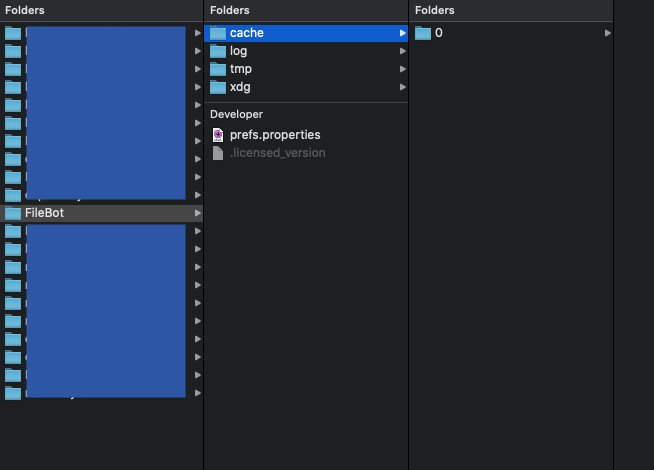
UPDATE: There is actually a bigger problem that I just realized. When I start Filebot docker in UNRAID, it stops almost instantaneously. Why can I not start Filebot docker? *****OLD POST Hello, I cannot find filebot.conf file in order to activate webGUI to yes I was running filebot by jlesage on UNRAID v6.7.x without issues. Then I updated Filebot, then updated UNRAID OS to 6.8, and was using filebot for few days. Then filebot wouldn't restart one day. Then I tried updating filebot, didn't work. Then I deleted filebot, and folder under appdata/filebot, then reinstalled filebot. I cannot run filebot in Web UI, because I cannot find filebot.conf file anywhere in appdata folder on UNRAID, in order to set WebUI to "yes". Where do I find filebot.conf, to set web UI to "yes"? Alternatively, what am I doing wrong so much that I cannot access WebUI on default port 7813? Below is image from folder "appdata" Thanks.
-
Hello, I read through all posts and it seems that GPU passthrough for i7-8700 (integrated GPU - HDU 630) on Asus MoBo is not available to run OSX VM. Here is my post with all details on CPU, MoBo, errors and other stuff. My CPU is compatible with iGTV project (which supports Intel i-7 8th generation) Are there any solutions as of July 31, 2019, to pass through this GPU? Any step by step guide would be appreciated! Btw, I entered BIOS, and ensured that primary Graphics is set to use the Integrated GPU on my CPU. I can start OSX VM but I get frozen login screen and cannot proceed. Thank you!
-
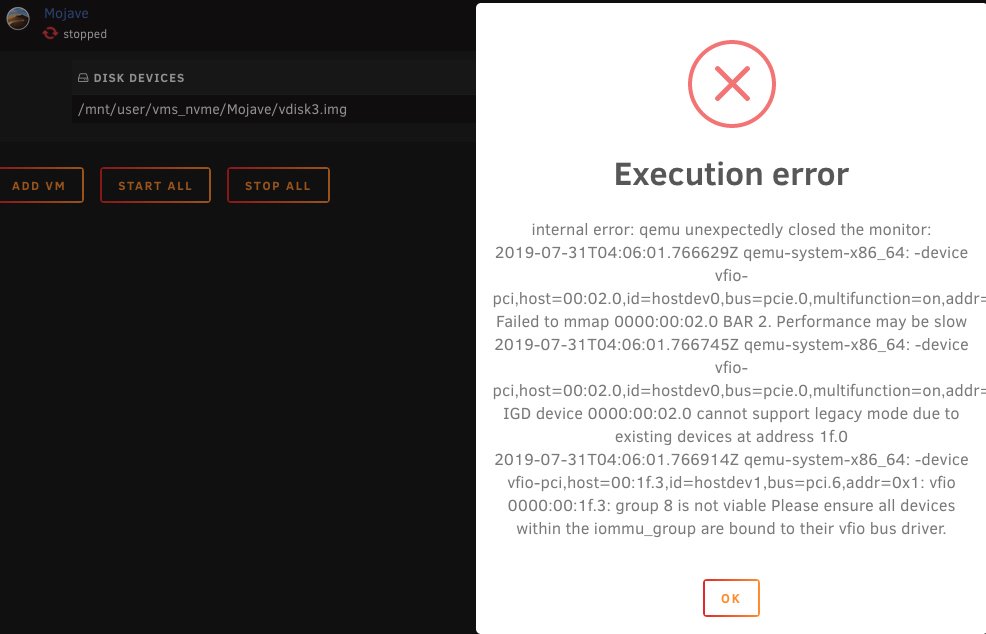
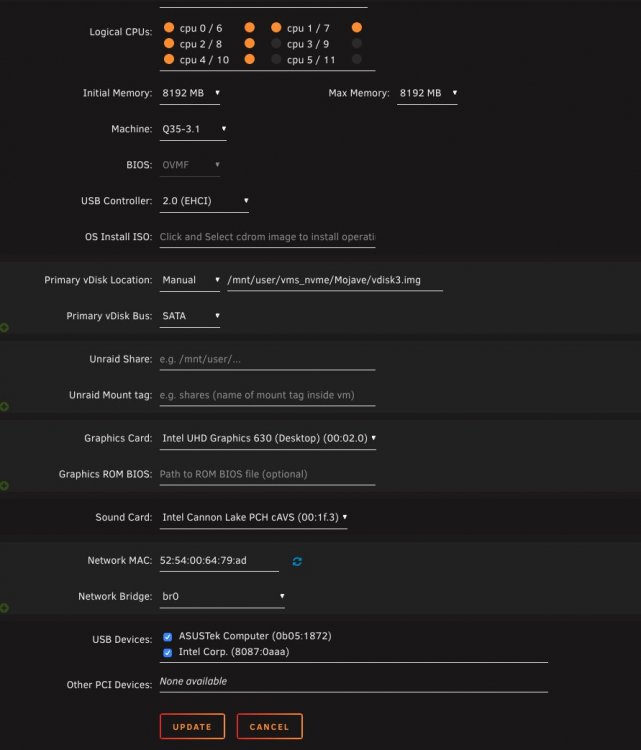
Hello, I followed the Youtube video on installing Mojave, and it worked, until the last steps where I edited VM to switch following: 1. Graphics Card: from "VNC" to "Intel UHD Graphics 630 (Desktop)" 2. Sound Card: from "None" to "Intel Cannon Lake PCH cAVS" 3. Checked "ASUSTek Computer" and "Intel Corp." Then I got an error message when starting VM (even when I chose individual choices above only, I still got error message). I cannot start VM at all. As soon as error message appears, VM stops. Does anyone know how to fix this? I attached all settings I have, along with log files. Here are my core server components: 1. CPU: Intel Core i7-8700 with integrated UHD graphics: https://ark.intel.com/content/www/us/en/ark/products/126686/intel-core-i7-8700-processor-12m-cache-up-to-4-60-ghz.html 2. MoBo: ASUS ROG STRIX B360-I GAMING: https://www.asus.com/us/Motherboards/ROG-STRIX-B360-I-GAMING/ When I run in terminal: lspci -nn I get: root@Tower:~# lspci -nn 00:00.0 Host bridge [0600]: Intel Corporation 8th Gen Core Processor Host Bridge/DRAM Registers [8086:3ec2] (rev 07) 00:02.0 VGA compatible controller [0300]: Intel Corporation UHD Graphics 630 (Desktop) [8086:3e92] 00:14.0 USB controller [0c03]: Intel Corporation Cannon Lake PCH USB 3.1 xHCI Host Controller [8086:a36d] (rev 10) 00:14.2 RAM memory [0500]: Intel Corporation Cannon Lake PCH Shared SRAM [8086:a36f] (rev 10) 00:14.3 Network controller [0280]: Intel Corporation Wireless-AC 9560 [Jefferson Peak] [8086:a370] (rev 10) 00:16.0 Communication controller [0780]: Intel Corporation Cannon Lake PCH HECI Controller [8086:a360] (rev 10) 00:17.0 SATA controller [0106]: Intel Corporation Cannon Lake PCH SATA AHCI Controller [8086:a352] (rev 10) 00:1b.0 PCI bridge [0604]: Intel Corporation Cannon Lake PCH PCI Express Root Port #21 [8086:a32c] (rev f0) 00:1c.0 PCI bridge [0604]: Intel Corporation Cannon Lake PCH PCI Express Root Port #5 [8086:a33c] (rev f0) 00:1d.0 PCI bridge [0604]: Intel Corporation Cannon Lake PCH PCI Express Root Port #9 [8086:a330] (rev f0) 00:1f.0 ISA bridge [0601]: Intel Corporation Device [8086:a308] (rev 10) 00:1f.3 Audio device [0403]: Intel Corporation Cannon Lake PCH cAVS [8086:a348] (rev 10) 00:1f.4 SMBus [0c05]: Intel Corporation Cannon Lake PCH SMBus Controller [8086:a323] (rev 10) 00:1f.5 Serial bus controller [0c80]: Intel Corporation Cannon Lake PCH SPI Controller [8086:a324] (rev 10) 00:1f.6 Ethernet controller [0200]: Intel Corporation Ethernet Connection (7) I219-V [8086:15bc] (rev 10) 03:00.0 Non-Volatile memory controller [0108]: Micron/Crucial Technology Device [c0a9:2263] (rev 03) root@Tower:~# 4-Log Files.txt
-
In WebGUI->Settings-Downloads, I cannot save changes for "Automatically add torrents from" I wanted to add the folder to watch , click "plus" icon, the folder is added. When I click SAVE button at the button, then return to settings, none of the changes were saved. How do I solve this issue?
-
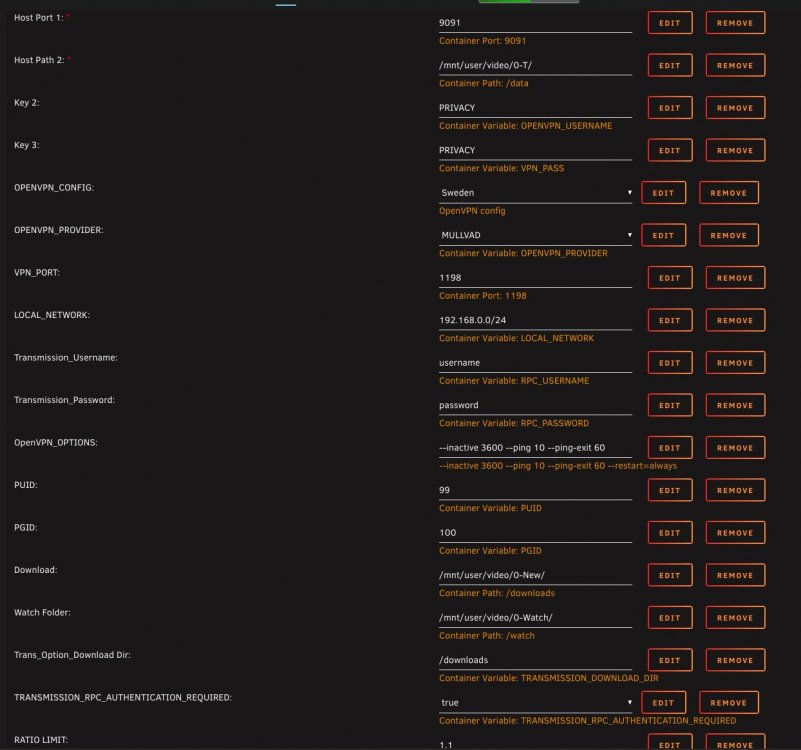
I installed transmission_vpn with following settings (see image) The installation doesn't seem to be working on UNRAID 6.7.2....WebGUI cannot be launched. When I install, put in Mullvad username and password, then open up WebGUI...I get blank web page with " Unable to connect Firefox can’t establish a connection to the server at 192.168.1.123:9091. " My server is located on 192.168.1.123, and local ports are open for all devices on 192.168.0.0/24 Why am I getting this error? Why can I not launch WebGUI? Also, In edit settings, what is: 1. Container Path: / data. - is this for incomplete downloads? 2. RPC_USERNAME and PASSWORD: why is this required? Noone uses the server but me. How can I disable this it? 3. What is difference between "Container Path: /downloads" and "Container Variable: RANSMISSION_DOWNLOAD_DIR"? Where is torrent data downloaded? 4. Where are INCOMPLETE files downloaded? 5. Is this app maintained? When I installed the app, I went to appdata/TRansmission_VPN folder. And config file is missing. openvpn-credentials.txt are also missing. Why? Does that folder need to be modified? Thanks.
-
Thank you. Can I sync files between my desktop folder and mounted external harddrive on UNRAID? I noticed something odd when syncing - files are being created in nextcloud de-novo. here are steps 1. I mounted external storage on UNRAID 2. I installed nextcloud on my desktop 3. I configured syncing between folder on my desktop and folder on mounted external harddrive (UNRAID server). 4. Syncing started, and Nextcloud created a folder on my nextcloud(!), but didn't sync with folder on my UNRAID external storage Does that mean that in order to sync files (between desktop and my server), I have to move all my folders FROM UNRAID external storage TO Nextcloud first? The manual seems to imply that....but wanted to double check just in case. Thanks!
-
Ok. I need help with this. I cannot change MariaDB password. MariaDB -> EDIT -> change my root password from 0 to 'mypassword'. Clicked 'Apply'. MariaDB -> Console -> type in 'mysql -uroot -p', then 'mypassword', I get error message below. However, when I just lick 'Enter' for my password, I am automatically logged in. I am kind of reluctant leaving my root account unprotected...... What seems to be an issue? ************CONSOLE************ # mysql -uroot -p Enter password: ERROR 1045 (28000): Access denied for user 'root'@'localhost' (using password: YES) # mysql -uroot -p Enter password: Welcome to the MariaDB monitor. Commands end with ; or \g. Your MariaDB connection id is 10 Server version: 10.3.16-MariaDB-1:10.3.16+maria~bionic-log mariadb.org binary distribution Copyright (c) 2000, 2018, Oracle, MariaDB Corporation Ab and others. Type 'help;' or '\h' for help. Type '\c' to clear the current input statement. MariaDB [(none)]>
-
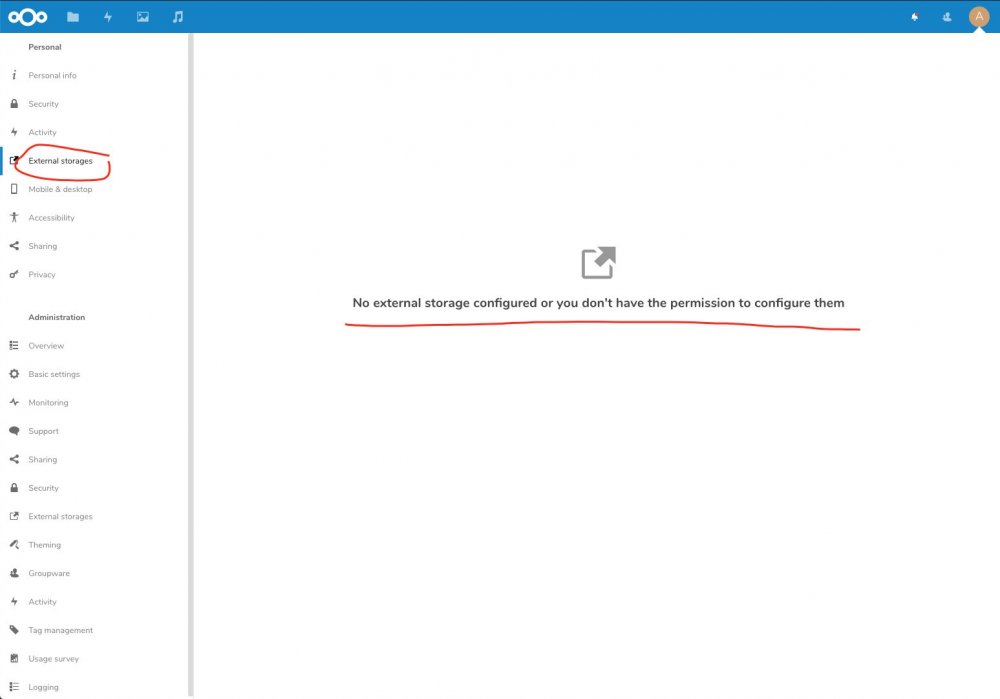
I tried, and I cannot change the setting ...see screen shot.
-
Simple question, to which I cannot find an answer. Do I need to upload my files from UNRAID shares to nextcloud, or can I MAP nextcloud folder to ACCESS my shares file? For example, on UNRAID I have a share called "myshare" that I have used for a while, which contains all my documents, 150GB of them, and that I want to sync across my UNRAID server, desktop and laptop. Resilio sync is easy....create a folder in Resilio Sync GUI, MAP the folder to your local folder (to UNRAID share "myshare"), and do the same on your other device. Does Next cloud allow the same? OR, do I have to UPLOAD 150GB of my data from "myshare" into nexcloud folder, so that that data will be synced across all device? Thanks.
-
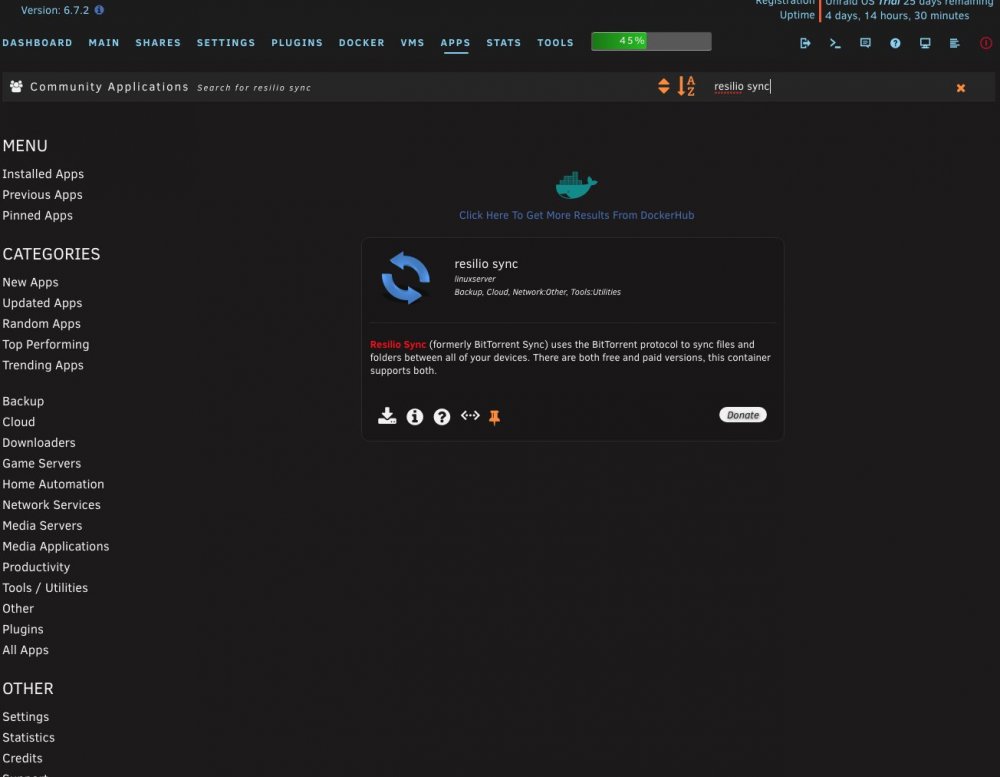
Ah, ok. I just realized there are TWO docker images in APP tab for Resilio Sync. I installed the one from linux server via APP tab and Community Applications. Let's see if it works.......and if, with correct /downloads PATH , it doesn't baloon my docker image.
-
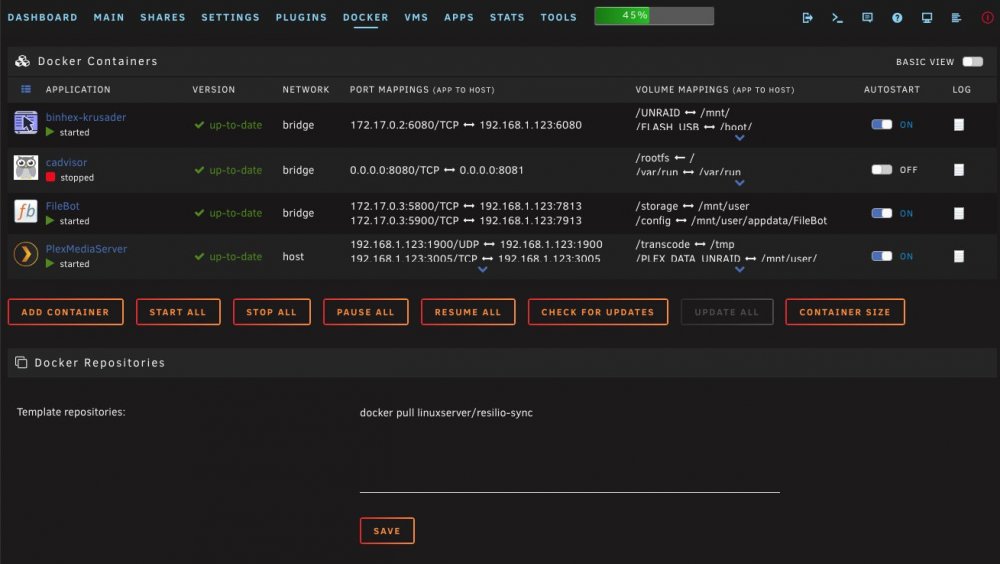
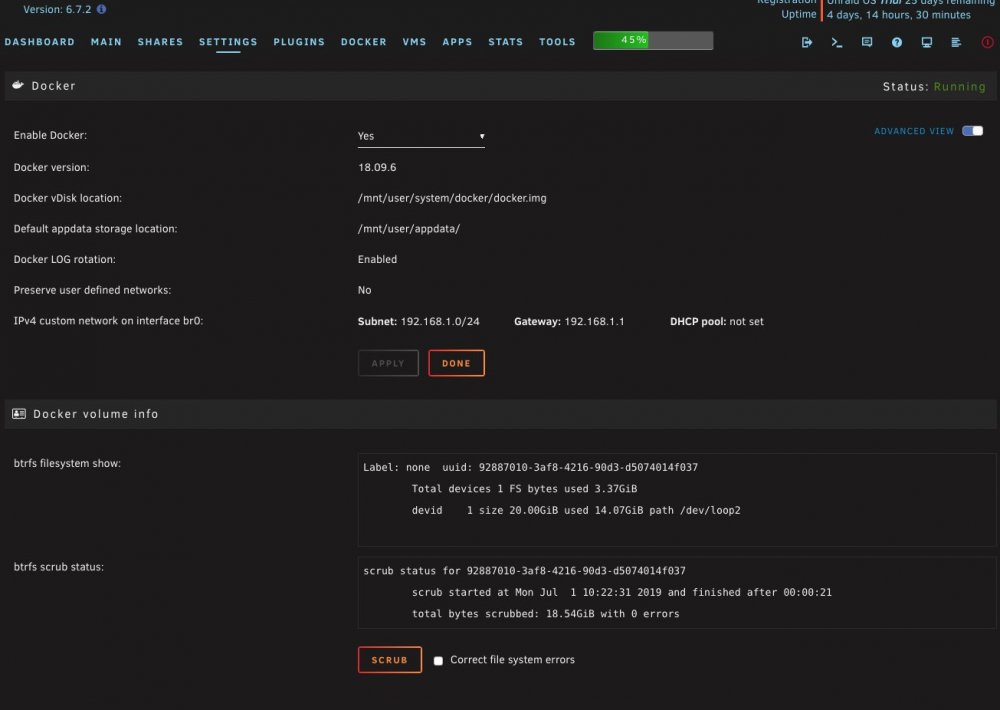
Thanks. I deinstalled Resilio-sync and my docker image went down significantly. It's normal now. I want to reinstall Resilio Sync from linux repository (and not from NOT limeware repository via CA ) This is dumb question, but I've never done this before. How do I pull linux/resilio-sync image to my unraid? I see image is on: https://hub.docker.com/r/linuxserver/resilio-sync/ https://github.com/linuxserver/docker-resilio-sync What do I do in UNRAID to load this? In UNRAID, I went to DOCKER tab, clicked on "Add Container", then under "Repository: entered above link. The command failed. With both links. So, how do I do it? Do I go into terminal window and then enter "docker pull linuxserver/resilio-sync". If that is correct, please tell me in WHICH folder in terminal should I be "sitting in" when I execute the command?
-
Hi, I configured Resiolio-sync, and it's running NEW ISSUE! - My docker image filled up to 93% (from 20GB of total space) When going to Docker-->Container Size, it shows: Name Container . Wrtiable Log resilio-sync . 122 MB 302 kB 15.3 GB It's clear Resiolio-sync is filling up my docker image with log files. How do I flush (clear) log files? How do I prevent this from happening again? thanks.
-
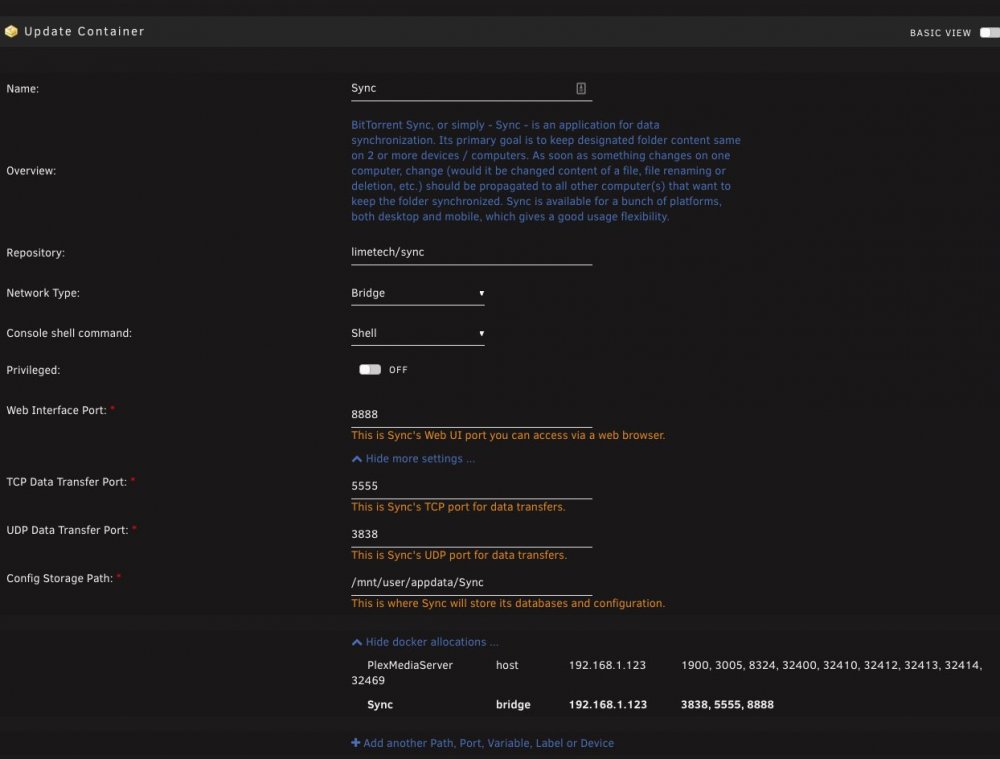
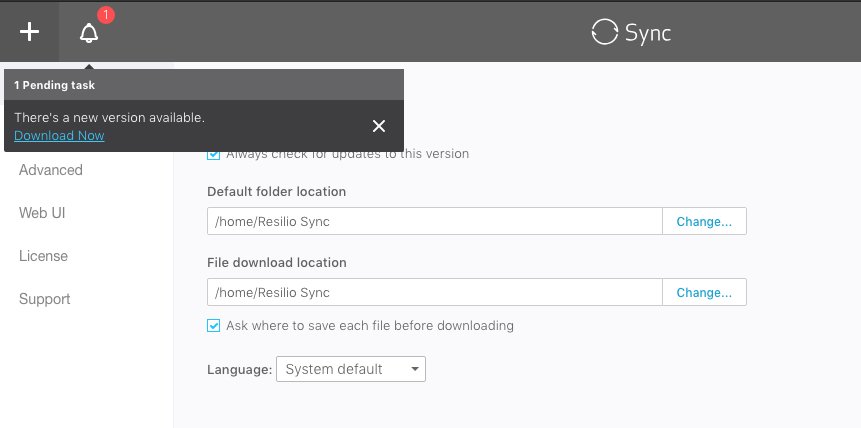
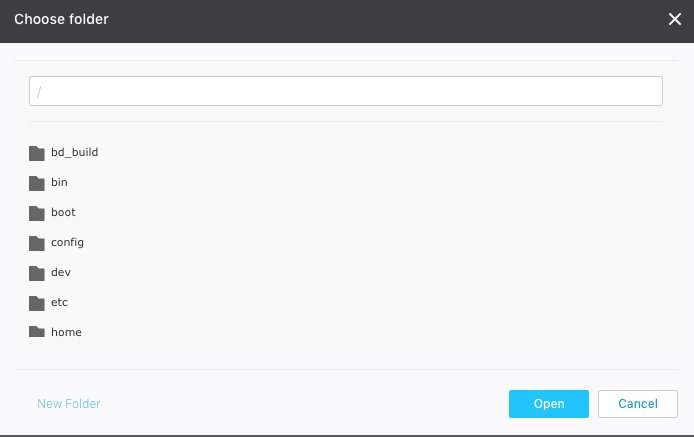
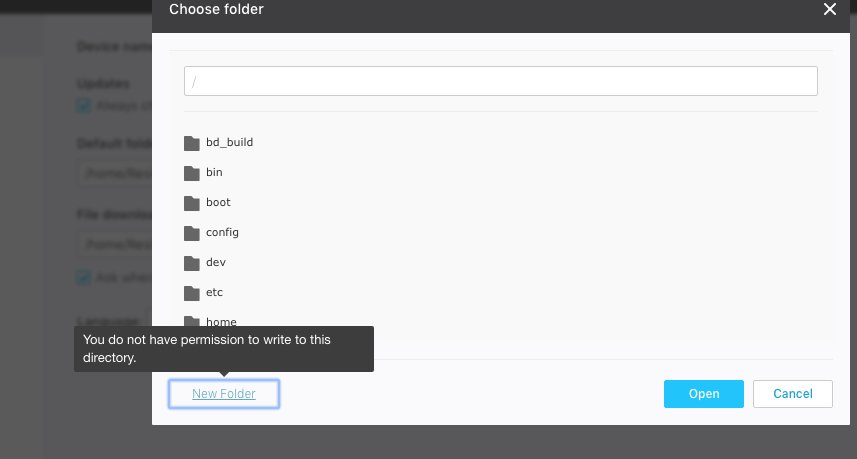
I need help! I have installed and used Resilio Sync on Mac and Synology without any issues. I cannot configure Resilio Sync for UNRAID. I do not know how and where to add share folders. When I want to choose a folder to sync, I do not see the list of my share folders, but some other folders I do not recognize (bd_build, bin, boot, config..etc). When I want to create a new folder, error message states "You do not have permissions to write to this directory". There is an annoying alert that asks me to update app. Then routes me to https://www.resilio.com/platforms/desktop/ which does NOT list download site for UNRAID. I have never encountered these difficulties when setting up Sync on Mac or Synology. This is frustrating. Does anyone know how to set up Resilio sync so that I can normally select shares to sync with??? Below are screen shots.

-
It worked. thanks
-
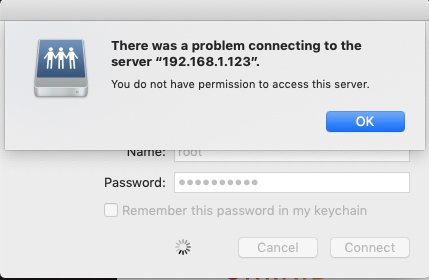
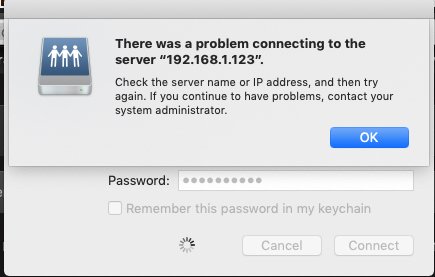
I tried to connect Mac to UNRAID by doing: 1) On UNRAID, settings->Network Settings....under IPv4 address: 192.168.1.123/24 2) On UNRAID, settings->SMB settings-> enable SMB: "Yes (Workgroup)" 3. On Mac, Finder->Go->Connect to server with following settings "smb://192.168.1.123/24". As username and password, I entered my UNRAID username and password, which is "root", and password for root, then clicked on "Connect". I get following error (1st image) When I set "Enhanced macOS interoperability" to "Yes", I get also error (2nd image) What am I doing wrong?
-
Ah! Now it makes sense. Thanks! Here is the rule summarized. There are three conditions when buying HDD for UNRAID. 1. Determine the total size of all of your files. Let's say this is 6TB. 2. Purchase (or reuse) data HDDs which cumulatively(!) have a total storage of a minimum(!) 6TB. This could be HDDs: 1+2+3TB, 2+4TB, 3+3TB. 3. Purchase ONE parity HDD, whose size must(!) be equal to the largest data HDD. Given examples above (in order of appearance) this could be: 3TB, 4TB, 3TB. UNRAID does NOT mirror the data, meaning it does not create a duplicate of all of your files. At any given time, there is only ONE version of a file across ALL data HDDs. UNRAID simply enables you to purchase less HDDs, and still be able to recover ONE failed drive - this is done using ONE parity drive. Parity drive does NOT store the actual file, meaning parity drive will not have a PDF or Word document on it - the parity drive stores only a bit calculation from a summary of all data HDDs. Given above examples, the bits would be summarized across 3, 2 and 2 HDDs. There is an option to have TWO parity drives, but I'll leave that discussion for experts. In my case, I have a small home NAS, with 3HDD slots (2.5 or 3.5), and 2 SSD slots (M.2 factor) on Motherboard. So my configuration will be 1 parity HDD (6TB, which I will need to purchase), and two HDD (each 4TB, which I already have). I will have a total of 8TB capacity for all my files. Given that all of my files have cumulative 4TB size, I will have 4TB of additional storage free, which should last me for few years. So, instead of purchasing several new drives worth cumulatively anywhere between $750 and $1,200, I will only need to purchase ONE drive of $150. I decided to purchase parity drive of 6TB, which will enable me to upgrade my future data needs to 12TB (e.g. 4+8TB of data HDDs) if I ever went that far with my data. I buy only HGST HDDs, which are more expensive but have the lowest HDD failure rate (according to Backblaze). Every single Seagate and WD HDD I bought always failed within 1-2 yrs (the former being by far the worst). Not one HGST drive I bought ever failed, and I have one that has been running for 8 years now.
-
Thanks for quick response. I'm trying to understand this (and I still do not), to know which HDD to purchase and the price is LITERALLY either $100 for ONE additional HDD (parity) of 3TB or $450 for THREE brand new HDD with each 6TB. Help me understand. In RAID 1 it's pretty self-explanatory: HDD 1 with 6TB HDD 2 with 6TB If all of my data is 6TB and I want it mirrored, I need two drives to have minimum size of 6TB EACH. Easy. In UNRAID, and with my total data of 6TB, how is it possible to have: 1 Parity HDD = 3TB 1 HDD (the data drive)= 3TB 2 HDD (the data drive)= 3TB to ensure that ALL of my 6GB data is mirrored? I would assume that 6TB+6TB = 12TB (for mirrroring), so HHD1 and 2 would need to have 6TB EACH, and parity would need to have 6TB. Am I misunderstanding something? This video is informative but doesn't help me (personally) calculate the size:
-
Hi, I am new to Unraid and after watching every tutorial, I still cannot understand how much storage I need for each of the drives. I'd assume the answer is simple. I have Synology NAS with 2 HDD (both 4TB each) + 1 SSD (0.5 TB for Cache) Given than all of my data will amount to a total of 6TB (in next 5 yrs), what should be the minimal size of: Parity HDD? HDD 1? HDD 2?




