Everything posted by [email protected]
-
rename / prename would be nice
-
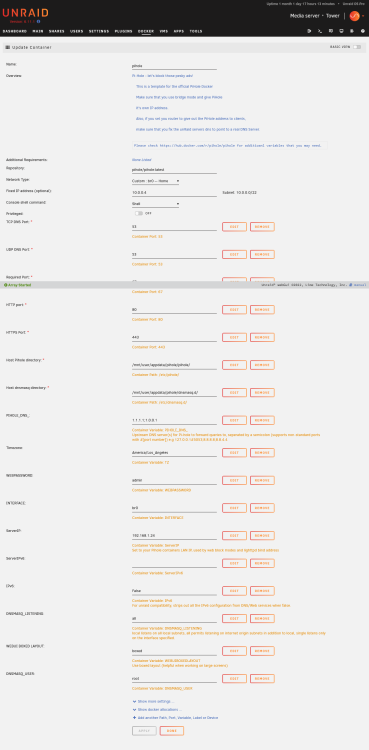
I can't get the web interface to load. Can someone tell me what i did wrong here? Settings are attached. Logs show: s6-rc: info: service cron: starting s6-rc: info: service cron successfully started s6-rc: info: service _uid-gid-changer: starting s6-rc: info: service _uid-gid-changer successfully started s6-rc: info: service _startup: starting s6-rc: info: service _startup successfully started s6-rc: info: service pihole-FTL: starting s6-rc: info: service pihole-FTL successfully started s6-rc: info: service lighttpd: starting s6-rc: info: service lighttpd successfully started s6-rc: info: service _postFTL: starting s6-rc: info: service _postFTL successfully started s6-rc: info: service legacy-services: starting s6-rc: info: service legacy-services successfully started ServerIP is deprecated. Converting to FTLCONF_LOCAL_IPV4 [i] Starting docker specific checks & setup for docker pihole/pihole [i] Setting capabilities on pihole-FTL where possible [i] Applying the following caps to pihole-FTL: * CAP_CHOWN * CAP_NET_BIND_SERVICE * CAP_NET_RAW * CAP_NET_ADMIN [i] Ensuring basic configuration by re-running select functions from basic-install.sh [i] Installing configs from /etc/.pihole... [i] Existing dnsmasq.conf found... it is not a Pi-hole file, leaving alone! [✓] Installed /etc/dnsmasq.d/01-pihole.conf [✓] Installed /etc/dnsmasq.d/06-rfc6761.conf [i] Installing latest logrotate script... [i] Existing logrotate file found. No changes made. [i] Assigning password defined by Environment Variable [✓] New password set [i] Added ENV to php: "TZ" => "America/Los_Angeles", "PIHOLE_DOCKER_TAG" => "", "PHP_ERROR_LOG" => "/var/log/lighttpd/error-pihole.log", "CORS_HOSTS" => "", "VIRTUAL_HOST" => "f611cac0d28a", [i] Using IPv4 [i] Preexisting ad list /etc/pihole/adlists.list detected (exiting setup_blocklists early) [i] Setting DNS servers based on PIHOLE_DNS_ variable [i] Applying pihole-FTL.conf setting LOCAL_IPV4=192.168.1.24 [i] FTL binding to custom interface: br0 [i] Enabling Query Logging [i] Testing lighttpd config: Syntax OK [i] All config checks passed, cleared for startup ... [i] Docker start setup complete [i] pihole-FTL (no-daemon) will be started as root Checking if custom gravity.db is set in /etc/pihole/pihole-FTL.conf [i] Neutrino emissions detected... [✓] Pulling blocklist source list into range [✓] Preparing new gravity database [i] Using libz compression [i] Target: https://raw.githubusercontent.com/StevenBlack/hosts/master/hosts [✓] Status: Retrieval successful [i] Imported 182498 domains, ignoring 1 non-domain entries Sample of non-domain entries: - 0.0.0.0 [i] List stayed unchanged [✓] Creating new gravity databases [✓] Storing downloaded domains in new gravity database [✓] Building tree [✓] Swapping databases [✓] The old database remains available. [i] Number of gravity domains: 182498 (182498 unique domains) [i] Number of exact blacklisted domains: 0 [i] Number of regex blacklist filters: 0 [i] Number of exact whitelisted domains: 0 [i] Number of regex whitelist filters: 0 [✓] Cleaning up stray matter [✓] FTL is listening on port 53 [✓] UDP (IPv4) [✓] TCP (IPv4) [✓] UDP (IPv6) [✓] TCP (IPv6) [✓] Pi-hole blocking is enabled Pi-hole version is v5.16.2 (Latest: v5.16.2) AdminLTE version is v5.19 (Latest: v5.19) FTL version is v5.22 (Latest: v5.22) Container tag is: 2023.03.1
-
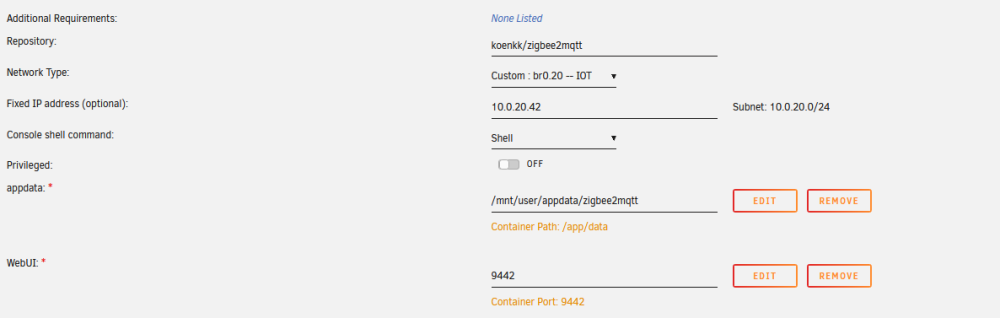
So I am running zigbee2mqtt on my IOT network and when I assign it a static IP there, the front end port mapping doesn't work. If I leave it on br0, then it works fine. Anyone have any thoughts on why? PS @Thomas_H nice to see another loxone user!

-
So that is a bug right? That it didn’t kill shares on shutdown?
-
OK, diagnosed it. Posting for posterity: lsof | grep /mnt/user Got a random bash process: bash 21148 root cwd DIR 0,56 4096 648799827764686976 /mnt/user/media/anime-movies kill -9 21148 it shut down. No idea what process that was... maybe an open session somewhere.
-
OK So when I run root@Tower:~# mount | grep "/mnt/user", I get the following: shfs on /mnt/user type fuse.shfs (rw,nosuid,nodev,noatime,user_id=0,group_id=0,default_permissions,allow_other) I have no idea what that means
-
I have seen a couple of messages around this, but no real answer.. My array can't be stopped, when I try I get the following repeated in console: Mar 13 10:25:35 Tower root: rmdir: failed to remove '/mnt/user': Device or resource busy Mar 13 10:25:35 Tower emhttpd: shcmd (370295): exit status: 1 Mar 13 10:25:35 Tower emhttpd: shcmd (370297): /usr/local/sbin/update_cron Mar 13 10:25:35 Tower emhttpd: Retry unmounting user share(s)... Mar 13 10:25:40 Tower emhttpd: shcmd (370298): umount /mnt/user Mar 13 10:25:40 Tower root: umount: /mnt/user: target is busy. Mar 13 10:25:40 Tower emhttpd: shcmd (370298): exit status: 32 Mar 13 10:25:40 Tower emhttpd: shcmd (370299): rmdir /mnt/user Diagnostics attached. My questions: 1. How do I shut down my system safely right now - ideally without needing a parity run? 2. How do I fix this on a permanent basis? tower-diagnostics-20230313-1026.zip
-
OK, I read through everything here, but am hesitant to do anything since some posts are quite old. Running Windows 11 and 6.11.1. I can see my shares just fine and they are set to public. I mapped them to a network drive. But despite having R/W access, I can't get it to let me write. Windows says I need permission. I cleared my credentials, I unmapped and remapped the network drive, etc. No luck. The folder I want to write in is owned by nobody:users.
-
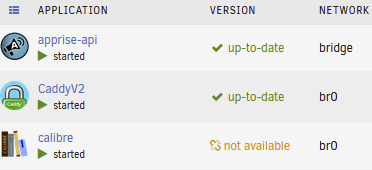
Ok doing the extra setting worked, should just update the docker to include it i suppose. Also I am getting an error on the version update:
-
My docker just shows either a white or black screen and no calibre interface. I tried deleting appdata/calibre and reinstalling from scratch without luck. Tried private tabs and both chrome and firefox. Anyone have any thoughts?
-
I found my server wasn't running and the attached screen showed the above message - seems like a kernel panic? Anything I can do to identify the issue? tower-diagnostics-20221107-1037.zip
-
No - I have noticed that any questions related to networking issues rarely get answered. People just say delete 'network.cfg' as the only solution.
-
So I have my server setup to be on the default LAN 10.0.0.0/22 and the IOT VLAN 10.0.20.0/24 When i go the client list for my Unifi router, I only see the 10.0.20.86 entry for the VLAN. I don't see the 10.0.0.101 address it should have for the default LAN. Any idea what is going on here?
-
So I was told elsewhere to enable Wireguard to access VLANs, I needed to add CIDR ranges to the AllowedIPs field. When I added 0.0.0.0/0 to "Peer allowed IPs:" it kills Unraid's connectivity. Right now I have the default lan on 10.0.0.0/22 and an IOT lan on 10.0.20.0/24 as well as a guest lan and a couple of other specialty ones. So what is the best way to enable VLAN access here?
-
Solved it sort of - it was Wireguard. I think when I added 0.0.0.0/0 to allowed peers, it created problems. I need to experiment more with it since i want VPN clients to be able to access both my VLANs
-
@JorgeB So it worked fine until I started adding dockers back. I added Jellyfin and then I could not connect or add any other dockers or ping. So either it is that particular config or it is the docker service itself? tower-diagnostics-20221018-1225.zip
-
Yeah - I will try and copy over the files as you suggest to my install. This is totally weird, right?
-
@JorgeB Used a fresh install and can ping (although it seems slow). So definitely feels like an Unraid problem, at least partially. PING cnn.com (151.101.131.5) 56(84) bytes of data. 64 bytes from 151.101.131.5 (151.101.131.5): icmp_seq=1 ttl=56 time=2.58 ms 64 bytes from 151.101.131.5 (151.101.131.5): icmp_seq=2 ttl=56 time=2.90 ms 64 bytes from 151.101.131.5 (151.101.131.5): icmp_seq=3 ttl=56 time=2.77 ms 64 bytes from 151.101.131.5 (151.101.131.5): icmp_seq=4 ttl=56 time=2.95 ms 64 bytes from 151.101.131.5 (151.101.131.5): icmp_seq=5 ttl=56 time=2.65 ms ^C64 bytes from 151.101.131.5: icmp_seq=6 ttl=56 time=2.64 ms --- cnn.com ping statistics --- 6 packets transmitted, 6 received, 0% packet loss, time 25026ms rtt min/avg/max/mdev = 2.580/2.749/2.954/0.139 ms
-
@JorgeB tried direct connect same problem. My Caddy reverse proxy works fine to get into the services onto the machine from outside. I cannot ssh into the machine remotely either but can use the webUI based terminal.
-
Well now when I change network settings the UI entirely crashes, what a mess...
-
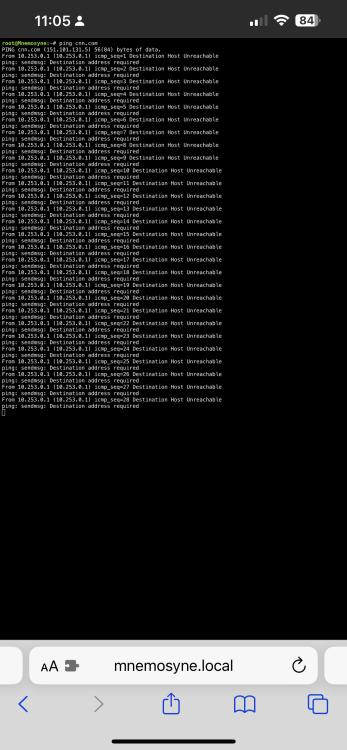
No luck there either.... This is pretty frustrating! root@Mnemosyne:~# ping cnn.com PING cnn.com (151.101.3.5) 56(84) bytes of data. From 10.253.0.1 (10.253.0.1) icmp_seq=1 Destination Host Unreachable ping: sendmsg: Destination address required ^CFrom 10.253.0.1 icmp_seq=2 Destination Host Unreachable ping: sendmsg: Destination address required --- cnn.com ping statistics --- 2 packets transmitted, 0 received, +2 errors, 100% packet loss, time 5001ms root@Mnemosyne:~# mnemosyne-diagnostics-20221017-1150.zip
-
Ok. I renamed network.cfg and by default I still get errors on ping mnemosyne-diagnostics-20221017-1107.zip
-
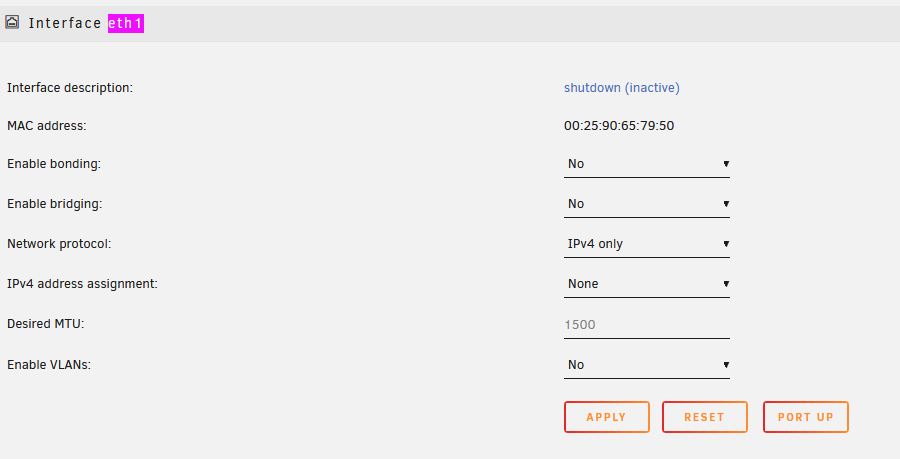
Hi @Jorge Yes - it does have internet access through eth0. eth1 doesn't have anywhere to clear a gateway from?
-
Fix Common Problems is having troubles connecting to github, if I try to ping google.com from the command line, it fails too. root@Mnemosyne:~# ping github.com ^C root@Mnemosyne:~# ping cnn.com ^C root@Mnemosyne:~# ping 1.1.1.1 PING 1.1.1.1 (1.1.1.1) 56(84) bytes of data. ^C --- 1.1.1.1 ping statistics --- 14 packets transmitted, 0 received, 100% packet loss, time 13319ms root@Mnemosyne:~# ping 8.8.8.8 PING 8.8.8.8 (8.8.8.8) 56(84) bytes of data. No idea why this is happening! mnemosyne-diagnostics-20221017-0934.zip
-
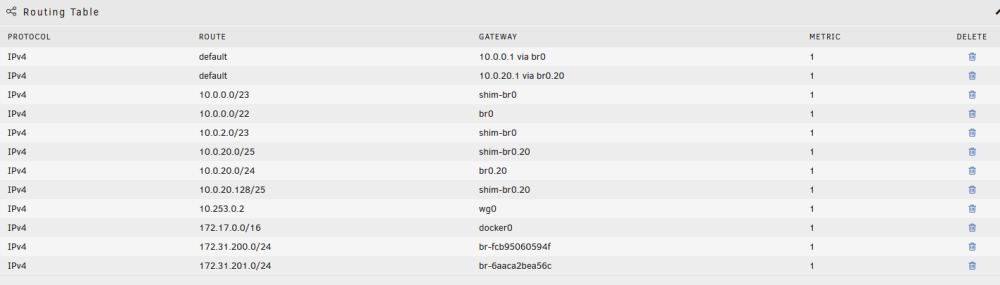
When I enable docker, the various lans get split up with shims to cover the addressable space. So in the attached picture you can see that my 10.0.0.0/22 main network has two shim-br0 to cover the addressable space: 10.0.0.0/23 10.0.2.0/23 Same for the IOT VLAN 10.0.20.0/24 which has two shim-br0.20 10.0.20.0/25 10.0.20.128/125 And then there are two entries at the bottom which I have no idea what they are for, but look like they are splitting apart the docker network: 172.17.0.0/16 docker0 172.31.200.0/24 br-fcb95060594f 172.31.201.0/24 br-6aaca2bea56c