





Everything posted by [email protected]
-
So my error happened due to Wireguard sort of taking over my server's IP. I turned it off and everything worked.
-
Is CA working right now? Getting this: Download of appfeed failed. Community Applications requires your server to have internet access. The most common cause of this failure is a failure to resolve DNS addresses. You can try and reset your modem and router to fix this issue, or set static DNS addresses (Settings - Network Settings) of 208.67.222.222 and 208.67.220.220 and try again. Alternatively, there is also a chance that the server handling the application feed is temporarily down. Last JSON error Recorded: Syntax error
-
OK - tried cutting it to LAN and couldn't get it working. I'll play around more and report back whatever it is I messed up.
-
@ljm42 Thanks for the tips - I did have it working before but had to reset up everything. So I turned off IPv6 and fixed that typo, and now I don't even get those bits. I noticed that it is randomizing the listen port on my phone every time i connect - is that supposed to happen? Or should that be 51820?
-
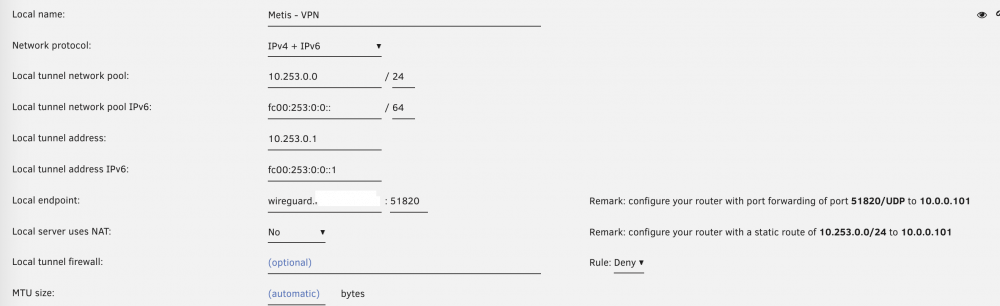
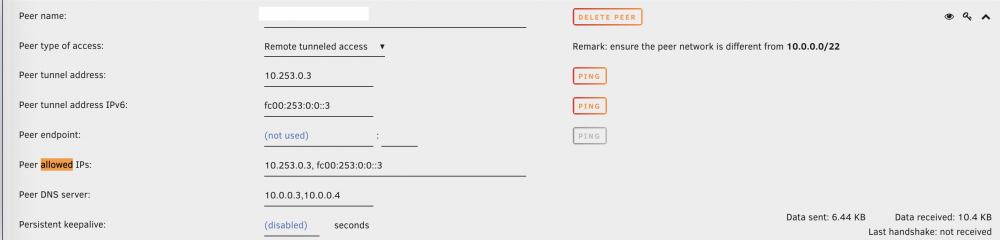
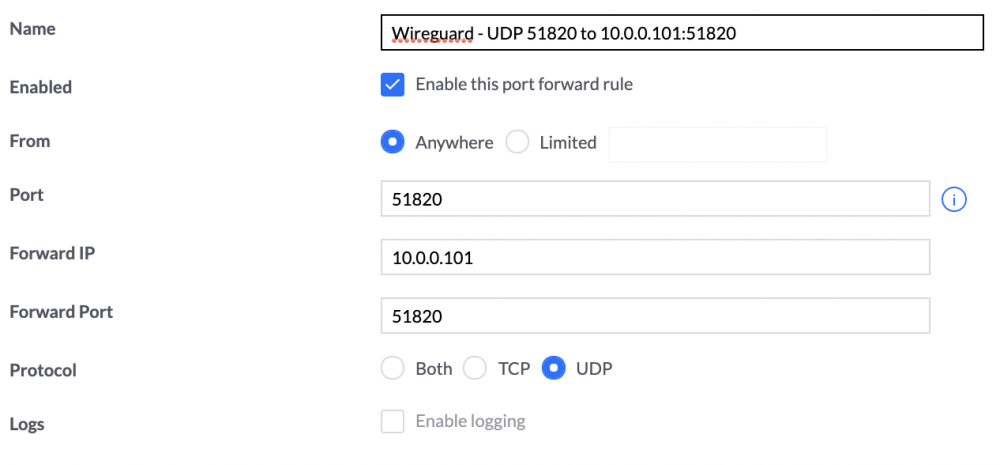
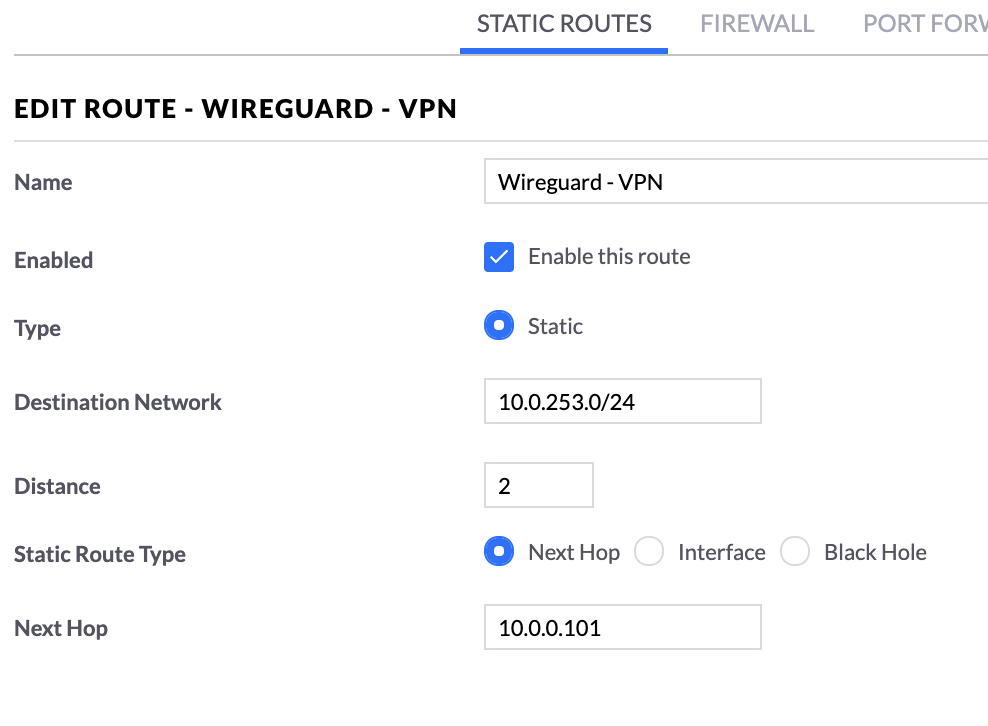
So I am not getting a handshake and I just get a little bit of data transfer. Wireguard and UniFi settings here - would love to know what is wrong. My dynamic DNS works fine for other purposes.
-
@nug I note that he uses a special network for his reverse proxying so if you have it setup the same way - you need to join that network in portainer. Also, oddly enough, if you look at spaceinvader's video and even my own docker page, I don't have any ports mapped for xmpp besides 5280 that I manually added.
-
I doubt it would fix the Unraid issue, but I have been contemplating switching over to Portainer for all my dockers anyway. For installing it in portainer, I will need to experiment with it but I suspect it should be straightforward. Not sure why spaceinvader didn't just do that if he was going to use the GUI for some parts and not others.
-
I have the same thing. The current situation is kind of messy since it was installed song docker compose so Portainer is pretty much like “it isn’t mine” and Unraids docker manager isn’t like “not me!” I will probably reinstall the stack in Portainer or hopefully someone will roll an Unraid docker for jitsi that works well. It would actually be nice if they were rolled into one just for convenience. also if you are using Nginx Proxy Manager, you need to expose port 5280 on the prosody container in Portainer.
-
Finally got jitsi to work. The setup guide from @SpaceInvaderOne didm not expose port 5280 on the xmpp docker. Once I mapped that, it seems to work better. I am going to go hunt down the rest of the ports that probably need to be made available for full functionality.
-
So I reinstalled and now it wants to be on bridge and not a custom br0 IP address. No idea why. something probably wonky with Unraids networking. Anyway, back to Jitsi. If I don’t map any of the custom locations, I can see myself and people on my lan can join and see me. When I map the custom locations it becomes a mess. So something about 5280 for BOSH and the web socket aren’t working right.
-
Out of nowhere today I am getting this error in logs and it isn't working: [nginx] starting... nginx: [emerg] invalid IPv6 address in resolver "[fe80::46d9:e7ff:fe95:e3db%br0]" in /etc/nginx/conf.d/include/resolvers.conf:1 Any thoughts on why this is happening?
-
So oddly enough it started working with a simple https redirect to the appropriate IP and port without any of the location stuff. Haven't thoroughly tested it yet though.
-
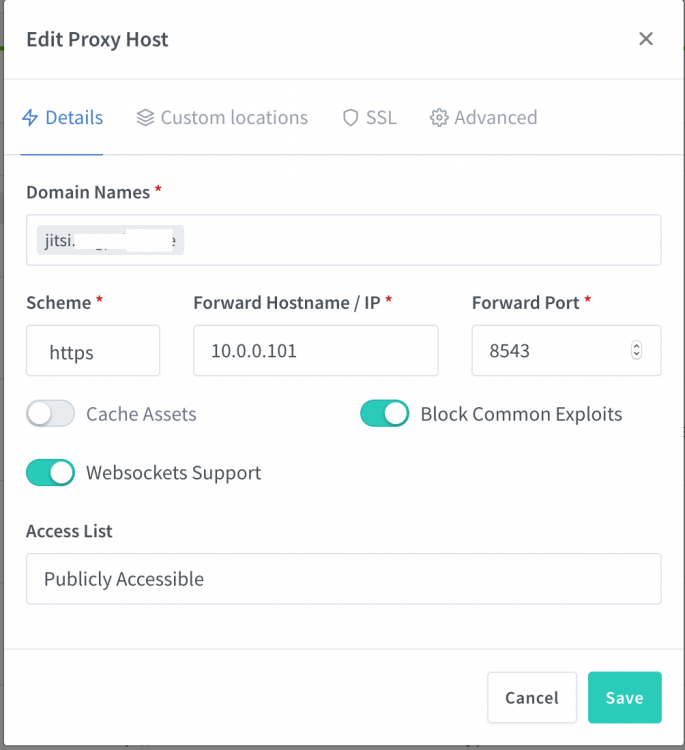
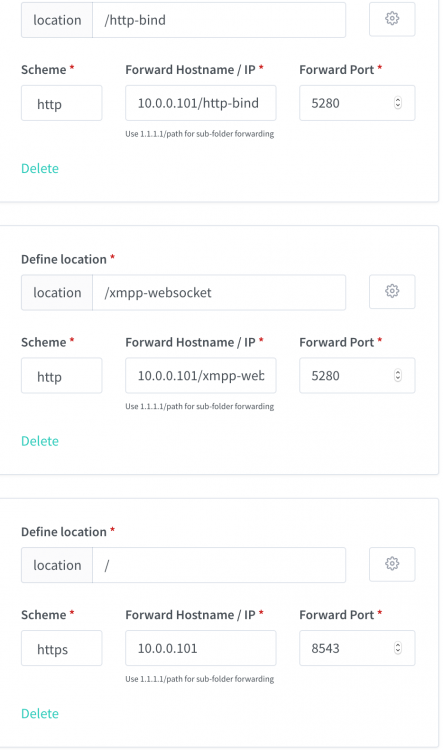
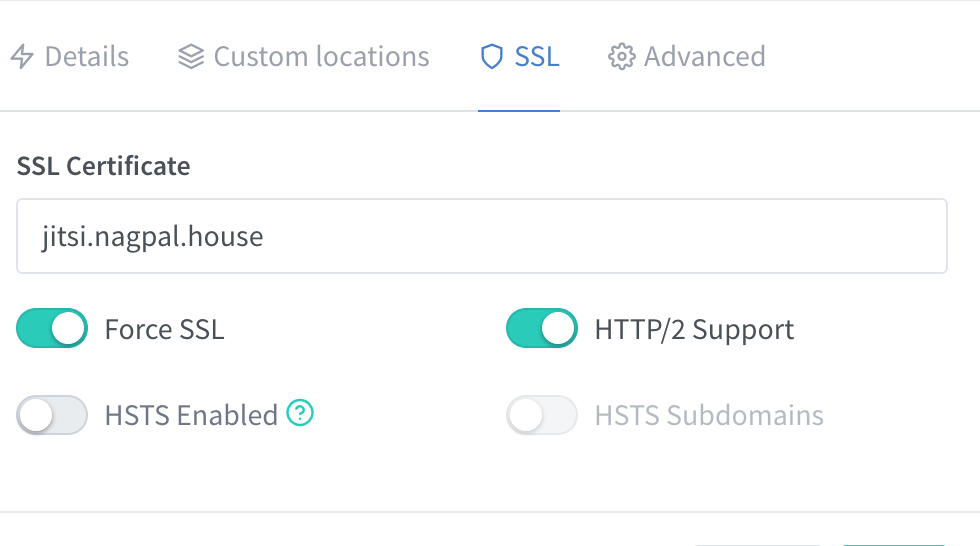
So this?
-
I get a lot of "strophe" errors which I suspect is part of the problem. Not really sure what is going on... I suspect it has to do with nginx proxy manager settings which i am still sorting out.
-
So I have lots of weirdness going on. No request for authentification. I can't get the mic to work in the chat since I am set to muted/no video and can't unset it. But when I click on the little arrow, I can see the meter go up and down when I talk and I can see a preview video. ...And I get thrown off a bunch. I suspect it has to to do with my reverse proxy and https issues since WebRTC won't work without it. What sucks is I don't think there is a way to test WebRTC without https just to make sure.
-
OK - so currently having problems with the functionality of it even within my LAN. I installed it per spaceinvaderones instructions, I can go to the site and create a room. But it never asks for authentication, it never asks for microphone or video use. So something functionally is wrong with my setup.
-
I am using a wildcard on google. So hopefully not an issue with the wildcard itself.
-
Would you mind putting up screenshots of your NPM config? Did you map custom locations?
-
I got the docker installed via @SpaceInvaderOne's method - but I have been using Nginx Proxy Manager to manage reverse proxies. So I just need to figure out the configuration there.
-
Anyone able to point to how to use this with Spaceinvaderone's recent jitsi guide? He uses nginx/LE with conf files and his sample nginx conf file is posted at the bottom here. I am not sure how to point at containers the same way... # make sure that your dns has a cname set for jitsi this file assumes the subdomain is meet.yourdomain.com server { listen 80; listen 443 ssl http2; listen [::]:443 ssl http2; server_name meet.*; location / { # enable the next two lines for http auth # auth_basic "Ask for password from your organisation"; # auth_basic_user_file /config/nginx/.htpasswd; ssi on; proxy_pass http://meet.jitsi; proxy_set_header X-Forwarded-For $remote_addr; proxy_set_header Host $http_host; } # BOSH location /http-bind { proxy_pass http://xmpp.meet.jitsi:5280/http-bind; proxy_set_header X-Forwarded-For $remote_addr; proxy_set_header Host $http_host; } # xmpp websockets location /xmpp-websocket { proxy_pass http://xmpp.meet.jitsi:5280/xmpp-websocket; proxy_http_version 1.1; proxy_set_header Upgrade $http_upgrade; proxy_set_header Connection "upgrade"; proxy_set_header Host $host; tcp_nodelay on; } }
-
Thanks for putting netbox up there! I was having a hellish time getting it to work on my own.
-
So changing the IP fixed it for me, but I don’t think that was the actual problem.
-
After several days and lots of help on the unifi forums - answer is it didn't like to be bridge or host and once I gave it its own IP, worked fine. No idea why. Next question, for ACLs, I enter in the logins and passwords I want them to have. Then do I need to change the Access parameter? Whenever I setup an ACL for a particular one, it doesn't work anymore.
-
OK - it has nothing to do the with proxy manager and everything to do with my Unifi router not port forwarding for some reason. So need to figure out what is going on there.
-
Same error with the downgrade, which is just plain weird since it used to work fine.


