Everything posted by [email protected]
-
I finally, sort of solved, a problem with this issue (creating a custom ipvlan bridge while the rest of dockers stay on whatever) https://forums.unraid.net/bug-reports/stable-releases/upgrade-from-61211-to-700-breaks-tailscale-subnet-routing-with-dockervm-enabled-r3566/ I mean, this is a bug that should never have happened, but well.. So, I would have liked to post my solution there for anyone else who doesn't want to spend three days trying to do it, but I have no ability to comment at all. Is there some category of account I need?
-
So appdata backup force shutdown my postgresql17 container and corrupted the database. Is there a good solution for this? Because right now I am thinking this thing might be worse than having no backup. If I am trying to safeguard my data, the one thing it should absolutely never do is exactly what it did. Yeah, I could probably script something to make it wait longer - and maybe I will (realistically I want it to wait a long time for a graceful shutdown and if it doesn't get it, then skip it that container now and flag it to me to deal with in the morning). For now I guess I am just going to have it not backup my databases, which is a total garbage solution. Am I missing something obvious here?
-
It was a custom setup of a container, the container thread is basically for app store ones. Anyway it started working randomly, no idea why. I'll close this.
-
I have the env file definition in the extra parameters section and get this command - but it doesn't take... Can anyone tell me why it can't find the env file? docker run -d --name='aiometadata' --net='bridge' --pids-limit 2048 -e TZ="America/Los_Angeles" -e HOST_OS="Unraid" -e HOST_HOSTNAME="Tower" -e HOST_CONTAINERNAME="aiometadata" -l net.unraid.docker.managed=dockerman -l net.unraid.docker.webui='http://[IP]:[PORT:3232]/' -p '3232:3232/tcp' -v '/mnt/user/appdata/aiometadata':'/app/data':'rw' --env-file /mnt/user/appdata/aiometadata/aiometadata.env 'ghcr.io/cedya77/aiometadata:latest'
-
Hi everyone, I looked through this thread and saw that a couple of people were having similar issues with tar verification when backing up /mnt/cache/appdata, but not sure I saw the resolution? I have two dockers using /mnt/cache/appdata preferentially for their backups since they use sqlite heavily and lock states cause messes if they point to /mnt/user/appdata - pocket-id and bazarr. I checked their individual docker entries, and the plugin correctly pulls in the /mnt/cache/appdata/pocket-id path, but I still get tar verification failures. > tar verification failed! Tar said: tar: /mnt/cache/appdata/pocket-id: Not found in archive; tar: Exiting with failure status due to previous errors Any iudea how to get rid of this error and have it validate correctly?
-
I got this working, but I would really suggest that they add a permanent /tmp mapping to the template to /mnt/cache/appdata/bazarr/tmp/ or similar. otherwise if it gets stuck it will stuff your docker.img. I'd also suggest doing the appdata link to /mnt/cache/appdata/bazarr/ since the sqlite database loves to lock up when running both sonarr and radarr at the same time for the first time.
-
One small suggestion, the ordering of restart should, by default, be the same as the order they appear on the Docker tab, otherwise I am just setting the same thing twice (databases before apps, etc)...
-
OK, I think I finally got syslogs working... Just lots of random moving pieces to fit together just right. Here is my vector.toml: [sources.syslog] type = "file" include = ["/var/log/syslog"] ignore_older = 86400 # optional, ignores very old logs read_from = "beginning" # or "end" [transforms.to_syslog] type = "remap" inputs = ["syslog"] source = ''' .message = string!(.message) ''' [sinks.vlogs] type = "elasticsearch" inputs = ["syslog"] endpoints = ["http://10.0.0.6:9428/insert/elasticsearch/"] api_version = "v8" compression = "gzip" [sinks.vlogs.healthcheck] enabled = false [sinks.vlogs.query] _msg_field = "message" _time_field = "timestamp" _stream_fields = ["host", "container_name"]I'll add docker logs later...
-
I have been really struggling to get it to work with VictoriaLogs - especially since they give all their examples in YAML and it isn't just a 1-to-1 conversion. Any ideas?
-
Anyone able to do Tempest, a simple PHP script that generates XMLTV files for use with HDHomeRun and other live TV tuning? Github: https://github.com/K-vanc/Tempest-EPG-Generator I tried out ChatGPT, but was unsure how to get it up on dockerhub and confirm it was working correctly: ``` FROM php:8.2-cli # Install git and PHP extensions needed RUN apt-get update && apt-get install -y git \ && docker-php-ext-install curl xml \ && apt-get clean && rm -rf /var/lib/apt/lists/* WORKDIR /app # Clone the repo directly into /app RUN git clone https://github.com/K-vanc/Tempest-EPG-Generator.git . # Ensure main script is executable RUN chmod +x Tempest-EPG-Generator.php CMD ["php", "Tempest-EPG-Generator.php"] ```
-
I just came here to post the same problem...
-
Restarted, they didn't come back, but they did return when I just refreshed their template entries. Going to go with blip for now and get back to working on why they can't actually access one another on the network...
-
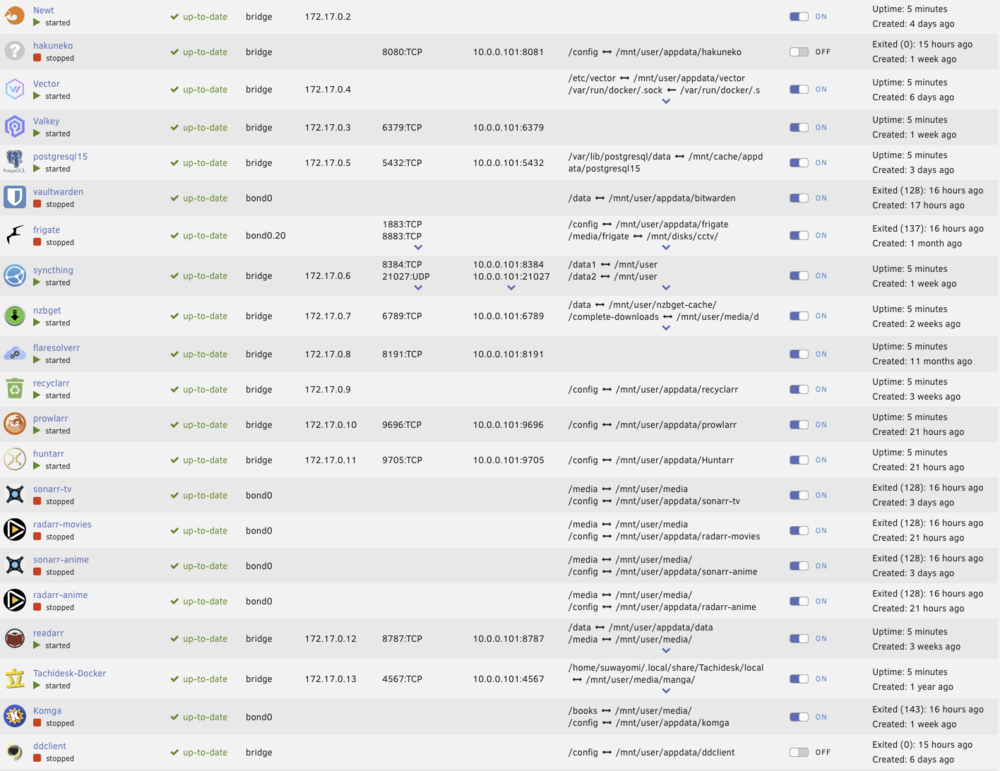
I was having a problem where dockers were unable to talk to one another despite host connections being enabled so I was stopping and starting the docker system to try out IPVLAN vs MACVLAN, etc. But after a couple of times, now half of the dockers didn't startup and when I try and start them, it says no container available. It is not all of them, but about a third of them. Relatively recent changes include updating to 7.1.2 from 6.11.x, enabling Appdata Backup, and switching USB flash drives. So it could be any of that. Attached a screenshot just to show which dockers were affected and diagnostics file Zip archive.zip
-
One minor suggestion - Shouldn't default ordering of containers be the same as what is the docker tab rather than just alphabetical
-
I have an old entertainment system in my car that takes blu rays and dvds. So was looking for a dvd authoring docker or similar to get selected media from Jellyfin, convert it and burn it to movie disc format. there is plenty of software for PCs/Macs but it feels like Linux offerings are non-existent? I get that at most people are going the other way and just ripping at this point…
-
Yeah, that would be great.
-
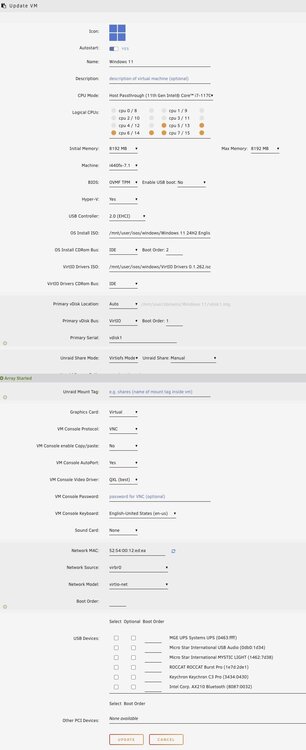
I guess I will resurrect this thread, I am not sure what is wrong with these settings, but I end up in the UEFI console instead of it trying to install Win 11. Probably something stupid on my part, but would appreciate any guidance...
-
So my docker image filled up to over 50GB. I think it is because there is only one config mapping for library and files and appdata? I am not sure... but it is definitely something weird. Did a container size look and this is what I got: Name Container Writable Log calibre 55.4 GB 52.5 GB 13.1 kB ... Template is: Name: calibre Overview: Calibre(https://calibre-ebook.com/) is a powerful and easy to use e-book manager. Users say it’s outstanding and a must-have. It’ll allow you to do nearly everything and it takes things a step beyond normal e-book software. It’s also completely free and open source and great for both casual users and computer experts. Additional Requirements: None Listed Repository: lscr.io/linuxserver/calibre Network Type: Bridge Console shell command: Bash Privileged: Off WebUI: 8088 Port: 8081: 8089 PASSWORD: CLI_ARGS: Appdata: /mnt/user/media/ebooks/ PUID: 99 PGID: 100 UMASK: 022
-
Requesting zoxide to be added, it is life changing
-
Sonoma 14.1.2 and Unraid 6.12.4 I feel like I am constantly battling to just get simple finder access to my share. I have no idea why that is... I have my user account set to read/write. I log in through command-K > smb://tower.local And then I can't copy files, delete files, or whatever. When I do a "get info" the lock icon appears. I tried with and without the nsmb.conf file suggested in the pinned thread
-
@gevsan did you get this working? I tried your same variable setup and I don't see an option to download as CBZ anywhere appearing.
-
I started logging outside of Unraid to see what might be causing Unraid to crash. Running 6.12.2 and just seeing some instability. I attached the past day, seems like it crashed right around midnight logs-data.csv
-
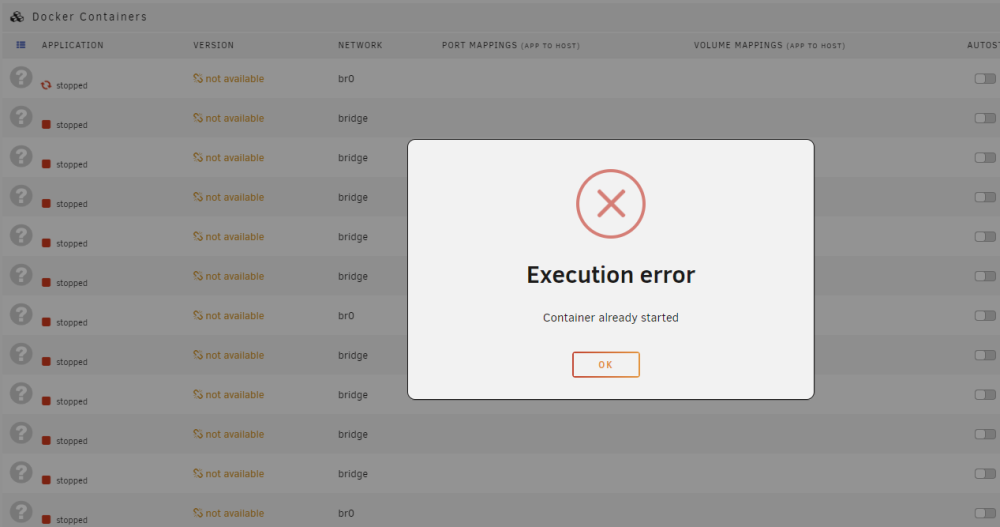
I came to look at my server and found this: I tried turning off the docker service and then on again and it said docker service failed to start. Anyone know what is going on here? tower-diagnostics-20230705-1700.zip
-
Hit stop array, stuck at stopping. I already killed the nginx process that was getting stuck at /mnt/user. This sort of thing happens ALL the time. I have never once successfully shut down an array without a hard power down. I would love to know why and have it work properly for once. It is hot today and I don't want to run a parity check in the heat. root@Tower:~# tail -f /var/log/syslog Jul 2 18:06:23 Tower emhttpd: Unmounting disks... Jul 2 18:06:23 Tower emhttpd: shcmd (3779): umount /mnt/disk4 Jul 2 18:06:23 Tower root: umount: /mnt/disk4: target is busy. Jul 2 18:06:23 Tower emhttpd: shcmd (3779): exit status: 32 Jul 2 18:06:23 Tower emhttpd: Retry unmounting disk share(s)... Jul 2 18:06:28 Tower emhttpd: Unmounting disks... Jul 2 18:06:28 Tower emhttpd: shcmd (3781): umount /mnt/disk4 Jul 2 18:06:28 Tower root: umount: /mnt/disk4: target is busy. Jul 2 18:06:28 Tower emhttpd: shcmd (3781): exit status: 32 Jul 2 18:06:28 Tower emhttpd: Retry unmounting disk share(s)... root@Tower:~# lsof | grep /mnt/disk4 root@Tower:~# root@Tower:~# mount | grep /mnt/disk4 /dev/md4p1 on /mnt/disk4 type xfs (rw,noatime,nouuid,attr2,inode64,logbufs=8,logbsize=32k,noquota) /mnt/disk4/system/docker/docker-xfs.img on /var/lib/docker type xfs (rw,noatime,attr2,inode64,logbufs=8,logbsize=32k,noquota) tower-diagnostics-20230702-1808.zip
-
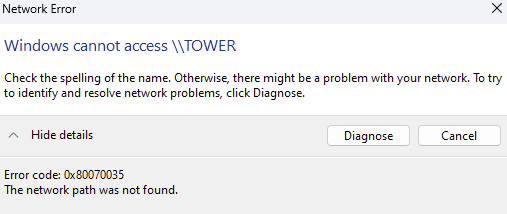
Well, it was working yesterday for me and now it isn't. A file server that can't serve files is useless and fighting with Windows is exhausting. I enabled insecure SMB shares and SMBv1, no joy - still getting network path not found errors. But honestly it feels like why should I have to be enabling deprecated features? tower-diagnostics-20230621-1112.zip