





PitRejection2359
Members
-
Joined
-
Last visited
Everything posted by PitRejection2359
-
Did you ever get the answers to your questions above? I'm currently running an array that is 100% spinning disks (5 disks all different sizes) and a spinning parity, as well as a 100% SSD BTRFS cache. I'd like to start / transition away from spinning disks if I can, but will likely end up doing this slowly over time as I can afford and when SSDs are on offer, so knowing whether a ZFS array can accept multiple different disks (both different sizes and HDD / SSD combination) would be really helpful.
-
Restarting the array didn't reset the read errors, but restarting the server did. Thank you for all your help. 👍
-
Just thought of another thing - how do I cancel the error that the daily status email reports: I've acknowledged the UDMA error which was there after the restart, and tried to "clear stats" from the main page, but can't get rid of those 256 read errors on Disk 3. Do I need to restart the server for that?
-
Thanks very much, will take a look at the cables and keep an eye on the disk. 👍
-
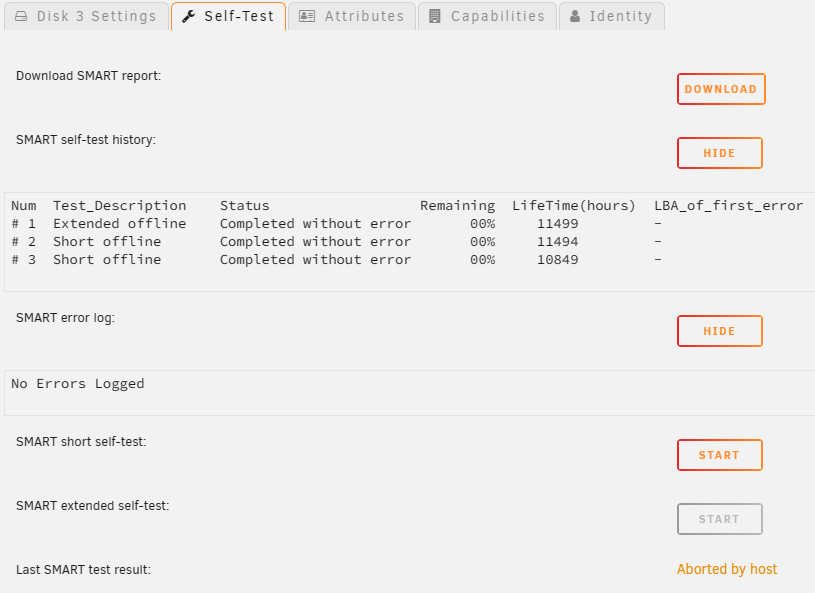
SMART page for the drive: SMART extended test results: SAMSUNG_HD204UI_S2H7J90B622655-20230501-1329.txt
-
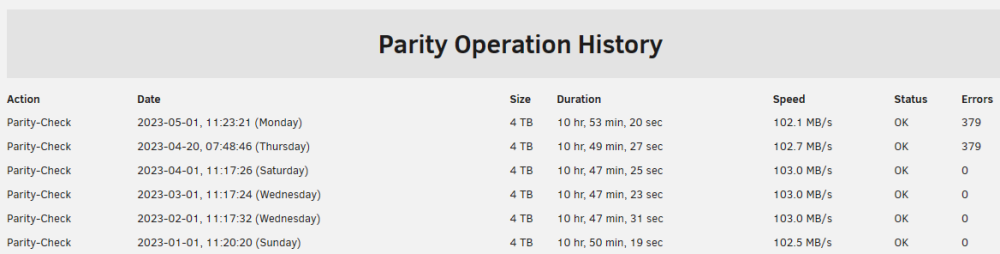
Yeah, did the extended test, it came back with no errors, as far as I can tell. I thought I had attached it to the first post... Will check shortly. I'm a little confused by the parity check results (my lack of understanding)! The status is "OK", but it shows 379 errors - exactly the same as the previous parity check after the power failure. How can the parity be OK if there is a read error?
-
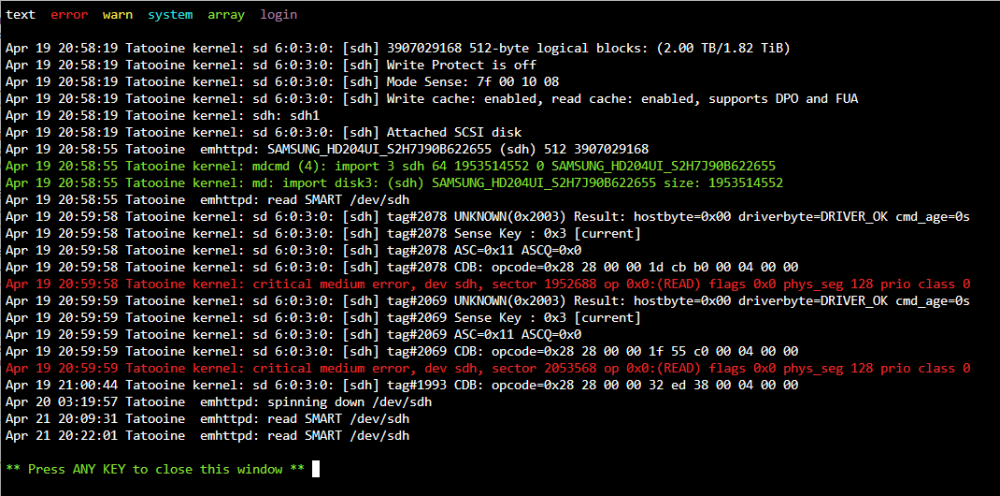
Hi - I had a couple of power cuts around a week ago. Unraid has done 2 full parity checks since it came online and has both times had 379 errors show: Disk 3 is showing 256 read errors: Log from shortly after the power came back on: But SMART check and diagnostics don't really show anything too bad as far as I can see (attached). SAMSUNG_HD204UI_S2H7J90B622655-20230422-1612.txt tatooine-diagnostics-20230422-1635.zip Is the drive dying and needs replacing, or will a reboot reset the daily fault email and clear the read errors? Thanks in advance,

-
having the same issue - restarting the API didn't fix it for me.
-
did you work out how to resolve this? I am having the same issue. Thanks.
-
worked perfectly for me - thank you very much @Squid
-
I'm also having a "ca md too weak" error, along with some other issues with depreciated options: 2023-01-31 22:46:51,441 DEBG 'start-script' stdout output: 2023-01-31 22:46:51 WARNING: file 'credentials.conf' is group or others accessible 2023-01-31 22:46:51,441 DEBG 'start-script' stdout output: 2023-01-31 22:46:51 OpenVPN 2.5.8 [git:makepkg/0357ceb877687faa+] x86_64-pc-linux-gnu [SSL (OpenSSL)] [LZO] [LZ4] [EPOLL] [PKCS11] [MH/PKTINFO] [AEAD] built on Nov 1 2022 2023-01-31 22:46:51 library versions: OpenSSL 3.0.7 1 Nov 2022, LZO 2.10 2023-01-31 22:46:51,442 DEBG 'start-script' stdout output: 2023-01-31 22:46:51 NOTE: the current --script-security setting may allow this configuration to call user-defined scripts 2023-01-31 22:46:51,443 DEBG 'start-script' stdout output: 2023-01-31 22:46:51 OpenSSL: error:0A00018E:SSL routines::ca md too weak 2023-01-31 22:46:51 Cannot load inline certificate file 2023-01-31 22:46:51 Exiting due to fatal error 2023-01-31 22:46:51,445 DEBG 'start-script' stdout output: [info] Starting OpenVPN (non daemonised)... 2023-01-31 22:46:51,451 DEBG 'start-script' stdout output: 2023-01-31 22:46:51 DEPRECATED OPTION: --cipher set to 'AES-256-CBC' but missing in --data-ciphers (AES-256-GCM:AES-128-GCM). Future OpenVPN version will ignore --cipher for cipher negotiations. Add 'AES-256-CBC' to --data-ciphers or change --cipher 'AES-256-CBC' to --data-ciphers-fallback 'AES-256-CBC' to silence this warning. Will adding the " tls-cipher "DEFAULT:@SECLEVEL=0" " line remove both errors (until my VPN provider updates their cipher to 512), or have I got another error in parallel to the sha512 update needed? Thanks.
-
same here.
-
perfect - thank you!
-
I've created an issue here on Github. One of the responses says that this is fixed in the preview version of PhotoPrism - is there a way to add this preview build as an option in your container?
-
ah, gutted - it still didn't work. Do you want me to post anything to help diagnosis?
-
OK, thanks. I've been out all day and will try to load it now with the additional variable, but no mariadb this evening and let you know.
-
OK, no dramas - I'll delete the original container as you requested to test it. If I were to set up the docker with a separate mariadb, I presume the data would stay intact if I deleted the photoprism docker in the future - would it pick up all the data after a future delete / reinstall?
-
Will try this today. I'm guessing this will remove the database with all the data from my photo library (facial recognition, albums, tags, archive, approved photo etc)? Not a major snag, but will take a while to rebuild all that! Sent from my SM-G965F using Tapatalk
-
Hi Ich777, I've just set up photoprism and am having a similar error to a few others with the rawtherapee conversion: "FATAL ERROR: Creation of the user's processing profile directory "/photoprism/.config/RawTherapee/profiles" failed!". I've not tried to add the "home" variable or done anything with permissions yet - its a very vanilla / simple / standard installation so far. What would you recommend to try first to fix it? Thanks!
-
nice work - thank you.
-
That fixed it - thanks very much.
-
amazing - rebooted and all appears fine now. diags attached for info. Thanks very much! tatooine-diagnostics-20220410-1043.zip
-
great - thank you. unfortunately, my pool seems to have got messed up and has lost config during the disk replacement - I've started a separate thread - not sure if you can help there as well? Thanks,
-
Is anyone able to help me out here? Sent from my SM-G965F using Tapatalk
-
I'm guessing the following is where the error is: Apr 9 15:31:47 Tatooine emhttpd: shcmd (530): mkdir -p /mnt/cache Apr 9 15:31:47 Tatooine emhttpd: /mnt/cache uuid: 9bafae41-27ca-4125-b748-c512ae2ff207 Apr 9 15:31:47 Tatooine emhttpd: /mnt/cache found: 4 Apr 9 15:31:47 Tatooine emhttpd: /mnt/cache extra: 0 Apr 9 15:31:47 Tatooine emhttpd: /mnt/cache missing: 1 Apr 9 15:31:47 Tatooine emhttpd: /mnt/cache Label: none uuid: 9bafae41-27ca-4125-b748-c512ae2ff207 Apr 9 15:31:47 Tatooine emhttpd: /mnt/cache Total devices 4 FS bytes used 104.47GiB Apr 9 15:31:47 Tatooine emhttpd: /mnt/cache devid 1 size 465.76GiB used 107.03GiB path /dev/sdh1 Apr 9 15:31:47 Tatooine emhttpd: /mnt/cache devid 2 size 223.57GiB used 42.00GiB path /dev/sdd1 Apr 9 15:31:47 Tatooine emhttpd: /mnt/cache devid 4 size 223.57GiB used 42.03GiB path /dev/sdi1 Apr 9 15:31:47 Tatooine emhttpd: /mnt/cache devid 5 size 465.76GiB used 106.03GiB path /dev/sdc1 Apr 9 15:31:47 Tatooine emhttpd: /mnt/cache mount error: Invalid pool config But I'm not suite sure how to fix it? It appears to be missing disk 3 (which I guess is the disk I replaced with the new disk), but I though the process I followed was meant to take that into account and replace it with the new disk....




