PitRejection2359
Members
-
Joined
-
Last visited
Everything posted by PitRejection2359
-
So why does it show as NTFS when I put it back into a windows PC? And why does one of them show correctly as NTFS? Unfortunately, the servers are one and the same hardware! So it can either run ESXi or Unraid, but not both at the same time! The reason I thought this would be fine is because the disks are formatted as NTFS, so should have allowed me to migrate the data one drive at a time and then add the drives to the array once the data had been copied off. If I can't do this, I need to work out how to migrate all the data another way!
-
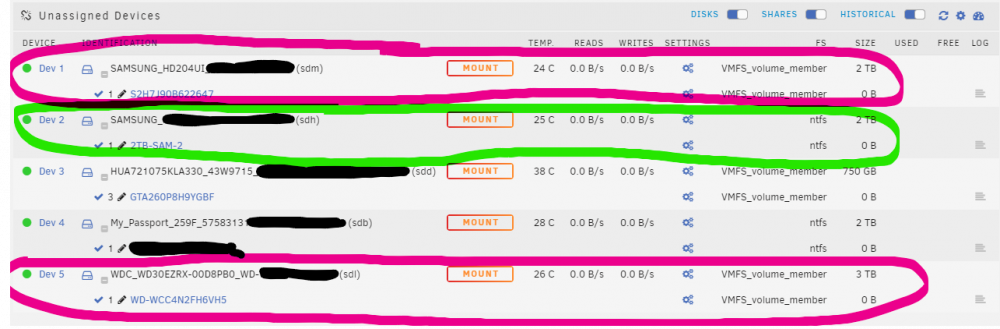
Hi - I'm having some issues with some drives that appear as VMFS volume member / file system (previous thread in wrong place😞 I'm mid-migration from ESXi to Unriad, and have come across a slight issue in that a couple of disks are appearing in VMFS FS format, and I can't access them in Unassigned Devices to copy the data off to my new unraid array. When the PC was on ESXi, I had an LSI2008 controller (in IT mode) passed through to a windows 10 VM which had the disks attached to it, and therefore passed through to the VM to see all the SMART data, etc. They were formatted in NTFS and all working fine. Now that I'm running unraid, out of the 3 disks that were passed through in ESXi, one is showing as NFS and the other 2 are showing as VMFS. This is odd, as all 3 were passed through on the same controller, and all appeared fine in the windows VM. It's possible that they were previously formatted as VMFS before they were passed through, but once passed through they were reformatted in windows as ntfs. Any ideas how 2 out of the 3 are showing as VMFS, and more importantly, is there any way to mark them back to ntfs so that I can mount them as unassigned devices and copy the data across to the array? In the first attached image, the drive circled in green highlighter is OK and showing as NTFS, whereas the 2 circled in pink highlighter are showing as VMFS for some reason. Dev 3 / sdd is correctly showing as VMFS - this disk was also in ESXI, but not passed through to anything and does have a VMFS formatted store on it. I just hung the 3TB WD drive in a windows PC and it shows correctly as an NTFS drive all accessible in windows. So why does Unraid show them as VMFS?

-
I just hung the 3TB WD drive in a windows PC and it shows correctly as an NTFS drive all accessible in windows. So why does Unraid show it as VMFS?

-
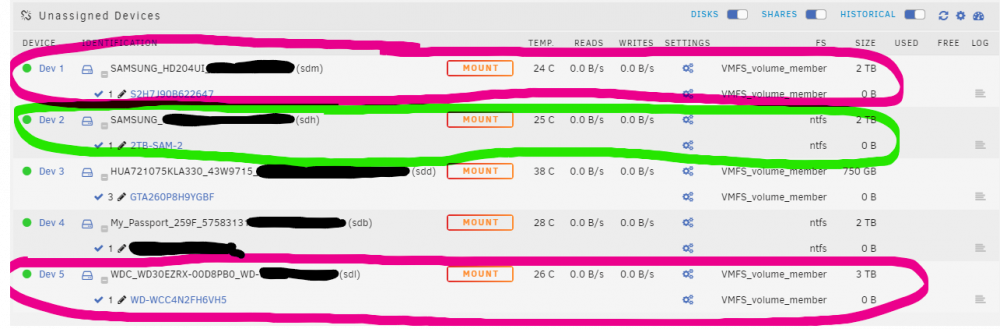
Hi Everyone, I'm mid-migration from ESXi to Unriad, and have come across a slight issue in that a couple of disks are appearing in VMFS FS format, and I can't access them in Unassigned Devices to copy the data off to my new unraid array. When the PC was on ESXi, I had an LSI2008 controller (in IT mode) passed through to a windows 10 VM which had the disks attached to it, and therefore passed through to the VM to see all the SMART data, etc. They were formatted in NTFS and all working fine. Now that I'm running unraid, out of the 3 disks that were passed through in ESXi, one is showing as NFS and the other 2 are showing as VMFS. This is odd, as all 3 were passed through on the same controlled, and all appeared fine in the windows VM. It's possible that they were previously formatted as VMFS before they were passed through, but once passed through they were reformatted in windows as ntfs. Any ideas how 2 out of the 3 are showing as VMFS, and more importantly, is there any way to mark them back to ntfs so that I can mount them as unassigned devices and copy the data across to the array? In the attached image, the drive circled in green highlighter is OK and showing as NTFS, whereas the 2 circled in pink highlighter are showing as VMFS for some reason. EDIT: Dev 3 / sdd is correctly showing as VMFS - this disk was also in ESXI, but not passed through to anything and does have a VMFS formatted store on it. I'm just about to hang them into an external USB HDD reader on a Windows desktop to see what they appear as, and will update when I can.
-
ideal - thank you.
-
Evening Fellow Unraid Forum Members, I've been messing around with my Unraid setup on a "test" PC and have installed a whole bunch of apps, disks, and configurations. I'm now ready to plug it into my "main" server and start migrating data across, and want to reset the unraid installation back to the default fresh install and build it from there. I've backed up the USB data and copied off the ".key" file. Before I reformat and reset, I just want to confirm that all I need to do after reinstalling the fresh unriad on the same USB is to copy the key file back into the config folder? Cheers.
-
I'm thinking about passing a disk through to a VM in Unraid, and am wondering whether it is possible to spin that disk down, particularly when the VM is off. Is this possible?
-
Thank you! Sent from my SM-G965F using Tapatalk
-
Hi - I've just installed an SSD to use as a cache and installed the Dynamix Trim plugin too. I've set it up, but is there a way to tell whether it has completed successfully on schedule (is there a log I can access easily)? Thanks in advance.
-
Looking for an answer to this too - just working out what I can do with VMs and what's possible. Cheers.
-
Thanks. Mine's been running for a couple of weeks now and still no long term logging of stats. every time I go to the stats page it restarts the logs...
-
amazing - thank you very much. apologies for the delayed reply - my notifications weren't set properly up for some reason.
-
Hi @PTRFRLL, Thank you so much for these instructions - I'm just trialling / migrating to Unraid and the ability to have Pulseway up an running is fantastic! I have a couple of questions that I'm hoping you might be able to help with: Once its up and running, which is the primary config.xml file I should be editing to change the settings - /boot/pulseway/config.xml? How do I go about upgrading pulseway when a new version is released? Do I just download and copy the new txz file to the /boot/extra folder, and it all works on the next boot? If an update adds new features and requires new settings / strings to be defined in the config.xml file, I presume I would need to copy a new sample xml file and edit that, but do I need to save it in both /boot/pulseway/ and /etc/pulseway/, or does it just need to be in the boot/pulseway folder? Finally (sorry!), I have the "Fix Common Problems" CA plugin installed, and it comes up with a warning: "Extra packages being installed were found in /boot/extra. It is not recommended to install any packages this way. The recommended way is via the NerdPack / DevPack plugins". I'm guessing there isn't a way to install pulseway using either of those is there? I ask as I don't think I want to stop the FCP plugin from monitoring that area (to check no viruses have been installed there), but I would also like to stop that warning for Pulseway. Many thanks for reading!
-
Hey @fireplex - did you ever get it working? I have the same problem and can't see how to get the logging to work. Cheers.
-
Ah, of course - that makes sense. Thank you. So actually, as I have a parity drive available, the better / safer option would be to go with my option 2, as the parity drive would be there and doesn't get any additional stress, and each drive joining the array gets wiped only once. Thanks again.
-
Hi All, I'm currently trying out unRAID on a spare PC with a plan to migrate to it from my current setup of ESXi with a few windows 10 VMs that currently do the job of my home server, etc. What I don't have is enough spare disks to migrate the approx 4TB of data (currently across 3 drives) to the new system in a single copy/paste, as I need to re-purpose the old disks into the new array. I do have at least 1 x 2TB drive that I can start the array with - possibly 2 x 2TB if I remove some redundancy from my existing setup. My current server set up is a mixture of a mirrored and un-mirrored drives using DrivePool in a windows 10 VM. I've purchased a new 8TB drive to use as a dedicated backup with an incremental / differential backup plan (currently using acronis in a windows VM, but still TBC what I'm going to use when I migrate fully - I will probably keep the acronis going in a VM initially until I come up with a better solution), and will re-purpose my previous 4TB backup drive as the parity drive in unRAID. So, I'm trying to work out the best way to do the migration without stressing the disks too much, or creating additional work; should I: Create the array in unRAID without a parity drive initially and migrate the data and drives across one by one, then add the largest drive (4TB) as parity at the end? I'm thinking this would mean the system will only have to create the parity set once at the end, rather than having to re-compute it every time I add an additional drive as I gradually move across once the data has been copied across from the old system? Add the parity drive and 1 or possibly 2 data drives, then gradually add more data drives as the disks are freed up from the old system when the data is copied across. This means the data will all be protected right from the start in unRAID, but will it be slow and put additional stress on the parity drive every time i add an additional disk? Thanks in advance.
-
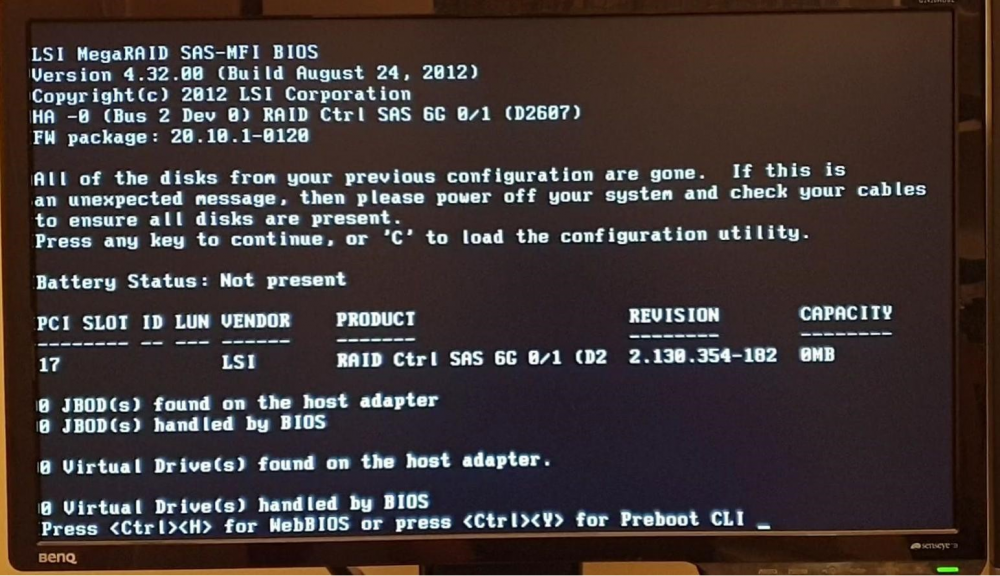
OK; please can can you explain how you can tell, so I can understand better? Its Fujitsu hardware, so I was expecting at least some reference to Fujitsu somewhere in the boot environment! I wonder if someone has possibly started to flash it and it got screwed up perhaps because it appears as a "AVAGO MegaRAID" in windows 10, the "Ctrl-H" option doesn't work, the "Ctrl-Y" does work (and i get to the CLI), but the "C" option does not take you to the config screen as it bumps back into windows boot. No worries - I'll dig out the instructions for flashing it to the full LSI, as I was expecting to have to do that anyway!
-
Hi, I've just bought a D2607 off ebay and fired it up in my PC to test it for the first time. The firmware / version shows as below: This looks to me like it's already been flashed to LSI firmware, but I can't work out what version it is and whether i need to update it! Can anyone help?! Thansk in advance!