





althoralthor
Members
-
Joined
-
Last visited
Everything posted by althoralthor
-
Thanks Jorge. Great idea... I guess this is what happens when unraid and my dockers are solid for years at a time... I don't even know how to ask for help! 😀
-
I am struggling with an issue where ONE disk doesn't spin down. When I look at open files, it is ALWAYS a media file (a tv episode) which makes me look at Plex (using the linuxserver version). When I check the plex dashboard, nothing is being viewed. Stopping the plex docker allows me to then spin down all disks in the array and they stay spun down. I don't honestly know what to do next. I cannot think of a reason as to why Plex would be accessing one single file on my array (oddly it is almost always an episode of Foundation... not sure why, and don't know that its relevant). Any pointers on where to turn next? This has me thinking about switching to Emby...
-
I will PM a moderator to have this post moved to the appropriate location. But in the meantime... I am struggling with an issue where ONE disk doesn't spin down. When I look at open files, it is ALWAYS a media file (a tv episode) which makes me look at Plex (using the linuxserver version). When I check the plex dashboard, nothing is being viewed. Stopping the plex docker allows me to then spin down all disks in the array and they stay spun down. I don't honestly know what to do next. I cannot think of a reason as to why Plex would be accessing one single file on my array (oddly it is almost always an episode of Foundation... not sure why, and don't know that its relevant). Any pointers on where to turn next? This has me thinking about switching to Emby... Thanks in advance
-
The BETA parameter for the key automatically using the current key is VERY nice. i was using a different make-mkv docker that i had to update the key manually. this is very cool... Thank you!
-
for me..its here: flash/config/plugins/ProFTPd
-
Thanks, appreciate the response
-
Am thinking of building a server just for testing/preclear of drives. Will the trial version license be enough for this?
-
So I probably need to reinstall Mac OS i would imagine? So recreating the VM (rebuilding the xml, etc.) worked just fine. My VM is back. Thanks 1812, and thanks Squid. You guys rock!
-
Now that...is a bummer. I'm sure you can guess the ramifications....the VM won't boot now. Has anyone else out there gotten their Mac VM to run with 6.5?
-
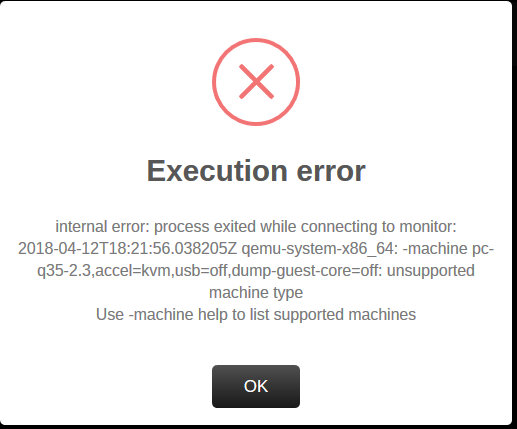
Squid- you are the MAN. I am able to start my windows VM. thank you sir! there is one issue that I'm still trying to figure out. I have a Mac VM as well that has always worked. I get an error (screen shot below) when trying to start it. Here are the logs. If you need more diags, etc. please let me know. 2018-04-12 18:19:13.072+0000: starting up libvirt version: 4.0.0, qemu version: 2.11.1, hostname: Emperor 2018-04-12 18:19:13.072+0000: Domain id=1 is tainted: high-privileges 2018-04-12 18:19:13.072+0000: Domain id=1 is tainted: custom-argv 2018-04-12T18:19:13.097941Z qemu-system-x86_64: -machine pc-q35-2.3,accel=kvm,usb=off,dump-guest-core=off: unsupported machine type Use -machine help to list supported machines 2018-04-12 18:19:13.149+0000: shutting down, reason=failed 2018-04-12 18:21:06.816+0000: starting up libvirt version: 4.0.0, qemu version: 2.11.1, hostname: Emperor 2018-04-12 18:21:06.816+0000: Domain id=2 is tainted: high-privileges 2018-04-12 18:21:06.816+0000: Domain id=2 is tainted: custom-argv 2018-04-12T18:21:06.841592Z qemu-system-x86_64: -machine pc-q35-2.3,accel=kvm,usb=off,dump-guest-core=off: unsupported machine type Use -machine help to list supported machines 2018-04-12 18:21:06.861+0000: shutting down, reason=failed 2018-04-12 18:21:56.013+0000: starting up libvirt version: 4.0.0, qemu version: 2.11.1, hostname: Emperor 2018-04-12 18:21:56.013+0000: Domain id=4 is tainted: high-privileges 2018-04-12 18:21:56.013+0000: Domain id=4 is tainted: custom-argv 2018-04-12T18:21:56.038205Z qemu-system-x86_64: -machine pc-q35-2.3,accel=kvm,usb=off,dump-guest-core=off: unsupported machine type Use -machine help to list supported machines 2018-04-12 18:21:56.089+0000: shutting down, reason=failed Below is the error window... Any help is appreciated!
-
Thanks Squid- thats just it. I can't even view the settings any longer. Diags are attached. Any help is appreciated! emperor-diagnostics-20180412-1144.zip
-
In fact, I do not even see anything on the VM's page. No option to start existing, no option to create new VM

-
right...besides you i guess.
-
I just upgraded to 6.5 and my VM's are gone as well. VM's are enabled, but they are gone. Has anyone else seen this?
-
Hi SIrG- Still love the server... had a question. was reading on line about blocking IP addresses from connecting and wasn't sure if this was available in the implementation you have? Found below on this website: http://www.proftpd.org/docs/howto/ConnectionACLs.html <Limit LOGIN> Order deny,allow # -- Add blacklisted addresses here -- Deny from ... Deny from ... # Many more Deny from lines # Allow everyone not explicitly blacklisted AllowAll </Limit> Been trying to test but it doesn't seem to be working. I may be screwing something up, but was curious if it would even work at all? Let me know when you get a chance! Thanks- Al ****** I figured it out. It was an issue between the keyboard and chair (in other words...me). Deny statements work just fine!
-
727 days currently. my old 5.04 server that was my first one. still running.
-
SIrG!!! thank you so much! I appreciate the commands. worked like a champ. I am a big fan of your FTP server by the way...has saved me a ton of time!
-
Thanks SirG... so i had tried to use a directory on a share i created, and i think i am close. but i have hit the wall on my linux kung fu. tried googling and only confused myself even more. so i just want to give everyone permissions. here is the share path: /mnt/user/media and i have a dir called xfer. can you help me with my chmod command? i guess i am just not linux capable... Thanks in advance!
-
Hi SirG- Am trying to log connections and transfers. I edited the proftpd.conf file located in /flash/config/plugins/proftpd and tried to point it to a share, however it failed. i then tried to uncomment your commented path (above), restarted the plugin and it still does not log the transfer. any ideas what i am doing wrong? here is what i have in the file: # Control Logging - comment and uncomment as needed # If logging Directory is world writeable the server won't start! # If no SystemLog is defined proftpd will log to servers syslog. #SystemLog NONE #SystemLog /boot/config/plugins/ProFTPd/slog #TransferLog NONE TransferLog /boot/config/plugins/ProFTPd/xferlog #TransferLog /media/xfer/xferlog WtmpLog NONE
-
Does anyone use this docker? Anyone able to give me a pointer (or 2)?
-
I think I posted this last question in the wrong thread. sorry about that. Here it is.. I am clearly a newb....So I have CUPS loaded and am able to install my USB printer. I chose to share printer. Now, I am trying to add the printer to my laptop using this link: https://zedt.eu/tech/windows/installing-an-ipp-printer-in-windows-10/ but am not sure what the printer name should be. I have tried http://IP address:631 and when it prompts me to login when I hit browse, I can enter the CUPS ID and password but it does NOT show any printers listed. What is the "share name" of the printer? I have a queue name but its pretty large and when sharing the printer I don't see how to choose a more friendly share name. I also need to setup google cloud print, but am thinking first things first... Anyone able to give me some pointers? Thanks in advance Al
-
I am clearly a newb....So I have CUPS loaded and am able to install my USB printer. I chose to share printer. Now, I am trying to add the printer to my laptop using this link: https://zedt.eu/tech/windows/installing-an-ipp-printer-in-windows-10/ but am not sure what the printer name should be. I have tried http://IP address:631 and when it prompts me to login when I hit browse, I can enter the CUPS ID and password but it does NOT show any printers listed. What is the "share name" of the printer? I have a queue name but its pretty large and when sharing the printer I don't see how to choose a more friendly share name. I also need to setup google cloud print, but am thinking first things first... Anyone able to give me some pointers? Thanks in advance Al
-
Thank you Squid!!! I had gone into the edit mode thinking to find it there, but realized I didn't use the advanced view. Thank you, was able to login.
-
I am not able to find any topics on this which makes me think I'm doing something VERY wrong. I installed the CUPS docker and attempted to get to the gui. it prompts for a user and password (which sorta surprised me) so I figured I would root. Doesn't work. tried any ID I have on the server and none of them work. Can someone please tell me what the heck I am doing wrong??? Thanks in advance. Al
-
Thanks saarg. I ended up typing it manually as paste wouldn't work for me. Thanks for verifying others had the issue too. I couldn't find any other posts about it.

