





Armed Ferret
Members
-
Joined
-
Last visited
Everything posted by Armed Ferret
-
Getting <Response code="503" title="Maintenance" status="Plex Media Server is currently running database migrations."/>. So Im guessing my Db is corrupted. I cant figure out how to repair it. I tried stopping the container, renaming com.plexapp.plugins.library.db to com.plexapp.plugins.library.db. , starting the container, but still got the same error. The only thing Im really interested in keeping, is my users list. Everything else can be resync'd. Any ideas on how to get this working again?
-
I enabled Tailscale yesterday and I am unable to access SAB. Radarr and Sonarr work fine. But when I connect to Sab, I get "External internet access denied - https://sabnzbd.org/access-denied" The logs show: "2025-04-22 16:44:54,001::INFO::[notifier:157] Sending notification: Warning - Refused connection from: 100.X.X.X Mozilla/5.0 (Windows NT 10.0; Win64; x64) AppleWebKit/537.36 (KHTML, like Gecko) Chrome/135.0.0.0 Safari/537.36] (type=warning, job_cat=None)" 100.x.x.x is the tailscale network. My unraid server is on the 192.X network. Im assuming it has to do with that. I saw someone mentioned to look at at Q4 in the github, but Im not understanding it. Do I need to go into edit in the SAB settings and add a variable? I am not see en var or LAN Network.
-
Hello, My docker.img stopped suddenly. After looking through the logs, I noticed my cache drive was full. When I hit mover, nothing would happen (mover has worked in the past.). I saw this error in the diagnostic logs for my cache drive: Feb 4 21:05:18 Prometheus root: mount: /mnt/cache: wrong fs type, bad option, bad superblock on /dev/nvme0n1p1, missing codepage or helper program, or other error. Feb 4 21:05:18 Prometheus root: dmesg(1) may have more information after failed mount system call. Feb 4 21:05:18 Prometheus emhttpd: shcmd (12122): exit status: 32 Feb 4 21:05:18 Prometheus kernel: XFS (nvme0n1p1): Invalid superblock magic number Also, the smart test wouldn't run on the cache drive. I tried removing the cache from the array and adding it back to see if it would do a file system check and possibly fix it. It didn't. Any help would be appreciated. Thanks Unconfirmed 319673.crdownload
-
Im having the same issue but Im not sure how to do this with an Unraid docker.
-
I run plex on ubuntu to take advantage of hardware transcoding. I am trying to automount my shares, but when I restart autofs.service I cannot see the shares anymore. username@plex:~$ ls /mnt/nfs ls: cannot access '/mnt/nfs/tv': No such file or directory ls: cannot access '/mnt/nfs/music': No such file or directory ls: cannot access '/mnt/nfs/movies': No such file or directory movies music tv However, when I stop the autofs.service I can ls to those folders. username@plex:~$ ls /mnt/nfs/movies username@plex:~$ Anyone know how to get this working?
-
Did you try rebooting unraid? Did that resolve the error?
-
Is your downloads share going to a cache drive? Are you seeing any errors on that drive? You can check by running this command from your unraid terminal - btrfs dev stats /mnt/cache If any of them have a count then try rebooting unraid. Then check to see if you are still getting a count. Another option you could do is turn off "Use Cache Pool" under Shares > Downloads. I'm operating under the impression that your /data is mapped to your downloads folder in SAB. I believe I had this issue as well. I was no longer able to get content from Sonarr and Radarr. Ans I also had those other .py errors as well. I had a bunch of errors on my cache drive. So I rebooted to see if it was generating any new errors. After the reboot, my cache drive no longer connected. I had to delete the Downloads share, recreate it (and the incomplete and complete folders within). The reason for this was that SAB showed 0GB Folder. And when I tried to connect to the complete and incomplete folders in SAB it would throw a connection error Then I had to reinstall SAB because it wasn't connecting and I read somewhere that the Downloads Share needs to be created first before installing SAB. That resolved my issue So cliff notes: - Run '- btrfs dev stats /mnt/cache' to check for errors - Even if you don't have any, I would still try a reboot - If cache still shows and no issues were found you can do the following + Delete your Downloads share from termlinal. Its probably under /mnt/user/ + to delete a folder you will need to use the 'rm -r downloads' directory + Now remove SAB (Make sure you take a screenshot of the docker settings just in case) + Create the new share and the complete and incomplete folders + install sab + once installed, launch SAB and set it up. Make sure you switch the folders from the default location to /data/incomplete and /data/complete + You will need to update the API from SAB on Sonarr and Radarr Now test. Hopefully I am making this clear. Im doing this all from memory.
-
Its the same drive. How do I change it back?

-
I am getting "Docker Image Failed to Start" on the Docker tab I see this error in the logs Mar 8 09:54:42 Prometheus emhttpd: shcmd (166): /usr/local/sbin/mount_image '/mnt/disks/Samsung_SSD_860_EVO_500GB_S59UNJ0N109855F/system/docker/docker.img' /var/lib/docker 50 Mar 8 09:54:42 Prometheus root: Creating new image file: /mnt/disks/Samsung_SSD_860_EVO_500GB_S59UNJ0N109855F/system/docker/docker.img size: 50G Mar 8 09:54:42 Prometheus root: ERROR: failed to zero device '/mnt/disks/Samsung_SSD_860_EVO_500GB_S59UNJ0N109855F/system/docker/docker.img': Input/output error Mar 8 09:54:42 Prometheus root: btrfs-progs v5.10 Mar 8 09:54:42 Prometheus root: See http://btrfs.wiki.kernel.org for more information. Mar 8 09:54:42 Prometheus root: Mar 8 09:54:42 Prometheus root: failed to create file system I looked in that location and I dont even see the docker.img. I searched the entire file system for docker.img via terminal with 'find / name docker.img' and it says no file exists When I look under the Apps tab and try to uninstall docker, docker seems grayed out. I have attached my diagnostics logs. unraid-diagnostics-20220308-1159.zip
-
If you click on the sonarr icon, click on it and go to edit settings, what is the ports for sonarr and what is the puid and pgid? 401 means you are not authorized, as Im sure you are aware. From the ports you provided there are 6's in front of some of your ports. IE SAB, Sonarr, radarr.
-
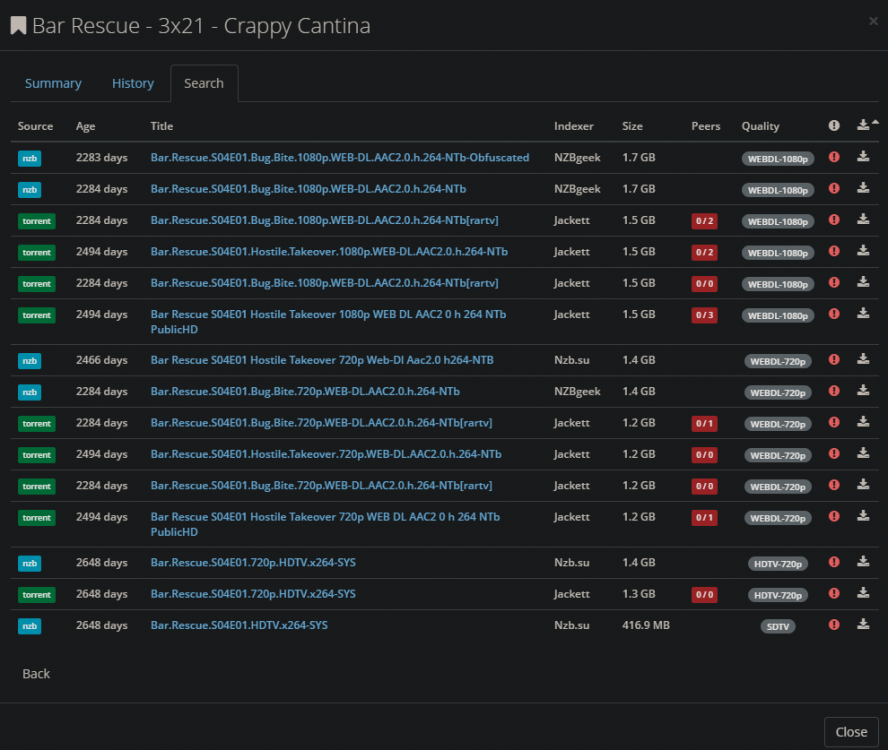
Hi, So when I search for an episode in Sonarr, for instance bar rescue I see s03E21 but when I click on the manual search button it only shows S04E01. This happens for a few episodes. And when I hover over the red circle it just says that the file is larger than the maximum allowed. It does not say "Wrong Series". I read a post that says refreshing the series in drone fixed this but I think they were running docker on an actual PC and not in unraid. https://forums.sonarr.tv/t/wrong-season-numbering/1008/8 Can anyone help with getting sonarr to show the correct episodes when I click manual search? Thanks
-
left click icon in deluge unraid web ui, select 'web ui' and enable cheats This does not work when you sleepct multiplayer. You just join the server. I guess I left that part out. no. I actually found a command that works. 1. Launch the unraid terminal 2. Run the following command "docker exec -u nobody -it binhex-minecraftserver screen -r minecraft". replace 'binhex-minecraftserver' with whatever the name of your docker is. Then the console launches. Thanks for the help.
-
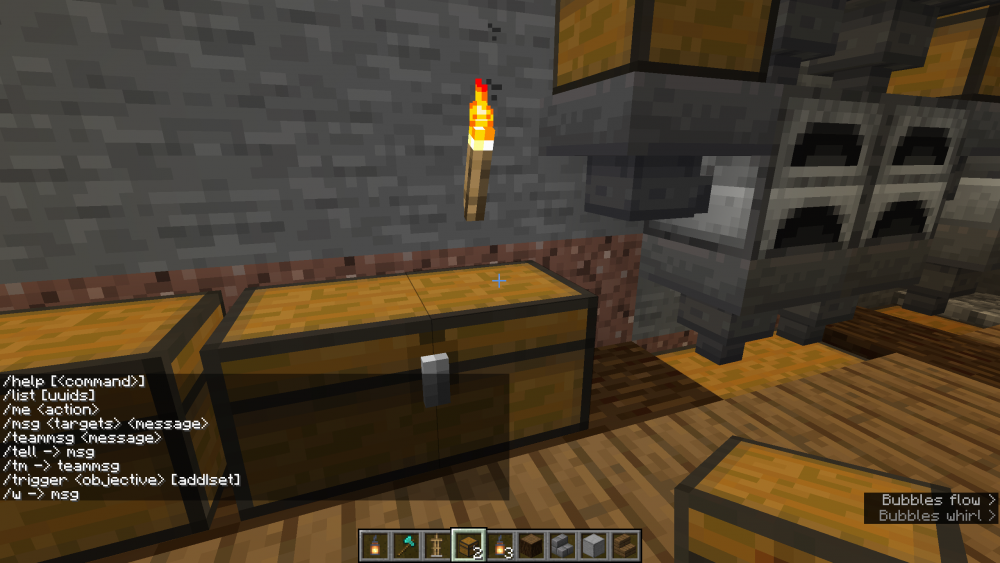
I moved my Single player world to my minecraft server. It launches fine and all of my buildings are there. Cheats are enabled on the Single Player world. But when I launch the server I am unable to do any commands like changing the game mode. It only gives me a list of the commands in my screenshot. I tried launching the console by using the following command but I get an error. docker exec -u nobody -it binhex-minecraftserver /usr/bin/minecraftd console https://github.com/binhex/documentation/blob/master/docker/faq/minecraftserver.md OCI runtime exec failed: exec failed: container_linux.go:346: starting container process caused "exec: \"/usr/bin/minecraftd\": stat /usr/bin/minecraftd: no such file or directory": unknown So from the error its saying that it doesnt exist there. Im sure it has to do with me having my appdata on my unassigned devices drive instead of the default location. I looked in the binhex-mincraftserver folder but cant find the path to the minecraftd Below is the path to the minecraft folder on my unassigned devices. /unraid_unassigned_disks/Samsung_SSD_860_EVO_500GB_S59UNJ0N109855F/appdata/binhex-minecraftserver/ What I am looking to do is enable cheat commands on my Minecraft server and the only way I can find is through the console. I am open to other ideas as well. So summary 1. How do I access the Minecraft Console through Unraid terminal? 2. Is there another way I can get the in-game cheat commands enabled if I cannot access the console? Thanks
-
Hello, In SABNZBD I am getting "Cannot create backup file for /config/sabnzbd.ini.bak" I went into the location of the backup file and renamed it to sabnzbd.ini.bak.old. I saw the system created a new sabnzdb.ini backup file but Sab is still throwing the error. I have the cache saving to an unassigned device SSD instead of the array. I have no issues with SAB except for this error being thrown. Any help would be appreciated. Thanks
-
In Deluge if you enable Labels through Plugins then it will add the TV or Movie Label. Thats how it knows where to move the media to.
-
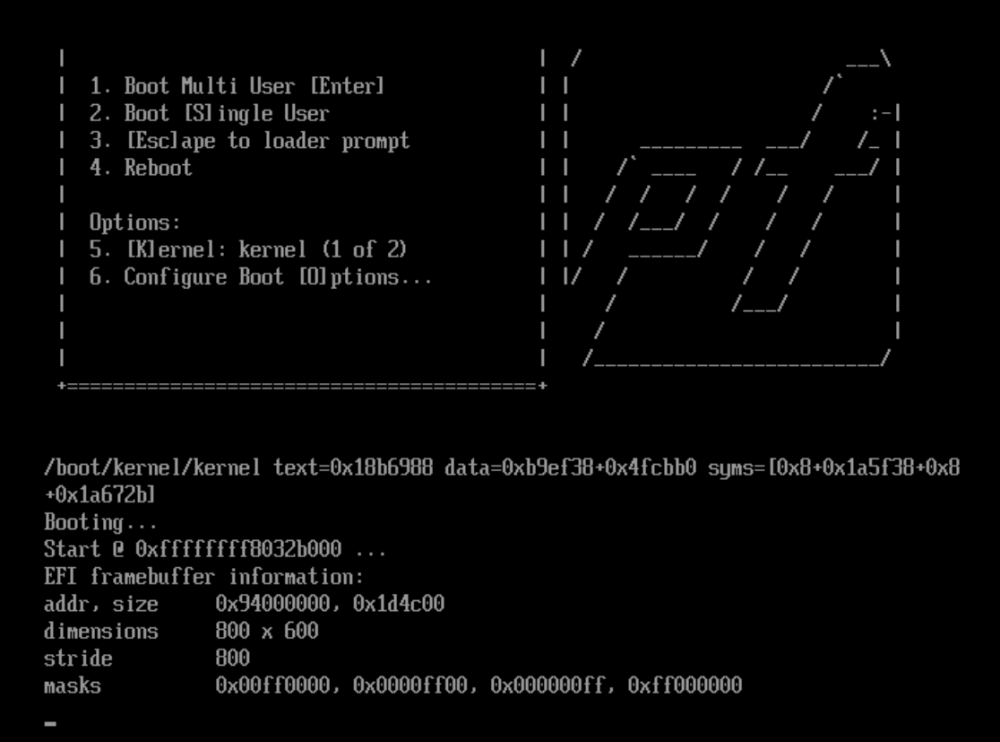
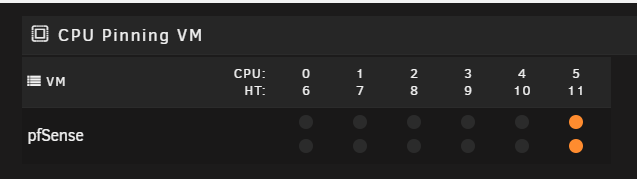
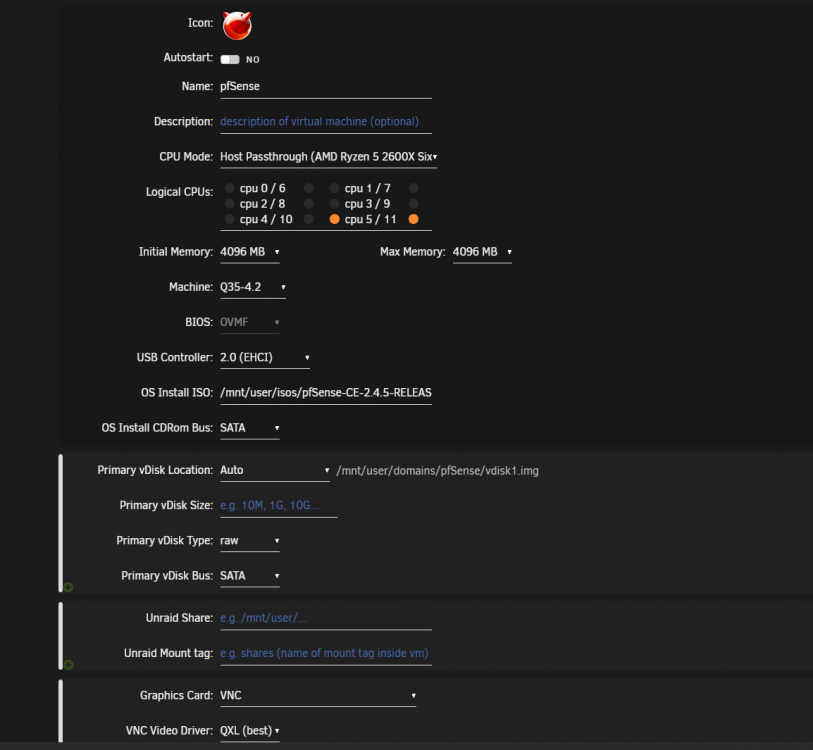
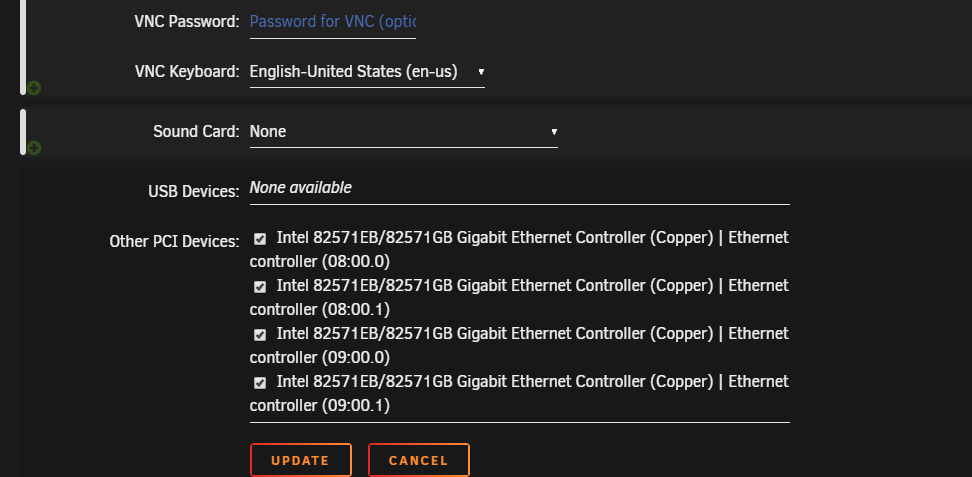
Hello. When I launch PFSense for the first time I get stuck on the black screen where it says booting... and nothing else happens. I have attached my logs from my PFsense Vm. I see the following errors 2020-05-24 02:05:07.735+0000: Domain id=1 is tainted: high-privileges 2020-05-24 02:05:07.735+0000: Domain id=1 is tainted: host-cpu char device redirected to /dev/pts/0 (label charserial0) 2020-05-24T02:05:18.252838Z qemu-system-x86_64: vfio-pci: Cannot read device rom at 0000:08:00.0 Device option ROM contents are probably invalid (check dmesg). Skip option ROM probe with rombar=0, or load from file with romfile= 2020-05-24T02:05:18.254745Z qemu-system-x86_64: vfio-pci: Cannot read device rom at 0000:09:00.0 Device option ROM contents are probably invalid (check dmesg). Skip option ROM probe with rombar=0, or load from file with romfile= 2020-05-24T02:05:18.256320Z qemu-system-x86_64: vfio-pci: Cannot read device rom at 0000:08:00.1 Device option ROM contents are probably invalid (check dmesg). Skip option ROM probe with rombar=0, or load from file with romfile= 2020-05-24T02:05:18.257872Z qemu-system-x86_64: vfio-pci: Cannot read device rom at 0000:09:00.1 Device option ROM contents are probably invalid (check dmesg). Skip option ROM probe with rombar=0, or load from file with romfile= I did some searches and someone mentioned it has to do with the CPU pinning but I pinned 2 threads on 1 core. I even tried switching the pinning to a different core. I had 1 and 7 pinned but now I have 5 and 11. So Im a little lost here. I used the vfio plugin to get passthrough working. I also had to enable ACS override to get the IOMMU groups broken up. Here is my pfsense VM config Part 1 Part 2 I have attached my pfsense logs and my IOMMU group in txt files. Any help would be appreciated. PFsense logs.txt IOMMU Groups.txt
-
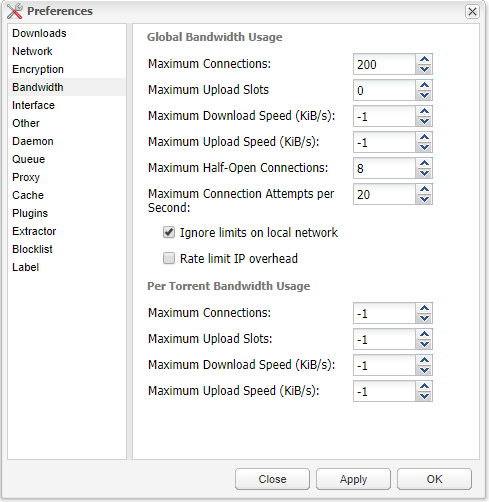
Does anyone have some optimal settings for deluge for speed? These are my settings but the speeds are very slow :
-
So I am trying to mess with the Ads list because I am still seeing Ads on places like Forbes.com and Amazon. I added all the lists from Wally3ks Blocklist https://wally3k.github.io/ But they are not working. Ive uploaded the logs In the logs I see a bunch of invalid domain errors. Here are some examples: [i] Target: http://sysctl.org/cameleon/hosts [i] Received 20569 domains, 20569 domains invalid! Sample of invalid domains: - # Last updated : 2018-03-17 - 127.0.0.1 localhost - 127.0.0.1 0.r.msn.com - 127.0.0.1 0.start.bz - 127.0.0.1 000dom.revenuedirect.com [i] Target: https://s3.amazonaws.com/lists.disconnect.me/simple_tracking.txt [i] Received 38 domains, 3 domains invalid! Sample of invalid domains: - # Basic tracking list by Disconnect - # License: GPLv3 - # Contact: support [at] disconnect.me [i] Target: https://s3.amazonaws.com/lists.disconnect.me/simple_ad.txt [i] Received 2705 domains, 3 domains invalid! Sample of invalid domains: - # Ad filter list by Disconnect - # License: GPLv3 - # Contact: support [at] disconnect.me Music I did some research and people are saying that "easy lists" are no longer being supported. So how do I add them then? Do I just add the domains in the files individually? Or is this a different issue? pihole logs.txt
-
Your Thumbnails should be downloaded on your array. They shouldn't be accessing them across the internet. Perhaps Pihole is adding some extra load on your unraid server. Or the location where plex metadata is has too much data on it. Have you tried moving your Plex Metadata to a cache folder? This sped up my resolution of Thumbnails on all of my devices.
-
Do you have IPv6 enabled on pihole for some reason?
-
What port are you using? Is there a port conflict on Unraid? Can you telnet to that ip on the port you are using for pihole?
-
Hey Guys..I had this issue and resolved it by doing the following: First go into Settings > Network and make sure Bridging is enabled. Next go to Settings > Docker and make sure "Host Access to Custom Networks" is enabled. If they are both enabled and you still do not have the br0 interface run the following commands from terminal to rebuild the network stack. rm /var/lib/docker/network/files/local-kv.db (First ran this to delete the local-kv.db) /etc/rc.d/rc.docker restart (then this restarted the docker service) Now these are two separate commands. Once I did all of that, the interface came up for me. Let me know if this works.
-
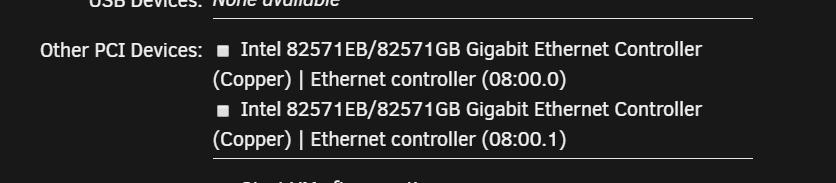
I used the vfio-config plugin to get a 4 port NIC to pass through. I had to enable acs override to get the IOMMU groups to break up first. Then I used the plugin to create the cfg file. These are the for ports I am trying to pass through IOMMU group 25: [8086:10bc] 08:00.0 Ethernet controller: Intel Corporation 82571EB/82571GB Gigabit Ethernet Controller (Copper) (rev 06) IOMMU group 26: [8086:10bc] 08:00.1 Ethernet controller: Intel Corporation 82571EB/82571GB Gigabit Ethernet Controller (Copper) (rev 06) IOMMU group 27: [8086:10bc] 09:00.0 Ethernet controller: Intel Corporation 82571EB/82571GB Gigabit Ethernet Controller (Copper) (rev 06) IOMMU group 28: [8086:10bc] 09:00.1 Ethernet controller: Intel Corporation 82571EB/82571GB Gigabit Ethernet Controller (Copper) (rev 06) The config file adds all 4 of them BIND=08:00.0 08:00.1 09:00.0 09:00.1 But I only get 2 ports to show in my VM When I look in the plugin I only have a green orb next to the ones that are being passed through. Any idea how I can get all 4 ports to pass through?

-
I ended up fixing it. I had to do the following: Bridge mode was enabled but in Settings > Docker "Host Access to custom networks" was disabled. So I needed to stop the docker service and enable that. Even after doing that I did not see a custom option for network adapter and when I ran the following command there was no br0 interface docker network ls So I did the following to rebuild the network stack rm /var/lib/docker/network/files/local-kv.db (First ran this to delete the local-kv.db) /etc/rc.d/rc.docker restart (then this restarted the docker service) After that I was able to see the br0 interface.
-
I try to run this command. I can remove the local-kv.db but I cannot restart rc.docker. When I do an ls-a to that location, I do not have rc.docker. I am running into the same issue where I cannot select br0 for network device.





