





Mantene
Members
-
Joined
Everything posted by Mantene
-
Oh, it even does it in safe mode. I am ready to throw the box out the window
-
Yes, I read that a while back. And I do not overclock my RAM (or my CPU), I am using approved RAM and all the same RAM in all the slots. Also, my power settings are correct so the c-state should not be an issue. And again, I haven't made any changes to any of that recently and I have been running Unraid for quite some time now. Also, here is a diagnostics from a regular boot - it crashed about 20 seconds after I got this! eeyore-diagnostics-20210504-1730.zip
-
I don't know what is going on. All of the sudden my server is rebooting what seems like every few minutes. I have been running 6.9.2 since it first came out, so it isn't like I am running a beta release. And I haven't made any configuration changes to the server. In fact, I was simply using the Windows 10 VM when it started this behavior. I am attaching the diagnostic data from Safe Mode with the array started. Yes, it seems to work in safe mode. I know that some plugins got updated today but I honestly don't know which ones - unassigned devices? But that shouldn't cause this, right? Please help! eeyore-diagnostics-20210504-1719.zip
-
I don't know what is going on. All of the sudden my server is rebooting what seems like every few minutes. I have been running 6.9.2 since it first came out, so it isn't like I am running a beta release. And I haven't made any configuration changes to the server. In fact, I was simply using the Windows 10 VM when it started this behavior. I am attaching the diagnostic data from Safe Mode with the array started. Yes, it seems to work in safe mode. I know that some plugins got updated today but I honestly don't know which ones - unassigned devices? But that shouldn't cause this, right? Please help! eeyore-diagnostics-20210504-1719.zip
-
I think the @limetech people need to fix this. The new build of Windows 10 still does not allow AMD procs to use Hyper V.
-
Nothing from me. I keep hoping some unraid update will fix this.
-
No one has found a solution to this yet?
-
So I am guessing no one can help. Okay. I will keep playing around.
-
Does anyone have WSL2 working with an AMD processor?
-
wsl1 works. The better wsl2 does not.
-
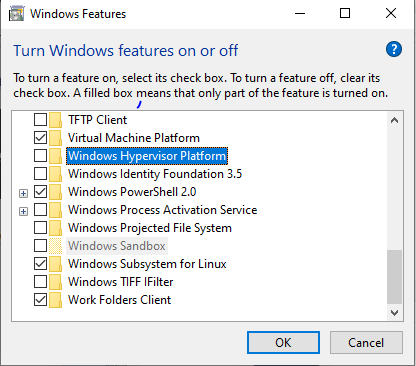
Running Fast Ring on this VM so 19613. As for optional components:
-
I have a Windows 10 VM and would like to get WSL2 working on it, but nothing I try seems to work. I have an AMD Ryzen 3900X. I added kvm_amd.nested=1 to my syslinux.cfg file. I run spaceinvaderone's script to turn on nested vms, and I still get an error when I try to set up WSL2 on my Windows 10 VM. Anyone have any real luck with this? Is there something that needs to be added to unraid by the devs? Any help would be much appreciated. This is what I see when I try to install Ubuntu as the WSL2 distro: Installing, this may take a few minutes... WslRegisterDistribution failed with error: 0x80370102 Error: 0x80370102 The virtual machine could not be started because a required feature is not installed. Press any key to continue... Maybe I missed a step somewhere?
-
Thanks, I did read that before posting. However, I did not think I had any other browser windows open. BUT I DID! On my phone. So annoying. All fixed. Thank you for prompting me to re-check.
-
I am getting a lot of wrong cfrs token errors. Every 20 seconds or so it seems. I have the latest plugins. eeyore-diagnostics-20200413-1008.zip
-
Ok. So I did some experimenting last night and got it to work. This did not work: # TorGuard WireGuard Config [Interface] PrivateKey = ********************************************* DNS = 1.1.1.1 Address = 10.29.1.64/24 [Peer] PublicKey = ************************************************** AllowedIPs = 0.0.0.0/0 Endpoint = 159.65.247.35:443 PersistentKeepalive = 25 This worked: [Interface] PrivateKey = ********************************************* DNS = 1.1.1.1 Address = 10.29.1.64/24 [Peer] PublicKey = ************************************************** Endpoint = 159.65.247.35:443 AllowedIPs = 0.0.0.0/0 Why?
-
As posted above, here is a comparison: So, here is a TunSafe config: [Interface] PrivateKey = ************************************ Address = 10.34.234.162/8 DNS = 1.1.1.1 [Peer] PublicKey = ****************************************** Endpoint = 190.2.141.162:51840 AllowedIPs = 0.0.0.0/0 And here is the TorGuard config: # TorGuard WireGuard Config [Interface] PrivateKey = ********************************************* ListenPort = 51820 DNS = 1.1.1.1 Address = 10.29.1.64/24 [Peer] PublicKey = ************************************************** AllowedIPs = 0.0.0.0/0 Endpoint = 159.65.247.35:443 PersistentKeepalive = 25 Oh, and I removed the ListenPort from the TorGuard conf before importing it.
-
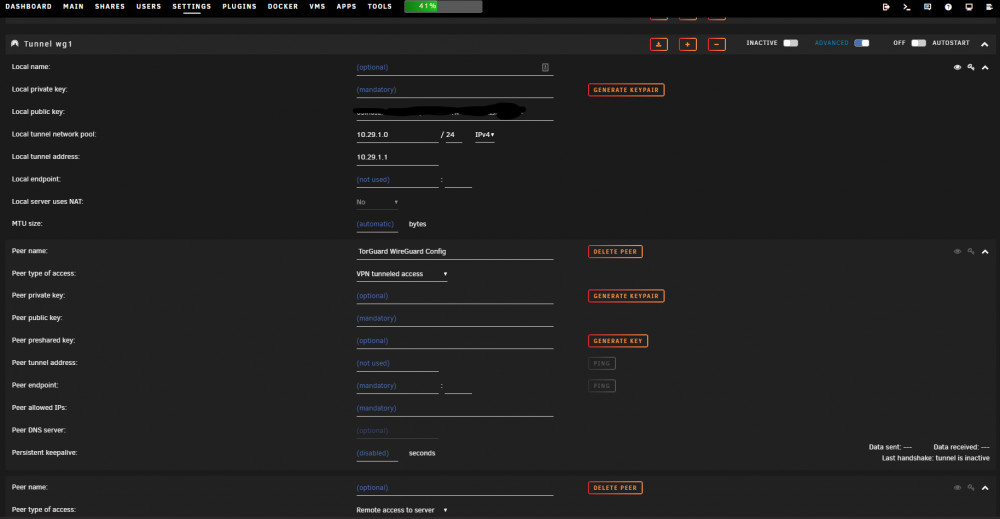
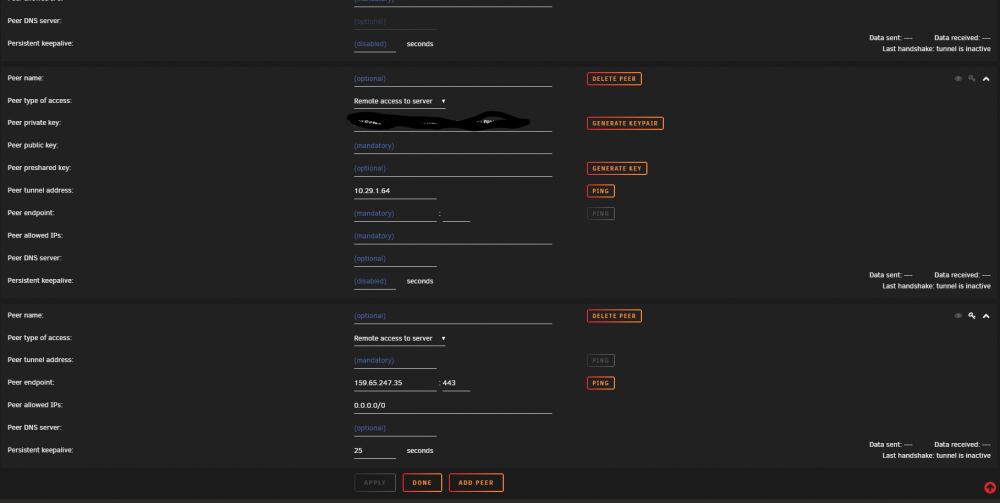
UPNP is off. I updated the plugin. I imported the TorGuard conf. It still doesn't work, though the active switch no longer flashes. It switches to Active, but once you reload the page or navigate away and then go back to vpn settings, it is off. Are there log files I can send you? Here is a screenshot of what the imported tunnel looks like.
-
importing a conf file automatically creates wg1. And I made sure wg0 was turned off before trying this.
-
Unfortunately, that did not solve the problem. When I try to turn it on the active/inactive switch just keeps flashing on and off really fast!
-
Thank you!
-
So, here is a TunSafe config: [Interface] PrivateKey = ************************************ Address = 10.34.234.162/8 DNS = 1.1.1.1 [Peer] PublicKey = ****************************************** Endpoint = 190.2.141.162:51840 AllowedIPs = 0.0.0.0/0 And here is the TorGuard config: # TorGuard WireGuard Config [Interface] PrivateKey = ********************************************* ListenPort = 51820 DNS = 1.1.1.1 Address = 10.29.1.64/24 [Peer] PublicKey = ************************************************** AllowedIPs = 0.0.0.0/0 Endpoint = 159.65.247.35:443 PersistentKeepalive = 25 So, what is going on? Any ideas?
-
Yep, I am running into the same problem with TorGuard. Their config does not seem to work out-of-the-box.
-
This is the best thing ever! Wireguard makes my life so much easier! Thank you!
-
Yeah, I did that at first, but it takes so long with fewer cores. If it could use the nvidia driver it would be much more efficient. Plus the quality of nvenc is actually quite good.
-
@SlrG Thank you for this!!!


