





thunderclap
Members
-
Joined
-
Last visited
Everything posted by thunderclap
-
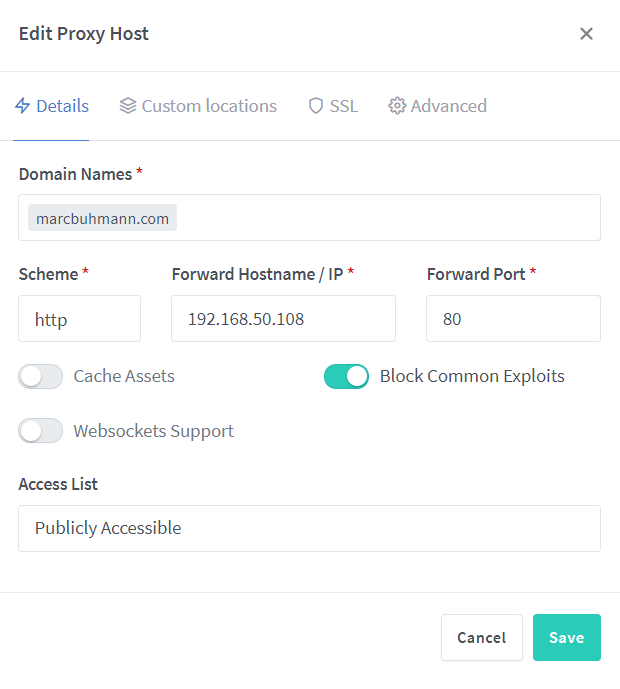
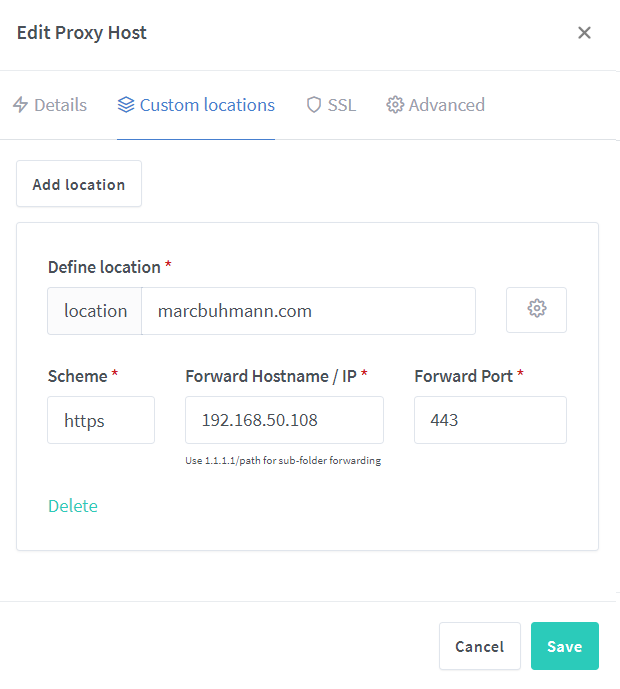
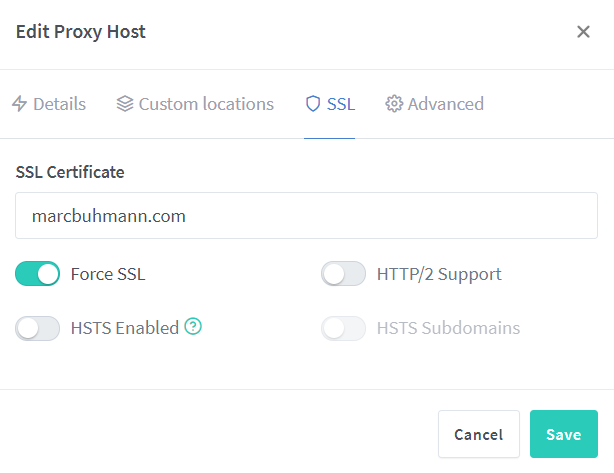
Removed but I'm still getting the too many redirects error.
-
Here are the three tabs I've filled stuff out in, nothing in Advanced
-
For the domain I'm having trouble with or the docker itself?
-
I've attached what I think you're looking for.
-
If you'd like to see what I'm seeing the URL is here. I do see quite a few 301 in the Network list under Developer Tools, not sure how to read it though. Right now I have it pointing from NginxProxyManager to my Ubuntu VM which has VestaCP installed.
-
Accessing via IP+port does work albeit site site is broken; several images won't display. Network tab doesn't show anything questionable, at least to my layman eyes.
-
If you're talking about the DNS I use at home it's NextDNS. As for the host file, are you talking about in the NginxProxyManager docker, the WP docker, or the VM?
-
For my Unraid dockers, I have a domain registered through Namecheap. Namecheap points to Cloudflare where I use CNAME's to point the subdomains to DuckDNS and that then points to NginxProxyManager on Unraid. NginxProxyManager then points to the IP of Unraid + the docker port. (eg. Nextcloud, Tautulli, etc.) These all work flawlessly. For other domains (not subdomains) I've tried several set ups. They're registered through Namecheap, Namecheap points to Cloudflare where I use a CNAME to point to DuckDNS that then points to NginxProxyManager on Unraid. This is where I've tried several varying configurations. If I use a VM I point the domain name to the VM's IP. Error. If I use a Wordpress docker instead of the VM I use the Unraid IP + the WP docker port. Error. I've cut out Cloudflare and configured Namecheap to use a CNAME to point to DuckDNS. If I point to the docker or VM I get an error.
-
So I decided to cut out the VM and try setting up Wordpress in dockers instead. Doing it this way everything is passed through exactly like my subdomains: Namecheap --> Cloudflare --> NginxProxyManager. I figured doing this would make it works since I have no issues with my subdomain dockers. Wrong... I'm still getting too many redirects. So I'm stumped, does anyone have an ideas how to resolve this? Very much appreciated.
-
I'm hoping someone can give me a hand with a problem. I'm using NginxProxyManager with Cloudflare and DuckDNS for several dockers which all work fine. However, I also have an Ubuntu VM running with a couple of Wordpress sites and a Mastodon instance with it's own dedicated IP. Regardless if I send the domains directly to DuckDNS or send to Cloudflare first, I can't get the sites to load. I always get a too many redirects error. On the Ubuntu server I have VestaCP installed because I let a friend control his own domains. Regardless, I'm not sure what is causing the error. I've tried disabling SSL in NginxProxyManager as well as VestaCP but no matter what I do I get the error. It's all a little convoluted but here's what I've tried: Namecheap -> Cloudflare -> DuckDNS -> NginxProxyManager -> VestaCP Namecheap -> DuckDNS -> NginxProxyManager -> VestaCP I've tried disabling SSL first in NginxProxyManager and then in VestaCP thinking having SSL enabled in both was causing the issue but it wasn't. If I remove both then the error changes to connection lost. Does anyone have a solution to resolving the issue?
-
I'd be interested in this too. I would love to set up a Mastodon docker instance in Unraid.
-
I tried following this guide but on the third bash command "RAILS_ENV=production bin/bundle exec rake mastodon:webpush:generate_vapid_key" it generates an error and no key is generated. Any suggestions?
-
I'm having an interesting problem with LetsEncrypt. Two issues I've experienced I would like to try and resolve: if I use use DNS through Cloudflare my subdomains become unbearably slow. If I do the subdomains through my registrar and forego Cloudflare, anytime I add or remove a subdomain LetsEncrypt reports a firewall/timeout error for several hours rendering my subdomains inaccessible. Does anyone know why this is happening?
-
You need to remove the .step file in the /data/updater<random characters>/ folder. SSH in and rm .step
-
I’ve tried both stable and beta channels.
-
I’m hoping someone can point me in the right direction to update. NextCloud is showing that I’m running 18.0.7 and that the latest version is 18.0.10 but it keeps hanging on the update. I also know version 20 just came out. How does one upgrade to the latest version? Thanks.
-
I'm trying to get the 'Play Trailer' option working, yet every time I click it I get a "Playback Error: Conversion failed. The transcoder exited due to an error." I have the trans_dir folder set to /transcode in the docker but that doesn't seem to work. I looked at the FAQ on Github and tried setting transcode to RAM. I created a new host path (Host Path 1), Container Path is set to /transcode and Host Path is set to /tmp/ Any ideas? UPDATE: It turns out my servers time changed after a BIOS update and it was causing the problem.
-
Sorry if this has been asked (didn't see it if it was): I have a large photo collection already on my Unraid server in its own directory. Is there a way to link Piwigo to just look there and populate its database with those photos instead of uploading them all again? Update: I found references to creating a symlink for galleries to where my photos are, which I did, but I keep getting the error: [./galleries/] PWG-ERROR-NO-FS (File/directory read error) It looks like this might be due to conflicting ownership and permissions of the symlink and directory and files, however per suggestions online everything matches (ownership is set to nobody:users and permissions set to 777). Any suggestions?
-
It's been a crazy couple a days and I've finally been able to pop on. Do you still need assistance? Feel free to PM me.
-
Hello everyone. Let me first preface this with saying that I'm not 100% it's this container that's causing my problem, but since it's the one that points to Cloudflare it's a good candidate. So I have several subdomains set up that have worked fine for months. Connection and speed were great. Within the last few weeks, though, the connection via subdomains have become sluggish and sometimes don't even connect properly. All the subdomains in Cloudflare are SSL and are directed to DuckDNS to ensure proper direction. If I connect via IP locally or use the DuckDNS with the proper port it all works as it should, it's just when I try to connect via Cloudflare subdomain I experience issues. Has this happened to anyone else? If so, any suggestions? I've checked the Letsencrypt log shown in the docker area but there are no errors. Thanks.
-
So I finally got it working: the trick is to NOT change the port in the serverconfig file, but to leave it at 26900. Who would have thought? Once I did that the port I assigned the container to opened right up.
-
Yes, I changed all the port numbers in the container as well as the server config file. As I previously mentioned, I installed the second container using the latest stable build (18.4) using your install and it worked along side the first container install. It's only after I upgraded to the latest experimental that it stops working. Oh well, maybe it's something with the latest A19 build of 7DTD. I realize it's hard to troubleshoot for you since you don't have the game and I do appreciate you taking the time to try and help.
-
Same usage as far as I can tell. I even disabled the A18.4 server to see if there was a conflict but there wasn’t.
-
Yeah, that's what's confusing me. I even deleted the A19 docker, created a new docker using the latest stable and it works fine. I then added the -beta latest-experimental code and once it updates I can no longer get through the port. It's really weird.
-
I'm not what's going on, but with the beta the server seems to have an issue starting and doesn't allow the port to be opened. Anyone else experiencing this with the A19 of 7DTD? This is what's in the log: ---Prepare Server--- ---Moving SaveGameFolder location--- ---Savegame location found--- ---Moving UserDataFolder location--- ---UserDataFolder location found--- ---Server ready--- ---Start Server--- Found path: /serverdata/serverfiles/7DaysToDieServer.x86_64 [S_API FAIL] SteamAPI_Init() failed; SteamAPI_IsSteamRunning() failed. Setting breakpad minidump AppID = 251570
