





dja
Members
-
Joined
-
Last visited
Everything posted by dja
-
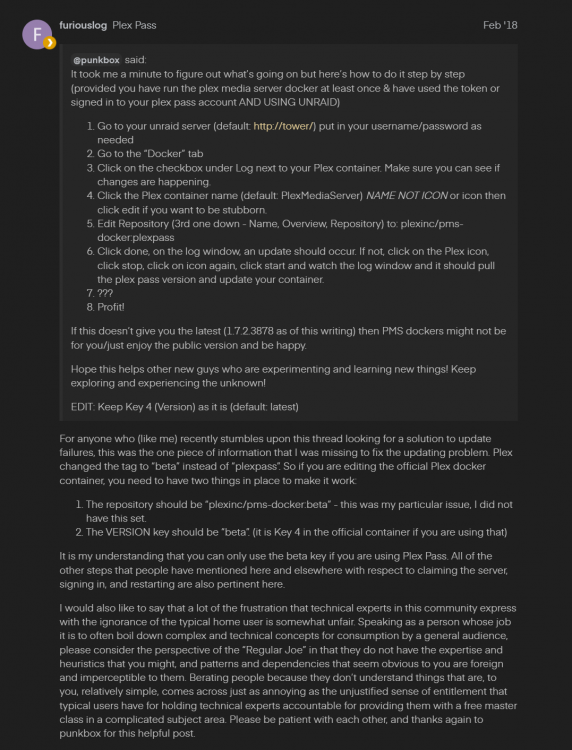
Thanks for the info here @abhi.ko. Why on earth does Plex NOT list this litterally ANYWHERE in the docker page or Github!??! Anyway, it should be noted (as you linked!) - Plex has CHANGED it to require 'beta' now, NOT plexpass. So make sure you have repository and version set to that!!! https://forums.plex.tv/t/plex-docker-wont-update-to-latest-plex-pass-version/193548/11 ALSO- the official guide: https://forums.plex.tv/t/guide-official-plex-docker-for-unraid-update-to-plexpass-beta-version/627515
-
For the standard plex docker just as extra parameter. I added my nvidia card as well for testing. Both worked as added. --device=/dev/dvb/ --runtime=nvidia For binhex I added both ways, as a variable and extra parameter. Tried both separately and together.
-
Having an issue with binhex-Plexpass docker seeing DVB card as implemented by @ich777 DVB driver. Official plex docker DOES work. I've tried passing the /dev/dvb value both ways and it doesn't appear when attempting to add in Plex. Anything I can try? For background and sorry if this is a cross-post. From the DVB thread:
-
No, sorry for the confusion. I do not have TVHeadend installed now, I only added that as a troubleshooting step to verify the DVB was showing in docker- then I removed it. I read previously in the thread that the official Plex docker worked but @binhex Plex docker did not, I can confirm that. I tried the official Plex docker and it is working. I have moved Plex server from a Windows install before so I guess it wouldn't be terrible to do via Docker and a NVME cache drive. Hardest thing is walking all my family/friends through adding a new server again...that's painful! lol Maybe there is a way to move the files/config without adding a new server name, but my Plex Docker'Fu isn't that good.
-
Thanks @ich777 for the work on this! I'm not getting my WinTV quad to show in binhex Plex docker. Does show in TV headend. I saw this was a issue a few pages back...did anyone sort this out? I've tried passing the /dev/dvb value both ways and it doesn't appear when adding in Plex. Edit- On official docker for Plex is DOES appear, so I guess it's a docker issue. If there is some magic to make it appear in @binhex version that would be greatly appreciated! If not, I guess I need to switch my entire install over to that. Uuuugh...Please let me know how much beer and/or coffee this will take!
-
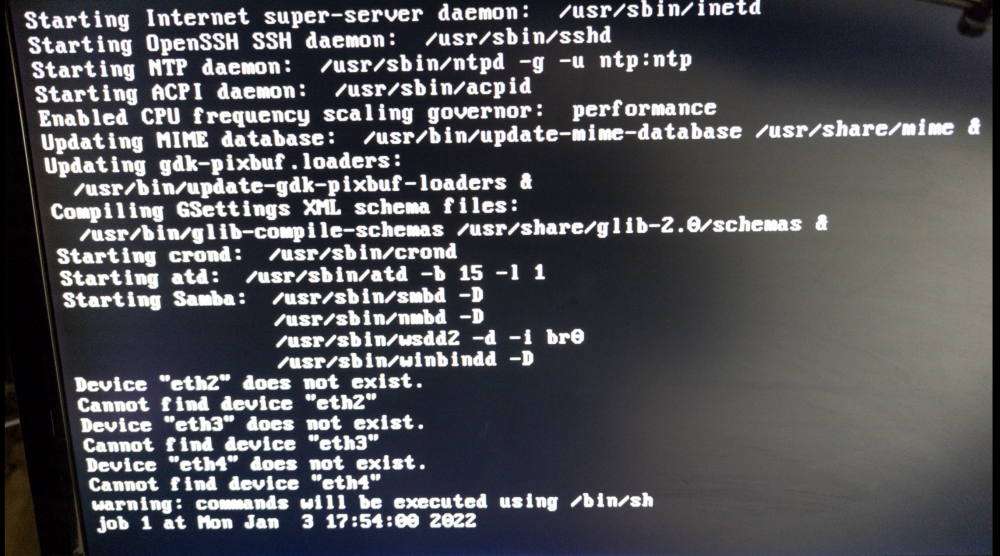
For whomever this might help- my network config was eff'd up in some way. At one point I had a 4 port network card (bond) and later removed it. The entries were still present in /boot/config/network.cfg. It did not seem to cause an issue until today. I did notice on rebooting my server that it would attempt to load the adapters and fail. I never thought much of it...but it must have caused an issue today. Perhaps this was exasperated by me changing the network setting for Docker to macvlan. I understand this has caused issues where the GUI would not load. Either way- I deleted the network.cfg file after testing & removing the recently updated plugins that may have caused an issue. (I added them back before deleting) This resolved the issue for me. I did set macvlan BACK to ipvlan in GUI safe mode in my troubleshooting prior to the delete. Not sure if that helped our not. I changed that initially to troubleshoot issues with a docker communicating to another docker image.
-
Yes I have done that and it loads fine. How would I tell which plugin is causing the issue and isolate what the problem might be?
-
No errors found. Here is what my terminal shows on the connected monitor. It is just stuck here. I have SSH, are there any logs I can grab manually?
-
I saw another post about dockers and macvlan, which I DID just change. I was able to change it back from safe GUI mode and reboot but no dice so far. I'll try the check.
-
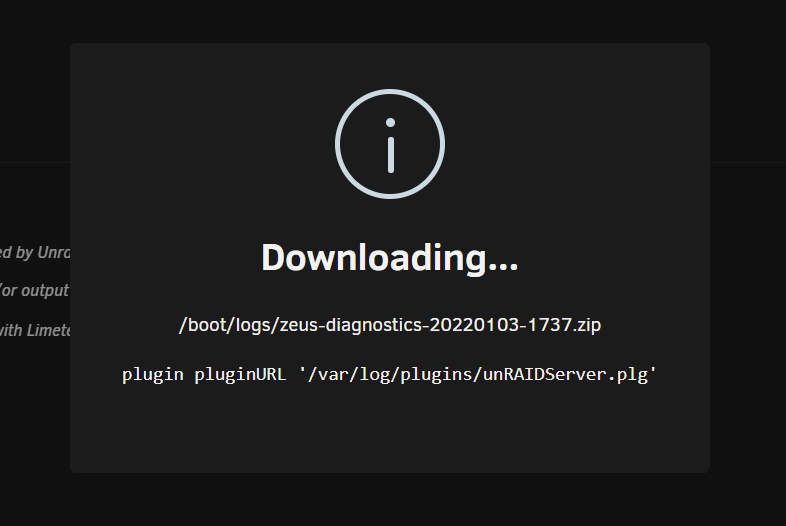
Help please! A bit stuck here. Earlier today I updated unassigned devices and community apps plugins. I noticed I could load the community apps page earlier and rebooted and now I can't get the GUI to boot without safe mode no plugins. I'm trying to run diagnostics but it is stuck at the process shown in the screen shot. I have SSH and GUI access, but not sure where/what to do now. *The only other thing in recent days was a rebuild of a array drive. That completed and I ran check on it to bring the files back online for the share. (XFS encrypted setup with 2 cache drives) Ideas?
-
I think you are looking at this the wrong way. You are not adding a new VM. You are adding it back. The backed up XML will have all your settings and everything else in the VM is in the backed up .img file. There is no other way to restore VMs from this plugin. (That I know of anyway..) Again, clicking 'new' is just giving you a spot to re-add the XML data for restoring.
-
General question- Is it absolutely overkill to setup the PROXY in the app in addition to this docker using VPN? I have always followed the guide below to "harden" the app to IP leakage. Is that not a concern with this implementation? https://torguard.net/knowledgebase.php?action=displayarticle&id=241
-
I'm not sure I understand what you are trying to do. The point of the back up is to restore your VM should the working version stop or otherwise be made unavailable.
-
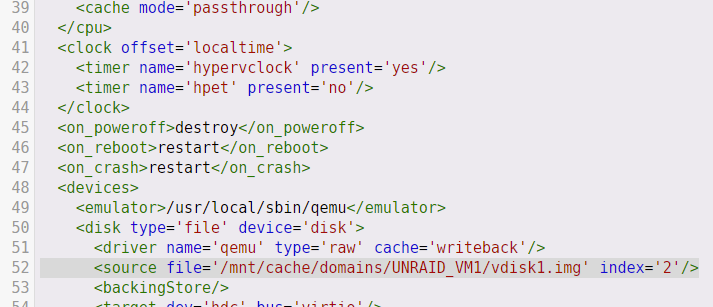
HOW TO RESTORE!!!! Option 1- Script: Use the great script from @petchav, many thanks! See the video below for a guide on how to use this. Option 2- Manual restore: You will need: 1. Your backup .img file (after extraction) 2. Backed up XML file 3. Your backed up .fd file Step 1- In terminal, extract img file from .zst backup. Example below. Replace with your .zst file name. zstd -d -C --no-check 20211114_0300_vdisk1.img.zst You will likely get the error below IF you run the command above without --no-check Decoding error (36) : Restored data doesn't match checksum *Note, -no-check option MAY NOT be supported by Unraid. If this doesn't work in terminal, try Cygwin (Windows) and run it. https://www.cygwin.com. Place your .zst file in the c:\Cygwin folder. With Windows you can now also install a Linux environment as well. (Beyond scope of this guide!) Copy the backup to the local machine or it will take forever! ALSO- you can backup WITHOUT compression and save yourself some grief!!! (See options) Step 2- Place .img file back into directory where it was backed up from. Look in the backed up XML file for the following line and ensure that YOUR path AND files exist: Step 3- Place backed up .fd file to: (file name may vary) /etc/libvirt/qemu/nvram/4a2b120f-0ea9-846a-6e11-f097002e442d_VARS-pure-efi.fd You may need to remove the 14 character timestamp at the start of the filename!! For example, remove 20211205_0300_ 20211205_0300_4a2b120f-0ea9-846a-6e11-f097002e442d_VARS-pure-efi.fd Step 5- verify ALL files are where they were BEFORE the backup. Look at XML file for file locations. Step 6- Open your .xml file. Copy the contents. Don't mess with it! Step 7- Create a new VM in Unraid. When asked, it does NOT matter what type, (Win11, 10 etcetera..) just pick one. Once you do that and BEFORE hitting "Create", you will have the VM options page. Select the "Form View" button at top right of screen. Change to XML view. Select all contents and delete. Paste contents of backed up XML in. Select create and away you go!
-
I posted in the thread how to restore, maybe a couple pages back.
-
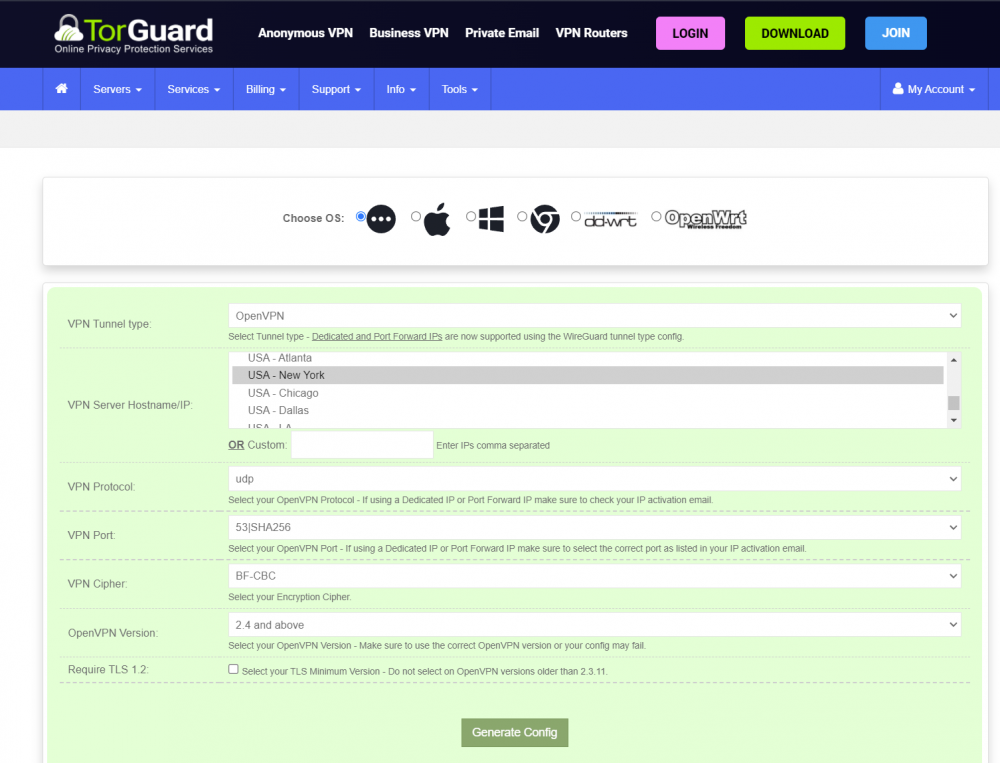
I'm getting maybe 15-30 MB/s out of this setup with TorGuard. Is there a recommended config for this? I would normally max my GiG connection out without the VPN. Even 1/2 that speed would be nice.
-
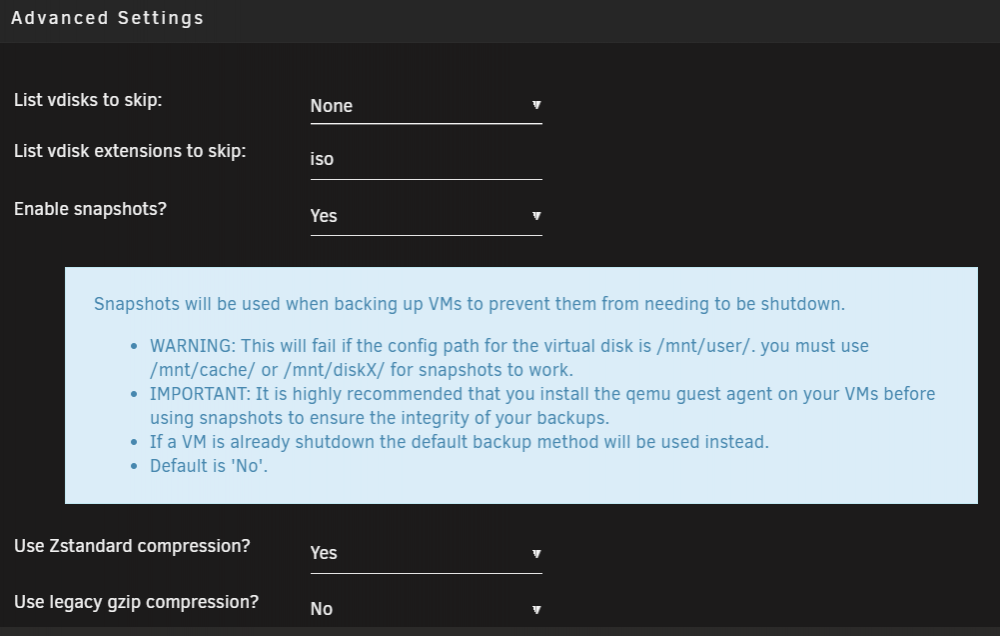
I think the issue may be that you have it shutting down your VM and it is NOT shutting down. Notice the 2nd line below in logging. I may be reading the log message incorrectly though. Did you install the Virtio drivers on the VM? That is the easiest thing to check/do first and may resolve it. I would install that and allow the backup to run without shutting down the VM. Also- where is your VM image (disk) file stored? See message below- 2021-12-06 02:00:02 failure: snapshot command failed on vdisk1.snap for BlueIris Server (W10). 2021-12-06 02:00:02 failure: snapshot_fallback is 0. skipping backup for BlueIris Server (W10) to prevent data loss. no cleanup will be performed for this vm.
-
That sounds right if the path exist. Can you navigate to the target in terminal? Also, can you post the log file? (forgot to ask!) You may need to enable that. (3rd tab, 'other settings') If you don't have it enabled now, you may need to run the backup again and then attach that file here. I've got a Win10 VM running with Virtio drivers installed and it works well, you should be able to backup. Do you have Virtio drivers installed for the VM?
-
It sounds like the target for your backup is not quite right. Where are you backing up to?
-
What is the proper way to set these scripts up so that the mounts do not hold the array open when trying to stop it / reboot? Maybe I have missed a step, but I am having to ps -ax | grep rclone and kill IDs and then kill mounts with fusermount -uz What am I missing?
-
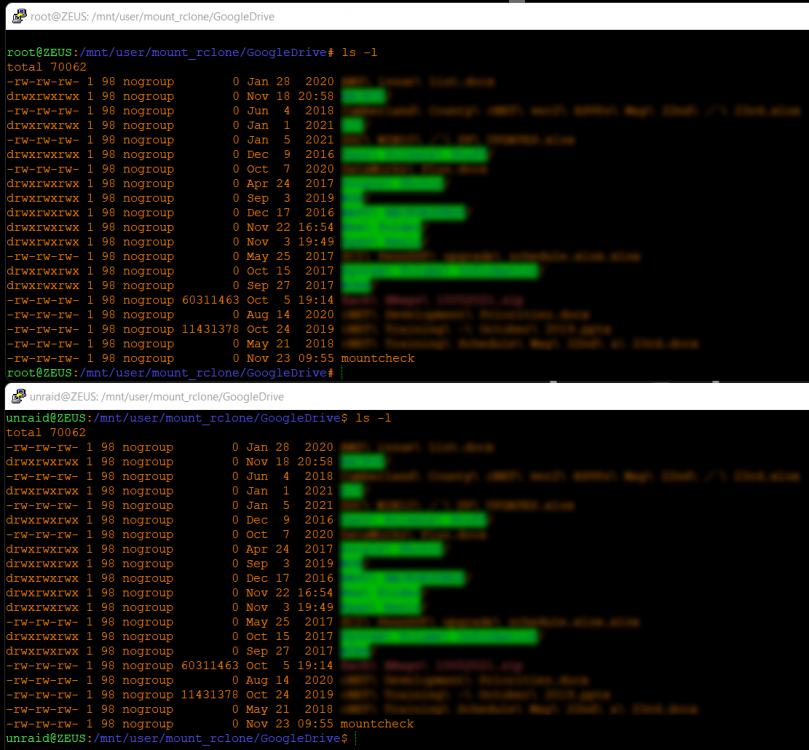
Yes, I did. No luck there. I did ls -l with both root and my unraid user accounts. They both have identical listings? This has been the issue though, navigation and directory listing works ok, it is just creation and delete that is the issue.
-
Thanks @Roudy! Maybe I am missing something. Still getting the error? My mount script is below. I used fusermount -uz to kill existing mount and killed the script also before re-running. Does it need a reboot possibly? Edit- it turns out my nobody:user ID are not 99 and 100, they are 98 and 99. I ran getent group | grep no Still no dice though. Getting same error. ###################### #### Mount Script #### ###################### ## Version 0.96.9.3 ## ###################### ####### EDIT ONLY THESE SETTINGS ####### # INSTRUCTIONS # 1. Change the name of the rclone remote and shares to match your setup # 2. NOTE: enter RcloneRemoteName WITHOUT ':' # 3. Optional: include custom command and bind mount settings # 4. Optional: include extra folders in mergerfs mount # REQUIRED SETTINGS RcloneRemoteName="GoogleDrive" # Name of rclone remote mount WITHOUT ':'. NOTE: Choose your encrypted remote for sensitive data RcloneMountShare="/mnt/user/mount_rclone" # where your rclone remote will be located without trailing slash e.g. /mnt/user/mount_rclone RcloneMountDirCacheTime="720h" # rclone dir cache time LocalFilesShare=" /mnt/user/local" # location of the local files and MountFolders you want to upload without trailing slash to rclone e.g. /mnt/user/local. Enter 'ignore' to disable RcloneCacheShare="/mnt/user0/mount_rclone" # location of rclone cache files without trailing slash e.g. /mnt/user0/mount_rclone RcloneCacheMaxSize="400G" # Maximum size of rclone cache RcloneCacheMaxAge="336h" # Maximum age of cache files MergerfsMountShare="/mnt/user/mount_mergerfs" # location without trailing slash e.g. /mnt/user/mount_mergerfs. Enter 'ignore' to disable #DockerStart="" # list of dockers, separated by space, to start once mergerfs mount verified. Remember to disable AUTOSTART for dockers added in docker settings page MountFolders=\{"downloads/complete,downloads/intermediate,downloads/seeds,movies,tv"\} # comma separated list of folders to create within the mount # Note: Again - remember to NOT use ':' in your remote name above # OPTIONAL SETTINGS # Add extra paths to mergerfs mount in addition to LocalFilesShare LocalFilesShare2="ignore" # without trailing slash e.g. /mnt/user/other__remote_mount/or_other_local_folder. Enter 'ignore' to disable LocalFilesShare3="ignore" LocalFilesShare4="ignore" # Add extra commands or filters Command1="--rc" Command2="" Command3="" Command4="" Command5="" Command6="" Command7="" Command8="" CreateBindMount="N" # Y/N. Choose whether to bind traffic to a particular network adapter RCloneMountIP="192.168.1.41" # My unraid IP is 172.30.12.2 so I create another similar IP address NetworkAdapter="eth0" # choose your network adapter. eth0 recommended VirtualIPNumber="2" # creates eth0:x e.g. eth0:1. I create a unique virtual IP addresses for each mount & upload so I can monitor and traffic shape for each of them ####### END SETTINGS ####### ############################################################################### ##### DO NOT EDIT ANYTHING BELOW UNLESS YOU KNOW WHAT YOU ARE DOING ####### ############################################################################### ####### Preparing mount location variables ####### RcloneMountLocation="$RcloneMountShare/$RcloneRemoteName" # Location for rclone mount LocalFilesLocation="$LocalFilesShare/$RcloneRemoteName" # Location for local files to be merged with rclone mount MergerFSMountLocation="$MergerfsMountShare/$RcloneRemoteName" # Rclone data folder location ####### create directories for rclone mount and mergerfs mounts ####### mkdir -p /mnt/user/appdata/other/rclone/remotes/$RcloneRemoteName # for script files mkdir -p $RcloneCacheShare/cache/$RcloneRemoteName # for cache files if [[ $LocalFilesShare == 'ignore' ]]; then echo "$(date "+%d.%m.%Y %T") INFO: Not creating local folders as requested." LocalFilesLocation="/tmp/$RcloneRemoteName" eval mkdir -p $LocalFilesLocation else echo "$(date "+%d.%m.%Y %T") INFO: Creating local folders." eval mkdir -p $LocalFilesLocation/"$MountFolders" fi mkdir -p $RcloneMountLocation if [[ $MergerfsMountShare == 'ignore' ]]; then echo "$(date "+%d.%m.%Y %T") INFO: Not creating MergerFS folders as requested." else echo "$(date "+%d.%m.%Y %T") INFO: Creating MergerFS folders." mkdir -p $MergerFSMountLocation fi ####### Check if script is already running ####### echo "$(date "+%d.%m.%Y %T") INFO: *** Starting mount of remote ${RcloneRemoteName}" echo "$(date "+%d.%m.%Y %T") INFO: Checking if this script is already running." if [[ -f "/mnt/user/appdata/other/rclone/remotes/$RcloneRemoteName/mount_running" ]]; then echo "$(date "+%d.%m.%Y %T") INFO: Exiting script as already running." exit else echo "$(date "+%d.%m.%Y %T") INFO: Script not running - proceeding." touch /mnt/user/appdata/other/rclone/remotes/$RcloneRemoteName/mount_running fi ####### Checking have connectivity ####### echo "$(date "+%d.%m.%Y %T") INFO: *** Checking if online" ping -q -c2 google.com > /dev/null # -q quiet, -c number of pings to perform if [ $? -eq 0 ]; then # ping returns exit status 0 if successful echo "$(date "+%d.%m.%Y %T") PASSED: *** Internet online" else echo "$(date "+%d.%m.%Y %T") FAIL: *** No connectivity. Will try again on next run" rm /mnt/user/appdata/other/rclone/remotes/$RcloneRemoteName/mount_running exit fi ####### Create Rclone Mount ####### # Check If Rclone Mount Already Created if [[ -f "$RcloneMountLocation/mountcheck" ]]; then echo "$(date "+%d.%m.%Y %T") INFO: Success ${RcloneRemoteName} remote is already mounted." else echo "$(date "+%d.%m.%Y %T") INFO: Mount not running. Will now mount ${RcloneRemoteName} remote." # Creating mountcheck file in case it doesn't already exist echo "$(date "+%d.%m.%Y %T") INFO: Recreating mountcheck file for ${RcloneRemoteName} remote." touch mountcheck rclone copy mountcheck $RcloneRemoteName: -vv --no-traverse # Check bind option if [[ $CreateBindMount == 'Y' ]]; then echo "$(date "+%d.%m.%Y %T") INFO: *** Checking if IP address ${RCloneMountIP} already created for remote ${RcloneRemoteName}" ping -q -c2 $RCloneMountIP > /dev/null # -q quiet, -c number of pings to perform if [ $? -eq 0 ]; then # ping returns exit status 0 if successful echo "$(date "+%d.%m.%Y %T") INFO: *** IP address ${RCloneMountIP} already created for remote ${RcloneRemoteName}" else echo "$(date "+%d.%m.%Y %T") INFO: *** Creating IP address ${RCloneMountIP} for remote ${RcloneRemoteName}" ip addr add $RCloneMountIP/24 dev $NetworkAdapter label $NetworkAdapter:$VirtualIPNumber fi echo "$(date "+%d.%m.%Y %T") INFO: *** Created bind mount ${RCloneMountIP} for remote ${RcloneRemoteName}" else RCloneMountIP="" echo "$(date "+%d.%m.%Y %T") INFO: *** Creating mount for remote ${RcloneRemoteName}" fi # create rclone mount rclone mount \ $Command1 $Command2 $Command3 $Command4 $Command5 $Command6 $Command7 $Command8 \ --allow-other \ --umask 000 \ --dir-cache-time $RcloneMountDirCacheTime \ --log-level INFO \ --poll-interval 15s \ --cache-dir=$RcloneCacheShare/cache/$RcloneRemoteName \ --vfs-cache-mode full \ --vfs-cache-max-size $RcloneCacheMaxSize \ --vfs-cache-max-age $RcloneCacheMaxAge \ --bind=$RCloneMountIP \ --uid 99 \ --gid 100 \ $RcloneRemoteName: $RcloneMountLocation & # Check if Mount Successful echo "$(date "+%d.%m.%Y %T") INFO: sleeping for 5 seconds" # slight pause to give mount time to finalise sleep 5 echo "$(date "+%d.%m.%Y %T") INFO: continuing..." if [[ -f "$RcloneMountLocation/mountcheck" ]]; then echo "$(date "+%d.%m.%Y %T") INFO: Successful mount of ${RcloneRemoteName} mount." else echo "$(date "+%d.%m.%Y %T") CRITICAL: ${RcloneRemoteName} mount failed - please check for problems. Stopping dockers" docker stop $DockerStart rm /mnt/user/appdata/other/rclone/remotes/$RcloneRemoteName/mount_running exit fi fi ####### Start MergerFS Mount ####### if [[ $MergerfsMountShare == 'ignore' ]]; then echo "$(date "+%d.%m.%Y %T") INFO: Not creating mergerfs mount as requested." else if [[ -f "$MergerFSMountLocation/mountcheck" ]]; then echo "$(date "+%d.%m.%Y %T") INFO: Check successful, ${RcloneRemoteName} mergerfs mount in place." else # check if mergerfs already installed if [[ -f "/bin/mergerfs" ]]; then echo "$(date "+%d.%m.%Y %T") INFO: Mergerfs already installed, proceeding to create mergerfs mount" else # Build mergerfs binary echo "$(date "+%d.%m.%Y %T") INFO: Mergerfs not installed - installing now." mkdir -p /mnt/user/appdata/other/rclone/mergerfs docker run -v /mnt/user/appdata/other/rclone/mergerfs:/build --rm trapexit/mergerfs-static-build mv /mnt/user/appdata/other/rclone/mergerfs/mergerfs /bin # check if mergerfs install successful echo "$(date "+%d.%m.%Y %T") INFO: *sleeping for 5 seconds" sleep 5 if [[ -f "/bin/mergerfs" ]]; then echo "$(date "+%d.%m.%Y %T") INFO: Mergerfs installed successfully, proceeding to create mergerfs mount." else echo "$(date "+%d.%m.%Y %T") ERROR: Mergerfs not installed successfully. Please check for errors. Exiting." rm /mnt/user/appdata/other/rclone/remotes/$RcloneRemoteName/mount_running exit fi fi # Create mergerfs mount echo "$(date "+%d.%m.%Y %T") INFO: Creating ${RcloneRemoteName} mergerfs mount." # Extra Mergerfs folders if [[ $LocalFilesShare2 != 'ignore' ]]; then echo "$(date "+%d.%m.%Y %T") INFO: Adding ${LocalFilesShare2} to ${RcloneRemoteName} mergerfs mount." LocalFilesShare2=":$LocalFilesShare2" else LocalFilesShare2="" fi if [[ $LocalFilesShare3 != 'ignore' ]]; then echo "$(date "+%d.%m.%Y %T") INFO: Adding ${LocalFilesShare3} to ${RcloneRemoteName} mergerfs mount." LocalFilesShare3=":$LocalFilesShare3" else LocalFilesShare3="" fi if [[ $LocalFilesShare4 != 'ignore' ]]; then echo "$(date "+%d.%m.%Y %T") INFO: Adding ${LocalFilesShare4} to ${RcloneRemoteName} mergerfs mount." LocalFilesShare4=":$LocalFilesShare4" else LocalFilesShare4="" fi # make sure mergerfs mount point is empty mv $MergerFSMountLocation $LocalFilesLocation mkdir -p $MergerFSMountLocation # mergerfs mount command mergerfs $LocalFilesLocation:$RcloneMountLocation$LocalFilesShare2$LocalFilesShare3$LocalFilesShare4 $MergerFSMountLocation -o rw,async_read=false,use_ino,allow_other,func.getattr=newest,category.action=all,category.create=ff,cache.files=partial,dropcacheonclose=true # check if mergerfs mount successful echo "$(date "+%d.%m.%Y %T") INFO: Checking if ${RcloneRemoteName} mergerfs mount created." if [[ -f "$MergerFSMountLocation/mountcheck" ]]; then echo "$(date "+%d.%m.%Y %T") INFO: Check successful, ${RcloneRemoteName} mergerfs mount created." else echo "$(date "+%d.%m.%Y %T") CRITICAL: ${RcloneRemoteName} mergerfs mount failed. Stopping dockers." docker stop $DockerStart rm /mnt/user/appdata/other/rclone/remotes/$RcloneRemoteName/mount_running exit fi fi fi ####### Starting Dockers That Need Mergerfs Mount To Work Properly ####### # only start dockers once if [[ -f "/mnt/user/appdata/other/rclone/remotes/$RcloneRemoteName/dockers_started" ]]; then echo "$(date "+%d.%m.%Y %T") INFO: dockers already started." else # Check CA Appdata plugin not backing up or restoring if [ -f "/tmp/ca.backup2/tempFiles/backupInProgress" ] || [ -f "/tmp/ca.backup2/tempFiles/restoreInProgress" ] ; then echo "$(date "+%d.%m.%Y %T") INFO: Appdata Backup plugin running - not starting dockers." else touch /mnt/user/appdata/other/rclone/remotes/$RcloneRemoteName/dockers_started echo "$(date "+%d.%m.%Y %T") INFO: Starting dockers." docker start $DockerStart fi fi rm /mnt/user/appdata/other/rclone/remotes/$RcloneRemoteName/mount_running echo "$(date "+%d.%m.%Y %T") INFO: Script complete" exit log.zip
-
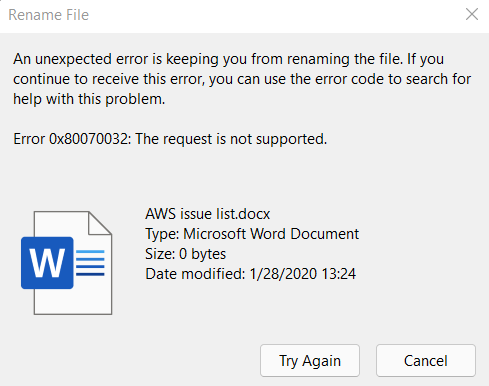
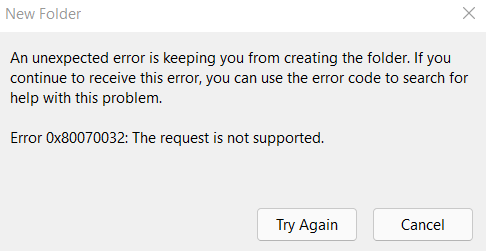
Having an issue with SMB shares. Apologies if this isn't supported. I am able to SSH into Unraid and delete (WinSCP or putty shell), upload and change and create files from the mounted rclone drive but when connected from SMB share on a Windows device I can navigate and download, but deleting, renaming or creating fails. Although, on create it throws an error but still creates it (?) Am I missing something? Is this supported, do I need to adjust anything? The one difference I know of- SSH is using root vs. the user I have for logging in. (Which has permissions set to access r/w) *Edit- so this does appear to be a root vs. normal user issue. How do I change my existing rclone mount to use another user without starting over?
-
HOW TO RESTORE!!!! For anyone this might help- if you try to restore the img file that is in the zst compressed file: you may receive an error of - Decoding error (36) : Restored data doesn't match checksum To get around this run the following (replace with your file name) zstd -d -C --no-check 20211114_0300_vdisk1.img.zst Where 20211114_0300_vdisk1.img.zst is your file name to replace. If this doesn't work in terminal, try Cygwin (Windows) and run it. https://www.cygwin.com/ Place your .zst file in the c:\Cygwin folder. Much easier! For some reason, every VM backed up with zst selected is created like this and throws an error (for me). They ALL restore without issue (for me) doing this. PS, you'll need to create a custom VM once your .img file is restored. Paste the contents of the associated backed up XML file in. LOOK AT YOUR XML FILE closely!! Ensure the img file is in the same folder as was/is spec'd in the XML and also ensure the following are present: (File names may vary, look at backed up files) /usr/share/qemu/ovmf-x64/OVMF_CODE-pure-efi.fd /etc/libvirt/qemu/nvram/4a2b120f-0ea9-846a-6e11-f097002e442d_VARS-pure-efi.fd For what its worth- I have disabled zst compression and just have it back up the img file!! No need to take a chance. Hope this helps!
-
Yes, I am seeing that locally and when I try to use it remotely. It's not an urgent thing, but when I was 2000 miles away and couldn't get into my system remotely (due to my mistakes with VPN) it would have been handy! Thanks for the continued help.






