





Jarsky
Members
-
Joined
-
Last visited
-
Apologies I never replied. The new v6 Pi-Hole has the API @ pi.hole/api while the admin interface is still pi.hole/admin
-
I'm using the new v6 of Pi-Hole and the Prometheus Pi-Hole Exporter plugin. It's unable to connect to the API; and theres no configuration option in the plugin to change the target address 2024-05-03 15:56:11.607 WARNING API: Bad request (The API is hosted at pi.hole/api, not pi.hole/admin/api) 2024-05-03 15:56:26.604 WARNING API: Bad request (The API is hosted at pi.hole/api, not pi.hole/admin/api) 2024-05-03 15:56:29.006 WARNING API: Bad request (The API is hosted at pi.hole/api, not pi.hole/admin/api) 2024-05-03 15:56:39.005 WARNING API: Bad request (The API is hosted at pi.hole/api, not pi.hole/admin/api)
-
Since you have quite small disks, i'd change that Minimum free space to something like 10GB; or your disks are going to stop allocating data with 58GB free on them. As to the allocation; you're using High-water so it will try to fill up the disk to 50% then move to the next and do the same...then cycle back through them again. It does this progressively though; so if youre copying a large directory to the array it will allocate it all to the disk its currently targeted with High-water. You can read more about it in the docs here: https://docs.unraid.net/unraid-os/manual/shares/user-shares/#high-water-method Do you have other shares as well on these disks? The allocation is a per share setting; if you have other shares that are using Primary Storage "Array" then they will also affect how full the disks get in total Edit: If you want them to be as equal as possible; then change it from High-water to Most-free
-
Apr 21 03:00:21 Tower kernel: BUG: kernel NULL pointer dereference, address: 0000000000000030 Apr 21 03:00:21 Tower kernel: RIP: 0010:uncharge_folio+0xe/0xd8 Apr 21 03:00:21 Tower kernel: __mem_cgroup_uncharge_list+0x49/0x84 Apr 21 03:00:21 Tower kernel: release_pages+0x2de/0x30e Apr 21 03:00:21 Tower kernel: truncate_inode_pages_range+0x15a/0x382 These lines in particular from your logs are interesting; as they all pertain to memory management. The kernel panicked with a memory access issue; then the following messages all relate back to physical memory (only some relate back to swap). Also you updated the BIOS recently as your revision is from March 2024 Apr 21 03:00:21 Tower kernel: Hardware name: ASUSTeK COMPUTER INC. System Product Name/Pro WS W680-ACE IPMI, BIOS 3401 03/19/2024 Reading the notes for that BIOS; they have made changes to memory management PRO WS W680-ACE BIOS 3401 Version 3401 12.5 MB 2024/03/22 1.Improved DDR5 compatibility 2.Further optimized CEP settings when disabled I see in your logs you're running them at 4800Mhz; did you run them with XMP disabled (which IIRC is 3200Mhz)? Check that the RAM slots are free from any debret or dust as well. You could also try rolling back the BIOS revision; otherwise could be the CPU on it s way out, and the IMC (Integrated Memory Controller) is faulting. I had an issue with one of my Ryzen9's...it was always a bit buggy and the other day it just completely died (thankfully replaced under Warranty).
-
Nevermind. I was on 6.12.9 when this started. Upgraded to 6.12.10 yesterday. Unmounted and Remounted the VM's and other Servers today, and its all back to normal. I guess it was an issue with the fixes put in for SMB on 6.12.9? https://docs.unraid.net/unraid-os/release-notes/6.12.10/
-
Hi team, Just checking if something has changed with Unraid in regards to SMB/CIFS versions? UnRaid Version: 6.12.10 I've noticed just today that every single one of my VM's which is mounted the Samba shares is getting the error: $ df -h df: /mnt/share: Resource temporarily unavailable These are mounts on physically connected devices as well as VM's hosted on the UnRAID server itself. I have not changed configus on any of my machines. Theyre all Ubuntu 22.04 Servers. They're configured to use SMB v3; but have also tried changing some to auto which I believe is connecting at SMB v3.1.1 Still the same error. This isnt affecting NFS shares theyre mounting fine. The mounts are still accessible; however theyre sporadic. The problem im seeing is that the flow is getting disconnected so writes are failing for example. Apps are also reporting unknown disk size as the VMs arent properly calculating disk free Seeing these errors in the machines affected (locally hosted VM's as well as Network attached servers) jarskynas-diagnostics-20240420-2326.zip
-
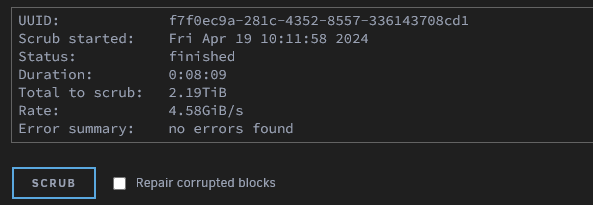
This is an old thread, but i've seen others having the same issue of being able to find the file associated. I just ran into it again yesterday after a power outage rebooted my server several times. So for records sake.... Select your pool, tick to "Repair Corrupted Blocks" and click "SCRUB"; you should see an error log like below: Apr 18 19:57:42 TOWER kernel: BTRFS error (device nvme0n1p1): bdev /dev/nvme0n1p1 errs: wr 0, rd 0, flush 0, corrupt 5, gen 0 Apr 18 19:57:42 TOWER kernel: BTRFS error (device nvme0n1p1): unable to fixup (regular) error at logical 5507816349696 on dev /dev/nvme0n1p1 Apr 18 19:57:46 TOWER kernel: BTRFS error (device nvme0n1p1): bdev /dev/nvme1n1p1 errs: wr 0, rd 0, flush 0, corrupt 5, gen 0 Apr 18 19:57:46 TOWER kernel: BTRFS error (device nvme0n1p1): unable to fixup (regular) error at logical 5507816349696 on dev /dev/nvme1n1p1 This gives you the device; if you have a lot of mounts you can check the mount point running this: root@TOWER:/var/log# cat /proc/mounts | grep '/mnt/' | grep -v -E 'tmpfs|shfs' /dev/md1p1 /mnt/disk1 xfs rw,noatime,nouuid,attr2,inode64,logbufs=8,logbsize=32k,noquota 0 0 /dev/md2p1 /mnt/disk2 xfs rw,noatime,nouuid,attr2,inode64,logbufs=8,logbsize=32k,noquota 0 0 /dev/md3p1 /mnt/disk3 xfs rw,noatime,nouuid,attr2,inode64,logbufs=8,logbsize=32k,noquota 0 0 /dev/md4p1 /mnt/disk4 xfs rw,noatime,nouuid,attr2,inode64,logbufs=8,logbsize=32k,noquota 0 0 /dev/md5p1 /mnt/disk5 xfs rw,noatime,nouuid,attr2,inode64,logbufs=8,logbsize=32k,noquota 0 0 /dev/md6p1 /mnt/disk6 xfs rw,noatime,nouuid,attr2,inode64,logbufs=8,logbsize=32k,noquota 0 0 /dev/md7p1 /mnt/disk7 xfs rw,noatime,nouuid,attr2,inode64,logbufs=8,logbsize=32k,noquota 0 0 /dev/md8p1 /mnt/disk8 xfs rw,noatime,nouuid,attr2,inode64,logbufs=8,logbsize=32k,noquota 0 0 /dev/md9p1 /mnt/disk9 xfs rw,noatime,nouuid,attr2,inode64,logbufs=8,logbsize=32k,noquota 0 0 /dev/md10p1 /mnt/disk10 xfs rw,noatime,nouuid,attr2,inode64,logbufs=8,logbsize=32k,noquota 0 0 /dev/md11p1 /mnt/disk11 xfs rw,noatime,nouuid,attr2,inode64,logbufs=8,logbsize=32k,noquota 0 0 /dev/nvme2n1p1 /mnt/cache btrfs rw,noatime,ssd,discard=async,space_cache=v2,subvolid=5,subvol=/ 0 0 /dev/nvme0n1p1 /mnt/nvme_mirror btrfs rw,noatime,ssd,discard=async,space_cache=v2,subvolid=5,subvol=/ 0 0 The one we're looking for here is /mnt/nvme_mirror We can then run an inspect-internal like below to find the culprit file that occupies that block root@TOWER:/var/log# btrfs inspect-internal logical-resolve -o 5507816349696 /mnt/nvme_mirror/ /mnt/nvme_mirror//VM/VM1/vm1.img So we can see that our offending file is /mnt/nvme_mirror/VM/VM1/vm1.img We can move this offending file somewhere else e.g mv /mnt/nvme_mirror/VM/VM1 /mnt/user0/share Repeat for any other offending logical block numbers reported. We can then re-run the scrub and should find no errors. Move the files back to their original directories Re-run the scrub one more time; and should still come back with no errors.
-
Hey im trying to do this as my telegraf just stopped working when I upgraded to Unraid 6.12 Heres the run command, but its failing even though the path to the entrypoint.sh file is correct. Any ideas? docker run -d --name='telegraf' --net='host' --privileged=true -e TZ="Pacific/Auckland" -e HOST_OS="Unraid" -e HOST_HOSTNAME="TOWER" -e HOST_CONTAINERNAME="telegraf" -e 'HOST_PROC'='/rootfs/proc' -e 'HOST_SYS'='/rootfs/sys' -e 'HOST_ETC'='/rootfs/etc' -e 'HOST_MOUNT_PREFIX'='/rootfs' -l net.unraid.docker.managed=dockerman -l net.unraid.docker.icon='https://github.com/atribe/unRAID-docker/raw/master/icons/telegraf.png' -v '/var/run/utmp':'/var/run/utmp':'ro' -v '/var/run/docker.sock':'/var/run/docker.sock':'ro' -v '/':'/rootfs':'ro' -v '/sys':'/rootfs/sys':'ro' -v '/etc':'/rootfs/etc':'ro' -v '/proc':'/rootfs/proc':'ro' -v '/mnt/nvme_mirror/Docker/telegraf':'/etc/telegraf':'rw' -v '/run/udev':'/run/udev':'ro' --user=root --entrypoint=/mnt/nvme_mirror/Docker/telegraf/entrypoint.sh 'telegraf:1.7.1-alpine' 5e74b7db49a5a52cf0f26b0d4897f84fea8e1bcbef3e8a69e82d497e888915e7 docker: Error response from daemon: failed to create shim task: OCI runtime create failed: runc create failed: unable to start container process: exec: "/mnt/nvme_mirror/Docker/telegraf/entrypoint.sh": stat /mnt/nvme_mirror/Docker/telegraf/entrypoint.sh: no such file or directory: unknown. The command failed.
-
I disabled the cache for all shares and moved the tdarr-temp share away from it (which was Cache only), deleted the tdarr-temp folder (even though it was empty), and ran the mover again and it cleared it this time. Moved the folder back to the cache and re-enabled it and its been fine since. Not sure what happened but for some reason the BTRFS Data "partition" just stayed as this "Data, single: total=16.00GiB, used=15.81GiB" even with multiple balance attempts. Sorted now though
-
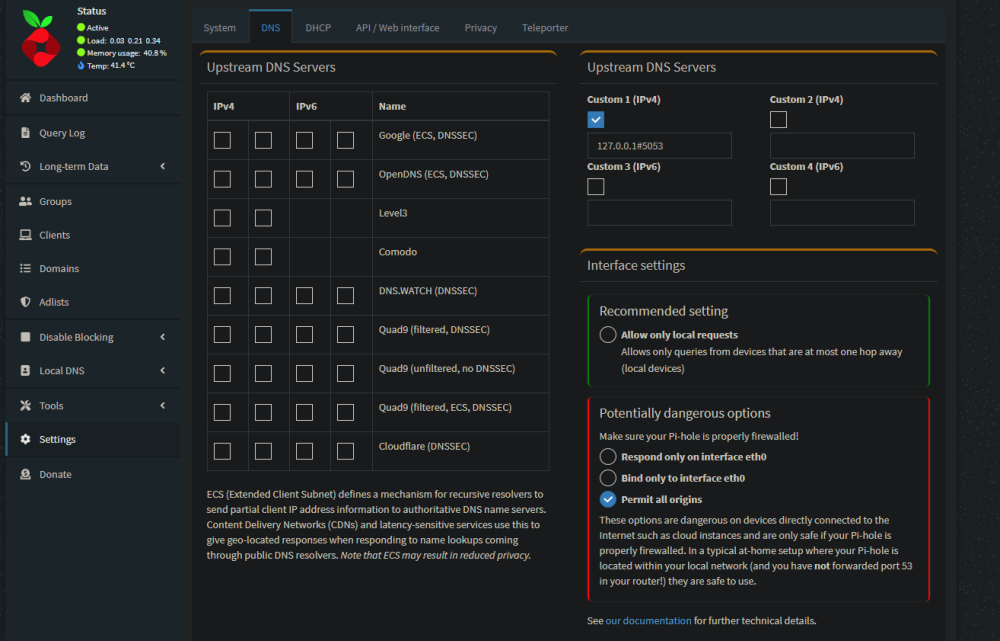
Since your VPN allocates IP addressess in a different subnet (10.253.x.x), in Pi-hole did you try change Interface settings to "Permit all origins" ?
-
I'm also having issues with constantly getting FlashBackups from Dynamix monitor.ini When a disk hits its warning threshold for temp or capacity then it modifies this monitor.ini file. We just moved into summer so my NVMe's have been going above 55C so been triggering FlashUpdate 30x or more per day. Ended up raising the temp limits and putting in a .gitignore for the monitor.ini file commit 567886bd602fe3cb5275d3226c1763ab542c1758 (HEAD -> master, origin/master) Author: gitbot <[email protected]> Date: Fri Dec 16 15:39:07 2022 +1300 Config change diff --git a/config/plugins/dynamix/monitor.ini b/config/plugins/dynamix/monitor.ini index 610b6e4..74c5dbe 100644 --- a/config/plugins/dynamix/monitor.ini +++ b/config/plugins/dynamix/monitor.ini @@ -14,3 +14,4 @@ parity.ack="true" [temp] cache="55" nvme_mirror="60" +nvme_mirror2="60" commit e91ca96edaaf3a23c86d1ec5df8214945ef9a617 Author: gitbot <[email protected]> Date: Fri Dec 16 15:33:07 2022 +1300 Config change diff --git a/config/plugins/dynamix/monitor.ini b/config/plugins/dynamix/monitor.ini index 4fe88ac..610b6e4 100644 --- a/config/plugins/dynamix/monitor.ini +++ b/config/plugins/dynamix/monitor.ini @@ -11,3 +11,6 @@ disk9="94" [smart] parity.187="1" parity.ack="true" +[temp] +cache="55" +nvme_mirror="60" commit dabafbd261a8709783feba83c394d33e7d445dfe Author: gitbot <[email protected]> Date: Fri Dec 16 14:58:05 2022 +1300 Config change diff --git a/config/plugins/dynamix/monitor.ini b/config/plugins/dynamix/monitor.ini index e1fd020..4fe88ac 100644 --- a/config/plugins/dynamix/monitor.ini +++ b/config/plugins/dynamix/monitor.ini @@ -11,5 +11,3 @@ disk9="94" [smart] parity.187="1" parity.ack="true" -[temp] -nvme_mirror="60"
-
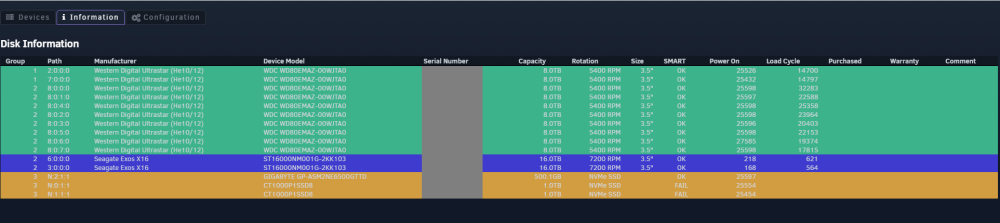
Pulling the Warranty info from UnRAID isn't working. It wasnt working in 6.9.xx I'm now on 6.11.5. Tried deleting the database, uninstalling the plugin and reinstalling the plugin, but still not pulling the warranty info. All the Warranty info is agains the drives e.g But still not showing in DiskLocation, have tried rescanning as well.

-
I just noticed today, that my cache isnt completely emptying. The BTRFS Data gets stuck at ~16GB usage. Any ideas on how to resolve, or do I need to reboot? root@TOWER:~# btrfs device usage /mnt/cache /dev/nvme2n1p1, ID: 1 Device size: 465.76GiB Device slack: 0.00B Data,single: 16.00GiB Metadata,single: 1.00GiB System,single: 32.00MiB Unallocated: 448.73GiB root@TOWER:~# btrfs scrub start /mnt/cache scrub started on /mnt/cache, fsid c20831e7-b715-430c-9d21-3fff9f3daae4 (pid=27825) root@TOWER:~# btrfs scrub status /mnt/cache UUID: c20831e7-b715-430c-9d21-3fff9f3daae4 Scrub started: Thu Dec 15 20:23:05 2022 Status: finished Duration: 0:00:04 Total to scrub: 15.82GiB Rate: 3.96GiB/s Error summary: no errors found root@TOWER:~# btrfs filesystem df /mnt/cache Data, single: total=16.00GiB, used=15.81GiB System, single: total=32.00MiB, used=16.00KiB Metadata, single: total=1.00GiB, used=17.89MiB GlobalReserve, single: total=20.45MiB, used=0.00B root@JARSKYNAS:~# btrfs filesystem du -s /mnt/cache Total Exclusive Set shared Filename 0.00B 0.00B 0.00B /mnt/cache root@TOWER:~# ls -la /mnt/cache total 16 drwxrwxrwx 1 nobody users 20 Dec 14 17:30 ./ drwxr-xr-x 19 root root 380 Dec 14 17:20 ../ drwxrwxrwx 1 nobody users 0 Dec 15 19:47 tdarr-temp/ root@JARSKYNAS:~# ls -la /mnt/cache/tdarr-temp/ total 16 drwxrwxrwx 1 nobody users 0 Dec 15 19:47 ./ drwxrwxrwx 1 nobody users 20 Dec 14 17:30 ../

-
Hey all, Just wondering if i've done this wrong....i'm replacing my 2 x Crucial P1 1TB NVMe's with 2 x Samsung 970 Evo Plus 2TB NVMe's in my secondary cache pool, which hosts my Dockers & VM's. The cache pool is a RAID1. I followed this FAQ, which said just to stop the array, replace the drive and select the new drive and start the array In the UI I can see that the BTRFS operation is running, and I can see some activity on the NVMe drives every now and then. I can see in the log that its relocating blocks Dec 12 15:04:11 TOWER kernel: BTRFS info (device nvme1n1p1): found 5463 extents, stage: move data extents Dec 12 15:04:22 TOWER kernel: BTRFS info (device nvme1n1p1): found 5463 extents, stage: update data pointers Dec 12 15:04:29 TOWER kernel: BTRFS info (device nvme1n1p1): relocating block group 1086715854848 flags data|raid1 Dec 12 15:06:18 TOWER kernel: BTRFS info (device nvme1n1p1): found 4546 extents, stage: move data extents Dec 12 15:06:22 TOWER kernel: BTRFS info (device nvme1n1p1): found 4546 extents, stage: update data pointers Dec 12 15:06:44 TOWER kernel: BTRFS info (device nvme1n1p1): relocating block group 1085642113024 flags data|raid1 Dec 12 15:08:47 TOWER kernel: BTRFS info (device nvme1n1p1): found 5386 extents, stage: move data extents But its excrutiatingly slow. It's been 2 hours and its only done 70GB which means its going to take approx a full day for less than 1TB on each of the NVMe drives. It also looks like its draining the secondary drive in the mirror, and putting it on drive 3 rather than to copy it. Is this normal behavior? I thought the new device should replace device 1? root@TOWER:~# btrfs device usage /mnt/nvme_mirror missing, ID: 1 Device size: 0.00B Device slack: 0.00B Data,RAID1: 788.05GiB Metadata,RAID1: 2.00GiB System,RAID1: 32.00MiB Unallocated: -790.08GiB /dev/nvme1n1p1, ID: 2 Device size: 931.51GiB Device slack: 0.00B Data,RAID1: 857.05GiB Metadata,RAID1: 3.00GiB System,RAID1: 32.00MiB Unallocated: 71.43GiB /dev/nvme0n1p1, ID: 3 Device size: 1.82TiB Device slack: 0.00B Data,RAID1: 69.00GiB Metadata,RAID1: 1.00GiB Unallocated: 1.75TiB root@TOWER:~# iostat -m Device tps MB_read/s MB_wrtn/s MB_dscd/s MB_read MB_wrtn MB_dscd loop0 0.00 0.00 0.00 0.00 0 0 0 loop1 0.00 0.00 0.00 0.00 0 0 0 loop2 0.00 0.00 0.00 0.00 0 0 0 loop3 0.00 0.00 0.00 0.00 0 0 0 nvme0n1 16.90 0.00 6.03 0.00 0 60 0 nvme1n1 78.30 0.18 4.53 0.25 1 45 2
-
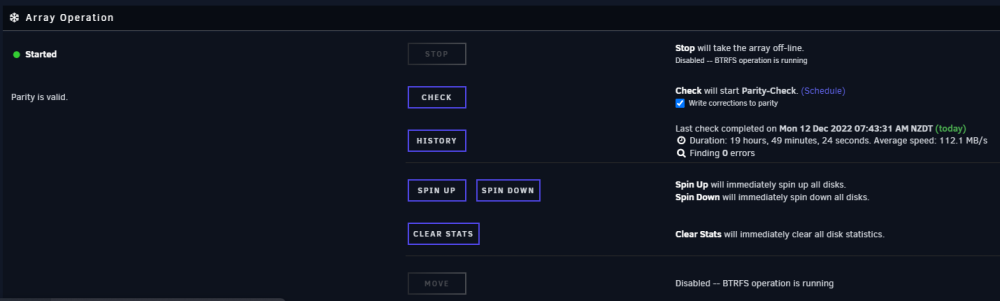
I'm interested in this feature as well. My VM's & Dockers run on their own pool (NVMe mirror) so have nothing to do with the main array. Some of them may access an SMB/NFS share as a mount, but in the case where the array is down that mount will just go unreachable in the VM. Theres times I do storage maintenance like the last 2 weeks, where there shouldn't be a need for me to stop every Docker & VM to just replace/upgrade a drive in the primary array. I get this might be complicated though when users have VM's that have vdisks on /mnt/user



