





isaw
Members
-
Joined
-
Last visited
Everything posted by isaw
-
the card would not detect correclty or passthrough to dockers via /dev/dri when it was running the old firmware. SR-IOV did 'work' showing multiple (24) vGPU's, but i didnt physically try them. After the firmware update its now 7 Capabilities: [320 v1] Single Root I/O Virtualization (SR-IOV) IOVCap: Migration- 10BitTagReq+ IntMsgNum 0 IOVCtl: Enable- Migration- Interrupt- MSE- ARIHierarchy+ 10BitTagReq- IOVSta: Migration- Initial VFs: 7, Total VFs: 7, Number of VFs: 0, Function Dependency Link: 00
-
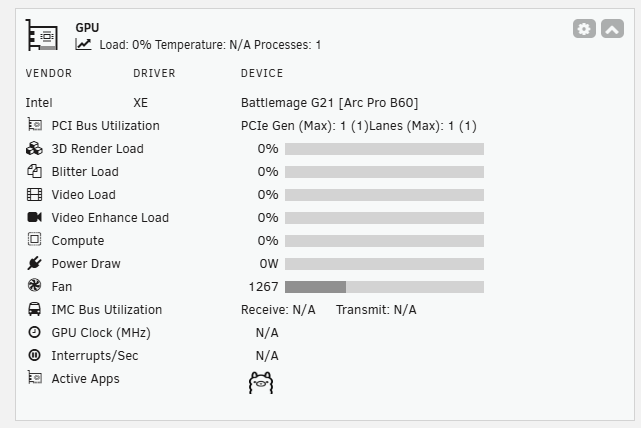
you may need to jump to 7.3.0rc1 to get the 6.18 kernel which has xe included. lspci -s 07:00.0 -v 07:00.0 VGA compatible controller: Intel Corporation Battlemage G21 [Arc Pro B60] (prog-if 00 [VGA controller]) .... Kernel driver in use: xe Kernel modules: xeStill doesnt display correctly for me tho. Unsure how to go about passing or blocking i915/xe drivers noted about
-
Reporting back.. 7.3.0 rc1, B60 24gb is working with SR-IOV (latest firmware caps it at 7 devices, older firmware was 24) Passthrough to dockers for AI (Ollama/etc) are working with --device=/dev/dri intel_gpu_top doesnt work but the Nvtop command does, but is missing some info. LSPCI reports as G3x1, but nvtop reports G3x8 for bandwidth. (Mb limited to G3x16). not sure how to test? I did need to do a firmware update for the GPU, this was made more difficult as whole device passthrough to a windows WM would not work, and I did not have a windows PC easily accessible to update it on. Persisted and eventually used this tool, https://github.com/Solaris17/ARC-Firmware-Tool and the latest firmware from the reportsitory. If you can throw the card in a windows box and update it it's 1000x easier.
-
B60 owner, out of the box installed Into unraid server. (No rebar, csm off, above 4g enabled) Upgraded to 7.3.0 rc1, can see 24 VF options in system devices. Have no since updated the Firmware/firmware-data and opromcode to 101.8517, and the number of VF's is now 7. Followed this guide to do the update through unraid: https://forum.level1techs.com/t/remember-to-update-your-intel-arc-firmware-on-linux/208736
-
I have the same usecase as you, WIndows VM, need to connect via VNC, want copy paste. (Technically, its using Guacamole broswer to access a Windows VM, hosted on Unraid, there are requirements that mean RDP is not viable - ie VPN) I tried using spice and other details, but never got it fully working and i really REALLY wish it would happen. Copy and pasting via virtual desktops would make work so much easier. I ended up mapping a virtual drive using VirtioFS, pointing to a file share on unriad. Its not perfect, but I make it work. Hopfully something will change and it will work eventually.
-
Still an issue 6.12.6. Stop KVM, try to restart, libvirt.img in use. Same Losetup output as above.
-
So eventually i started with SEABIOS as this image is a dos / MBR, not GPT/uefi compatible. so now its running at least, willl look to convert and backup properly in the future.
-
I've replaced my Cache nvme, and whilst following the steps for move/replace/move, my docker and VM libvirt both got runined (they were working for a bit but have now gone). I recreated the VM's, pointed to the existing .img files and one has sucessfully started, my windows 2016 server has not. The IMG file still has the vaild partitions but just doesnt seem to be detected by the bios to boot. root@Dozer:~# fdisk -l /mnt/user/domains/Server2016/vdisk1.img Disk /mnt/user/domains/Server2016/vdisk1.img: 80 GiB, 85899345920 bytes, 167772160 sectors Units: sectors of 1 * 512 = 512 bytes Sector size (logical/physical): 512 bytes / 512 bytes I/O size (minimum/optimal): 512 bytes / 512 bytes Disklabel type: dos Disk identifier: 0xde59d7c4 Device Boot Start End Sectors Size Id Type /mnt/user/domains/Server2016/vdisk1.img1 * 2048 1026047 1024000 500M 7 HPFS/NTFS/exFAT /mnt/user/domains/Server2016/vdisk1.img2 1026048 167768063 166742016 79.5G 7 HPFS/NTFS/exFAT root@Dozer:~# qemu-img info /mnt/user/domains/Server2016/vdisk1.img image: /mnt/user/domains/Server2016/vdisk1.img file format: raw virtual size: 80 GiB (85899345920 bytes) disk size: 77.1 GiB root@Dozer:~# XML config <?xml version='1.0' encoding='UTF-8'?> <domain type='kvm' id='13'> <name>Server2016</name> <uuid>e13ba1fa-8e9e-2a8c-5ad4-7049ee7c36eb</uuid> <metadata> <vmtemplate xmlns="unraid" name="Windows Server 2016" icon="windows.png" os="windows2016"/> </metadata> <memory unit='KiB'>16777216</memory> <currentMemory unit='KiB'>16777216</currentMemory> <memoryBacking> <nosharepages/> </memoryBacking> <vcpu placement='static'>4</vcpu> <cputune> <vcpupin vcpu='0' cpuset='5'/> <vcpupin vcpu='1' cpuset='13'/> <vcpupin vcpu='2' cpuset='7'/> <vcpupin vcpu='3' cpuset='15'/> </cputune> <resource> <partition>/machine</partition> </resource> <os> <type arch='x86_64' machine='pc-i440fx-7.1'>hvm</type> <loader readonly='yes' type='pflash'>/usr/share/qemu/ovmf-x64/OVMF_CODE-pure-efi.fd</loader> <nvram>/etc/libvirt/qemu/nvram/e13ba1fa-8e9e-2a8c-5ad4-7049ee7c36eb_VARS-pure-efi.fd</nvram> </os> <features> <acpi/> <apic/> <hyperv mode='custom'> <relaxed state='on'/> <vapic state='on'/> <spinlocks state='on' retries='8191'/> <vendor_id state='on' value='none'/> </hyperv> </features> <cpu mode='host-passthrough' check='none' migratable='on'> <topology sockets='1' dies='1' cores='2' threads='2'/> <cache mode='passthrough'/> </cpu> <clock offset='localtime'> <timer name='hypervclock' present='yes'/> <timer name='hpet' present='no'/> </clock> <on_poweroff>destroy</on_poweroff> <on_reboot>restart</on_reboot> <on_crash>restart</on_crash> <devices> <emulator>/usr/local/sbin/qemu</emulator> <disk type='file' device='disk'> <driver name='qemu' type='raw' cache='writeback'/> <source file='/mnt/user/domains/Server2016/vdisk1.img' index='1'/> <backingStore/> <target dev='hdc' bus='virtio'/> <serial>vdisk1</serial> <boot order='1'/> <alias name='virtio-disk2'/> <address type='pci' domain='0x0000' bus='0x00' slot='0x05' function='0x0'/> </disk> <controller type='usb' index='0' model='ich9-ehci1'> <alias name='usb'/> <address type='pci' domain='0x0000' bus='0x00' slot='0x07' function='0x7'/> </controller> <controller type='usb' index='0' model='ich9-uhci1'> <alias name='usb'/> <master startport='0'/> <address type='pci' domain='0x0000' bus='0x00' slot='0x07' function='0x0' multifunction='on'/> </controller> <controller type='usb' index='0' model='ich9-uhci2'> <alias name='usb'/> <master startport='2'/> <address type='pci' domain='0x0000' bus='0x00' slot='0x07' function='0x1'/> </controller> <controller type='usb' index='0' model='ich9-uhci3'> <alias name='usb'/> <master startport='4'/> <address type='pci' domain='0x0000' bus='0x00' slot='0x07' function='0x2'/> </controller> <controller type='pci' index='0' model='pci-root'> <alias name='pci.0'/> </controller> <controller type='virtio-serial' index='0'> <alias name='virtio-serial0'/> <address type='pci' domain='0x0000' bus='0x00' slot='0x04' function='0x0'/> </controller> <interface type='bridge'> <mac address='52:54:00:83:47:97'/> <source bridge='br0'/> <target dev='vnet12'/> <model type='virtio-net'/> <alias name='net0'/> <address type='pci' domain='0x0000' bus='0x00' slot='0x03' function='0x0'/> </interface> <serial type='pty'> <source path='/dev/pts/0'/> <target type='isa-serial' port='0'> <model name='isa-serial'/> </target> <alias name='serial0'/> </serial> <console type='pty' tty='/dev/pts/0'> <source path='/dev/pts/0'/> <target type='serial' port='0'/> <alias name='serial0'/> </console> <channel type='unix'> <source mode='bind' path='/var/lib/libvirt/qemu/channel/target/domain-13-Server2016/org.qemu.guest_agent.0'/> <target type='virtio' name='org.qemu.guest_agent.0' state='disconnected'/> <alias name='channel0'/> <address type='virtio-serial' controller='0' bus='0' port='1'/> </channel> <input type='tablet' bus='usb'> <alias name='input0'/> <address type='usb' bus='0' port='1'/> </input> <input type='mouse' bus='ps2'> <alias name='input1'/> </input> <input type='keyboard' bus='ps2'> <alias name='input2'/> </input> <graphics type='vnc' port='5900' autoport='yes' websocket='5700' listen='0.0.0.0' keymap='en-us'> <listen type='address' address='0.0.0.0'/> </graphics> <audio id='1' type='none'/> <video> <model type='qxl' ram='65536' vram='65536' vgamem='16384' heads='1' primary='yes'/> <alias name='video0'/> <address type='pci' domain='0x0000' bus='0x00' slot='0x02' function='0x0'/> </video> <memballoon model='virtio'> <alias name='balloon0'/> <address type='pci' domain='0x0000' bus='0x00' slot='0x06' function='0x0'/> </memballoon> </devices> <seclabel type='dynamic' model='dac' relabel='yes'> <label>+0:+100</label> <imagelabel>+0:+100</imagelabel> </seclabel> </domain> Im freaking out a little right now as there is a few months of work on that VM which I dont want to lose. what am I missing to get it to boot? EDIT: I'm able to mount the .img file in another VM and all the data/contents is accessible. now if I could just get it to boot correctly.
-
Still an issue here too. 6.12.2 If KVM is stopped it wont start unless docker is stopped. can this now be flagged as a bug and be tracked as such?> its been going on for years now
-
Hi, Have had some issues with this in 6.11.5 and now 6.12.0. Sometimes when trying to paste into a w10 VM the whole VM instantly shuts down. Seems to be specific to Spice as when no copy/paste is set in the VM config it never crashes. Windows event in the VM has no entrys, and I didnt see anything in the KVM log either. But I'll try and capture it again.
-
Hi, Been happily using Guac for years now (thanks!!) but have noticed now with 1.5.1 that the sharing profile is no longer available. As such I'm unable to 'share' a session via a URL with someone else. I double checked it was enabled in the config for the WM, and then again for the user, but there is no 'Share' when bringing up the session preferences. I'm sure this was working before! The only thing related I can see is under Users;Shared Connection (MYSQL) is locked and unable to be edited I'm running the default image and image mysql DB.
-
Thanks @97WaterPolo Added said userscript and away we go! Happily working now.
-
+3 Issue of unable to access 'Host network' from 'Docker network'. My usecase is from Ngix Proxy manager (172.17.0.9) to a local service running on a virtual IP (192.168.0.7). From Ngix Docker I can ping the gateway (192.168.0.1) and other physical devices on the network) but cannot ping the docker VIP (192.168.0.7). When stopping docker, turning off "Host access to custom networks", applying, turning on "Host access to custom networks", applying, allows host access again, until the next reboot. So it works, but has to be set at each reboot. Is there a bug tracker where this can be logged?
-
have you gone back and tried to do a backup using rsync manually? can you connect properly between the systems? do you need a new key? (eg could if have been deleted when you swapped USB's?) the issue of no such file or directory should be telling here, can you resolve it another way and check? does the folder have access rights?
-
Going to bump this as I think it needs to be upgraded to a bug. When disabling VmManager via settings it will stop, but reenabling required the docker service to stop also (the .img file is being accessed by all Dockers). Once docker is stopped VM can be restarted, then Docker restarted.
-
Thanks, I stepped through this and its updated now. Having the auto update working would be good if its something possible to do for the future.
-
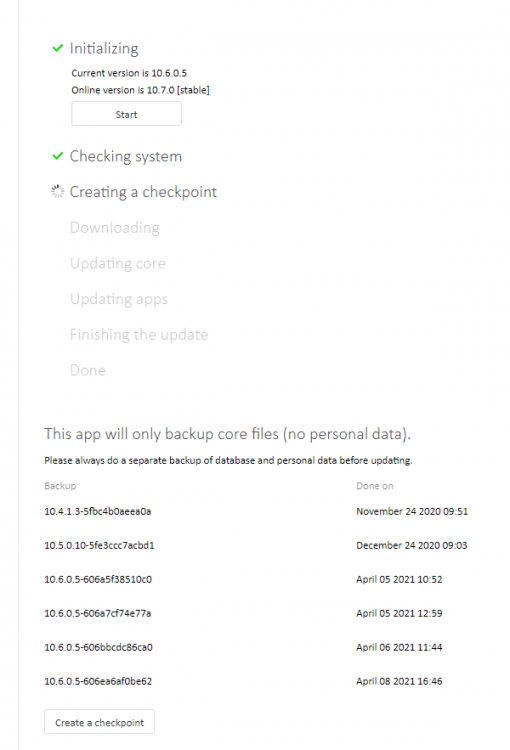
Hi, I'm having an issue upgrading from 10.6.0 to 10.7.0. When using the built in upgrader the process stalls at creating a checkpoint, which its completed multiple times now. it never seems to complete this step. I've set the permissions to /config by: chown -R www-data:www-data /config but nothing seems to allow me to get past this checkpoint after letting it run for 12+ hours. nothing shows in the docker log. switching to php 7.3 (from 7.2) seems to fail. Any help/tips here?
-
Did this ever get fixed? I've got an issue with KVM not starting and doing the above fuser -c /mnt/user/system/libvirt/libvirt.img replies with a large number of processes. Without killing them all and restarting the array/docker/server is there any other options?

-
Hi All, Has anyone managed to get VNC File sharing working with a Unraid Docker Guacamole instance connecting to an Unraid VM/KVM Instance? Everytime I try to enable SFTP I cant connect to the remote host anymore, and from within the Guac shell there is no ability to sftp to check connectivity. Any advice or pointers? Google and reddit seems pretty skimp on info
-
Any update on alternative? Have been using this browser/app as a jump to box and its been super useful. Would love if it was still working/updated.
-
Thanks. though I was going crazy....
-
Hi, Trying to use Privatebin. After pulling the image and changing the default port to 1025 the image never works. log: [s6-init] making user provided files available at /var/run/s6/etc...exited 0. s6-chown: fatal: unable to chown /var/run/s6/etc/services.d/nginx/run: Operation not permitted s6-chown: fatal: unable to chown /var/run/s6/etc/services.d/php-fpm7/run: Operation not permitted [s6-init] ensuring user provided files have correct perms...exited 0. [fix-attrs.d] applying ownership & permissions fixes... [fix-attrs.d] done. [cont-init.d] executing container initialization scripts... [cont-init.d] done. [services.d] starting services [services.d] done. 2020/04/30 22:36:30 [warn] 186#186: the "user" directive makes sense only if the master process runs with super-user privileges, ignored in /etc/nginx/nginx.conf:2 nginx: [warn] the "user" directive makes sense only if the master process runs with super-user privileges, ignored in /etc/nginx/nginx.conf:2 [30-Apr-2020 22:36:30] NOTICE: [pool www] 'user' directive is ignored when FPM is not running as root [30-Apr-2020 22:36:30] NOTICE: [pool www] 'user' directive is ignored when FPM is not running as root [30-Apr-2020 22:36:30] NOTICE: [pool www] 'group' directive is ignored when FPM is not running as root [30-Apr-2020 22:36:30] NOTICE: [pool www] 'group' directive is ignored when FPM is not running as root [30-Apr-2020 22:36:30] NOTICE: fpm is running, pid 185 [30-Apr-2020 22:36:30] NOTICE: ready to handle connections
-
HI, I'm trying to forward OpenPorject as a docker (running br0) from within NginxPM. I'm pointing the sub.domain.com to the forwarder IP, but i'm getting 502 gateway errors when trying to access said webpage. I tried to read the log in nginx (below) but i'm not seeing much that directly points me to an error. I have no other details configured within Npm apart from the IP/port 2020/03/24 16:57:53 [error] 924#924: *30 connect() failed (113: Host is unreachable) while connecting to upstream, client: 192.168.0.1, server: project.hostname.biz, request: "GET / HTTP/1.1", upstream: "http://192.168.0.6:8080/", host: "project.hostname.biz", referrer: "http://192.168.0.200:7818/nginx/proxy" 2020/03/24 16:57:56 [error] 924#924: *30 connect() failed (113: Host is unreachable) while connecting to upstream, client: 192.168.0.1, server: project.hostname.biz, request: "GET /favicon.ico HTTP/1.1", upstream: "http://192.168.0.6:8080/favicon.ico", host: "project.hostname.biz", referrer: "http://project.hostname.biz/" Edit, further inspection lead me down the line of the br0 not being able to communicate with the bridge IP range. In the docker settings there is a option to allow communication between bridge/br0, so i've ticked that and hey presto! away we go. Now, is there a simple way to setup sub.tld.com/docker ? or do all the entries need to be docker.tld.com


