





Squid
Administrators
-
Joined
-
Last visited
Everything posted by Squid
-
If its the port thing being logged, it is standard CA logging and expected to be there (CA checks on every installation if the default ports of a new app conflict with something already installed and let's the user know that they have to adjust)
-
Reset is the same on all pages. It cancels the changes (resets the page to how it was)
-
Is one of the icons for a container a question mark?
-
Probably from an automatic fsck being run on the flash drive
-
Since it’s only the one app what you need to actually post is the docker run command. It will outright say why it won’t start
-
The entire zip file
-
Console logs aren’t something I particularly look at unless I have an issue. Will look at it and confirm / fix for next rev
-
Thanks. But PHP errors being enabled are not recommended to have unless you are actively developing for the OS. In CAs case all PHP warnings are effectively fatal due to how it operates
-
How you did it is the way to do it. I get busy too on occasion
-
Plugins cannot have their download count determined. There is no "filter" for the spotlight. You can show them all from Home by clicking Show More in that section
-
Shortly, any template that does not have either a project or support entry in the template will be removed. It can't be too hard to either create a thread (or use the app's own support thread) or to even point to the project on GitHub where it's possible for a user to get some help. Also, WebUI entries are still messing people up. It always refers to the container port. It has never (and will never) point to the host port defined. CA has for years been attempting to fix these errors and it does for the most part. But in the circumstance where it cannot fix it automatically to point to the correct container port then CA will begin to automatically remove those templates. Along the same lines, hardcoded ports and IP addresses in the WebUI will wind up getting the template removed Maybe its because I still have a huge amount of pull requests outstanding (some for years) that are fixing all of this stuff and I'm rather sick of it.
-
Port mapping has no effect on containers with a custom IP address. The ideal place to ask about any issues with the app is within their dedicated support threads. which you can get via clicking on the icon and selecting Support
-
Yes CA thinks that it's installed due to the folder existing What you should be doing is submitting the base english files here: https://github.com/unraid/lang-en_US And then you can also include the Spanish translations here https://github.com/unraid/lang-es_ES That way the base translations will propagate to all the languages for someone to (hopefully) translate, and your Spanish ones will be there on the next update of the languages
-
You should post your diagnostics.
-
To be expected. The docker system ignores all port mappings when network type is a custom IP (or host)
-
Put the stick into another computer (eg: Windows) and run chkdsk on it
-
Thanks. Will be fixed next release. But, Tools - PHP Settings set it back to no errors / default.
-
It's one of the built-in safe guards to stop the feed from getting trashed if GitHub has issues. In this case, a repository was deleted by the maintainer so the feed aborts until an investigation happens. All by design and I try to look for this daily.
-
From the locally attached monitor / keyboard can you enter in at a command prompt diagnostics It'll get saved onto the flash drive in the /logs folder. Then powerdown powerdown and from another computer you can move the contents of /previous into the root of the flash drive and power everything back on and you'll be back running
-
You should post your diagnostics, what share in particular you're attempting this, and also ensure that you are properly connected to the server as the applicable user you created in Unraid
-
Looks like an issue with corruption on the flash drive and the boot files. Try moving the files from /previous to the root of the flash drive and then attempt the upgrade again.
-
Because it's not completely obvious, you're doing transfers when the system is running Windows and when it's running Unraid from the same source computer? Also, what share are you writing to when using Unraid?
-
It's showing that it has a 2.5G connection. Where are you seeing that its only running at 1G?
-
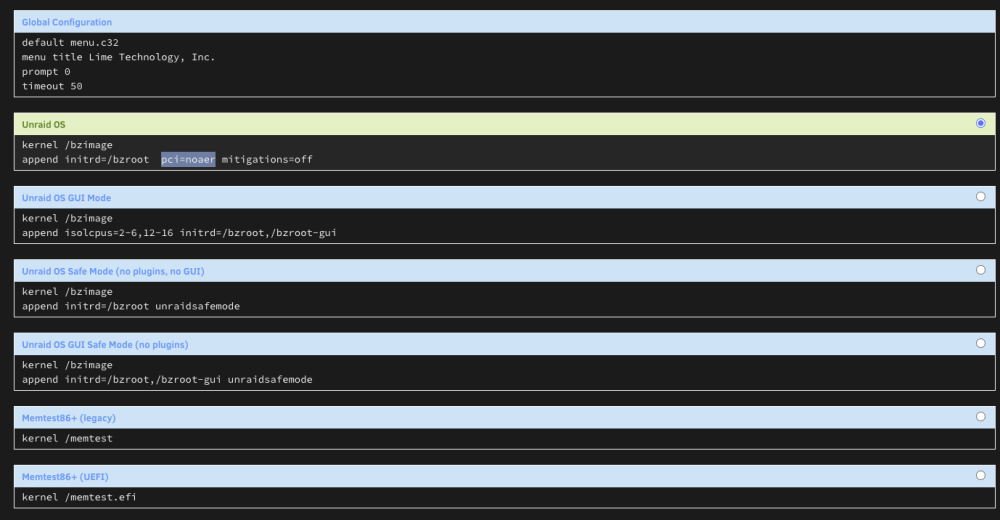
From Main, Boot Device, Click on Flash then Syslinux Configuration Add this to the Append line on which ever entry you have as default (the "radio" button that's selected) pci=noaer It should look something akin to this after the fact Reboot and see if that fixes you up
-
Is the nvidia plugin installed?



