





Rockikone
Members
-
Joined
-
Last visited
-
Hey, nachdem du fragtest, welche Setup's etc unter Unraid möglich sind. HIer mal meine aktuellen AI Workarounds . Ich selbst habe in meinem Server eine 5060ti mit 16gb vram. Wenn keine GPU-Anfrage ansteht, verbraucht die Graka im sleep 6 Watt Als LLM Host verwende ich Ollama oder aber auch Docker mit jeweils integrierter AI Nextcloud -> Ollama Gemma4:12b (Nvidia) Immich -> Foto AI Funktionen (Nvidia) Frigate -> Google TPU USB Modul Pop OS VM mit installierten Hermes Agent -> läuft immer, Hermes normaler Chat mit DeepSeek V4 flash (Gibt meiner Meinung nach nichts besseres bzgl Preis-Leistung), Vision Dinge Ollama gemma4:12b, Voice to text ein aktueller Whisper Docker welcher auch die Nvidia nutzt, Coding Ollama qwen code 2.5 Das wäre jetzt einmal alles, was mir so spontan eingefallen ist Grüße
-
Guten Morgen, @dibux hatte recht und der Code war tatsächlich abgeschnitten. Ich habe diesen jetzt entfernt und die xml Datei an sich hochgeladen. Wer diese einsetzen möchte (Anpassen der Netzwerkparameter) muss diese nach /boot/config/plugins/dockerMan/templates-user/ kopieren. Grüße
-
Hey, ich setze seit Jahren Nextcloud ein. Heute wurde mir das neue Docker Image für Nextcloud 33 angeboten (Offizieler Docker). Nachdem Update konnte ich mich nicht mehr per Weboberfläche einloggen. Server ging in einen Fehler. Den Übeltäter hatte ich schnell gefunden. Ich benutzte bisher OnlyOffice. Dieses Plugin (aktuell Version 10) sollte vor dem Update deaktiviert/gelöscht werden. Nachdem ich es per Konsole deaktiviert hatte, funktionierte Nextcloud ohne Probleme und ich gelangte auf die Weboberfläche. Jedoch jetzt ohne Office Anwendung. Für Euro-Office gibt es noch keine Docker-App im App Store von Unraid. Ich hab mir jetzt selbst ein Template erstellt. Nach Fehler fixen mit Hilfe der KI läuft dieses jetzt bei mir ohne Probleme und ich konnte es in Nextcloud einbinden. Die IP und Netzwerkschnittstellen müsst ihr anpassen. Das Passwort muss 32 Zeichen lang sein. Erwartet Nextcloud in Verbindung mit Euro-Office Das Einbinden eines Config und Log Verzeichnisses führte bei mir zu Abstürzen des Containers. Darum entfernt. Viel Spaß damit. Grüße aus Bayern Hier die XML Datei aus DockerMan von Unraid. my-Euro-Office.xml
-
Hey, erst einmal danke, das du dir die Arbeit machst. Schaut schon echt sehr professionel aus. Hinsichtlich der meinigen BackUPs 1x BackUP Server Unraid Lokal im Haus. Fährt 2x in der Woche automatisch hoch, BackUPs werden ausgeführt und er legt sich wieder brav schalfen 1x BackUP Server Unraid bei meinem Bruder im Haus. 1x in der Woche spiele ich meine Daten auf den dortigen Unraid auf eine verschlüsselte Festplatte Früher benutzte ich den BorgBackUP Docker aus dem APP Store. Seit einigen Jahren aber nun ausschließlich das Rsync Script von @mgutt Das tut seinen Dienst wunderbar. Ich habe es vor ca. 1 Monat einmal durch Claude Code gejagt und die von Claude genannten Fehler fixen lassen. Jetzt fühlt es sich noch besser an, merke aber selbst keinen Unterschied. Was ich aber vor einer Woche gemacht habe, ist, das ich auf NetBird (Plugin im AppStore), statt Tailscale, gewechselt bin. Funktioniert super. Bei Tailscale gab es auch nie Probleme. Aber bei Netbird ist mir deutlich sympatischer, das es sich hier um eine deutsche Firma handelt, auch wenn diese aus Berlin ist ;-) Grüße aus Bayern und Danke fürs Entwickeln
-
Hey, zur Info von meiner Seite. Freund von mir hatte eine Lizenz in der Vergangenheit gekauft (Basic) und diese nicht benötigt. Hat er mir geschenkt. Ich konnte die Lizenz über den Support auf meinen Account übertragen und ist in meinem Unraid Account nun gelistet. Also kurzgesagt. Es geht! Grüße
-
Hey, I may have found a bug in 7.2 RC1. I updated from 7.1.4 today. The Unraid server is connected to a UPS via USB. Under 7.1.4, communication with the UPS worked without any problems. Under 7.2 RC1, the UPS is marked as disconnected as soon as I start the UPS service in Unraid. However, the UPS values are displayed at the bottom. See screenshot. As I said, everything worked without any problems under 7.1.4. rechnerknecht-diagnostics-20251003-1010.zip
-
Hey, ich möchte mich auch gerne einmal äußern. Hab sehr viele Jahre den Linuxserver Docker benutzt. Jedoch hatte ich immer wieder kleinere Probleme, da die Struktur in diesem anders ist, als der des originalen Containers (App Store knex666). Ich wollte z.B. einen Backround Job laufen lassen, damit ich beim Nextcloud Assistant nicht immer 5 Minuten warten muss, bis ein eingegebener KI Prompt bearbeitet wird. Hierzu gibt es in der Wiki von Nextlcoud ein Anleitung, welche bei mir mit dem Linuxserver Docker nie funktionert hat. Sämtliche Befehle funktionieren bei mir mit dem knexx666 Nextcloud Docker. HIer einmal meine wichtigsten Docker Befehle aus der Unraid Shell heraus docker exec -u 99 nextcloud_org php occ db:add-missing-indices docker exec -u 99 nextcloud_org php occ files:scan --all docker exec -u 99 nextcloud_org php occ files:scan-app-data docker exec -u 99 nextcloud_org php occ maintenance:repair docker exec -u 99 nextcloud_org php occ maintenance:mode --off Für den 5 minütigen Cron Job gibt es einen eigenen Docker in Unraid Folgendes Script lasse ich für den KI Assistanten laufen. (Ollama mit LLM Model auf Unraid mit zugewiesener RTX5060 TI 16GB) #!/bin/bash echo "Starting Nextcloud Worker $1" # Function to attempt starting the worker start_worker() { echo "Attempting to start Nextcloud AI Worker $1..." # Run the worker inside the container (60 seconds for task execution) docker exec -u 99 nextcloud_org php occ background-job:worker -v -t 60 "OC\TaskProcessing\SynchronousBackgroundJob"; # Capture the exit status of the docker exec command exit_code=$? # Check if the worker ran successfully if [ $exit_code -eq 0 ]; then echo "Worker completed successfully." return 0 # Success else echo "Worker failed to start or complete with exit code $exit_code." return 1 # Failure fi } # Loop to start the worker and retry if it fails while true; do # Check if the container is running if ! docker ps --format "{{.Names}}" | grep -q "^nextcloud_org$"; then echo "Nextcloud container is not running. Waiting 60 seconds before next attempt." sleep 60 # If the container isn't running, wait for 60 seconds continue # Skip to the next iteration fi # Start the worker start_worker # Check if the worker succeeded or failed if [ $? -eq 1 ]; then # If failed, wait 30 seconds (or adjust as needed) to avoid rapid retries echo "Worker failed. Waiting 30 seconds before retrying..." sleep 30 fi done
-
Hey, my question has been resolved. To set up Accept Mode, nothing needs to be done in Unraid (other than enabling SSH within the Tailscale plugin there). Instead, you need to go to the Tailscale website (Machine Overview), and change the entry for SSH from "check" to "accept" under the Access Controls menu at the top. Best, Thomas
-
Hey, I'm reaching out to you with a question. I run a second Unraid server for data backup: A = My main Unraid server B = My Unraid backup server Server B is located in a different location. Both servers have Tailscale installed and connected to the Tailscale network. I can connect to the Unraid web interface of Server B from all clients. For backing up my data, I use the Rsync script by Mgutt. This involves writing data from A to B using SSH with rsync. The SSH certificates have been exchanged, so no password input is required. The Tailscale SSH service is enabled on Server B. However, when I try to connect to Server B from Server A via SSH (on the Tailscale network) in the Bash shell, I always get the Tailscale Check Mode displayed. To proceed, I have to authenticate through a browser link. Naturally, this prevents my weekly Rsync backup from working, as the SSH connection requires re-authentication every 12 hours (according to the Tailscale Wiki SSH Check Mode). My question is: How can I change the SSH connection from Check Mode to Accept Mode within Tailscale on Unraid?" Thank you in advance for your help. Regards, Thomas
-
I am also curious whether it is still possible to switch to 6.12 LTS. I actually see almost only advantages here. Limetech would have the latest LTS kernel at the start and would not have to backport the 6.6 used. OpenZFS has also been on 2.2.7 since yesterday and supports the 6.12 kernel. Of course, I don't know how much effort Limetech will have to put into switching to the 6.12 kernel. It would certainly be welcome. We've been waiting so long for Unraid 7 that one more month won't make any difference 🙂
-
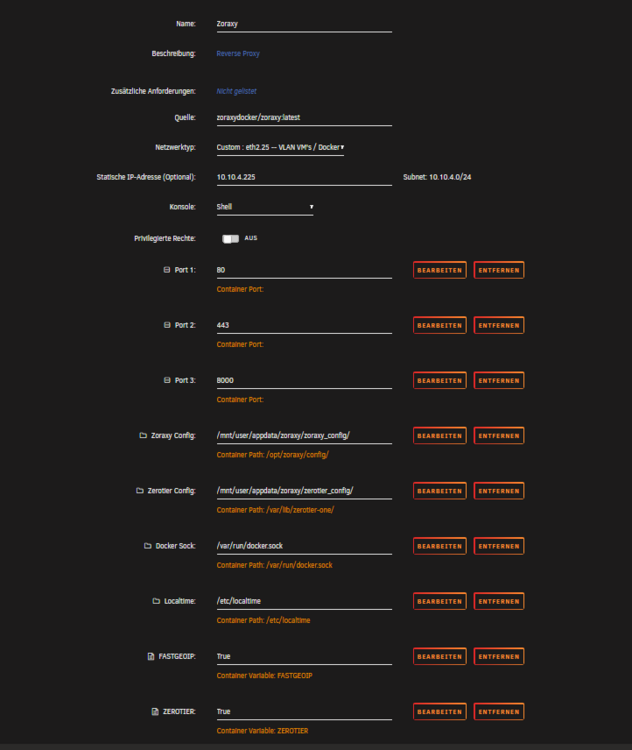
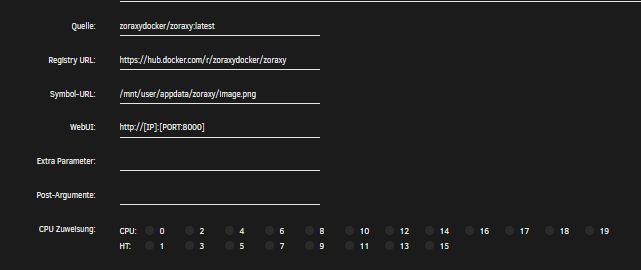
Guten Morgen, hatte das Video auch gesehen und gleich mal den Docker aufgesetzt. Im Anhang mein erstelltes Template. Läuft alles ohne Probleme!
-
Bin inzwischen weiter gekommen. Fehler liegt wohl in Nextcloud 30. Unter 29 funktioniert es. Hab bei Nextcloud ein Fehlerticket eröffnet! Grüße
-
Hallo zusammen, ist jetzt etwas spezielles, aber vielleicht kann mir von euch einer weiter helfen. Ich betreibe seit mehreren Jahren Nextcloud auf meinem Unraid Server (mehrere Docker MariaDB, OnlyOffice Server, Redis, Nextcloud) Ohne bisher größere Probleme. Nachdem ja immer mehr die KI Funktionen in den Vordergrund rücken, wollte ich nun gerne den Assistenten von Nextcloud nutzen. Auf meinem Server läuft auch der Ollama Docker mit dem LLM Llama3.2. Über den Docker Openweb UI kann ich auf Ollama zugreifen und kann mit dem LLM ohne Probleme kommunizieren. Da ich eine Nvidia Graka im System habe, funktioniert das sehr flott und ich bin mehr als zufrieden. In Nextcloud kann ich nach der Installation der entsprechenden Apps das Lokale LLM einbinden (IP des Dockers Ollama plus Port) und es wird mir bei der Auswahl (im Administrationsbereich im entsprechenden Punkt) auch das LLM angeboten und ausgewählt. Wenn ich jetzt im KI Assistenten einen Chat eröffne, erhalte ich leider keine Antwort. Ich bin bisher nicht dahinter gekommen warum. Die Kommunikation besteht, das kann ich im Protokoll Fenster von Ollama nachvollziehen. Auch funktioniert die Geschichte mit den Antworten über einen anderen Weg. Bin da nur zufällig darauf gekommen. Wenn ich die Nextcloud App auf meinem iPhone öffne, unter Sonstiges die KI Funktion starte und eine Fragen Prompt absetze, bekomme ich sofort eine Antwort. Die iPhone App kommuniziert ja auch nur über den Nextcloud Server. Da funktioniert die Verbindung. Funktionert bei euch unter Nextcloud (Linuxserver Docker) die Kommunikation im Browser mit einem lokalen LLM und habt ihr evtl noch einen Tipp für mich? Um ein Api Problem auszuschließen, habe ich mir den Docker litellm (LLM Proxy) auf Unraid erstellt. Hier funktionert litellm sozusagen als Gateway mit einer sauberen Api. Auch hier wird von Nextcloud das LLM gefunden und eingebunden, aber leider auch keine Antwort des LLM über den Assistenten im Browser. Grüße Thomas
-
Kann mich da nur anschließen. Ich sehe die aktuellen Angebote nur darin gut, die Leute mit den alten Abos (Basic und Plus) auf die neuen zu bringen und diese somit in die Update (Falle, kann man jetzt sehen wie man will) zu locken (ja, es gibt einen Mehrwert bei den Laufwerken!) Sobald du halt auf die neuen Modelle wechselst, ist halt ohne Bezahlen nach einem Jahr pustekuchen. Übirgens, bin mal gespannt, wie lange noch Unraid 7 auf sich warten lässt. Unraid 6.12 ist am 14.06.2023 erschienen. Heißt, das Update auf Unraid 7 wird deutlich über ein Jahr dauern. Wenn das der weitere Verlauf ist, kann es dir nämlich passieren, das du mit einem Lizenzkauf zum falschen Zeitpunk kein einziges Major Update bekommst, ohne erneut zur Kasse gebeten zu werden. Kann man jetzt einmal so stehen lassen! Ich liebe Unraid und bleibe definitv bei meinen alten Lizenzen. @ich777 @alturismo würde mich mal interessieren, wie ihr das als Admin sieht bzgl 2ter Absatz?
-
@ich777 Danke für deine Anleitung. Über den Weg des umkopieren läuft der Docker nun mit allen in der Config angegebenen Pfaden unter Unraid. Werde ich jetzt einmal testen. Grüße und Dankeschön




