giganode
Community Developer
-
Joined
-
Last visited
Everything posted by giganode
-
What PSU are you using and what is your system capable of drawing from a psu?
-
I had someone verify SRIOV to be working on an 14100. But for the 265k afaik you'll need to wait for the XE driver with sriov function which is is still in development.
-
I still didn't have enough time to fork and rewrite https://github.com/Jon0/ax1600i. If someone wants to do that, go ahead! I also have an ax1600i so contact me for testing and implementation afterwards 😃
-
I absolutely cannot recommend trying sleep mode. By design this makes no sense to me in combination with sriov.
-
And what happens if you shut down the vm? Is it going to sleep then?
-
That is correct. You need to adapt the command line on a system which uses sriov: intel_gpu_top -d sriov
-
The experience is much better than with virtual graphics. Exactly, sriov is the way to go. Also, this way you still can use the igpu in docker.
-
Whats the ouput of corsairmi? Please upload Diagnostics.
-
Modern iGPUs cannot be passed through afaik. Yes you need a usb to hdmi dongle for your use case, but that is totally fine. They are cheap and widely available.
-
You still need to have the plugin installed, when you want to use sriov on the igpu.
-
Did you try something like this? mosquitto_pub -h <MQTT_HOST> -p <MQTT_PORT> -u <MQTT_USER> -P <MQTT_PASSWORD> -t <TOPIC> -m <MESSAGE> --cafile <CA_CERT> --tls-version <TLS_VERSION>
-
You need to update to Unraid 7.
-
I can't seem to find your iGPU. Can you verify this? Also, did you already update to Unraid 7?
-
At what time/moment did you extract that log? Please provide Diagnostics without the plugin installed.
-
I'm afraid I don't understand your question. The credentials and other settings can be entered in Settings -> MQTT .
-
I'll publish a new release this evening Please, give me short feedback after testing.
-
Das sollte man aber erst einmal überprüfen bevor man eine Karte überflasht.
-
Das Problem wurde wohl durch das Flashen einer anderen Firmware gelöst.
-
No worries. You're welcome
-
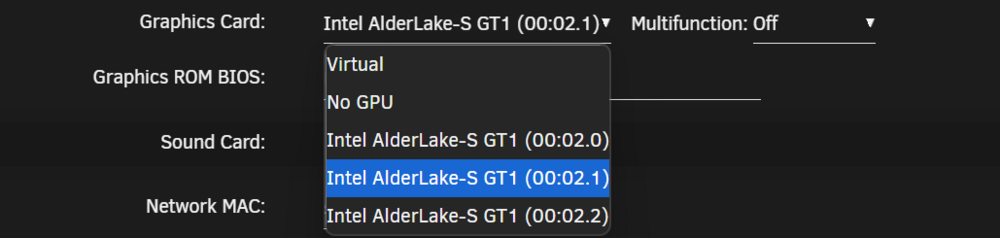
Yes, normally you should be able to just select it in the dropdown menu. Take a look here: 00:02.0 is my IGPU and 00:02.1 & 00:02.1 are my VFs.
-
Okay Also don't bind VFs from the iGPU to vfio.
-
Don't bind the iGPU to vfio on boot.
-
Yes! You should do that. This might be the "problem".
-
Apparently, this section doesn't help. Can you recreate the situation and upload Diagnostics?
-
The plugin is verified to work under rc1. You may have a different problem. Can you provide more details?