





CS01-HS
Members
-
Joined
-
Last visited
Everything posted by CS01-HS
-
I can't answer your question specifically but I solved my intermittent OOM errors with the SwapFile plugin (in community apps.) Haven't had one since.
-
Ah, that explains it. Thanks. Took some time but I got it working with qemu-8.2.
-
I have a Mojave VM that I run with pc-q35-5.1 With 7.3 it seems whenever I stop/start the array the machine setting in the XML (below) resets to pc-q35-8.0 Strange that UNRAID would make changes to VM XML surreptitiously. Is there any way to stop it? <os> <type arch='x86_64' machine='pc-q35-5.1'>hvm</type> <loader readonly='yes' type='pflash' format='raw'>/mnt/user/system/custom_ovmf/Macinabox_CODE-pure-efi.fd</loader> <nvram format='raw'>/etc/libvirt/qemu/nvram/318231bd-841c-44xa-a9f5-389c374b34cd_VARS-pure-efi.fd</nvram> </os>
-
My simple "fix" was a daily wakeup alarm in the BIOS. A day of downtime at worst. Alternatively a second UPS.
-
I was surprised to discover, after upgraded to 7.3 and internal boot, "flash backup" still works. No reconfiguration necessary. Thank you!
-
Is file manager the best way to copy or move? I worry using mover might conflict with the complex mover-tuning rules I set up.
-
Re: internal boot, if your existing pool is a BTRFS mirror and you want to preserve what's on it: Couldn't you remove one drive from the pool, provision it for internal boot, add it back to the pool (which would copy existing data to the BTRFS partition) then repeat the process with the other drive?
-
Yes but the VM is Mojave (with Q35-4.2) and the "new" device is an iPhone 5S. I don't want to take your time with what's likely an edge case.
-
USB 2.0 device but connected to a USB3 port. I switched to a USB2 port - no luck, same error. Thanks though. I went through hell trying to get the original device to sync before I discovered your plugin so maybe something I did in that process is the difference.
-
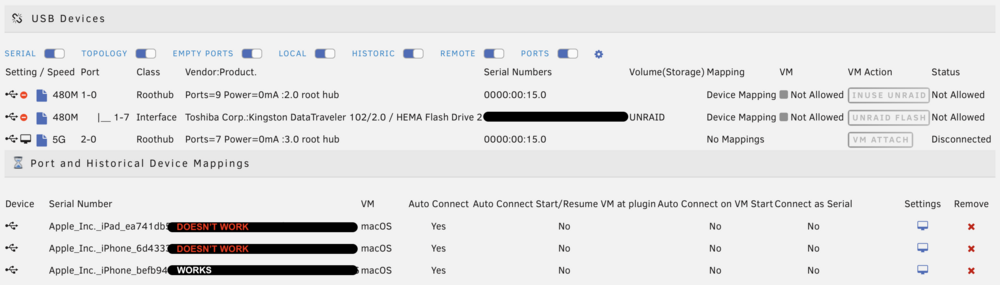
For a couple of years I've used this plugin to sync my iPhone to a macOS VM. Works great! But with two new iOS devices when I try to attach them I get a "bind" failure in the unraid log, the VM crashes, and the device restarts (which I believe is a security measure.) Same VM, same port, same cable for all 3. The original device (iPhone) still attaches and syncs perfectly. Any ideas? Log excerpt with phone that works: works Log excerpt with phone that doesn't: breaks
-
Right, "if 1 parity, and 1 disk lost, emulate the 1 lost disk." Makes sense. What I question is what I just experienced: "If 1 parity, and ALL disks lost, require 1 disk to be rebuilt." Why did that 1 data disk, and not the others, require a rebuild? Is there some advantage I'm missing or am I not explaining it clearly?
-
So, if I understand (and thank you for bearing with me): If all data disks go offline, writes to all will fail but because I have 1 parity I have to rebuild 1 disk (the first with a failed write.) If I had 2 parity's I'd have to rebuild 2 disks (the first 2 with failed writes.) I must be missing something because I don't see the benefit. Why not just handle the 1st failed write like all the rest and avoid the rebuild?
-
All 4 of my data disks dropped offline (red X) because the SATA card disconnected. Only the parity disk (and cache) connected to onboard ports remained. When I rebooted, after an XFS repair, disk1 was emulated (orange circle). The other 3 data disks mounted normally (green circle.) Is that because I was writing to disk 1 when SATA card glitched or for some other reason? I'm trying to understand how it works to distribute disks among my 4 onboard controllers and 4 from the card to mitigate risk.
-
So if I'd been writing to two disks it would have disabled the whole array or only 1 disk - or is this writing unrelating to the disabling?
-
I believe a software glitch (my fault) caused my SATA card to drop offline taking all 4 of my data disks with it. When it failed I was writing to Disk 1. A reboot fixed the card but when the server came back up Disk 1 was emulated. I ran XFS repair which worked and now I'm rebuilding the disk. But what if I had been writing to more than 1 data disk when the card failed? With 1 parity I can only emulate 1 disk so would however many disks I was writing (assuming the "writing to" caused the corruption/emulation) become un-rebuildable? If so, then is best practice to distribute disks among controllers to minimize the consequences of a single-point failure? Here's my syslog from the incident, in case it's interesting: syslog
-
A year or two ago I had strange "disappearing container" issues running Rebuild-DNDC so I uninstalled it. Maybe start there.
-
I'm having the same problem with Safari (v26.2) I assumed it was a server problem before trying Firefox which resolved it. I'll report back when v26.3 is official.
-
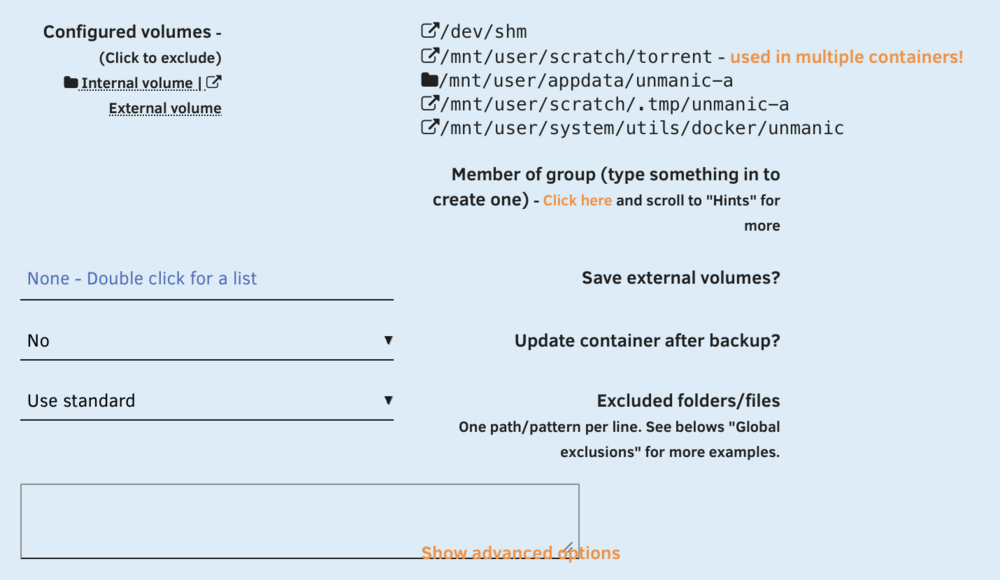
I woke up to a several-hundred GB backup and counting. Turns out, because of strange wrapping, when I thought I was setting "update container" in fact I was setting "save external volumes." Makes sense now. Thanks.
-
Can anyone tell me where the plugin stores the "updateContainer" value per container? I figured it was in the container's block in /boot/config/plugins/appdata.backup/config.json but I have half as yes, half as no and there's only one "no" in my config.json with the rest as empty strings. They're correct in the WebUI after refresh so I know they're stored somewhere.
-
With the version as of a couple weeks ago I didn't notice a multi-line printout every hour when mover ran. I don't know if the printout's intentional or a bug. Sure. For the syslog printout, the debug error, or both? Maybe a silly question but where would I do that?
-
Not a big deal but since I upgraded I see the following in syslog when it runs. (Config collapsed below - I have the two logging variables set to "no") Jan 6 10:00:02 NAS move: ***************************************************** Mover Tuning Plugin version 2025.12.26 **************************************************** Jan 6 10:00:02 NAS move: ----------------------------------------------------------------- Global settings --------------------------------------------------------------- Jan 6 10:00:02 NAS move: Using global (cache:yes) moving threshold: 75 % Jan 6 10:00:02 NAS move: Using global (cache:yes) freeing threshold: 50 % Jan 6 10:00:02 NAS move: Using global (cache:prefer) fillup threshold: 95 % Jan 6 10:00:02 NAS move: Primary threshold to Move all Primary->Secondary shares to secondary: 95 % Jan 6 10:00:02 NAS move: Age: Automatic (smart caching) Jan 6 10:00:02 NAS move: Clean Folders: yes Jan 6 10:00:02 NAS move: Skip file list: /boot/extras/mover_tuner/exclude.txt Jan 6 10:00:02 NAS move: Skip filetypes: DS_Store DSStore nfo unmanic Jan 6 10:00:02 NAS move: Notify: movedOnly Jan 6 10:00:23 NAS move: Mover tuning plugin done!# more /boot/config/plugins/ca.mover.tuning/ca.mover.tuning.cfg When I enabled debug logging, to track it down, I got this error: Jan 6 09:00:23 NAS move: ************************************************************ ANALYSING MOVING ACTIONS *********************************************************** Jan 6 09:00:23 NAS move: Deciding the action (move/sync/keep) for each file. There are 4 files, it can take a while... Jan 6 09:00:23 NAS move: awk: cmd. line:197: printf "PRIMARYSTORAGENAME|FILES_FROM_PRIMARY|SIZE_FROM_PRIMARY|FOLDERS_FROM_PRIMARY|FILES_FROM_SECONDARY|SIZE_FROM_SECONDARY|FOLDERS_FROM_SECONDARY|FILES_FROM_UNATTENDED|SIZE_FROM_UNATTENDED|FOLDERS_FROM_UNATTENDED\n" > " Jan 6 09:00:23 NAS move: awk: cmd. line:197: ^ unterminated string Jan 6 09:00:23 NAS move: grep: Jan 6 09:00:23 NAS move: /tmp/ca.mover.tuning/Summary_2026-01-06T090001.txt: No such file or directory
-
You can use unmanic to standardize your media files - relevant plugins would be: AAC Stereo Downmix, Normalize AAC. But as the other poster said easier to fix on the client end if possible.
-
I guess I should mark this solved.
-
I've had intermittent boot problems for a couple years. At first very rarely on startup it wouldn't pass the bios screen. No error, just stuck. But a reset would fix it. Over time the frequency increased to the point every reboot or power on required at least a dozen tries to start. I assumed it was power-related (power supply/degrading capacitors) but couldn't find a pattern. Recently, after going through the usual fidgeting on startup, it passed the BIOS but for the first time UNRAID wouldn't boot with the log reporting USB errors. So I created a new boot drive* and problem solved. I've restarted half a dozen times since, cold/warm doesn't matter, starts every time. I'd have thought with all the writing to flash - a thousand notifications, plugin and OS updates, etc - a bad drive would report errors. But nothing, not even one. Posting in case anyone else has a similar problem. *The unraid boot creator was unnecessarily frustrating. It errored out when I tried to create the drive from a backup zip on Mac, so I tried the windows version (on a windows VM), which also failed. In the end I used the manual creation process and copied the config and other directories over.
-
I just saw this reply. Great explanation, thanks!



