





CS01-HS
Members
-
Joined
-
Last visited
Everything posted by CS01-HS
-
The ordering bug (?) only affects containers with no group assignments. Regardless, you should group these. Where container B depends on container A: without groups: A is stopped for backup which may cause errors with B, before B is stopped for backup with groups: B is stopped, then A is stopped, then both are backed up, then A's started, then B's started
-
That's how I had it initially: But I haven't used this script in years (I eliminated the USB drive) so much may have changed. If it works, it works!
-
Re: Warnings for non-existent volumes: There's the xml template, or is that backed up even if the container's skipped? That and consider the case of a container that doesn't use volumes: We set it to skip A subsequent version does use volumes We won't know not to skip it until it's too late Backup Order In the new version with Backup type set to stop, backup, start for each container For grouped containers: They're stopped in reverse of Start order (good) They're backed up in reverse of Start order (fine either way) They're started in Start order (good) For un-grouped containers They're stopped, backed up, started in reverse of Start order (bug?)
-
Oh, I didn't realize. I was going off the debug output in test mode. I tried a real run (now with full paths) and it works. Thanks!
-
File-exclusion works as expected but folder-exclusion only excludes the folder itself, nothing under it. e.g. given the folder structure: MyShare/KeepOnCache/ File1.txt File2.txt And this entry in the exclude file: /mnt/cache/MyShare/KeepOnCache the find command (with sed evaluated) look like this: > find "/mnt/cache/MyShare" -depth | grep -vFx "/mnt/cache/MyShare/KeepOnCache" /mnt/cache/MyShare/KeepOnCache/File1.txt /mnt/cache/MyShare/KeepOnCache/File2.txt So File1.txt and File2.txt are not excluded from mover. Is that intended and if so what's the point of folder-exclusion?
-
Okay let's set that aside. Exact match (-x) means folder exclusion can't work because while the folder will match none of the files within it will.
-
I noticed folder exclusion using the File list path option stopped working. Enabling test mode I see this in the find command (where my exclude file is exclude.txt) grep -vFx -f <(sed 's/\/*$//' '/boot/extras/mover_tuner/exclude.txt') I don't see how this can work with the -x option: -x, --line-regexp Select only those matches that exactly match the whole line. For a regular expression pattern, this is like parenthesizing the pattern and then surrounding it with ^ and $. Even files in exclude.txt won't satisfy the exact match unless they're prefaced with the cache path, e.g. /mnt/cache/sharename/file.txt vs simply sharename/file.txt, which used to work. Am I missing something?
-
Yes. By default I think only subtitles save to the library directories but you can disable that. And consider this to synchronize watch state between the two: (It's not in the app store so you have to install manually) https://github.com/ArabCoders/watchstate But backup your watch states beforehand because a misconfiguration could reset it.
-
I didn't see it mentioned (maybe my search was insufficient) but it'd be handy if a share's recycle bin were emptied automatically when "free" dropped below a certain value or %, in case of emergencies. I'm in the process of standardizing my media library with unmanic so lots of churn, which made me think of it. I could do it with a simple user-script but that only solves it for me, and it's not as clean. Something to consider if you end up with too much free time!
-
If I'm reading this right: one of the two connectors may offer 4 ports from the JMB585.
-
I've fixed it (until the next reboot) with a symbolic link: ln -s /usr/local/bin/move /usr/local/sbin/move Seems to be running properly but hasn't finished yet.
-
Getting a strange error: Jun 13 15:02:32 NAS root: /usr/local/emhttp/plugins/ca.mover.tuning/age_mover: line 214: /usr/local/sbin/move: No such file or directory Which makes sense because move is in bin, not sbin. which move /usr/local/bin/move It's a simple fix but I wonder if it indicates something more serious if I'm the only one seeing it. age_mover was last modified May 23: ls -l /usr/local/emhttp/plugins/ca.mover.tuning/age_mover -rwxr-xr-x 1 root root 23309 May 23 09:01 /usr/local/emhttp/plugins/ca.mover.tuning/age_mover* My plugins are updated/running 6.12.0-rc8 EDIT: I see the age_mover in this post also references sbin. Huh. EDIT 2: It appear all scripts in /usr/local/emhttp/plugins/ca.mover.tuning reference sbin/move, which doesn't exist. Maybe the recently-released RC8 moved it from sbin to bin.
-
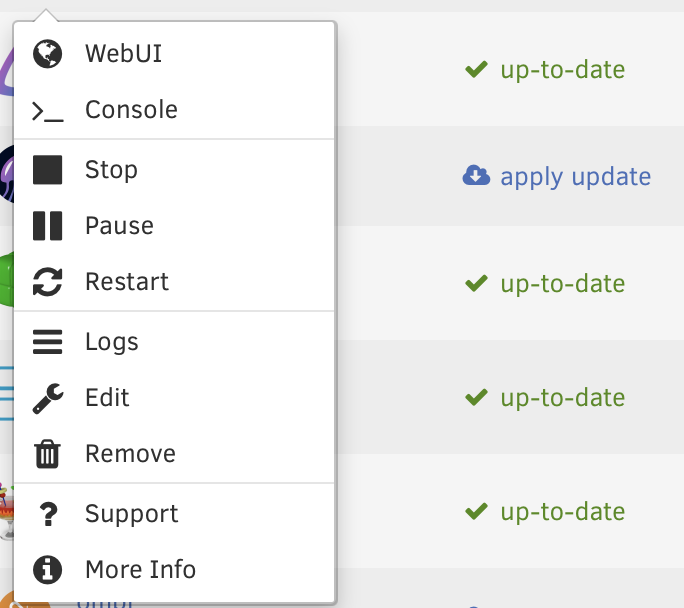
I wanted to change a container setting but when I clicked edit the template was blank. Thought that was strange and a reboot might fix it – Apparently it's made it worse, now there's no edit option in the menu: Same behavior in Safari and FF so it's not a browser cache issue. Any ideas? nas-diagnostics-20230424-1411.zip
-
I noticed in /boot/config/plugins a leftover directory from NerdPack, a plugin I'd uninstalled a while ago. It made me wonder if there's a standard method for cleaning up the plugins dir or the flash drive generally. A sort of "based on your settings here's a list files that by default shouldn't be there."
-
I use it, great plugin. But because it stops my containers for about 15 minutes I only run it weekly. Even if you run it nightly, what I'm proposing would allow a simpler (2 click) up-to-the-minute-it rollback.
-
Before updating sensitive containers I'll typically stop the container, tar up its appdata dir, then apply the update. This makes it easy to rollback in case something goes wrong. It'd be handy if this process were automated – present a Backup and Update menu option when an update's available, and Rollback and Delete Backup menu options when a backup's detected.
-
Done. I'm getting strange results. It works except for a handful of files which always error out. If I skip them it copies fine. And they copy fine to a standard unraid share. I checked their permissions, etc, no issues. These files might have thrown off my earlier reports of what was or wasn't working. I think you've caught the major issue though, some conflict with the "MacOS interoperability" setting. Thanks for helping me solve it.
-
Attached. Errors in Windows 10 are consistent now but Mac is fine. Strange. The "Windows" is actually Parallels VM. I thought that might affect it but the same VM writes to standard unRAID shares without issue. In case it's helpful: # smbstatus Samba version 4.17.5 PID Username Group Machine Protocol Version Encryption Signing ---------------------------------------------------------------------------------------------------------------------------------------- 15540 windows users 10.0.1.3 (ipv4:10.0.1.3:49285) SMB3_11 - partial(AES-128-CMAC) Service pid Machine Connected at Encryption Signing --------------------------------------------------------------------------------------------- file_history 15540 10.0.1.3 Mon Mar 27 03:08:49 PM 2023 EDT - - Locked files: Pid User(ID) DenyMode Access R/W Oplock SharePath Name Time -------------------------------------------------------------------------------------------------- 15540 99 DENY_NONE 0x100081 RDONLY NONE /mnt/disks/file_history . Mon Mar 27 15:08:49 2023 nas-diagnostics-20230327-1510.zip
-
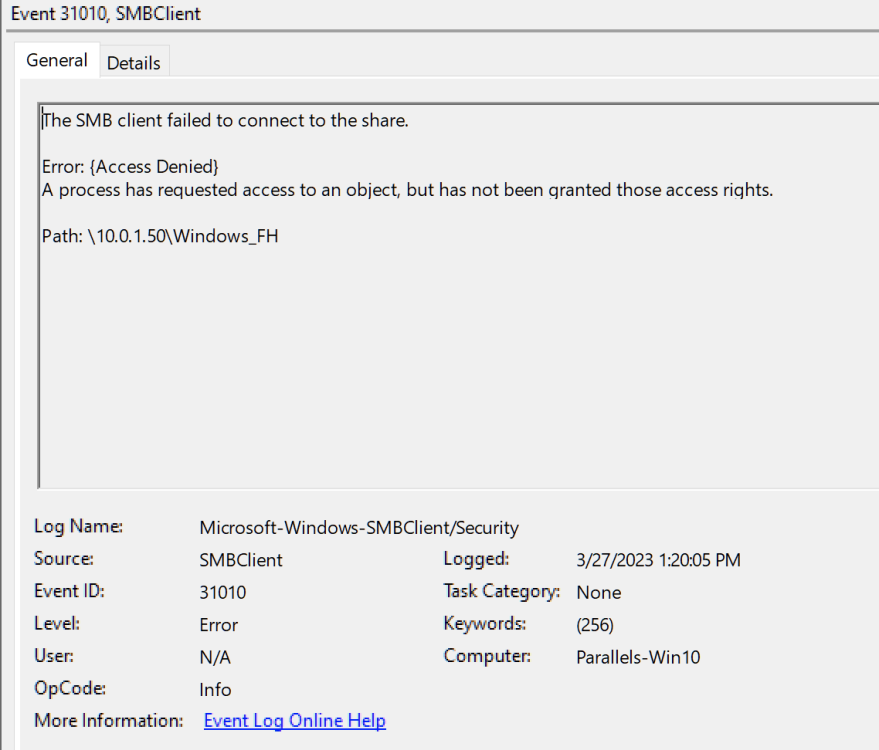
I did and it seems to be working now both on Windows and Mac, thanks. In windows event log I see entries like below referencing the share but maybe they're expected: Are there specific tests you'd like me to run before I restore 'macOS Interoperability' ? EDIT: Darn, I spoke too soon. The copy operation in windows just failed with another entry like the above in the event log.
-
I'm trying to use unassigned devices to share an exFat-formatted flash drive over SMB. It looks like it should work, the share is visible and I can read files fine but write errors out – on Windows eventually and on Mac immediately (all copied files are 0 bytes.) I thought it might be the flash drive but with the CLI I can copy multi-gig files to its mount point under /mnt/disks/ consistently. I've tried with SMB security set to Public and Private, force user 'nobody' yes and no, same result. I'm on 6.12.0-rc2 - could that be the issue? I haven't tried with earlier versions. nas-diagnostics-20230327-0814.zip
-
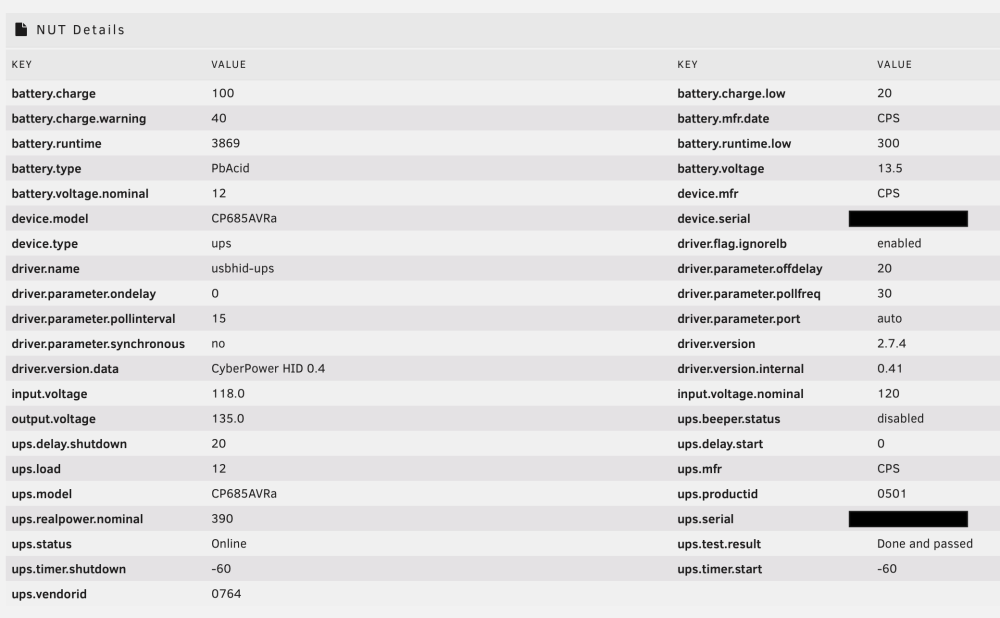
Here's my details page for reference:
-
Ah. I only have the one UPS so I can't test what's particular vs generic. Something else that might affect it: I have unRAID set up as client to a NUT server on an RPi. While I have you (in case it's helpful) here are additional state codes I gathered: > 'OL CHRG' => 'Online: charging', > 'OL CHRG LB' => 'Online: charging', > 'OL DISCHRG' => 'Online: discharging', > 'OL DISCHRG LB' => 'Online: discharging', > 'OL BOOST' => 'Online: low voltage', > 'OB DISCHRG' => 'Offline: On battery',
-
Right these tweaks are to your plugin (thanks by the way, works beautifully.) Did I post in the wrong thread?
-
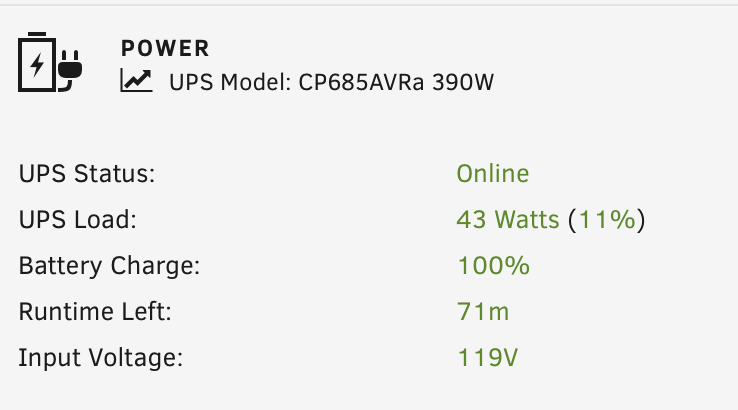
For anyone interested I did a quick-and-dirty tweak to match the display formatting to 6.12's default: Requires changing two files, presented below in diff format. nut_status.php: nutFooter.page:
-
The weekly scheduled boot of the VM that's caused this went off last night without a hitch – 2GB swap used (out of 4GB.) If it goes smoothly next week I'll mark this as solved, thanks.




