





CS01-HS
Members
-
Joined
-
Last visited
Everything posted by CS01-HS
-
Darn. Maybe this is the push I need to learn docker/container distribution.
-
I love the Grafana Unraid Stack - clean and simple. Any plans to update it with a recent version of Grafana? They've added some handy features since v7.3.7: https://grafana.com/categories/release/
-
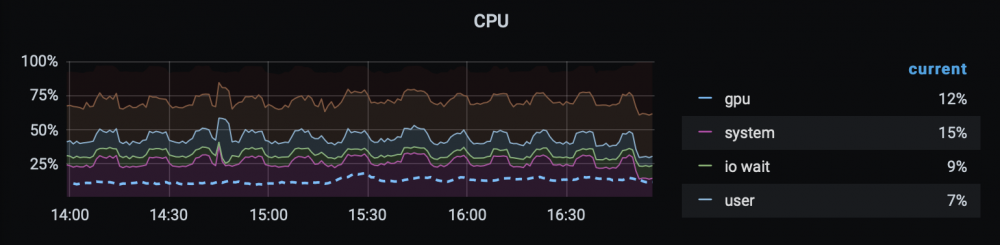
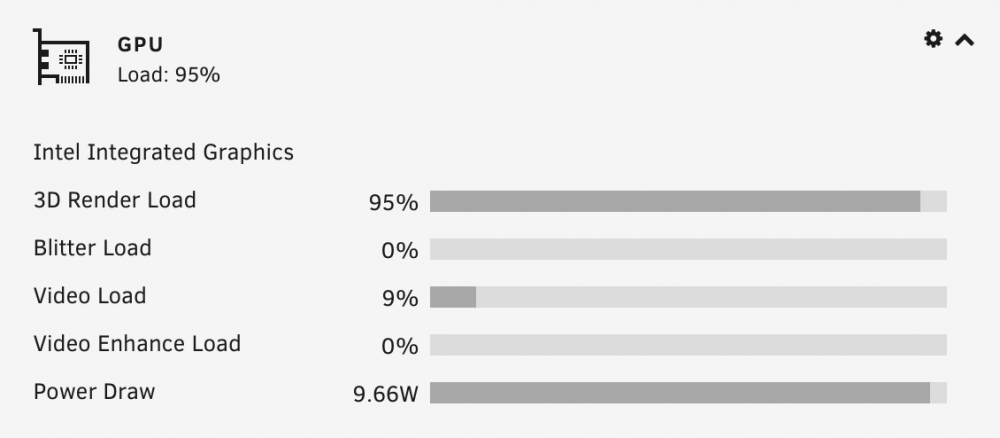
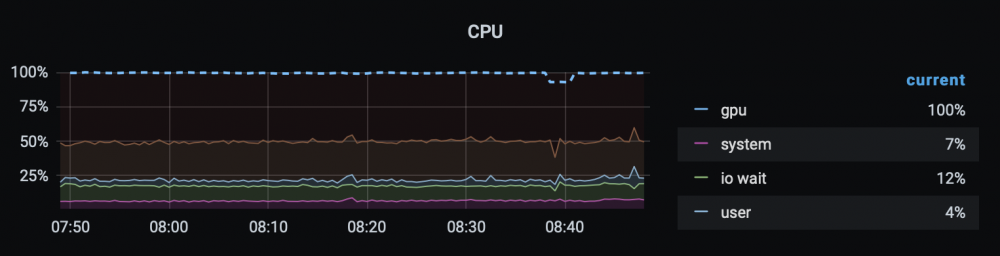
First thanks for this container, very handy. One suggestion: I was running batch conversions in HandBrake and couldn't figure out why my iGPU wasn't fully utilized: It turns out it was but it was maxing out 3D render load (95%) and the reporting script (get_intel_gpu_status.sh) grabs video load (9%): So I tweaked the script to grab whatever's highest: #!/bin/bash #This is so messy... #Beat intel_gpu_top into submission JSON=$(/usr/bin/timeout -k 3 3 /usr/bin/intel_gpu_top -J) VIDEO_UTIL=$(echo "$JSON"|grep "busy"|sort|tail -1|cut -d ":" -f2|cut -d "," -f1|cut -d " " -f2) #Spit out something telegraf can work with echo "[{\"time\": `date +%s`, \"intel_gpu_util\": "$VIDEO_UTIL"}]" #Exit cleanly exit 0 I overwrite the container's version with the following Post Argument, where utils is a new mapped path to the folder containing my tweaked version: && docker exec intel-gpu-telegraf sh -c '/usr/bin/cp -f /utils/get_intel_gpu_status.sh /opt/intel-gpu-telegraf/; chmod a+x /opt/intel-gpu-telegraf/get_intel_gpu_status.sh' (Full path to cp is necessary because cp is aliased to cp -i) Now the display reflects full utilization:
-
One advantage I noticed was it exposed unraid-autostart which I've added to my backup sets since reinstallation through Previous Apps didn't restore it (though it worked perfectly otherwise.)
-
I have appdata on a single XFS-formatted SSD. Recently on occasion a container would disappear on restart necessitating reinstall – thought it might be docker image corruption so I should recreate it. In the process I saw 3 options for docker root: BTRFS image XFS image Directory Directory looked interesting so I thought I'd try it. Have I chosen poorly? Are there benefits I can take advantage of?
-
I don't know if either of these applies but since RC2 VNC with Safari doesn't work for me.
-
Sorry for the delay, just saw this. Actually I meant Duplicacy's full appdata directory. On unRAID that's typically: /mnt/cache/appdata/Duplicacy I run the Backup/Restore Appdata plugin weekly which backs up all my containers' appdata directories (and my flash drive) to the array, so for simple corruption I'd just restore from that. I'm talking about catastrophic failure, your server's struck by lightning or stolen, etc. I believe everything necessary to recreate a container is either on flash or in appdata. So I take those two backups, created by the backup plugin, and save them elsewhere – an offline flash drive, remote server, etc.
-
Do you want versioned backup (I used Duplicacy's docker) or a simple copy in which case a User Script with a few calls to rsync would do? Whichever route you go as long as your backup drive's part of your unraid server if e.g. a power surge damages your main drives it'll also likely damage your backup drive. Same goes for an encrypting virus. Really you're only protecting against accidental deletion but that's better than nothing.
-
Strange bug since I updated to rc2: Occasionally when I delete a file, say test.txt, what appears in RecycleBin is a folder test.txt where the file should be and inside it the file test.txt. I rearranged my cache recently which involved manually moving files. Thought that might be the cause so I uninstalled the plugin, deleted all .Recycle.Bin folders in /mnt/user/ shares, and reinstalled but the problem persists. Anyone else seeing this?
-
Isn't the easier procedure adding a second disk to the cache pool, letting it balance, then removing the old one? Maybe more room for bigger errors.
-
Over SMB? Should be faster. I get about double that with a theoretically slower setup (odroid-HC2 over WebDAV.) You probably want to set this up as a copy job (initialize backblaze as copy-compatible and consider bit-identical.) Check out the forum: https://forum.duplicacy.com One piece of advice is keep a copy of duplicacy's appdata outside of CA AppData backups and duplicacy backups - In case of catastrophic failure to restore you'll need a working duplicacy and you don't want anything preventing that, e.g. encryption keys. (Seems like this would apply generally to backup software.)
-
Ah, so I was misremembering. Thanks.
-
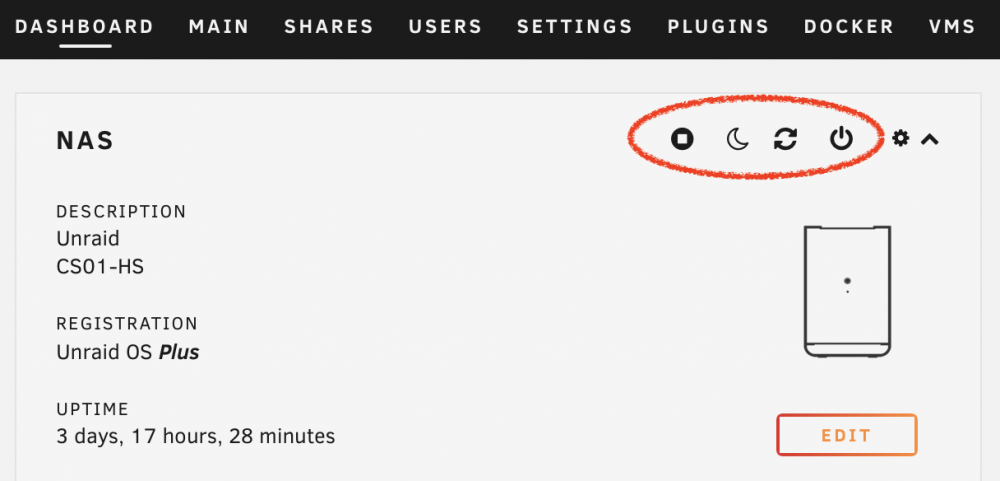
Ha, you're right that wasn't very clear. I'll rephrase: Are the buttons circled in my picture present in a clean install or did I change a setting (or maybe add a plugin) to get them?
-
I'm almost sure I enabled this option (somehow) when I first installed unraid. I'd like to disable it but I can't find the setting. Am I misremembering and it isn't optional?
-
On the off chance anyone else has a Silverstone CS01 here's my minimalist version. Light and dark.


-
My Cyberpower (685AVR) worked fine with the built in management with one exception: Setting Turn off UPS after shutdown to Yes (which is necessary if you want the machine to boot automatically when power's restored) would seem to work then as the server was booting, cut power, which caused a dirty shutdown. Apparently there's an incompatibility with Cyberpower's implementation - with Nut you can work around it (see my post linked above.)
-
Just a heads up. I saw repeated errors in the log file after updating to 2021.09.10: Sep 10 19:14:02 NAS crond[1762]: exit status 255 from user root /usr/local/emhttp/plugins/parity.check.tuning/parity.check.tuning.php "monitor" &>/dev/null Sep 10 19:21:01 NAS crond[1762]: exit status 255 from user root /usr/local/emhttp/plugins/parity.check.tuning/parity.check.tuning.php "monitor" &>/dev/null Sep 10 19:28:01 NAS crond[1762]: exit status 255 from user root /usr/local/emhttp/plugins/parity.check.tuning/parity.check.tuning.php "monitor" &>/dev/null Sep 10 19:35:01 NAS crond[1762]: exit status 255 from user root /usr/local/emhttp/plugins/parity.check.tuning/parity.check.tuning.php "monitor" &>/dev/null Sep 10 19:42:01 NAS crond[1762]: exit status 255 from user root /usr/local/emhttp/plugins/parity.check.tuning/parity.check.tuning.php "monitor" &>/dev/null Sep 10 19:49:01 NAS crond[1762]: exit status 255 from user root /usr/local/emhttp/plugins/parity.check.tuning/parity.check.tuning.php "monitor" &>/dev/null Sep 10 19:56:01 NAS crond[1762]: exit status 255 from user root /usr/local/emhttp/plugins/parity.check.tuning/parity.check.tuning.php "monitor" &>/dev/null Sep 10 20:00:01 NAS crond[1762]: exit status 255 from user root /usr/local/emhttp/plugins/parity.check.tuning/parity.check.tuning.php "monitor" &>/dev/null Running manually I got this error for every function defined in Legacy.php: # /usr/local/emhttp/plugins/parity.check.tuning/parity.check.tuning.php "monitor" <script>if (typeof _ != 'function') function _(t) {return t;}</script> Fatal error: Cannot redeclare parse_lang_file() (previously declared in /usr/local/emhttp/plugins/parity.check.tuning/Legacy.php:6) in /usr/local/emhttp/plugins/dynamix/include/Translations.php on line 46 I fixed it (?) by removing the functions from Legacy.php. NOTE: This is with v6.10.0-rc1
-
Click "Connect" at the top right of finder window and you should be able to log in. If that doesn't work then in finder hit [COMMAND + K] and enter the following (with appropriate substitutions) smb://<username>@<unraid IP address> If neither of those work, right click Finder in the dock while holding OPTION, select "Relaunch" and try them again.
-
Rebuild DNDC does what you want for one. Maybe supports two or you could install two instances?
-
After deleting an empty pool then recreating it I was presented with a misleading warning about parity which made me hesitate. I had to search the forum to confirm it would not be affected. (I don't know if this is new to 6.10 - this is the first time I've done it.)
-
You can maybe tweak the display pages to pickup output power (.20 * 100 = 20W?) and output power % (12). The "Optional" section of my post below should point you in the right direction. Your changes will be lost on reboot (or update) so follow the "go" instructions to preserve them.
-
Right, it never has. So those routes I saw initially, maybe with 6.9.1, shouldn't have been there. I was confused because I saw messages like the following (with ssh <hostname>.local) Welcome to Armbian 21.05.8 Buster with Linux 4.14.222-odroidxu4 System load: 6% Up time: 0 min Memory usage: 6% of 1.95G IP: 10.0.1.100 CPU temp: 42°C Usage of /: 5% of 29G storage/: 13% of 1.8T storage temp: 23°C [ General system configuration (beta): armbian-config ] No mail. Last login: Mon Aug 23 08:15:23 2021 from fe80::45c:6b5d:7c81:bb11%enx001e068747ab I guess I'll have to read up on IPv6. Thanks.
-
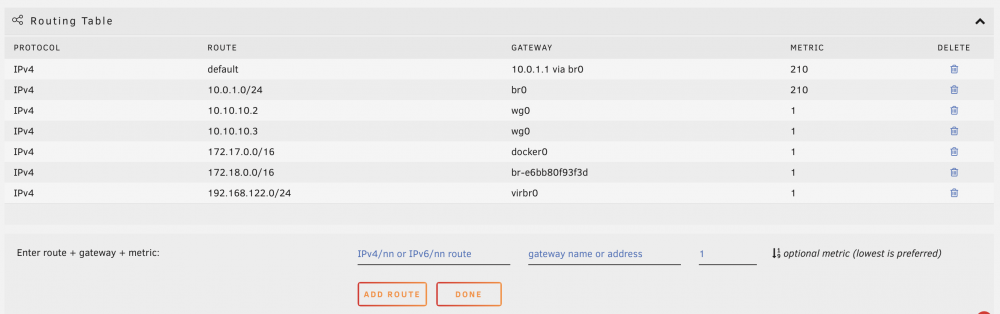
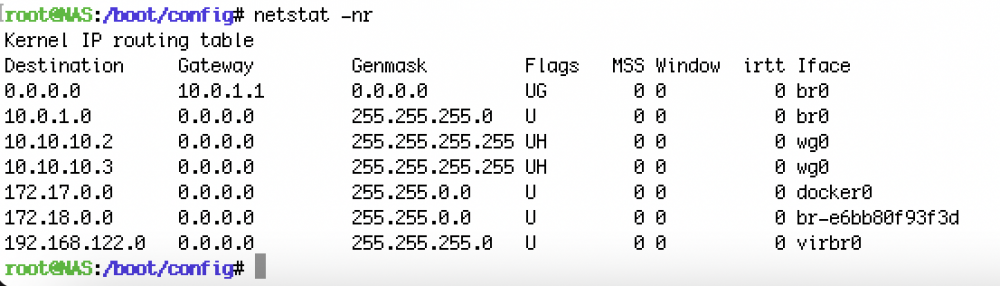
Maybe some progress. When I tried manually adding the route: ::1 / lo / 256 Nothing happened but I saw the following error in the log: dnsmasq[26655]: no servers found in /etc/resolv.conf, will retry resolve.conf was empty which I seem to have fixed by switching IPv4 from automatic to static then back to automatic: root@NAS:~# cat /etc/resolv.conf # Generated by dhcpcd from br0.dhcp domain lan nameserver 10.0.1.10 Now when I try to add ::1 / lo / 256 still nothing happens but no log errors!
-
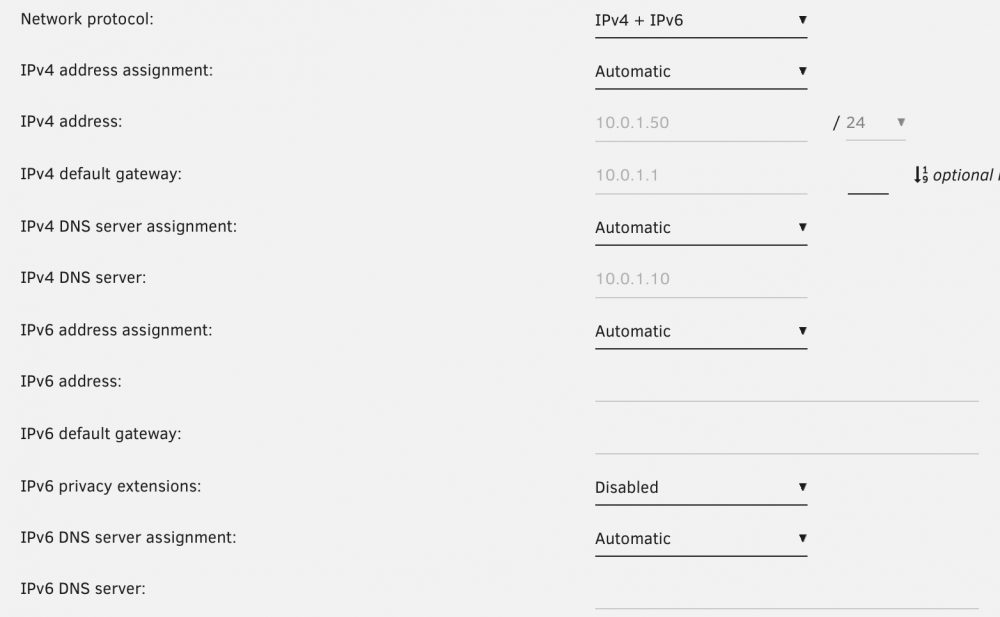
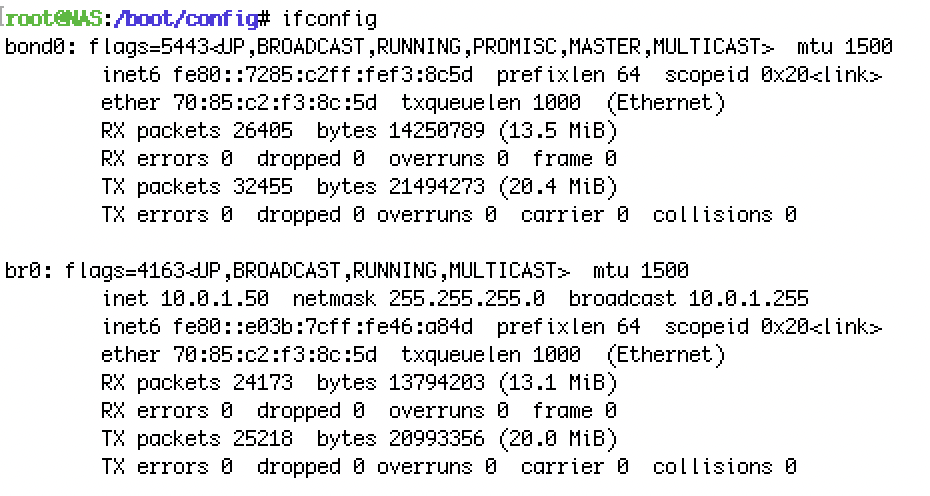
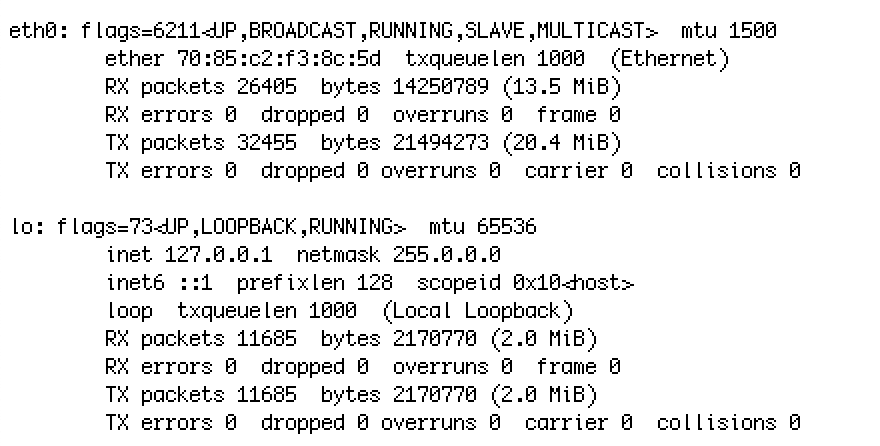
I have link-local IPv6 enabled on my router (to familiarize myself with IPv6.) I switched unRAID from IPv4 to IPv4 + IPv6 and rebooted: It's recognized (I can ssh) but no IPv6 entries in the routing table: I could have sworn I used to have some. It's possible I deleted them a while ago and forgot. I read a post suggesting to reset the routing table by deleting /config/network.cfg so I did that (I moved it to network.cfg.bak) and rebooted. No difference. Is there another way to reset the routing table or can I reconstruct it? (My understanding of networking is very basic.) EDIT: I should mention I'm on 6.10.0-rc1 but I suspect my problem's not 6.10-related.
-
I don't think everyone's as obsessed about power as we are. When bdee1 says "low power" he's probably (?) thinking closer to 60W than 20W.






