





CS01-HS
Members
-
Joined
-
Last visited
Everything posted by CS01-HS
-
Confirmed.
-
I'm having the same problem with "missing csrf_token." I tried a server restart to fix it, didn't help.
-
After several freezes (which caused unclean shutdowns) in Handbrake using the hardware encoder and also with monitoring, and random corrupted encodes, I got my machine stable with the following changes: Added intel_iommu=on,igfx_off to syslinux config (this may be optional) Added a dummy HDMI plug to my headless server (j5005) It's been stable now for several days despite continuous hardware encoding in Handbrake with no corruption.
-
Apparently there are advantages to 10 bit encoding even of 8 bit videos with minimal impact on file size, so no great loss. I have another question re: hardware acceleration: I notice with certain videos, decode consumes all my CPU with GPU (for encode) sitting at 2-3%. I see some references on the web to an option Enable QuickSync Decoding but I don't see it in the docker. Am I missing it, has it been removed, are there good reasons not to run it regardless? Thanks by the way, even hardware encode has reduced encode time by a factor of 10 in some cases. Amazing improvement.
-
Thanks. That led me to this https://github.com/chris1111/VoodooHDA-OC which finally got audio working on my j5005. I thought I'd have to stick with clover (where it worked by default.)
-
Thanks for incorporating the latest Intel driver with h265 fixes for Gemini Lake, I've been waiting to test it out. I'm having a strange problem though - on my j5005 qsv_h265_10bit hardware encode works perfectly, but qsv_h265 (8 bit) hardware encode fails with the following error: [04:52:23] qsv_hevc_make_header: MFXVideoCORE_SyncOperation failed (-17) Any guess whether that's a problem with the driver or with handbrake?
-
Was this ever resolved? I'm seeing it now.
-
Couldn't you run a user script every X minutes to chown the files to root and remove write permission from everyone else? I haven't tested that (or the command below) but something like: find '/mnt/RecycleBin/User Shares' -type f -follow -exec chown root:root {} \; -exec chmod ag-w {} \; Or use inotify if you want to get fancy.
-
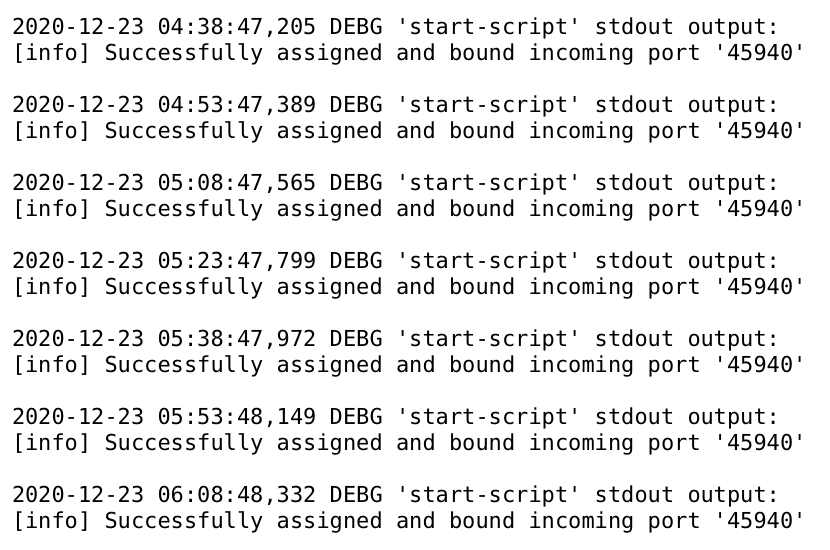
Anyone else seeing this every 15 minutes in their log? I'm not sure if it's a health check or a warning. If it's bound though it shouldn't need to re-bind...
-
The only incompatibility I can see is it can't track activity on alternate pools. I thought enabling cache might pick it up but no. Otherwise, works just as in 6.8.3.
-
Ignore my earlier advice which applied to a specific telegraf container. I didn't know "GUS" existed but I've just switched over, it's a lot neater. Smartctl seems to be working fine with it on RC2, I get drive temps.
-
To solve the missing smartctl problem: Go to advanced view in the telegraf docker and add the following to Post Arguments: /bin/sh -c 'apk update && apk upgrade && apk add smartmontools && telegraf' NOTE: smartctl calls in RC1/RC2 prevent drive spindown but that's a separate problem.
-
Here for reference is my full setup within Debian: [debian@debian]:~ $ sudo crontab -l # Edit this file to introduce tasks to be run by cron. # # Each task to run has to be defined through a single line # indicating with different fields when the task will be run # and what command to run for the task # # To define the time you can provide concrete values for # minute (m), hour (h), day of month (dom), month (mon), # and day of week (dow) or use '*' in these fields (for 'any'). # # Notice that tasks will be started based on the cron's system # daemon's notion of time and timezones. # # Output of the crontab jobs (including errors) is sent through # email to the user the crontab file belongs to (unless redirected). # # For example, you can run a backup of all your user accounts # at 5 a.m every week with: # 0 5 * * 1 tar -zcf /var/backups/home.tgz /home/ # # For more information see the manual pages of crontab(5) and cron(8) # # m h dom mon dow command # update youtube-dl once a week 05 00 * * 0 /usr/bin/wget https://yt-dl.org/downloads/latest/youtube-dl -O /usr/local/bin/youtube-dl [debian@debian]:~ $ [debian@debian]:~ $ crontab -l # Edit this file to introduce tasks to be run by cron. # # Each task to run has to be defined through a single line # indicating with different fields when the task will be run # and what command to run for the task # # To define the time you can provide concrete values for # minute (m), hour (h), day of month (dom), month (mon), # and day of week (dow) or use '*' in these fields (for 'any'). # # Notice that tasks will be started based on the cron's system # daemon's notion of time and timezones. # # Output of the crontab jobs (including errors) is sent through # email to the user the crontab file belongs to (unless redirected). # # For example, you can run a backup of all your user accounts # at 5 a.m every week with: # 0 5 * * 1 tar -zcf /var/backups/home.tgz /home/ # # For more information see the manual pages of crontab(5) and cron(8) # # m h dom mon dow command # download nightly 00 01 * * * /home/debian/scripts/youtube-playlist-download.sh > /var/log/youtube-playlist-download.log 2>&1 [debian@debian]:~ $ more /home/debian/scripts/youtube-playlist-download.sh #!/bin/bash # Download my youtube playlists # OPTIONS # YOUTUBE_CMD="/usr/local/bin/youtube-dl" SAVE_DIRECTORY="/mnt/unraid/Private/Youtube/" ARCHIVE_FILE="/home/debian/scripts/youtube-playlist-download.downloaded" YOUTUBE_USERNAME="PUT_YOUR_YOUTUBE_USERNAME_HERE" CMD_OPTIONS=(-i --yes-playlist --embed-thumbnail --add-metadata --embed-subs --all-subs -f bestvideo[ext=mp4]+bestaudio[ext=m4a]/mp4 --download-archive ${ARCHIVE_FILE} ) ${YOUTUBE_CMD} ${CMD_OPTIONS[@]} -o "${SAVE_DIRECTORY}%(playlist)s/%(playlist_index)03d - %(title)s.%(ext)s" https://www.youtube.com/user/${YOUTUBE_USERNAME}/playlists exit 0 [debian@debian]:~ $
-
I may be going about this the wrong way but I have a Debian VM in unraid always running that even on my underpowered board uses barely any CPU (< 1% at idle.) With /mnt/user mapped in the VM it gives full access to the unraid shares and makes tasks like installing youtube-dl and other miscellaneous CLI apps much easier.
-
I don't know if this is a bug but I wasn't sure where else to post it. I have two spindown problems in RC2: I've set default spindown to 15 minutes to help with testing. (1) The USB disk in Unassigned devices Unraid tries to spin it down (good!) but doesn't actually do it. That may be a problem with the drive's USB interface so I've cron'd a user script to spin it down with hdparm -y /dev/sdb (which works.) It looks like unRAID never detects that it's spun down (or a successful return from its own spindown call) because absent drive activity I see this every 15 minutes in the log whatever the drive's status: Dec 20 06:45:05 NAS emhttpd: spinning down /dev/sdb Dec 20 07:00:06 NAS emhttpd: spinning down /dev/sdb (2) The Fast pool These are 2.5" 7200rpm WD Blacks which also don't spin down. I see nothing in the log indicating unRAID attempts to spin them down except when I trigger it manually with the Web GUI Dec 19 21:09:57 NAS emhttpd: spinning down /dev/sdj Dec 19 21:09:57 NAS emhttpd: spinning down /dev/sdf Dec 19 21:09:57 NAS emhttpd: spinning down /dev/sdi I've attached diagnostics but this is more a request for information. Should I see spindown calls for Pool drives in syslog? (I should mention I haven't seen the array disks spin down either but they're set to 2 hours and haven't really had a chance. I'll lower it and keep an eye out.) nas-diagnostics-20201220-0734.zip
-
Sorry about that. I meant it sincerely though, an unclean shutdown (and subsequent parity check) should be a big deal. Auto-pause mitigates one small consequence of that - the larger consequence is potential data loss.
-
You can also pause it manually and parity-tuning will handle the resume. If unclean shutdowns are so frequent the extra click is burdensome you've got bigger problems
-
I'm running the original (more basic) version of this plugin with RC1 and two cache pools. So far so good.
-
I've been running beta35 since shortly after it was released. Now for the first time I see a continuous stream of the following error in syslog: Dec 9 10:44:24 NAS kernel: i915 0000:00:02.0: [drm] *ERROR* failed to enable link training Dec 9 10:44:28 NAS kernel: i915 0000:00:02.0: [drm] *ERROR* failed to enable link training Dec 9 10:44:31 NAS kernel: i915 0000:00:02.0: [drm] *ERROR* failed to enable link training It's not in any of my saved syslogs (syslog server) as far back as Sep 19, so beta25? I believe what triggered it was hardware transcoding an h265 file with the Emby docker which I've done many times before. If it makes a difference I'm using the old method to load the i915 driver because it won't boot with the new method unless a monitor's attached (see bug report) nas-diagnostics-20201209-1046.zip
-
I recently changed Error Logging from Syslog Only to Syslog and Output file. After a check I see the entries in syslog but can't find the "output file" - any idea where it's stored? (I saw a couple of posters ask but didn't see an answer.)


-
Or maybe Extra Parameters because the iHD driver has to be disabled before startup? I went the script route because I'm not experienced with docker tweaks so if you figure it out let me know!
-
I use the User Scripts plugin to run this script every hour - although maybe there's a more clever solution using Post Arguments in the docker template? #!/bin/bash # EmbyServer # # Verify it's running running=`docker container ls | grep EmbyServer | wc -l` if [ "${running}" != "0" ]; then docker exec EmbyServer /bin/sh -c "mv /lib/dri/iHD_drv_video.so /lib/dri/iHD_drv_video.so.disabled" 2>/dev/null if [[ $? -eq 0 ]]; then echo "EmbyServer: Detected iHD driver. Disabling and restarting EmbyServer..." docker restart EmbyServer echo "Done." fi fi exit 0
-
Yes, but only by passing a whole controller and performance is terrible, although that may be specific to my convoluted setup. <hostdev mode='subsystem' type='pci' managed='yes'> <driver name='vfio'/> <source> <address domain='0x0000' bus='0x02' slot='0x00' function='0x0'/> </source> <alias name='hostdev1'/> <address type='pci' domain='0x0000' bus='0x03' slot='0x00' function='0x0'/> </hostdev> I saw a recent post about usb/ip support in the next version which might be an option if you don't have a spare controller.

-
I managed to cause the same error (and freeze my server) playing around with intel_gpu_top in the intel-gpu-tools container so my problem's at a lower level, your container's fine.
-
Great. If you have the UPS set to shut itself off after issuing shutdowns make sure that delay is set long enough that the servers have time to shutdown. I mention it because out of caution I suggested stopping the array which consumes most unraid's shutdown time.





