





TexasUnraid
Members
-
Joined
-
Last visited
Everything posted by TexasUnraid
-
Make sure that the known hosts file is there, it seems to be missing. Possible a step was missed before this one. The SFTP command before this succeeded properly correct? You said to trust the source etc? Another thing is that the latest version of unraid allows you to put these files on the USB drive and it will automatically install them during a boot IIRC. It is also possible that this change has changed the folder layout for these items although I never updated mine and it still works.
-
I have no clue how you are running them all. I am lucky to keep 6-7 running without crashing and mine is more powerful. Something is up for sure.
-
I just updated sonarr and radarr and noticed that they are no longer able to pull from nzbhydra? Here is a sonarr log with a generic "internal server error" 2021-08-03 05:21:12.0|Info|NzbSearchService|Searching 2 indexers for [Ubuntu.ISO] 2021-08-03 05:21:14.8|Info|DownloadDecisionMaker|Processing 5 releases 2021-08-03 05:21:21.5|Warn|HttpClient|HTTP Error - Res: [GET] http://192.168./getnzb/api/3673761253753394063?apikey=(removed) 500.InternalServerError { "timestamp" : 1627986081517, "status" : 500, "error" : "Internal Server Error", "message" : null, "path" : "/getnzb/api/3673761253753394063" } 2021-08-03 05:21:21.5|Error|Nzbget|Downloading nzb for episode 'Ubuntu.ISO' failed (http://192.168./getnzb/api/3673761253753394063?apikey=(removed) NzbDrone.Common.Http.HttpException: HTTP request failed: [500:InternalServerError] [GET] at [http://192.168./getnzb/api/3673761253753394063?apikey=(removed) at NzbDrone.Common.Http.HttpClient.Execute (NzbDrone.Common.Http.HttpRequest request) [0x00154] in M:\BuildAgent\work\63739567f01dbcc2\src\NzbDrone.Common\Http\HttpClient.cs:105 at NzbDrone.Common.Http.HttpClient.Get (NzbDrone.Common.Http.HttpRequest request) [0x00007] in M:\BuildAgent\work\63739567f01dbcc2\src\NzbDrone.Common\Http\HttpClient.cs:281 at NzbDrone.Core.Download.UsenetClientBase`1[TSettings].Download (NzbDrone.Core.Parser.Model.RemoteEpisode remoteEpisode) [0x00057] in M:\BuildAgent\work\63739567f01dbcc2\src\NzbDrone.Core\Download\UsenetClientBase.cs:48 { "timestamp" : 1627986081517, "status" : 500, "error" : "Internal Server Error", "message" : null, "path" : "/getnzb/api/3673761253753394063" } 2021-08-03 05:21:21.5|Error|ReleaseModule|Downloading nzb failed [v3.0.6.1265] NzbDrone.Core.Exceptions.ReleaseDownloadException: Downloading nzb failed ---> NzbDrone.Common.Http.HttpException: HTTP request failed: [500:InternalServerError] [GET] at [http://192.168./getnzb/api/3673761253753394063?apikey=(removed) at NzbDrone.Common.Http.HttpClient.Execute (NzbDrone.Common.Http.HttpRequest request) [0x00154] in M:\BuildAgent\work\63739567f01dbcc2\src\NzbDrone.Common\Http\HttpClient.cs:105 at NzbDrone.Common.Http.HttpClient.Get (NzbDrone.Common.Http.HttpRequest request) [0x00007] in M:\BuildAgent\work\63739567f01dbcc2\src\NzbDrone.Common\Http\HttpClient.cs:281 at NzbDrone.Core.Download.UsenetClientBase`1[TSettings].Download (NzbDrone.Core.Parser.Model.RemoteEpisode remoteEpisode) [0x00057] in M:\BuildAgent\work\63739567f01dbcc2\src\NzbDrone.Core\Download\UsenetClientBase.cs:48 --- End of inner exception stack trace --- at NzbDrone.Core.Download.UsenetClientBase`1[TSettings].Download (NzbDrone.Core.Parser.Model.RemoteEpisode remoteEpisode) [0x0012f] in M:\BuildAgent\work\63739567f01dbcc2\src\NzbDrone.Core\Download\UsenetClientBase.cs:69 at NzbDrone.Core.Download.DownloadService.DownloadReport (NzbDrone.Core.Parser.Model.RemoteEpisode remoteEpisode) [0x00261] in M:\BuildAgent\work\63739567f01dbcc2\src\NzbDrone.Core\Download\DownloadService.cs:100 at Sonarr.Api.V3.Indexers.ReleaseModule.DownloadRelease (Sonarr.Api.V3.Indexers.ReleaseResource release) [0x001a7] in M:\BuildAgent\work\63739567f01dbcc2\src\Sonarr.Api.V3\Indexers\ReleaseModule.cs:129 Meanwhile NZB hydra shows everything worked just dandy: 2021-08-03 05:21 FileHandler NZB download from indexer successfully completed in 1481ms 2021-08-03 05:21 FileHandler NZB download request for "Ubuntu.iso" from indexer NZBGeek 2021-08-03 05:21 ExternalApi Search took 967ms. Returning 5 results 2021-08-03 05:21 Searcher Returning results 1-5 from 5 results in cache. A total of 5 results is available from indexers of which 0 were already rejected and 0 were removed as duplicates Everything has been working fine before this. Radarr does the same thing when I try to use it, not sure where to even start looking.
-
what does the yellow/green light mean in it? All of mine are yellow with some having a hint of green? Also noticed that some forks have the expected 0.5 second time and others are like 20 seconds+. Odd.
-
Yeah, I tried that, that got them to turn yellow but the logs show a lot of can not connect errors even on the ones that work when started normally.
-
Do I have to start them manually? Your earlier post made it sound like this program would handle starting them and might have better luck?
-
Yep but after a lot of searching that turned out to be the fix and worked great since.
-
Odd, all of the forks I am trying to start are yellow? A lot of can not connect errors. Is there a firewall setting I need to change? It is just the stock windows firewall.
-
I have tried it both ways. Doing GUI at the moment due to troubleshooting. For the script I use the line I posted earlier in a startup script I have running to start the GPU mining anyways. start "" "path to program" The double quotes before the path is the part that makes it work. The script runs and opens the GUI's and closes when it is done automatically.
-
Now that is interesting! Is there a reason to not use it for all of them?
-
yeah, thats about right, 100f is around 38c. At night it will drop down a little to ~90f in the garage with some fans setup in the window lol. Not as bad as some years, a few years ago it did not go below 90f for a few months, day or night.
-
In other news, if you install 3x 10krpm fans, I am impressed with how cool the drives can stay even in a 100f+ degree garage. Most are sitting around ~40c. Not cold but pretty good for a hot garage.
-
Windows 10. Some of them don't support linux so decided to not bother with it. Plus using nicehash to mine on my old Vega 56 on this system and it is easiest on windows as well.
-
lol, you are more dedicated to me. I am debating quitting farming so that I can use the PCIE slot for another GPU. Just got myself a 6700xt yesterday and can't decide if I should sell my old card or use it for mining. I am out of slots on this machine though. Interestingly, I uses about ~200W to run my drives for farming and is making ~$1-2/day or so. GPU mining uses around ~125w and makes ~$1-2 a day.
-
Very strange a lot of them simply will not sync / not crash for me. I have seen mixing different size memory on the same channel causing issues in the past. I generally try to have each channel match itself.
-
No idea how you are getting them all to play nice together. Are you adjusting any settings?
-
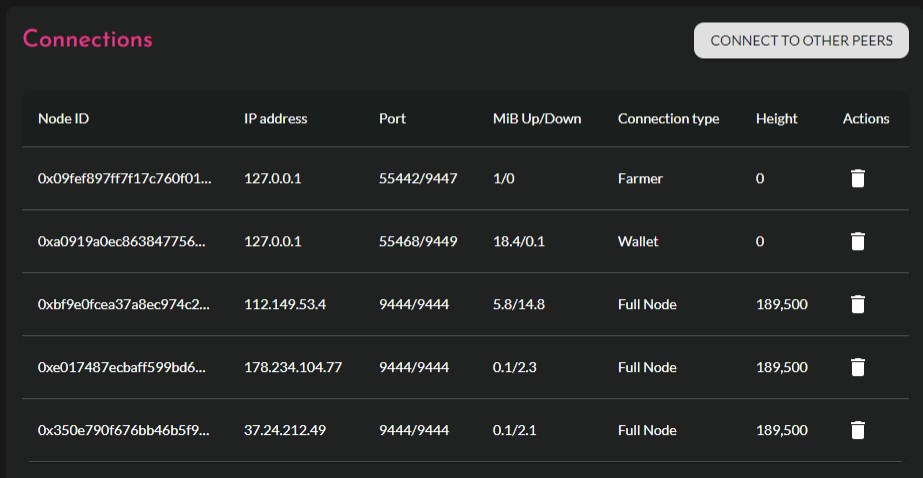
It is one of the few I can get running. Spare Flax Chiagreen seno avacado hddcoin taco flora greendoge goji Any others crash or will not sync.
-
I have tried multiple times to get the UD scripts to work but could never figure it out, it doesn't make sense. I wish it could be connected to user scripts so I can just select a user script to run.
-
So looks like I have tartube running ok. I decided to commit the changes and create a new container so that an update would not wipe it. I am curious, is there an easy way to change the page title and icon for the VNC window?
-
Ok, this has been happening for some time but I have been messing with dockers a fair amount recently and it has been really annoying. Basically I have ~75 dockers installed right now (although only about 15-20 are running under most circumstances). It seems there is some kind of script or memory hole that causes firefox to lock up from time to time whenever I have the docker tab open for an extended time (it has also happened on the user scripts tab when running a long script or the terminal if a lot of commands happen on the screen). After locking up completely for a bit firefox will generally show me a message complaining about a script not responding or taking too much resources. If I chose to "stop" the script, everything goes back to normal for a little bit until it happens again. Memory usage also goes pretty high during this time as well, not uncommon to see it 4-8gb higher then normal with the tabs I have open and it fall back down if I close the unraid tabs and restart firefox. My system memory is ok, generally max out around ~12gb on my 16gb system. I have not been able to track down any sure fire way to make the lock up happen besides working within the docker tab for awhile. It might be a firefox issue as I have not tried chrome outside a quick test or it could be a general issue with large amounts of dockers. Just figured I would toss it out there and see if anyone else has noticed this.
-
Ok, trying to setup the tartube in buster, took a bit to get all the dependencies sorted out but it seems to be working now. This issue now is that the user.sh script does not seem to be able to start tartube? If I run the script manually it starts it up perfectly but when I restart the container it does not? edit: after some trial and error I figured out part of the problem was that the user.sh script is run before the desktop is started. I tried to work around that by starting another script with a delay but that also failed for some reason. So I ended up using the built in startup option in debian and that seems to work.
-
I like function and looks lol.
-
Cool, thanks for the info! Guess I will go about getting that setup.
-
Nope, never bothered to even learn where the logs are in windows. I check the GUI sometimes but as you can tell I don't exactly make it a habit lol. For the last 2 weeks I have just been focused on getting it stable, should of done what I am doing now then.
-
lol, I came to realize I have not won anything in like a week or 2 when checking yesterday. Guess I will just start randomly adding new ones and see how it goes.

