





BVD
Members
-
Joined
-
Last visited
Everything posted by BVD
-
I just used it to migrate about 35TB of data from one unraid server to another without issue - usually use rsync, but it was a one time copy and didn't need the overhead I thought I'd incur. No issues on my end other than some graphical oddities that were more likely related to where I was transferring the data to than the tool itself - I had three concurrent streams going in tmux (so I wasn't just hitting one disk at a time) transferring via NFS over a 10G bonded pair, and I noticed whenever it went from copying many small files to the first in a series of larger ones, there was no progress noted for anywhere from 5 to 40 or so seconds. Looking at the network stats at the time, sure enough, things were dropping off significantly... Sure enough, it was due to network back pressure. If I end up having to do this kind of thing more often, I might finally have the justification needed for the time to implement RDMA, but for now, it's fine. Handy little plugin, thanks!
-
Yeah, thatd actually work come to think of it. The "right" way would be to use the network-rules.cfg file - youd actually use that file both to specify the numvfs as well as the macs for those vfs, as it's considered the single "source of truth" for persistent network changes. If you decide to go that route and have formatting issues, lemme know if you have any issues with the formatting or anything and I'd be happy to help - the most important part really is that you create you 'ACTION' adding the sriov_numvfs for the eth interface above/before you set the vf interface parameters (for probably obvious reasons lol)
-
If I had even just 5% as much time to dedicate to things I enjoy (like this) as I end up spending putting out fires at work, I'd be all over this - seems like it'd be fun to make a plugin. I have a few days off next week, maybe I'll read up on it if the kiddos let me and see what it'd take. I'd temper any expectations though... UnRAID in and of itself is a niche within a niche, people who both want a home NAS, AND are just crazy enough to go out and build their own after finding commercially available alternatives lacking (you know... like US!). Folks who'd also actually get something out of using a plugin that enables SR-IOV in addition to that? It's a niche's niche within that niche. I'm honestly surprised more than 2-3 people have chimed in about it, but that must just go to show the breadth of Limetech's customer base. The simple truth is, at least from what I've gathered lurking around for the last year or so, most people only have maybe 2 VMs going at a time max, usually with >8 or so containers running in the background, and they're not really going to see much benefit from this kind of technology... In fact, they'd just be adding to the complexity of their deployment, which without any tangible benefit, only makes matters worse should something else go sideways in their system down the line (more knobs to turn, dials and gauges to look at, etc). Now... When Intel's Xe graphics cards become 'real things' (I mean, like the kind you can go out and buy I guess, this graphics market sucks SO bad), well, that might be an entirely different story. The technology used is different (GVT-s and GVT-g), but the principle is the same (referring to SR-IOV). Want to have your graphics card partitioned so plex gets a 60% share of your encode/decode engine while the rest is allocated to an emulation VM? Or maybe have that emulation VM running with 20% allocated, another 40% for jellyfin and plex to share, chip 10-20 over to handbrake for automated media conversion, and leave the rest for something like blueiris to do motion detection? All these applications require *just* enough GPU power to need some kind of actual GPU for their work efficiency to skyrocket. And these products seem born for their use. Personally, I'm ready to plunk down for one right now, just to play with it and see how much life I can squeeze out of the thing. If they'd just quit delaying them another 6 months (every 4-6 months 😕 ), I'd be game for taking a week off to just go nuts with it.
-
This doesn't work the way you expect because you're attempting to do separate actions through two separate abstraction layers - one using the pci bus, one using sysfs. In order to make the pci version of this to work, you need to use the pci bus to create your VFs - the two options are mutually exclusive in this case. Sysfs is up at the OS level, which happens after the PCI bus is initialized, so unless you use PCI bus partitioning (which is sub-optimal as it limits your ability to make changes without a reboot), you'll want to script this as noted in the guide.
-
Yeah, I mentioned in the first post, it wouldn't be *super* difficult to add this into the OS - the problem becomes with OEMs do janky crap with their firmware or don't keep their drivers up to date 😕 On the up side... Works great with intel iGPUs as well For people to get the most out of this, they're also going to want to set up some filters so they can allocate bandwidth to whichever machines need it the most, but that's a tutorial for another day lol
-
Shoot.... You're right lol. I guess I didn't realize it as I'd just been using my own (admittedly janky) script instead. Should be corrected now, thanks for double-checking me!!
-
Yeah, it works with MLNX devices as well - the problem there is that the nvidia (who now own mellanox) guys behind their later drivers have started doing some... Well, typical nvidia-like crap that *can* make for some real difficulties down the line, depending on the configuration and whether or not nvidia considers it "supported". There's a lot I could say about the whole mess, but the short it is this: If you want to use virtual function mellanox drivers in a VM that nvidia doesn't want you to, be prepared for the possibility of long nights beating your head against a wall. It's the reason I didn't really make a guide including them, as I know enough of the pain points that I didn't feel comfortable doing so as I don't think I'd have the time necessary to support it properly. Now with intel based boards though? ... No problem. If for whatever reason your OS doesn't come with the VF drivers for the intel VF NIC you're using (like windows 10 for instance), it's super easy to get them installed. Just a few clicks and you're done.
-
You might check out the UnRAID Compulsive Designs subforum - it's got some decent stuff there, though admittedly itd be better if there were more contributions to it
-
If you want me to, sure. Let's talk 👍
-
Actually, if you do end up bringing efficiency / performance vs. consumption up, I might be able to provide some real data there. I went from consuming ~320w at idle to ~90 or so after I completed a migration, and with today's power prices... That's real money.
-
I think showing a little hood of the Linux kernel would open a lot of people's eyes as to just how much power they can have with UnRAID, at an efficiency level that just can't be achieved without the UnRAID array. If you go back to my first posts, you'll see questions about what most see as 'enterprise, not UnRAID' use cases, and recommending I use something else for those scenarios. Well, I'm stubborn, and made it all work anyway... Which I can do, because at it's core, UnRAID is still Linux. Things like SR-IOV implementation (basically bare metal levels performance of multiple VM's using a single hardware device), persistent hardware MAC addressing for virtual function interfaces (important for anyone that uses VLANs which depend upon them), bandwidth allocations for specific VMs or containers (so people's download clients don't hog all their bandwidth while they're gaming) at the hardware level (i.e. without negatively impacting host CPU utilization), complete control over noise/sound levels of your machine using user scripts, and so on. I've finally found the time to start documenting some of these, and as I have more free time available, I'll be trying to push more out in guide format. And all of this can be done without a rack mount server, at a power efficiency rate that's just not possible with traditional RAID implementations. Drive spindown control, easy point-and-click scheduling of the CPU performance profile, etc. all add up to saving a ton of money over the course of the years the server is running, and without compromising performance.
-
I appreciate it! I've got chipset specific guidance already typed up (i.e. i350, i250, 82xxx series, 7xx, etc), I just need to find the time to format it - If you try it out, I'd appreciate letting me know if you have any issues so I can get the guide updated to fix those edge cases. With the OS (UnRAID) being all in memory, with certain files only held in bzroot and other's pulled from config files with non-matching names in other directories on flash, there's always the possibility that certain specific niche's will need some tweaks. Honestly it's just nice to finally use some hard earned 'work' related knowledge for something *other* than work lol. I actually feel a little bit bad for not writing this up sooner after going through all the forum requests for SR-IOV support and passthrough related help
-
UnRAID 6.9, and new hotness chipsets /devices ***I have not yet fully tested this yet in UnRAID, please only attempt at your own risk until further notice*** ***The following should be considered a work in progress*** _________ _____ Pondering some potential upcoming guides/topics subsequent to this SR-IOV walkthrough could include: Making MAC addresses persistent (surviving reboots) for VF's when utilizing method 2 (the one in this post) Installing a NICs VF drivers in 'Unsupported' versions of operating systems which some OEM card vendors try to block because they're greedy jerks (such as Windows 10 Home/Pro) ... And anything else that catches my fancy. I've done quite a bit with my own UnRAID setup that is completely outside the UI to bend it to my will, and I honestly just didn't think much of it as it's been 'Linux stuff, sometimes with some UnRAID quirks thrown in'. After spending some more time reading up on the forum recently though, I understood how many folks simply didn't realize how much magic they had under the hood with their servers, and it seemed like the most common request/question was about enabling SR-IOV support for UnRAID... So I thought maybe I could help? If there are other topics of interest, I'm open to suggestions - who knows, maybe it's something I've already done and was just not engaged enough with the forum to see there was a need to be filled. I'll help where I can 👍
-
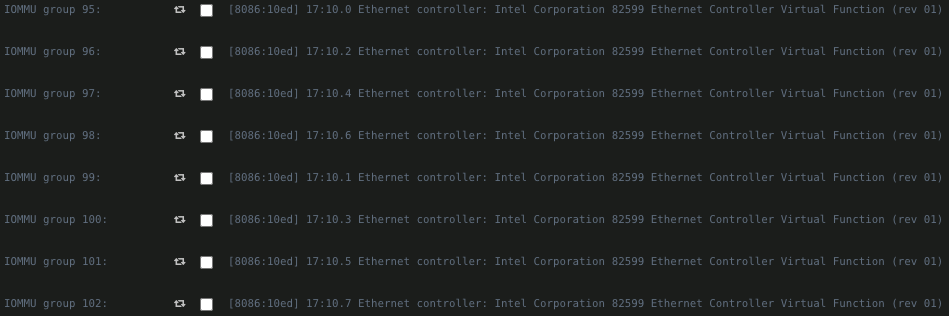
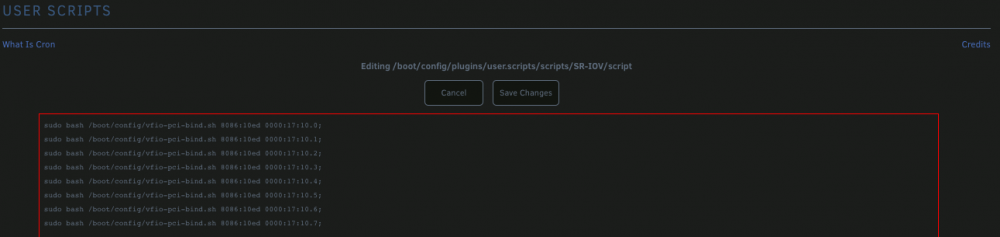
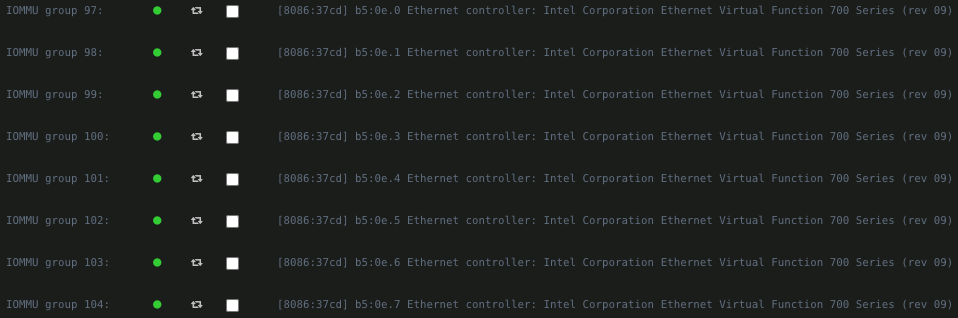
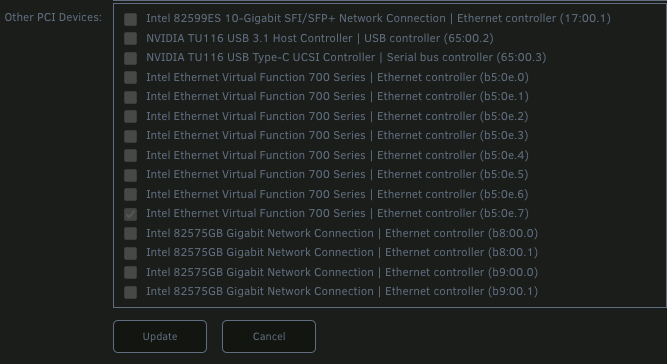
Driver / Device specific steps The following is the most generic option, and should work for most UnRAID deployments that contain SR-IOV supporting NICs, going back to around 6.4, but I would recommend no lower than 6.8.2 if you're working with any device using the i40e driver (save yourself the pain and upgrade!): Open your terminal and edit the go file nano /boot/config/go Add the following line to the bottom, specifying the number of vf's to create for this interface, replacing my ID (17.:0.1) with your own - I chose 4 per interface: echo 4 > /sys/bus/pci/devices/0000:17:00.3/sriov_numvfs echo 4 > /sys/bus/pci/devices/0000:17:00.3/sriov_numvfs Hit 'Ctrl+x' , then 'Y', then Enter (just following the on screen prompts to save the file), and it's time for a reboot (one of the joys of UnRAID!) Now that your system is back up and running, head to the system devices screen (Tools -> System Devices) - you should see something pretty: Now normally, with any other device showing here, you'd just check the box, save, and reboot. But if you try this, you'll notice they're not bound on reboot, and on checking the vfio log, it says the devices are not found/invalid. This is where we'll use the User Scripts plugin to automatically bind our vf's the first time we start our array, using the script we pulled down earlier. 5.a - In Settings -> User Scripts, create a new script. 5.b For each interface, we'll call the script, specifying the vendor ID (note, this is different from the physical devices vendor ID), domain (always 0000 in our case), and bus ID - we'll choose to run this at first array start only, as it's only needed once per boot, one line per vf: sudo bash /boot/config/vfio-pci-bind.sh 8086:10ed 0000:17:10.0; I have 8 of them, so mine looks like the below: Start the array, and you're done! You can now add the vf's just like you would any other pci device under the VM edit page: Next up, we'll talk about another (much simpler) method to do all of the above, which is now viable as of UnRAID 6.9 thanks to the later version of the Linux Kernel in use! (not that you can't try it with earlier versions... it's just that it's not as sure-fire a way with them as it is with 6.9)
-
I've got the right stuff, where do I start? Alright, on to the config/setup - I'm trying to make this as generic as possible to cover as many possibilities as possible at once, as the implementation of virtual functions and their utilization depends on a combination of both the driver AND the hardware. Let's first gather some information so we know what drivers we're using before we move forward with creating our vfs, and get the script set up so we only have to reboot the one time here: The first thing we need is a script to bind our vfs once they're created by the driver; vf creation happens AFTER the OS is booted, which means using the built in bind options just won't work for us in this instance. My script for doing this prior to 6.9 was such a friggin hack job, but worked fine... Fortunately, someone else has already done the work required for us here that's clean and pretty, saving me the embarrassment; Andre Richter is a legend, I highly recommend checking out and supporting his work: wget 'https://raw.githubusercontent.com/andre-richter/vfio-pci-bind/master/vfio-pci-bind.sh'; mv vfio-pci-bind.sh /boot/config/ While you're here in the terminal, make sure to add the following variable if it's not already in your syslinux config file: intel_iommu=pt This is more restrictive than the 'iommu=on' equivalent, as it explicitly looks for devices that support interrupt remapping, thereby also giving a performance benefit. However, do note that, as this is more restrictive, should it impact your ability to utilize other (non-interrupt remapping) devices that you require, set this instead to 'intel_iommu=on'. If using AMD, just replace 'intel' with 'amd' - the rest of the input is the same for both.. We now need to ensure that, if the card has it's own BIOS options, it's set to enable SR-IOV - not all boards' BIOS' do this, but we should check, just in case. Reboot your host and get into the BIOS: As you can see, each port has it's own config for my card, so I'll need to check the options for each one I plan to use. Again, this part will be unique to your card, but the idea should be the same; go through the BIOS options for the NIC, looking for anything related to either SR-IOV or virtualiztion, make sure the options are set to allow virtualization, then save+exit. For my NICs, it looks like this (sorry for the crappy pics!): We're finally ready for some config modification. We first need to know what driver we're using to determine the method for creating our vf's. Using the same vendor ID we had noted earlier: lspci -vv -d 8086:37d1 | grep -A 2 'Kernel driver' Kernel driver in use: i40e Kernel modules: i40e There are several possibilities here on how to actually create the functions, and the methods/modules we'll need to use vary depending on which functions your chipset requires and which chipset you're using. Finally, let's get cracking on creating our vf's...
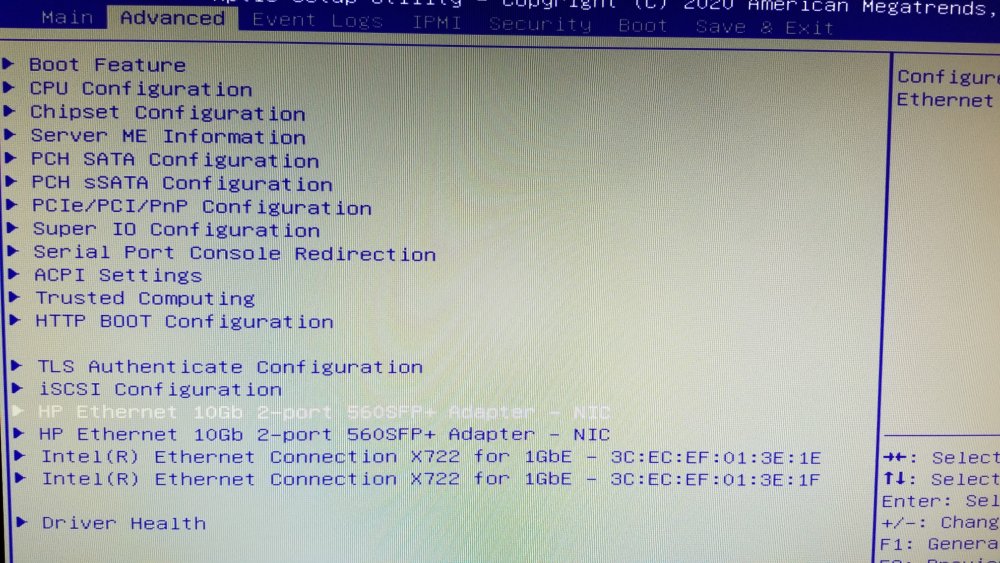
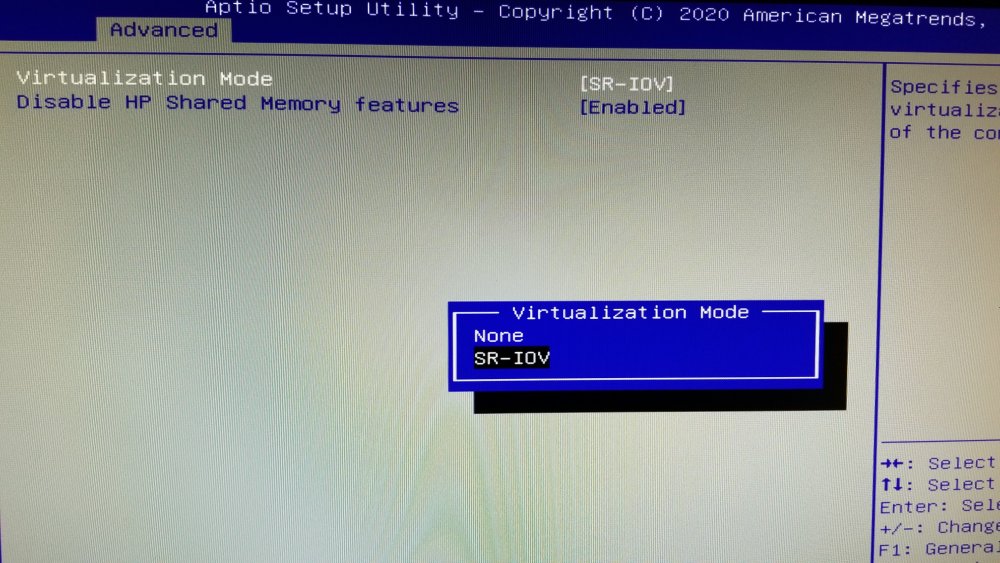
-
Does my NIC support it? If not, what should I buy? _______ Shopping for a NIC Great, but what should I get? Too many choices makes my brain hurt. I gotchoo. In brief for those who don't really care about all the intricacies or want to do further research, if you want a card for SR-IOV in your UnRAID server, I'd recommend either the Dell PRO/1000 ET (NOT the VT model); it'll give you up to 8 vf's per physical port (so 16 for dual port, 32 for quad models), which is likely more than most home users need, and you can find them for ~30 bucks or less. And now, we're ready to start the show...

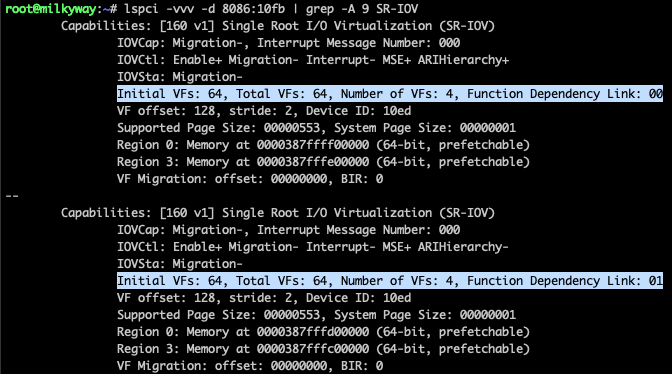
-
I've tried everything I can think of to get my markdown formatting to work here... but it just ain't happenin. So I apologize in advance for the lack of prettification! _____ I've seen a lot of folks more recently asking Limetech to implement SR-IOV support in unraid, whether it's so they can better secure specific virtual machines, better utilize resources, or simplify device passthrough, and as I looked around, I didn't see that anyone had really gone into this much; as I've been using SR-IOV with UnRAID since I spooled up my first server, I thought I'd try my hand at making what I hope will serve as at least some guidance to others wishing to either use, or know more about it. This guide is specific to 6.9RC2 as I just upgraded, but had been running with 6.8.2 and 6.8.3 earlier (so those *should* be fine), and I'll try to keep this up to date with releases as newer versions are released. My hope actually is that, in the longer run, none of these instructions will be necessary as the methods to implement them aren't terribly difficult or cumbersome, they just take time. For those who already know what SR-IOV is, what it's benefits are, etc, you can skip to the next post - _____ In brief, you can think of an SR-IOV device as a 'Hardware Hypervisor' technology, much as the Hypervisor itself (UnRAID being ours here, virtualizing Operating systems) is an Application/Software Hypervisor SR-IOV. We all know that basic VM performance is nearly bare metal when configured properly... With an SR-IOV device, the functions within that VM (you'd call them PCI cards standard PC) get direct PCI level access to the device - Network cards (Ethernet controllers), graphics cards, SCSI [SAS/SATA] controllers, HBAs/RAID controllers, ANYTHING that takes specialized hardware to perform performs much better when you can actually let that specialized hardware do the work. Not only can the performance be orders of magnitude better, but it's also considered far more secure than an emulated device as there's far less attack surface area. I've typed up some further information and reference material below for those interested:
-
@dmacias did you ever try fitting a GPU in this thing? I'd hoped the blower style 2070 I've been running in the old poweredge would fit, but alas, it's 'actual' full length (11.5"), and there's only 10.5" to play with. The 2070's always been far more than I ever needed anyway, but trying to find a 1660 (or anything other than a freakin 5 year old pascal based 1050ti) is absolute murder right now. Was hoping to stick with Turing for some of the NVENC enhancements Hard to sink my teeth into cuda AI without any cuda!
-
They're still there, just have to inspect the links - guessing something got screwy with a forum software upgrade or something... Ex: for https://forums.unraid.net//////////applications/core/interface/imageproxy/imageproxy.php?img=https://uploads.tapatalk-cdn.com/20171113/a70e4702a66a71c0d9a85dc12b35c54d.jpg&key=d89116affc10fb8063cf7593e5d05dc107233d49d796cc7f17d5bc3554091bc0 (First link I saw broken in the above), you'd just trim it down to: https://uploads.tapatalk-cdn.com/20171113/a70e4702a66a71c0d9a85dc12b35c54d.jpg I'm sure there's a way to quickly automate that, it seems unlikely that it only impacted this post if it really is related to a forum upgrade (or something similar).
-
I don't think this is under active development - I send at least 20 crash reports to them, and never got a single update the entire time. Seems like it's a dead product at this point.
-
I really liked the fundamental idea behind Scrutiny, but I don't think it's really ready for primetime yet - the UI kept reporting duplicates for SAS devices (I'm guessing it doesn't understand dual port connections, scanning the scsi bus or something?), and that's only when I could actually get the web UI to do anything other than show the spectacles with the loading dots. Could we perhaps get this marked as a beta or something? I really like the basic idea, it just needs some polish before I think it could be considered fully fledged.
-
____ I've just had the same issue on my first time running it - I reran it to see what went wrong, but mine only took something like 45 minutes or so across. Seems to happen when a significant amount of dupes are found and you close out the findings without taking any action initially (at least in my case).
-
They won’t be able to help you recover the lost data - but with the license, just rerun the installer on the same thumb drive and you should be able to boot. As long as the WWN of the thumb drive hasn’t changed, your license should be fine. Then just follow the information the rest have provided here regarding getting back up and operational.
-
Oh man... well, in theory the usb WWN should be consistent, so remaking the bootable drive will keep your license. In reality though, some USB drives (the cheap crap I’ve played with at least) don’t provide consistent WWNs - as crazy as that sounds to me coming from enterprise storage land, I saw it with my own eyes or I wouldn’t have believed it. Other than the license (which doesn’t matter if you’re just trialing), yeah, you’re starting from scratch. The drive gets very little in the way of writes, but when writes to the drive do occur, they’re important - configuration files, any plugins, anything you added from the base configuration is gone. Data on your array *should* be fine, however. So your vms data, docker data, etc, it’s all there, your OS just won’t know about it until you reconfigure everything. EDIT: I’d HIGHLY recommend taking a brief overview of the documentation whenever you get a moment, just to save against future heartache. I know some of it is woefully out of date, but the general principals still apply - just know that some of the specifics noted there may not be fully up to date (like specific video card details, links to super old posts, motherboard compatibility - guessing a lot of that is community contributed and has just fallen out of the “lime” light (hehe, I got {b}dad jokes for daaaays!)
-
That’s what I’m saying - even if it was automated through the app, you’d have to expose the server to the internet in some way to do so. VPN is the way to go.





