





BRiT
Members
-
Joined
Everything posted by BRiT
-
IMO, does not belong in nerdpack. Should be its own plugin, just like ZFS is.
-
The "light" is not for me, but I certainly appreciate the choice being my own. 😎
-
That script only produces 0-byte files. You need content in the files for the Recycle-Bin to function.
-
This thread is for the JoeL standalone script. It is not for the dynamix plugin called Cache Dirs. If you want help on the dynamix version, it would likely be best if you post in its specific support thread.
-
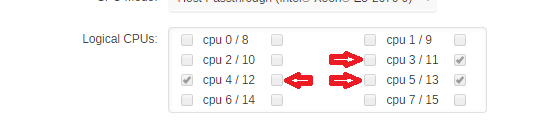
Picture to highlight what others said. You need to click on 6 Check Boxes. You only clicked on 3 check boxes. You're only giving it 3 resources, not 6.
-
Did you look at the Dev Pack/Dev Kit ?
-
Couldn't you drop to a shell/prompt and use the Linux commands of ps and kill ?
-
No, IIRC. isolcpus blocks the cores from being used by the host, where the dockers are run at.
-
You're doing security completely wrong then.
-
That's why you should be browsing the internet within a walled off VM Sandbox that doesn't have access to any of your data, if you want to truly protect it.
-
You can do it yourself? https://pypi.org/project/llfuse/ pip install llfuse
-
It's a shame that the current forum software does not provide solid forum searching at least on the level of XenForo based forums.
-
docker ps The column is Status but indicates how long it's been running.
-
Any thought on perhaps a semi-currated list of Guides and HowTos for popular plugins or dockers? Thats about all that came to mind when thinking what else it could offer built-in, like a really extended help section. Or maybe a "search on the forums" web page section that specifies this forum site for Google or Bing search engines, since the forum built in searching capability is such shit...
-
Anyone who is concerned about their data, if it's read-only patterns, should be using 'chattr +i' to make the data immutable.
-
I don't think you'd ever quit drinking...
-
It's 8 months later and same post applies...
-
Users running out of ram was very much a thing on the 32bit unraid versions, years before dockers and vms on unraid were a thing.
-
In the latest version (RC?) of unraid you can also specify boot order of docker containers. I am unsure ifthere are VM boot orders too. Not certain which category boots first, dockers or vms.
-
I wouldnt symlink things, I'd merely expand the Path setting inside the bashrc/profile to include the user scripts, but make sure its added last so they wont have naming conflicts.
-
try the following: You need to remove the sticky bit from the group field. IIRC, the group-sticky just forces all subdirectories to keep the same group as the parent. chmod -R g-s /mnt/disk#/share/directory-to-correct
-
Remove or comment out the line under the comment of # Prune empty directories from source dir
-
@CHBMB I think the better suggestion is to have UD push the users to install Fix Common Problems, which would then have a check for PreClear-Plugin with solution step of removing it. That would be better, right @Squid?
-
The Directory Cache is in RAM used by the Linux kernel. Nothing permanent is stored anywhere with Cache Dirs program -- all it does is continually do directory listings so the Kernel keeps using the entries so they're still in use and less likely to be purged from it's cache.
-
I dont believe the pass phrase management of emhttp ui extends to unassigned devices (yet). You might need to submit a feature enhancement request for UD.


