





BRiT
Members
-
Joined
Everything posted by BRiT
-
Looks like they will have to add python into Nerdpack if they are going to leave it out of bzroot. Or introduce a dependency on an unofficial python plugin for NerdTools. @LimeTech @erics @jonp any insight you can provide on this now?
-
Multi-lingual? Of course that is a whole new can of worms with the entire UI. Also, width of other columns would have to give some if a column were added. Horizontal scrolling should be avoided as much as possible to avoid losing track of which disk you are looking at. Yes, but the entire UI already has issues of not being multi-lingual., so this doesn't introduce a new issue. I'd much rather see the disk status clearly than the entire and extensive disk serial identifier or the filesystem. I think MyMain would just display the (last?) 4 characters from the serial required to uniquely identify the disk. These also happen to correspond to the characters on the sticker WD puts on the end of the drive that I can see clearly from my hotswap bays. Not sure how reliably unique these characters are across all drive manufacturers though. I think keeping the filesystem could be useful for supporting others when they post screenshots. I think that would be more useful on a detailed device screen and less useful on the overview summary screen (at least thats how i view the main tab) or that could be displayed as a second row under the device if its expanded, so default is a brief summary with nitty gritty only shown when expanded. I want to see the disk status, disk health, disk temp, max size, amount free, and error count by default. The rest such as full identifier, file system, reads, writes, and used is all secondary. This only applies if you think displaying the disk status clearly is a secondary concern to managing screen real estate.
-
Multi-lingual? Of course that is a whole new can of worms with the entire UI. Also, width of other columns would have to give some if a column were added. Horizontal scrolling should be avoided as much as possible to avoid losing track of which disk you are looking at. Yes, but the entire UI already has issues of not being multi-lingual., so this doesn't introduce a new issue. I'd much rather see the disk status clearly than the entire and extensive disk serial identifier or the filesystem.
-
Seems rather simple to solve ... add a text column next to the quick icon that displays the status. That should work for the color blind and mobile platforms.
-
Just want to remind everyone that hover text is worthless when viewing the admin pages on a mobile device such as phone oe tablet.
-
I just wanted to note that before I upgraded to RC2 I had nearly a 28 day system uptime but saw issues with 256Meg /var/log filesystem full. I had to resize it to 384Megs. Nearly all the space was in use by the 28 /var/log/sa/sa# files.
-
Your best bet is to google or bing for each tool thats installed or for "man <toolname>"
-
# resize log partition mount -o remount,size=384m /var/log I personally had to use at least 384 Megs since each day generated at least a 9.2 Meg file when Dynamix System Activity plugin was installed.
-
Seems like a simple regex applies to all the devices so far: "Multimedia (.*)controller:"
-
Where is this documented? Deep within the forums in a post somewhere.
-
You can not have a .page and .php file with the same base name. They must be combined in a single file or you must change the basenames.
-
If you do use dhcp, set up your dhcp server to use static settings for your known boxes.
-
Dynamix UI is built in to the latest available unRAID v6. You do not need to do anything.
-
I just wanted to add some more information related to this. Here are the readings from my Tyan 5512 based system: # ipmitool sdr CPU DTS value | 28 degrees C | ok CPU below tmax | 66 degrees C | ok PCI Area | 25 degrees C | ok SAS Case | 48 degrees C | ok CPU MOS Area | 24 degrees C | ok Ambient | disabled | ns DIMMA0 | 22 degrees C | ok DIMMA1 | disabled | ns DIMMB0 | 23 degrees C | ok DIMMB1 | disabled | ns CPU Vcore | 1.07 Volts | ok 3.3V | 3.29 Volts | ok 5V | 5.09 Volts | ok 12V | 12.19 Volts | ok VBAT | 3.36 Volts | ok Sys.1(CPU) | 1980 RPM | ok Sys.2(Front 1) | no reading | ns Sys.3(Front 2) | no reading | ns Sys.4(Rear 1) | no reading | ns Sys.5(Rear 2) | no reading | ns Sys.6 | no reading | ns Sys.7 | no reading | ns Sys.8 | no reading | ns Sys.9 | no reading | ns Sys.10 | no reading | ns PSU1 Present | Not Readable | ns PSU2 Present | Not Readable | ns And Sensors output to compare against, where I reconfigured the labels of the coretemp values so they would show up on the dashboard. # sensors acpitz-virtual-0 Adapter: Virtual device temp1: +27.8 C (crit = +95.0 C) temp2: +29.8 C (crit = +95.0 C) coretemp-isa-0000 Adapter: ISA adapter MB Temp: +28.0 C (high = +74.0 C, crit = +94.0 C) Core 0: +24.0 C (high = +74.0 C, crit = +94.0 C) Core 1: +25.0 C (high = +74.0 C, crit = +94.0 C) CPU Temp: +26.0 C (high = +74.0 C, crit = +94.0 C) Core 3: +23.0 C (high = +74.0 C, crit = +94.0 C) #ipmitool sdr| awk -F \| 'BEGIN{cpu="-";mb="-";fan="-"}{if(/^CPU DTS value/) cpu=$2*1; else if (/^CPU MOS Area/) mb=$2*1; else if (/Sys.1\(CPU\)/) fan=$2*1} END {print cpu,mb,fan}' 28 24 1980
-
It's also a part of the NerdPack plugin.
-
cpio works fine for v6. I did that to check out the updates before being able to install them on my server. The only difference if there ever was any would be in what compression level it uses.
-
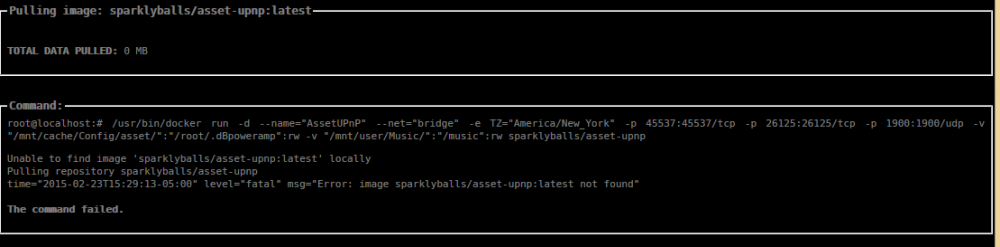
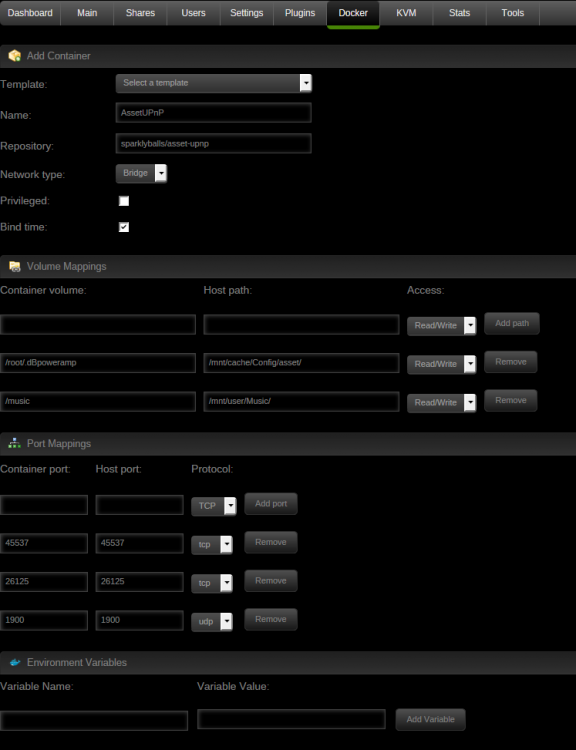
The registry for that docker isn't public or no longer exists. This can be verified by looking here: https://registry.hub.docker.com/repos/sparklyballs/
-
Latestis the version tag. This is needed to allow for proper use of dockers. This way the containers can be versioned just like the applications they run. It should work under beta14. I readded all of my docker co tainers under b14 without issue. If I have time, I'll see if I can add that particular docker you're using.
-
I assume your customized docker container is the none:none? If so, you need to signup for an account to the docker hub registry so you can store your container up there. Then once youre signed up, you need to commit and push your changes to the account and registry you setup. Then you can sagely readd your docker container using your new registry. The other option is you will have to manually recreate that custom docker from scratch. This is all beyond the scope of this thread. I suggest you create a new thread asking how to push your custom docker into docker hub registry.
-
Did you do a docker commit and docker push to a repository? If not, then you need to do that. You also need to add the docker through the ui so you create a my-templatefor it. Otherwise you will have to redo all the steps again.
-
And this is exactly why I use the modified script, since it makes 3 cycle preclear times a bit more manageable. A 3 cycle run on 4TB HGST drive is 74-75 hours. == invoked as: ./preclear_bjp.sh -f -c 3 -A /dev/sde == HGSTHDN724040ALE640 == Disk /dev/sde has been successfully precleared == with a starting sector of 1 == Ran 3 cycles == == Using :Read block size = 1000448 Bytes == Last Cycle's Pre Read Time : 12:11:43 (91 MB/s) == Last Cycle's Zeroing time : 8:39:55 (128 MB/s) == Last Cycle's Post Read Time : 12:17:47 (90 MB/s) == Last Cycle's Total Time : 20:58:46 == == Total Elapsed Time 75:07:02 == == Disk Start Temperature: 32C == == Current Disk Temperature: 35C, == invoked as: ./preclear_bjp.sh -f -c 3 -A /dev/sdc == HGSTHDN724040ALE640 == Disk /dev/sdc has been successfully precleared == with a starting sector of 1 == Ran 3 cycles == == Using :Read block size = 1000448 Bytes == Last Cycle's Pre Read Time : 12:02:23 (92 MB/s) == Last Cycle's Zeroing time : 8:32:16 (130 MB/s) == Last Cycle's Post Read Time : 12:07:32 (91 MB/s) == Last Cycle's Total Time : 20:40:53 == == Total Elapsed Time 74:04:51 == == Disk Start Temperature: 28C == == Current Disk Temperature: 31C,
-
Something isn't right with those, your Pre-Read times are significantly slower than it should be. Here's snippets from January for 2 drives I precleared concurrently using the faster preclear script; first was 1 cycle, then both were run for 2 more cycles. ========================================================================1.15b == invoked as: ./preclear_bjp.sh -f -A /dev/sdl == HGSTHDN724040ALE640 == Disk /dev/sdl has been successfully precleared == with a starting sector of 1 == Ran 1 cycle == == Using :Read block size = 1000448 Bytes == Last Cycle's Pre Read Time : 12:08:15 (91 MB/s) == Last Cycle's Zeroing time : 8:36:35 (129 MB/s) == Last Cycle's Post Read Time : 12:12:10 (91 MB/s) == Last Cycle's Total Time : 32:58:09 == == Total Elapsed Time 32:58:09 == == Disk Start Temperature: 36C == == Current Disk Temperature: 37C, ========================================================================1.15b == invoked as: ./preclear_bjp.sh -f -A /dev/sdd == HGSTHDN724040ALE640 == Disk /dev/sdd has been successfully precleared == with a starting sector of 1 == Ran 1 cycle == == Using :Read block size = 1000448 Bytes == Last Cycle's Pre Read Time : 12:01:58 (92 MB/s) == Last Cycle's Zeroing time : 8:30:13 (130 MB/s) == Last Cycle's Post Read Time : 12:06:48 (91 MB/s) == Last Cycle's Total Time : 32:40:07 == == Total Elapsed Time 32:40:07 == == Disk Start Temperature: 35C == == Current Disk Temperature: 36C, ========================================================================1.15b == invoked as: ./preclear_bjp.sh -f -c 2 -A /dev/sdl == HGSTHDN724040ALE640 == Disk /dev/sdl has been successfully precleared == with a starting sector of 1 == Ran 2 cycles == == Using :Read block size = 1000448 Bytes == Last Cycle's Pre Read Time : 12:07:51 (91 MB/s) == Last Cycle's Zeroing time : 8:36:52 (129 MB/s) == Last Cycle's Post Read Time : 12:12:39 (91 MB/s) == Last Cycle's Total Time : 20:50:36 == == Total Elapsed Time 53:50:05 == == Disk Start Temperature: 35C == == Current Disk Temperature: 36C, ========================================================================1.15b == invoked as: ./preclear_bjp.sh -f -c 2 -A /dev/sdd == HGSTHDN724040ALE640 == Disk /dev/sdd has been successfully precleared == with a starting sector of 1 == Ran 2 cycles == == Using :Read block size = 1000448 Bytes == Last Cycle's Pre Read Time : 12:01:55 (92 MB/s) == Last Cycle's Zeroing time : 8:30:12 (130 MB/s) == Last Cycle's Post Read Time : 12:06:54 (91 MB/s) == Last Cycle's Total Time : 20:38:11 == == Total Elapsed Time 53:18:20 == == Disk Start Temperature: 33C == == Current Disk Temperature: 35C,
-
Alright, based on that output your issue isnt caused from a full filesystem. Your cache drive and docker.img have plenty of free space. At least they report as such. I dont exactly know what steps to take next on trying to fix the btrfs issues. There is a filesystem check profram. Hopefully jonp or eric or LimeTech or one of the moderators can step in to help further.
-
I only have one BTRFS-disk, the cache disk. Not exactly true. Inside the docker.img itself is a BTRFS filesystem.
-
What does the following command show for /var/lib/docker and /mnt/cache? df -h Your docker.img might be full and needs to be recreated, or your cache drive might have issues. Its hard for me to tell from the log which BTRFs is having the issue.


