





Bob@unraid
Members
-
Joined
-
Last visited
Everything posted by Bob@unraid
-
Hello everyone, I really like the idea of having an DMS right on my unraid server. I added the IMPORTER_DIR = "/mnt/user/papermerge/input" to the papermerge.conf.py file next to the german interface and ocr. After restarting the docker the language is working great but the import dir is causing an error: WARNING/MainProcess] Importer from local folder task not started.Reason: 2. importer dir does not exist I have no clue want could be the problem. I created the share and input folder especially for the papermerge docker Any suggestions? Thanks!
-
Hello everyone, is it possible to enable file compression at duplicacy docker? Thanks a lot
-
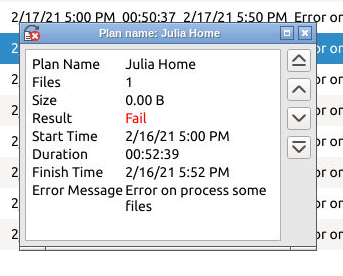
Hello everyone, I bought cloudberry recently and a view days ago the backup is starting to fail. I did not change anything with the docker or on the remote site. I am backup up to an old Synology NAS at my mom's house through sftp. Is there anything I can try to solve the problem? Thanks a lot
-
Thanks a lot for the fast answer. I defently try to delete the samba_mount.cfg from the UAD folder. I also attached the diagnostics. Thanks again and happy holiday unraid-diagnostics-20201223-1431.zip
-
I tried to mount an remote Synology NAS through nfs or smb and totally messed up wrong slashes and so on.... 😒 After that failed try my plan was to delete the share and do it better once again. The deletion of the smb went fine but I am unable to delete the nfs share. I tried to delete it with the red X, disable Auto Mount and delete it again, nothing worked. The Success Popup showed up every time but nothing changed. Is it possible to delete this share with the command prompt? The screenshot shows the current undeletable status Thanks

-
Found your docker yesterday and it is exactly what I am looking for. I tried to convert a file but I could not get it working. I could even find the output dir 😔 I really have no experiance with ffmpeg and its parameters. My goal is to convert my ts file with Intel QS to h264 and keep the audio tracks untouched. Any suggestions would be great
-
Thanks for the PhotoPrism docker. I tried some things some worked better some less. Is it possible to reset the whole docker? Thanks
-
Hello everyone, is it nessesary to exclude other shares than appdata from the "Docker Safe New Permissions command"? I just want to move a share that is splitted to 3 harddrives to a new member of the array. Thanks and stay safe
-
Hello everyone, I am quite new to unraid and the Unassigned Devices plugin. I was play around and tried to add my old Synology NAS, living at my mom's house, thru synology-dyndns using smb and nfs. After a few tries it did not work and I wanted to delete the remote shares. I tried to delete the smb and nfs share with the red X, confirmed it but the shares are still there even they are not working anywhere. Tried it again but no success. Can you help to delete the not working, not really needed shares? Thanks
-
Thanks for the fast responses. I tried to convert the file without QSV and the CPU load is even higher with much lower fps. So everything is fine I guess.
-
Hello everyone, I am quite new the unraid and docker system and I just wanted to double check if my docker config is right. I am using a i3 9100, enabled QSV by adding modprobe i915 and I also can select the QSV profiles in the GUI. When converting a 1080p ts file to h264 1080 mpr my cores are running an ~85%. I this right? Honestly I expected a much lower load Thanks a lot and stay safe
