





Linguafoeda
Members
-
Joined
-
Last visited
Everything posted by Linguafoeda
-
thank you - i actually checked my go file and it only had the below entries (i think related to enabling PUTTY SSH with key) and i also had INTEL-GPU-TOP (version 2023.09.13) already installed. Would i need to remove the "--device=/dev/dri" from the Plex container parameters after i install the gvt-g plugin? Also - does that mean if i enable this i wont be able to right click on the VM icon in the dashboard and use the "noVNC" viewer going forward? I use that pretty often from my work PC since i can't install other remote clients on my work PC. How about Anydesk, will that program work with this? I dont have parsec or use it because there's no ipad app + many of my other remote desktop clients use anydesk so I try to stay on that platform. /boot/config/go #!/bin/bash #Start the Management Utility /usr/local/sbin/emhttp & echo 1 > /sys/kernel/mm/ksm/run mkdir /root/.ssh chmod 700 /root/.ssh cp /boot/config/ssh/authorized_keys /root/.ssh/ chmod 600 /root/.ssh/authorized_keys
-
Hello - i have an i7-10700 with no dedicated GPU, just the intel iGPU. I always have a Windows 11 VM running though most of the time it's idling (i.e. not being actively accessed, and the only program running in Win11 GPU will be Chrome with 50-100 tabs open). I followed the below Plex container instructions to have my iGPU be used for Plex HW encoding, but I am having poor VM performance so i want to see if my iGPU can be used for both Win11 VM and Plex container. I have a few questions: Will this plugin allow me to dynamically use my intel iGPU for both docker and VM hardware acceleration? Can Plex and the VM simulataneously access the iGPU? If not, what if the Win11 VM is running but not being accessed by Anydesk or noVNC (the two primary remote clients I use), does that allow Plex to use the iGPU for hardware acceleration? Should i be following the steps outlined in the 2nd post to achieve this ability this dual Plex docker + Win11 VM hardware acceleration? Do i need to undo anything related to the settings below (i.e. "modprobe i915") before I install the Intel gvt-p plugin? Intel GPU Use Edit your go file to include: modprobe i915 , save and reboot, then add --device=/dev/dri to "extra parameters" (switch on advanced view)
-
I'm getting a weird error message on my discord from netdata, does anyone know what this means? SERVER needs attention, app.dhcp_fds_open_limit, App group dhcp file descriptors utilization = 500% App group dhcp file descriptors utilization = 500% Open files percentage against the processes limits, among all PIDs in application group app.dhcp_fds_open_limit
-
oh lol - yes i had that setup from the OP post changes. dope.
-
Where's this setting? what does it do?
-
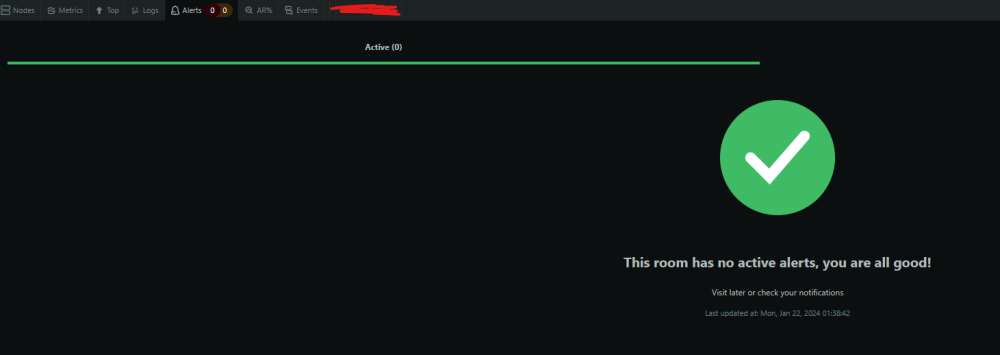
thank you - nano seemed to work. is there a way to globally set on my unraid all text editing to use nano? I tried to run that command on the main unraid terminal and it didn't work, but it did work in the container's (netdata) console. the test worked for the webhook, then i ran the first two commands, all i did was change the warn and crit ranges (i.e. alert at 70% instead of 80% for warn), then saved and exited, ran the reload-health command but nothing shows up in my netdata web console indicating an alert is setup? To edit ram.conf file: cd /etc/netdata 2>/dev/null || cd /opt/netdata/etc/netdata ./edit-config health.d/ram.conf ram.conf file: # you can disable an alarm notification by setting the 'to' line to: silent alarm: ram_in_use on: system.ram class: Utilization type: System component: Memory os: linux hosts: * calc: $used * 100 / ($used + $cached + $free + $buffers) units: % every: 10s warn: $this > (($status >= $WARNING) ? (70) : (90)) crit: $this > (($status == $CRITICAL) ? (90) : (98)) delay: down 15m multiplier 1.5 max 1h summary: System memory utilization info: System memory utilization to: sysadmin alarm: ram_available on: mem.available class: Utilization type: System component: Memory os: linux hosts: * calc: $avail * 100 / ($system.ram.used + $system.ram.cached + $system.ram.free + $system.ram.buffers) units: % every: 10s warn: $this < (($status >= $WARNING) ? (15) : (10)) delay: down 15m multiplier 1.5 max 1h summary: System available memory info: Percentage of estimated amount of RAM available for userspace processes, without causing swapping to: silent alarm: oom_kill on: mem.oom_kill os: linux hosts: * lookup: sum -30m unaligned units: kills every: 5m warn: $this > 0 delay: down 10m summary: System OOM kills info: Number of out of memory kills in the last 30 minutes to: silent ## FreeBSD alarm: ram_in_use on: system.ram class: Utilization type: System component: Memory os: freebsd hosts: * calc: ($active + $wired + $laundry + $buffers) * 100 / ($active + $wired + $laundry + $buffers + $cache + $free + $inactive) units: % every: 10s warn: $this > (($status >= $WARNING) ? (70) : (90)) crit: $this > (($status == $CRITICAL) ? (90) : (98)) delay: down 15m multiplier 1.5 max 1h summary: System memory utilization info: System memory utilization to: sysadmin alarm: ram_available on: mem.available class: Utilization type: System component: Memory os: freebsd hosts: * calc: $avail * 100 / ($system.ram.free + $system.ram.active + $system.ram.inactive + $system.ram.wired + $system.ram.cache + $system.ram.laundry + $sy> units: % every: 10s warn: $this < (($status >= $WARNING) ? (15) : (10)) delay: down 15m multiplier 1.5 max 1h summary: System available memory info: Percentage of estimated amount of RAM available for userspace processes, without causing swapping to: silent After editing ram.conf, ran: netdatacli reload-health
-
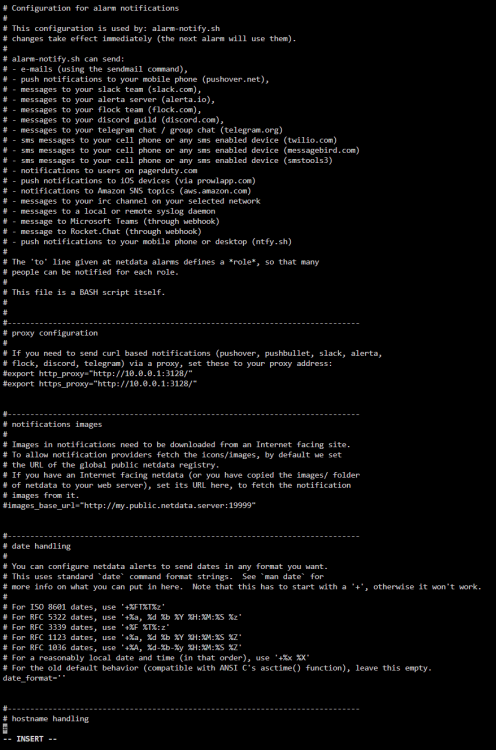
I don't have that option - it just says insert at the bottom. i right clicked on netdata container -> console -> type those two commands. i tried a bunch of ctrl + commands...nothing seems to do anything along the lines of saving.
-
Unfortunately not - the site gets blocked on my work PC but they don't block VM software so I want to be able to access video streams. So my only option would be to buy a cheap GPU?
-
I will try to setup discord memory usage alerts with netdata container as reported here:
-
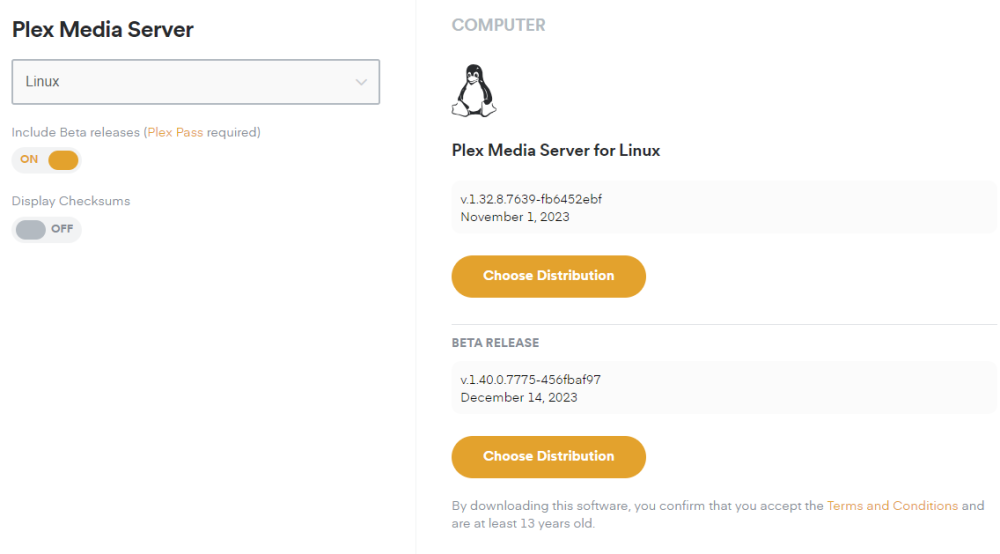
as an update - a Plex employee told me this is a known bug with the BETA plex version 1.40.7775 which i had been inadvertently on. I changed the VERSION variable of linuxserver container from "latest" to "docker" and it downgraded me to 1.32.8.7639. the problem has disappeared. Hallelujah
-
I see. I'm getting heavy video lag while trying to simply stream and watch a video on the VM through clients including Anydesk and the default noVNC. Do you have any advice or tips on how to significantly improve this video performance? I don't have a GPU to passthrough and my Plex container has the --device=/dev/dri parameter which I believe makes it use my Intel 10th gen iGPU for transcoding
-
I was reading some reddit Windows optimiztion threads and one of them suggested to use CPU pinning in Unraid -> Settings -> CPU Pinning. I realize i made the above changes that i guess disable CPU pinning. If I only have 1 VM really running 100% of the time (~8GB), and a bunch of docker containers that use maybe another 8GB of RAM of my 32GB total, is there any rhyme or reason for using or not using CPU pinning to pin 3-4 cores (of my 8 cores) to Win11 VM to improve performance?
-
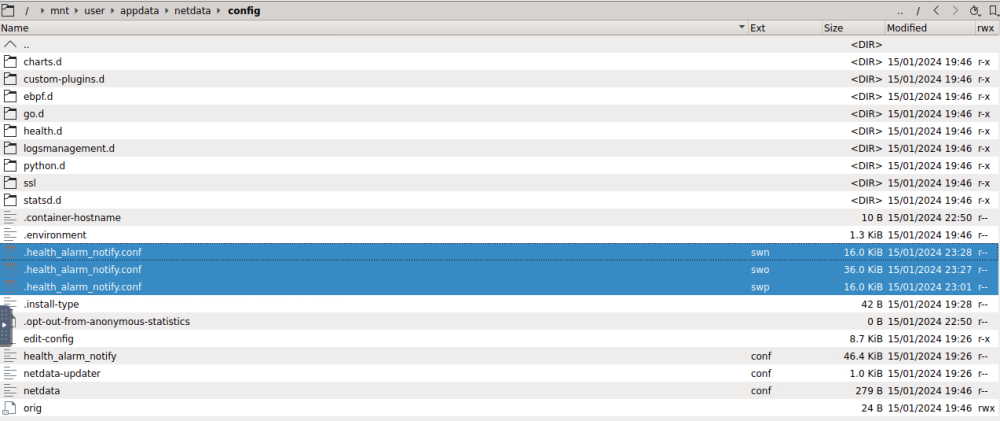
I now have three "health_alarm_notify.conf" files in my config folder with .swo, .swn and .swp extensions. not sure if i did something wrong...
-
So i uninstalled and reinstalled the container as it was entirely missing all those template variables, and i got netdata cloud up and running. I got to line 2 (sudo) and it failed. if i remove sudo word, it opens up a text editor-like window but then i don't know how to save the changes once I've made them? or can i edit this conf file in something like krusader? cd /etc/netdata 2>/dev/null || cd /opt/netdata/etc/netdata ./edit-config health_alarm_notify.conf Webhook Paste Info I'm supposed to paste? #------------------------------------------------------------------------------ # discord (discordapp.com) global notification options SEND_DISCORD="YES" DISCORD_WEBHOOK_URL="https://discord.com/api/webhooks/XXXXXXXXXXXXX/XXXXXXXXXXXXXXXXXXXXXXXXXXXXXX" DEFAULT_RECIPIENT_DISCORD="alerts"
-
hmm - which step should i do, hoopster or bmartino's method? And is there a way to backup in case something messes up in my server while attempting to downgrade?
-
How do i downgrade my server to 1.32, especially if it's currently using 1.40.7775 with LATEST / PUBLIC as my current settings?
-
Hmm interesting, i wonder why my lscr container with LATEST tag + plex/general/serverupdatesettings=PUBLIC is then using BETA 1.40.0.7775 instead of stable 1.32.8.7639. @Hoopster, what server version are you running with your DOCKER tag enabled? The entire reason i'm asking this is because of some sort of instability being caused in 1.40.7775.
-
For people who are Plex Pass users, what VERSION setting are you using among the 4 options (DOCKER, LATEST, PUBLIC, specific-version)? I found out I'm on the most recent BETA (1.40.0.7775-456fbaf97) using the LATEST container variable even though my plex -> general -> server update settings set to "public". A plex employee recently commented that my recent server woes may be driven by a BETA issue in 1.40.0.7775-456fbaf97 affecting music libraries (I have ~50k+ of songs). If that is the case, (A) I want to roll back to the latest STABLE release and (B) two figure out if for future reference i stay on BETA or stable/public releases going forward. I do like to get the latest BETA features because Plex is genuinely my favorite thing ever, but i also don't want to run into a future scenario of Plex being able to take down my entire system. One thought i had around (B) was to stay on BETA (once they roll out the fix) but limit Plex's ability to utilize all my CPU/RAM resources presumably causing the crash by limiting CPU to 50% of my available cores and RAM usage to ~25% of my total system RAM. Curious others thoughts around this solution. docker: Let Docker handle the Plex Version, we keep our Dockerhub Endpoint up to date with the latest public builds. This is the same as leaving this setting out of your create command. latest: will update plex to the latest version available that you are entitled to. public: will update plexpass users to the latest public version, useful for plexpass users that don't want to be on the bleeding edge but still want the latest public updates. <specific-version>: will select a specific version (eg 0.9.12.4.1192-9a47d21) of plex to install, note you cannot use this to access plexpass versions if you do not have plexpass.
-
I would love to get netdata properly setup so i can monitor alerts in future. Right now i have no folder of netdata anywhere i can find to even begin to edit an alert file? What is step #1 to create the netdata appdata folder...is there a package i need to install besides https://hub.docker.com/r/netdata/netdata docker container i have installed? How do i get "netdata cloud" installed and working?
-
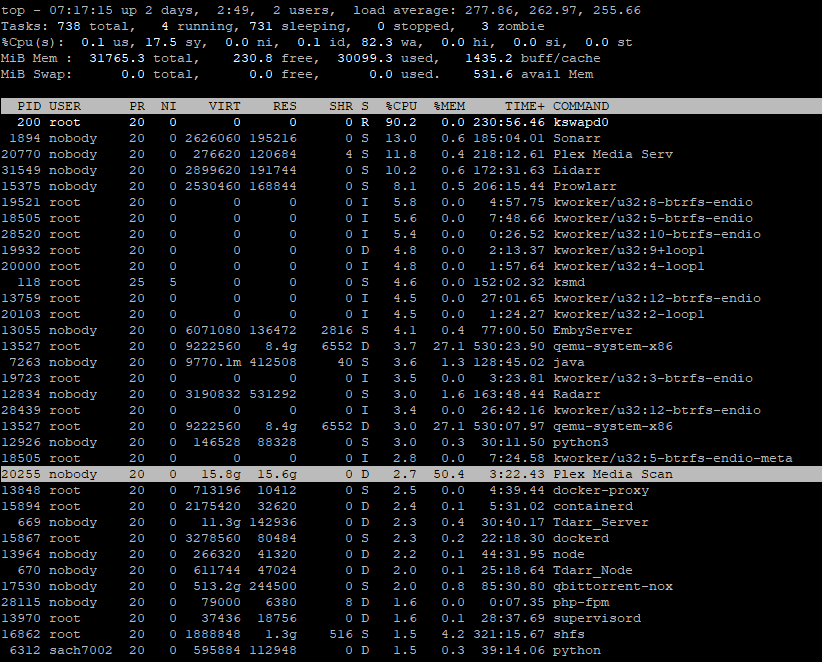
How do you limit Plex's RAM usage? It just crashed again last night. i feel i can safely say it's Plex causing unraid to crash, but now i want to troubleshoot and fix my plex install while i will be remotely away instead of having my server constantly crash. I also pinned the Plex container to only use CPU 4-7 / HT 12-15
-
I posted in the plex forum to see how to trouble shoot this. I added a ton of different tv shows / movies so it would be very cumbersome to try test each and every one. Any idea of how to troubleshoot finding specifically the one that is throwing the error?
-
I'd really love to figure out what's happening at Plex that is choking up server, instead of a stop-gap measure. i also noticed some errors with my music not showing properly in the web GUI anymore. Maybe i need to fix the database
-
So i opened the Plex Media Scanner Matcher log file and it's absolutely filled with this line item at 4:19am Jan 10, 2024 04:19:23.765 [23306795789120] WARN - [FFMPEG] - Unknown encoding
-
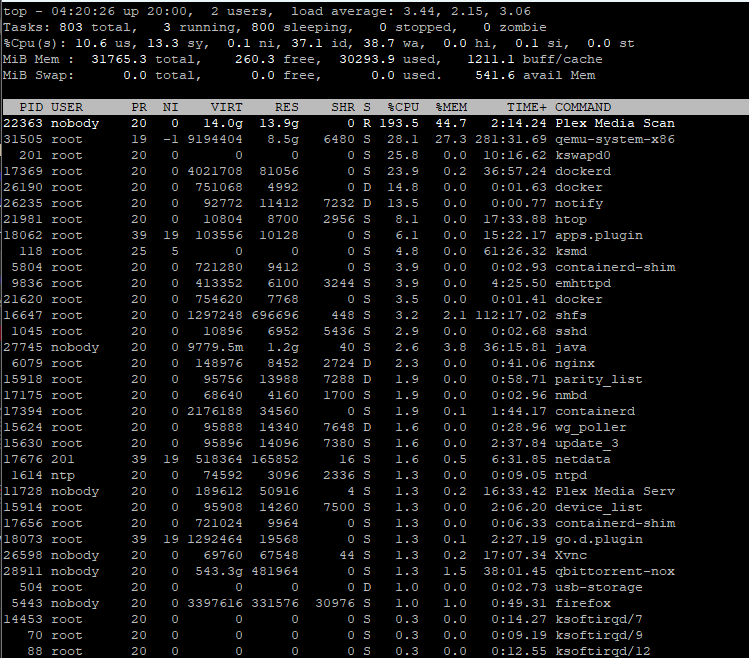
Crashed again at 4:20am. This time i had PuTTY running TOP and it gave me the below last screenshot. So this might be plex related? Any idea how to further troubleshoot this? I have re-followed the macvlan troubleshooting (https://docs.unraid.net/unraid-os/release-notes/6.12.4/#fix-for-macvlan-call-traces)
-
Dumb question but I'm trying to connect my agent to Netdata, i logged in via GitHub and then it asks me to run the command below, which i tried in the netdata's own console. Nothing happens, it says "sh: 1: sudo: not found". I cannot find any sort of netdata folder in either /etc/ or /mnt/cache/appdata/. Where is this file location that i can use to enable this netdata cloud connection? $ sudo cat /var/lib/netdata/netdata_random_session_id Tip: Run the command and paste here the key it will give you. If the command doesn't work out of the box, locate the /var/lib/netdata/netdata_random_session_id file, open it in your favorite text editor, and copy it to your clipboard. Also separately - what steps do i need to follow to enable alerts for x% memory usage that can be sent to my discord server? I clicked on "Alerts" button up top -> Alerts Configuration -> System Memory Utilization -> clicked the singular line item twice until it shows up as a sidebar but i don't see anywhere to enable it / configure it / change it. I am a pretty big noob when it comes to some Unraid stuff so any dummy-guide to enabling this would be much appreciated (the reason i want to enable memory usage alerts is so i can track down what is causing my Unraid machine to hit 100% RAM usage and crash daily, see below) )








