





Linguafoeda
Members
-
Joined
-
Last visited
Everything posted by Linguafoeda
-
I'm also having this issue where just idling of Windows 11 on the desktop puts me at 50-70% CPU usage (4 cores / 8 threads on a i7-10700) and launching chrome permanently has me using 100% of CPU. I just updated to 6.12.6 to see if that would help but it hasn't changed much. I saw the below thread too - any idea what things i should do to make performance much better for my Win11 VM? This all started happening when i enabled secure boot and TPM on my Windows 10 VM to allow it to upgrade to Win11.
-
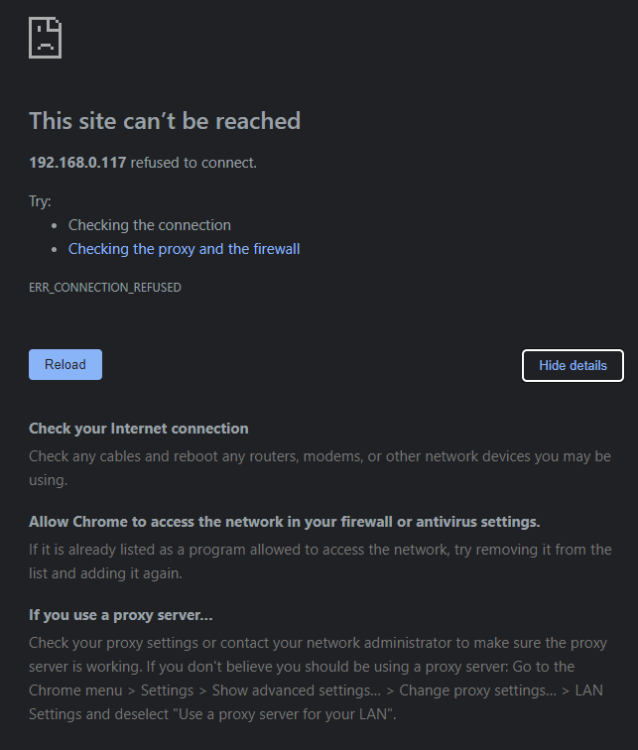
I updated my server to 6.12.6 and now krusader won't launch even though it's running. I remember having this issue a few months ago when i last restarted my server. Last I remember, it eventually started working again after a while but i have no idea how/when/why it did. Does anyone know what causes this and how to fix it? I'm just getting generic Chrome error message "ERR_CONNECTION_REFUSED". The log file from docker is below. I tried launching it via incognito on my windows laptop and on my iphone and neither work... ___. .__ .__ \_ |__ |__| ____ | |__ ____ ___ ___ | __ \| |/ \| | \_/ __ \\ \/ / | \_\ \ | | \ Y \ ___/ > < |___ /__|___| /___| /\___ >__/\_ \ \/ \/ \/ \/ \/ https://hub.docker.com/u/binhex/ 2023-12-05 17:57:43.833275 [info] Host is running unRAID 2023-12-05 17:57:43.863370 [info] System information Linux f8cc770e84ac 6.1.64-Unraid #1 SMP PREEMPT_DYNAMIC Wed Nov 29 12:48:16 PST 2023 x86_64 GNU/Linux 2023-12-05 17:57:43.889742 [info] PUID defined as '99' 2023-12-05 17:57:43.917954 [info] PGID defined as '100' 2023-12-05 17:57:43.951419 [info] UMASK defined as '000' 2023-12-05 17:57:43.975559 [info] Permissions already set for '/config' 2023-12-05 17:57:44.005324 [info] Deleting files in /tmp (non recursive)... 2023-12-05 17:57:44.031793 [info] WEBPAGE_TITLE defined as '[SERVER]' 2023-12-05 17:57:44.057644 [info] ENABLE_STARTUP_SCRIPTS not defined,(via -e ENABLE_STARTUP_SCRIPTS), defaulting to 'no' 2023-12-05 17:57:44.088550 [info] TEMP_FOLDER defined as '/config/home/.config/krusader/tmp'
-
This worked! 1. made a copy of my existing windows vdisk (mnt/user/domains/disk.img) calling it disk2.img 2. created a new VM and made everything the exact same except machine ("q35-7.1" vs. "q35-5.1" on my prior VM), bios ("OVMF TPM" vs. "OVMF" prior) and changed primary vdisk location to pointed to that disk2.img in my domains folder 3. relaunched the VM, downlaoded "Windows 11 Installation assistant" and ran it to force the 2H22 update
-
Hi catch44 - any idea of tips of how to convert an existing Windows 11 install to this new type of template? Again - i'm a bit of a noobie when it comes to this so a bit unsure how to proceed
-
bump
-
Hi - sorry for missing the past few pages of great work by the dev members in this thread. Quick questions: 1. I have updated my plugin to "2023.09.17.1", but i don't have the detailed graph/CPU usage etc. info on the main docker page. How do i get that (do i need to force restart the entire server or is there a command line to restart just the plugin etc.)? 2. A lot of members have done some incredible work regarding tweaks to the CSS for the dashboard to add spacing / making it look like the old Docker Folders. What are the steps to copy and paste their CSS to make mine look similar?
-
Can't wait to see this GUI update once you get some breathing room to get to it. you are the man!!!
-
bump
-
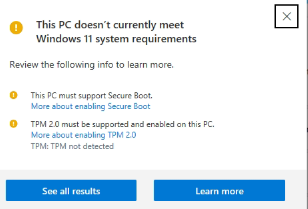
So i have a windows 11 VM that i installed a while back using the SpaceInvader guide. I've been wondering why my file explorer never got the tabbed browsing and realized that my VM doesn't seem to support Windows 11 (major) updates. After googling around, i couldn't find a solid, easy to understand guide on how to configure the VM such that it can update. I did find the reddit post below but i wasn't fully following what they were trying to say I need to do with a boot folder and such (there was also a comment about Unraid's "native secure boot + TPM", and I'd obviously prefer to use the unraid-recommended path instead of some random guy's Github editing OVMF files). Could someone point me in the right direction of a guide to get my Windows 11 VM enabled with secureboot/TPM so i can continue to get Win11 major milestone updates? I'm quite a beginner when it comes to configuring files in the boot folders and such so the easier the instructions, the better thank you!
-
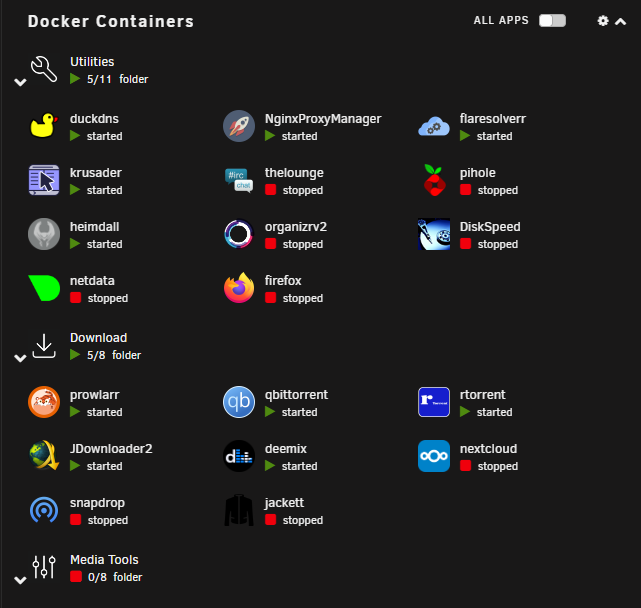
thank you @Mattaton and @scolcipitato. Any idea / guide on how to use custom CSS to replicate the dashboard as shown below vs. the stock version? This is an incredible add-on, thank you for updating it for 6.12. I just need to figure out how to get my custom icons back as well as changing the CSS of the dashboard and i'm a happy camper
-
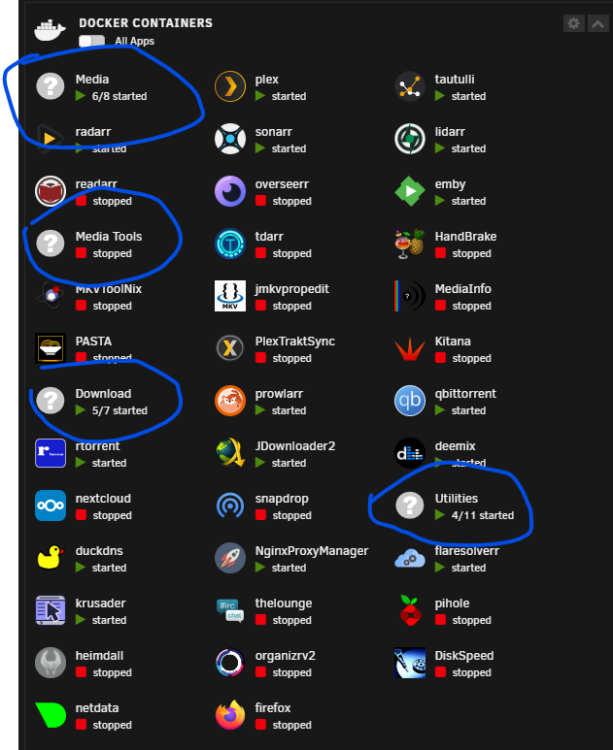
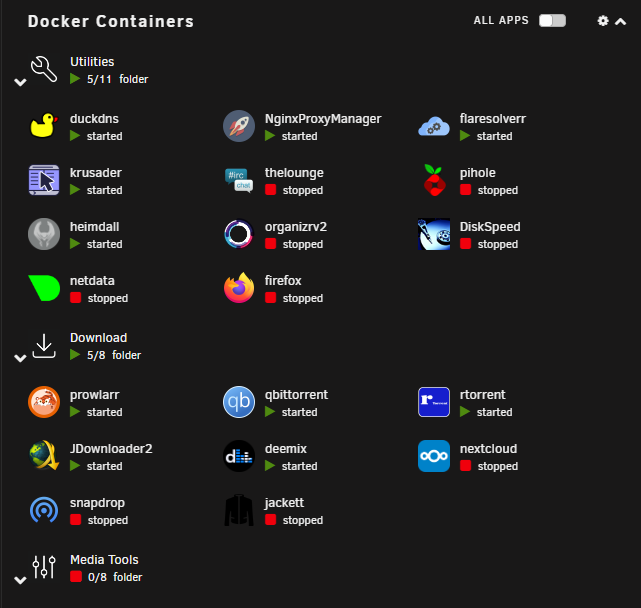
How do you organize the folders positions themselves? And do you know if below is how the folders are meant to show on dashboard? i was wondering if you could make the dashboard folder view similar to the old plugin (2nd picture). I'd really like to find a way to recreate the dashboard view like the 2nd pic, with the arrow to shrink/open the folder and separation between folders.
-
I cant open Krusader after restarting the container. The web page doesn't load (i'm on local LAN). I tried incognito and different browser. Does anyone know how to troubleshoot this? Created by... ___. .__ .__ \_ |__ |__| ____ | |__ ____ ___ ___ | __ \| |/ \| | \_/ __ \\ \/ / | \_\ \ | | \ Y \ ___/ > < |___ /__|___| /___| /\___ >__/\_ \ \/ \/ \/ \/ \/ https://hub.docker.com/u/binhex/ 2023-09-09 11:59:28.164797 [info] Host is running unRAID 2023-09-09 11:59:28.190948 [info] System information Linux 31d9f7faebd1 6.1.49-Unraid #1 SMP PREEMPT_DYNAMIC Wed Aug 30 09:42:35 PDT 2023 x86_64 GNU/Linux 2023-09-09 11:59:28.217535 [info] OS_ARCH defined as 'x86-64' 2023-09-09 11:59:28.247713 [info] PUID defined as '99' 2023-09-09 11:59:28.276546 [info] PGID defined as '100' 2023-09-09 11:59:28.316732 [info] UMASK defined as '000' 2023-09-09 11:59:28.344627 [info] Permissions already set for '/config' 2023-09-09 11:59:28.384006 [info] Deleting files in /tmp (non recursive)... 2023-09-09 11:59:28.415621 [info] WEBPAGE_TITLE defined as 'UNRAID-SERVER' 2023-09-09 11:59:28.447523 [info] TEMP_FOLDER defined as '/config/home/.config/krusader/tmp'
-
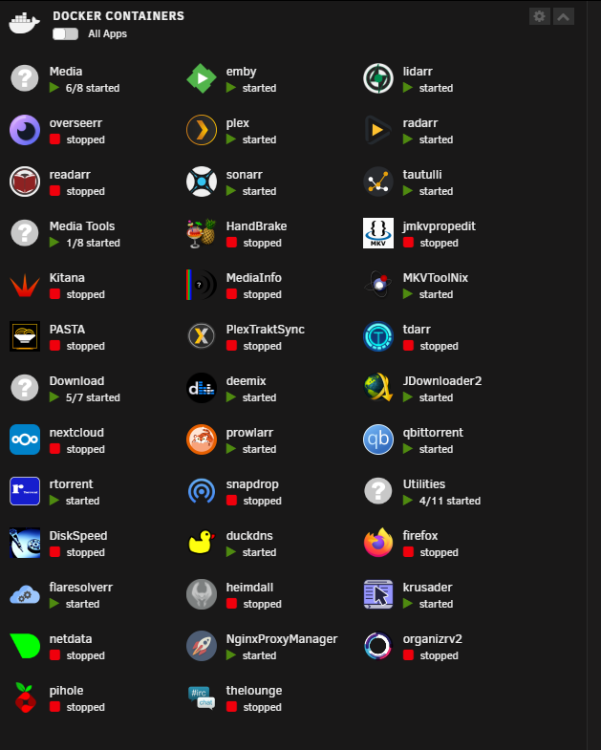
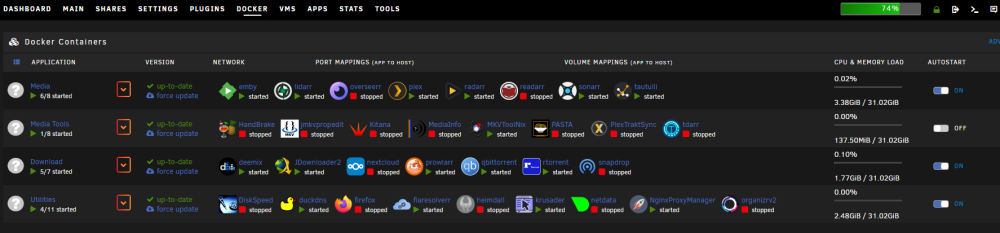
Just installed this. Thank you @scolcipitato for recreating it. A few things I've noticed missing vs. the legacy option: 1. ability to upload custom logo for icons 2. advanced graph/UI for detailed info on container usage stats etc. 3. ability to reorder the containers within a folder which also then affects the startup order of the apps upon a restart/array start (i.e. top containers are started first and top folders are started first) 4. my dashboard is not showing any folders. Any idea what is causing this? (i ended up just recreating the settings via web UI instead of importing anything from guilddarts fwiw)
-
Hi all - I use dockerfolder all the time. I upgraded to 6.12.4 and the main dashboard folders are gone. I assume i have to upgrade to this version. Does anyone know if i can import my old Docker Folder setup into FolderView, and if so, how? I remember upgrading to 6.9 a while ago and losing my Docker Folders and when recommended to uninstall and reinstall, i had to re-setup everything which took quite a while. Just trying to avoid that if possible
-
does anyone know if there is a way to locally access "mediaInfo" for media files within Krusader? It's cumbersome to open a separate MediaInfo docker container and manually open each file vs. being able to pull the MediaInfo directly in Krusader. I quickly googled but only found the below. is it possible even to install this within binhex's krusader on unraid? If so, could someone tell me how to? https://store.kde.org/p/1418250
-
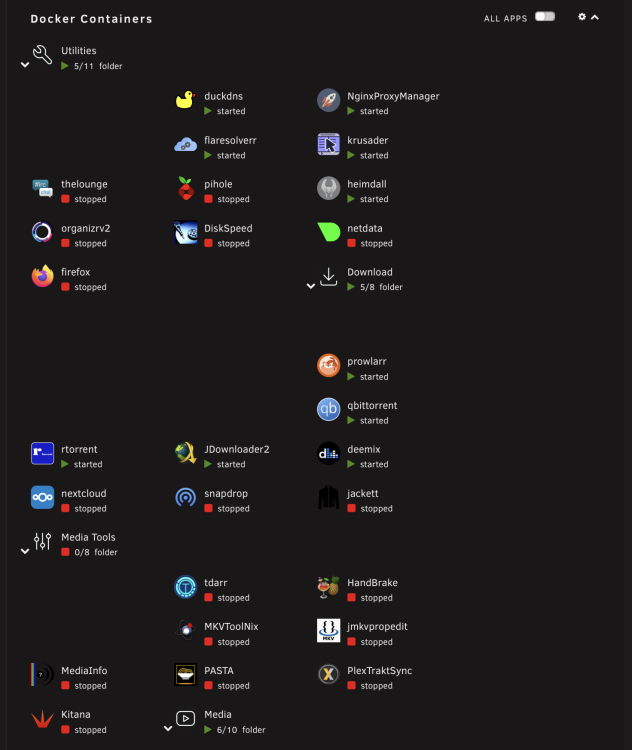
@thecode any chance you were able to look into what's causing this weird spacing issue in GUI for iPad?
-
bump
-
I'm trying to rollback to binhex/arch-qbittorrentvpn:4.4.5-2-02 (a tracker i use has been slow about whitelisting 4.5) but i have the fire logo with my current VPN (Windscribe) indicating it cannot connect. What am i doing wrong that my old qbit 4.4.5 won't connect anymore? I tried deleting the wg0 file in the wireguard folder and re-putting the .conf file downloaded from Windscribe into the wireguard appdata folder and relaunching qbit but it doesn't work. If i roll into the latest (i.e. binhex/arch-qbittorrentvpn), then it works fine but then multiple torrents won't seed / download from this specific tracker 😕
-
i'd like to see this too. i'm on 6.11.3
-
Does anyone know how to preserve the column settings/widths etc of the UI of qbittorrent so it's not dependent on the local cookie of the browser accessing? I sometimes clear cookies out of my browser which resets my qbittorrent view... https://qbforums.shiki.hu/viewtopic.php?t=6098
-
No worries, wasn't sure if i had missed a setting somewhere to re-enable it. Thanks so much for your work getting this to work with latest unraid. Last question - is there a way to fix the rendering issues with the dashboard on iPad/iOS devices? It shows up with a bunch of random spaces (see below screenshot from an iPad Pro 13")
-
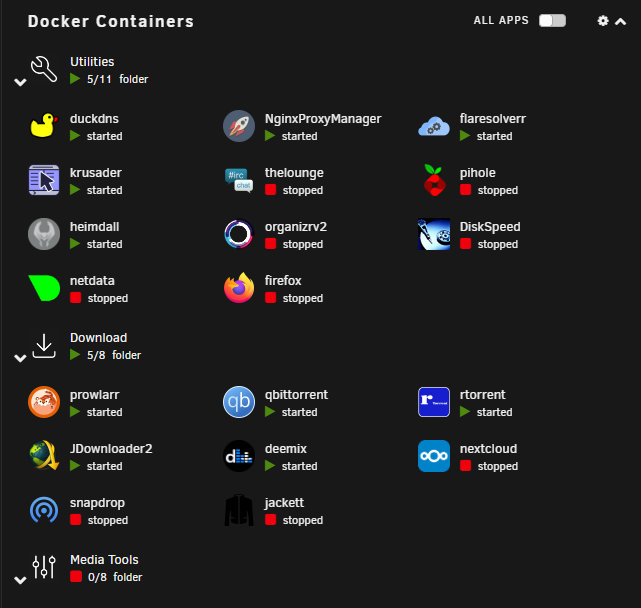
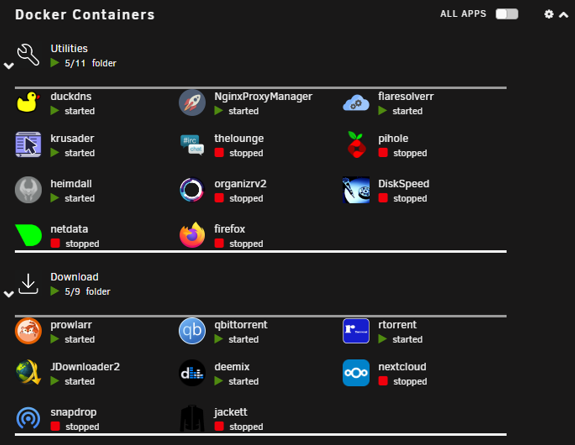
I was able to re-find some of the custom icons i had for folders, so i just reset my folders up. Thanks for the help. Any idea how to get the "white divider" lines back on the main dashboard page? that's only thing i can't seem to find Before: After:
-
i uninstalled the old docker folder to install squid repo for 6.11 and lost all my settings. is there any way to get this back?
-
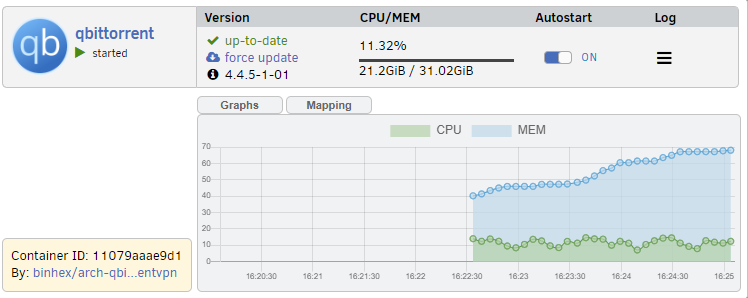
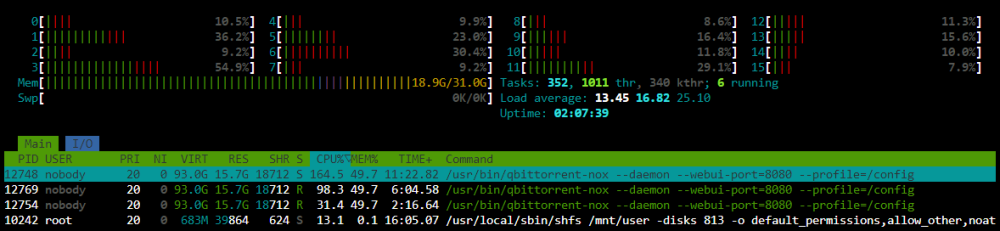
bump - does anyone know what’s going on here? I had to roll back to 4.3.9 to fix this. Wasn’t having this issue at all 2 days ago when I was running 6.11.0 Unraid / latest binhex qbt container. Is there some setting I’m missing that is causing qbit to use all my resources? Docker Folder I believe is what allows the individual monitoring in 2nd screenshot btw. .
-
I just rolled back to 4.4.5-1-01, what is going on here? If Qbittorrent runs for more than 5-10mins, its using up all my RAM and CPU? I updated to Unraid 6.11.1 (just did 6.11.2 now) today too, is it trying to download my files to RAM now???





