





Maertuerer
Members
-
Joined
-
Last visited
Everything posted by Maertuerer
-
Hey, me again. This month my gitlab got deleted AGAIN during the backup process, thank you!
-
So, during the last backup, my gitlab got deleted. How is this even possible? backup.log
-
1) install homarr as homepage 2) add tile with url (http://unraidip/Main) 3) click it Expected behaviour: main page loads Actual behaviour: login page loads This worked fine in all versions 6.x.x and just broke after updating to version 7.x.x I would assume that it has to do with the referrer policy. Homarr sets that to "no-referrer" and unraid then returns a 302 moved temporarily and redirects to login
-
Yeah, I had to use the SSD in the array... Might as well try to update to the most recent version, if I then can move the nvme from array to pool and keep using it. Is there a manual way to call trim on the ssd?
-
So, I tried to delete unused docker images and I am getting execution errors and the UI is Almost unusable now, CPU at 100% To me it feels like the SSD is dying right now nas-diagnostics-20250513-1755.zip
-
YES!!!! In there I got vaultwarden (didn't break) but also homarr and plex (which broke). Gitlab was not configured to backup external Data .... downloader was actually set to be skipped during backup .... Just gotta look into restoring the backup and reconfigure the missing backups correctly. No real data loss in gitlab, since I also have everything locally, but still sucks. THANK YOU VERY MUCH FOR YOUR SUPPORT, Ricky!
-
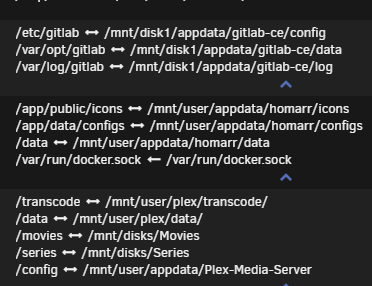
I am not completely understanding that question (noob), but is this what you are inquiring about? Both homarr settings, as well as gitlab data are gone Vaultwarden is still completely fine: /data/mnt/user/appdata/vaultwarden Data in /mnt/disk1/JDownloaderDownloads is fine, Data in /mnt/disk1/appdata/jdownloader2/ has been reset So it looks like only docker data in /mnt/disk1/appdata/ has been reset to the default values? Unfortunately, for homarr that would not explain the problem...
-
Is this someting useful? root@NAS:~# dmesg | grep -i error [ 0.422417] ACPI BIOS Error (bug): AE_AML_BUFFER_LIMIT, Field [CAP1] at bit offset/length 64/32 exceeds size of target Buffer (64 bits) (20220331/dsopcode-198) [ 0.422428] ACPI Error: Aborting method \_SB._OSC due to previous error (AE_AML_BUFFER_LIMIT) (20220331/psparse-529)
-
18, of which only 6 were running all the time.
-
No idea, where would I configure the size? Maybe just precaution years ago?
-
Like I said, it looks like all changes in all of my containers (some running over 2 years) I did have been reverted after the high RAM problem and a subsequent restart.
-
The "crash" happened after multiple years of no problems...
-
nas-diagnostics-20250513-1633.zip
-
Don't think I enabled that, is it under the syslog server settings? *Local Syslog Server is disabled "Mirror to flash" was turned off. What now?
-
Hey everyone, todayI had a memory leak I guess, 75% of 64GB RAM used. I got many errors navigating the UI (especially on the docker and apps tabs). After a restart, all my docker containers have lost their data and can't start anymore. Seems like the data in disk1/appdata has been affected, just all configured data is gone, the rest is fine. Vaultwarden works fine, for Plex I had to regenerate all thumbnails, everything else seems to be working fine. Gitlab does not start anymore and it looks like all data has been lost Any tips?
-
Did you get this working?
-
Hey, I hope this is the correct space for my question: I tried using your app for "copyparty", but nowhere does it mention how to get the password :)
-
I am also running into the the issue as @Moppen Response status code does not indicate success: 500 (Internal Server Error) during pairing. Any idea why this is happening? UI says "not connected" and folders are stuck on "queued" EDIT: completely unlinking the skill from the alexa app and relinking fixed this problem EDIT 2: apparently everything that this tool can do, Plex can do as well Unfortunately both announce what they are going to play "Ok, playing xxx by yyyyy from the album zzzzz Which is not really an option for me
-
Would have been great Looking for a tutorial on how to setup pihole and lancache on the same machine. Will keep looking
-
Hey ich777, first of all: thank you for all those docker templates you provide. Really appreciate them!! Recently I have been working with the LANCache-Prefill template and noticed that for BattleNet and Epic the Parameters are missing (SteamPrefill Parameters are present). Added the BattleNet one manually now for myself. Will these be added in the future? Is there a way to create some kind of pull request so that I could provide them? Kind regards Dustin
-
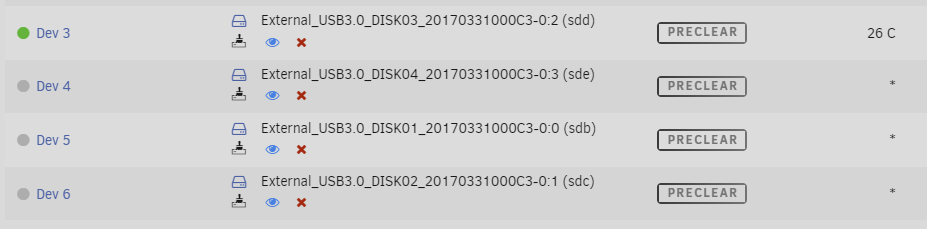
Ok the "problem" here was the external USB Dock (ORICO Tool-Free 5 Bay). When connecting them all via SATA they can be individually pre-cleared. Is there a way to support USB Docks? Probably something to do with the identification of the drive?
-
Hey I am trying to preclear 4 HDDs at the same time. After starting the preclear process for drive 1, unraid removes the preclear button next to ALL 4 HDDs and adds the "Preview Progress" button next to them (see image). Why is this happening? Kind regards Dustin
-
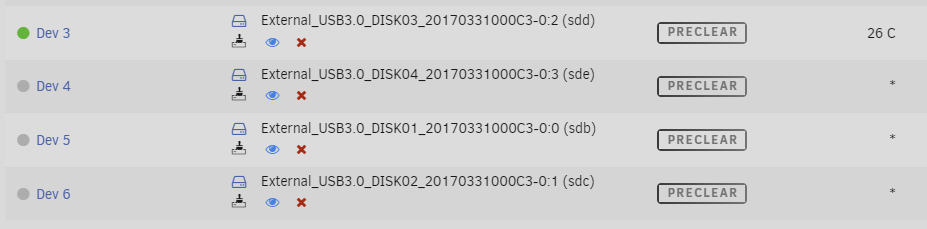
Hey I am trying to preclear 4 HDDs at the same time. After starting the preclear process for drive 1, unraid removes the preclear button next to ALL 4 HDDs and adds the "Preview Progress" button next to them (see image). Why is this happening? Kind regards Dustin
-
Drivers installed - a new Problem arose... I added a line to the syslinux config earlier: append initrd=/bzroot vfio-pci.ids=1b21:1142 This lead to the ssd not being discovered anymore. After removing that entry, now I can boot into windows again, but still the network is not available EDIT: Changing Network Model to virtio (duh) works now!!!! Thank you all for your help! Really appreciated!
-
No, now yet, only when booting directly into windows. Will try preinstalling the virtio drivers now, hope that works.
