





NeoJoris
Members
-
Joined
-
Last visited
-
Did you manage to find a mehtode to read telegram commands? I would like to do same (but with other actions possibly)
-
Are you running 7.0.0-beta.1 ?
-
I have the same issue. AB can't find the 'remotes' location (for me that is /mnt/remotes/SMB_NAS_Backup/Areopagus/) @Kilrah via console the folder is available, i think this is another issue.
-
Those are expensieve! Came here looking for a replacement recommendation after seeing that my newly acquired Sandisk Ultra Fit wont work anymore... The search continues...
-
@xhonestly If you dont have a backup or a file from the folder appdata/sonarr/Backups/scheduled i think you should start from scratch
-
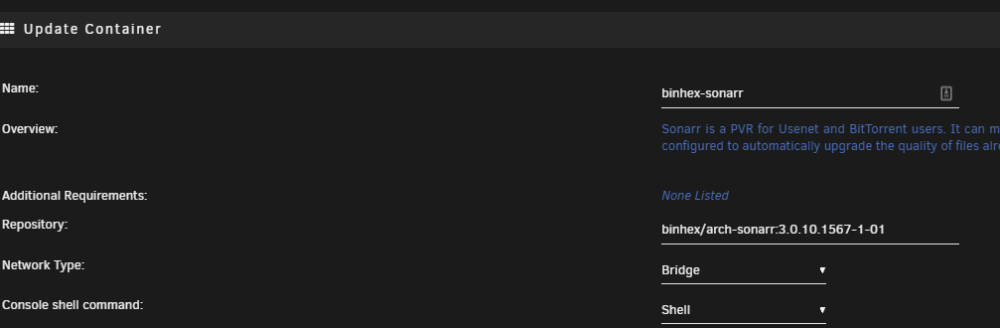
@xhonestly Sorry for the late reply. Only try this if you have a backup of your old databasefile (via manual backups or appdata backup plugin) Steps: remove docker image remove (specific) appdata folder install older version of this docker (see attached image) after stopping the newly made container (I had an backup of the database file) move the old database file into the new folder (only necessary if backup has been stored elsewhere) run DockerSafeNewPerms via tools tab (re)start the container Good luck!
-
I have the same error as @boianski I tried the sollution by @bobobeastie but not succesfull. Also tried to delete the database, and try to recover it from a backup but also not succesfull. Also tried another docker but also not succesfull.. I really dont want to set-up a fresh docker, all the settings are also in this database and not in the config.xml... Does anyone know how to install a earlier version of this docker so i can use the built-in restore to backup my settings? Ive done a rollback to repository binhex/arch-sonarr:3.0.10.1567-1-01 Managed to restore my settings and database, via the build-in restore function and a scheduled backup file
-
Thanks this rollback worked for me.
-
Thanks, After replacing disk 6 (and xfs_repair in maintenance mode) I've got it working again. But only without cache drives, which is fine for now.
-
root@NAS:~# cat /tmp/file.activity/file.activity.disks /mnt/disk1 /mnt/disk2 /mnt/disk3 /mnt/disk4 /mnt/disk5 /mnt/disk6 /mnt/disk7 /mnt/disk8 /mnt/disk9 /mnt/disk10 /mnt/disk11 /mnt/disk12 /mnt/disk13 /mnt/disk14 /mnt/disk15 /mnt/bufferdownloads /mnt/cache I did Yes, is fixed now Well I was not planning to replace that one just yet. As it still functions correctly with all other data; I do not understand what that has to do with the starting and stopping of this plugin. Can you elaborate? Ive attached dianostics nas-diagnostics-20220516-1512.zip
-
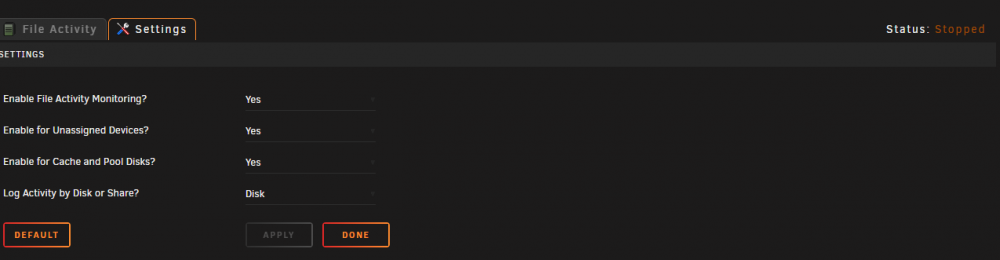
Same here on version 6.9.2 2021-04-07 No file activity visible and service stops repeatedly (restarting service via first tab does not result in any file activity) nas-diagnostics-20220511-1614.zip
-
I'm also experiencing some problems... Including being unable to login to game stores. ==> /mnt/user/appdata/lancache-bundle/log/nginx/access.log <== [wsus] 192.168.1.148 / - - - [10/Mar/2021:17:43:30 +0100] "GET /msdownload/update/v3/static/trustedr/en/authrootstl.cab?7768c4ebe73d95a2 HTTP/1.1" 502 182 "-" "Microsoft-CryptoAPI/10.0" "-" "ctldl.windowsupdate.com" "-" ==> /mnt/user/appdata/lancache-bundle/log/nginx/error.log <== 2021/03/10 17:43:30 [error] 2550#2550: *483 ctldl.windowsupdate.com could not be resolved (110: Operation timed out), client: 192.168.1.148, server: , request: "GET /msdownload/update/v3/static/trustedr/en/authrootstl.cab?7768c4ebe73d95a2 HTTP/1.1", host: "ctldl.windowsupdate.com" Although if other people still got it working, I might think it is my setup...
-
I'm sorry to maybe misinterpreting your problem, but have you checked for any hardware faults? Please try some cpu and memory tests (xmp was for me a random crasher and causing some drive and network instabilities on a threadripper)
-
To better understand your problem: Is this your user name? Also tried "samba reload" ?
-
Does this mean we can upgrade to 6.9 rc1 directly?


