





unevent
Members
-
Joined
-
Last visited
Everything posted by unevent
-
umm

-
Mastercard or Visa
-
Top notch design and manufacturer. Google for reviews as they are numerous and look at the build quality, quality of their boards, quality of their component choices, etc. There used to be a list of 'who's who' in power supplies put out by Tom's Hardware some years ago, but not sure if it has been updated in a while. Some better models of other brands are made by Seasonic. There are other brands that are good, but few actually design and manufacture their own.
-
Seasonic and those made by Seasonic is my recommendation. If you really need 750W, Newegg has some sales and rebates on several that are that size, but they are Gold vs. Titanium. Assuming you are in the US, Seasonic PRIME Ultra 750W 80+ Gold, fully modular, 12 year warranty, $109.99 (sale ends this coming Sunday), $20 rebate brings final to $89.99 (free shipping). The same in Titanium would be $180. I don't believe you would ever realize the ROI with that price difference as efficiency is only around 1.5% better with Titanium vs. Gold.
-
Thanks, and nice work.
-
Is this going to be 'the new way' of doing things or just one possible way for 6.4? I have no need or desire to segregate Dockers from VMs using VLANs and then juggle with rules on my router when I need communication between VLAN. I do have a need and desire to be able to give each Docker and VM there own IP and MAC, which I can do now just fine in 6.3.5 and on same subnet.
-
Most of my containers are from Binhex, though I don't use any of the VPN wrapped which was why I asked the question. I've found them to be the most stable and not crazy-fanatical about updating on what seems like every breath as some others do. Which reminds me, need to send Christmas gift to put some kick in the eggnog.
-
Very good, thanks.
-
Curious if you are routing DNS queries through the VPN tunnel or in the clear to Google servers?
-
Late, but was bored. Font is based on Bank Gothic with SpaceX inspiration.





-
I haven't read back in this Docker thread history, but is the Docker configured to pass the GPU device to the container (--device /dev/dri:/dev/dri)? edit: link to post describing complete process.
-
Looks good - even has the color. To throw out a comment, the lines in the graphic do make it look like stripes and having these stripes in the word RAID makes one assume it is a typical RAID where data is striped. However a major feature, if not the most critical one, is that unRAID does not stripe data - unRAID, as Tom puts it. Don't forget to copyright concepts unless your giving them away freely.
-
This video may give some inspiration to help differentiate this unRAID solution vs other RAID solutions. Stretch your mind a bit
-
Working good, thanks!
-
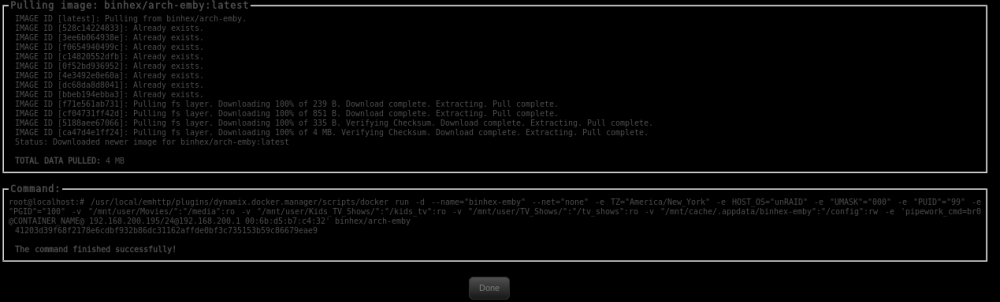
Might be a problem with the latest version. I tried to install and it only downloads 4MB and doesn't start. Appdata folder contains two files, perms and supervisor log. 2017-11-27 21:11:00.960595 [info] Host is running unRAID 2017-11-27 21:11:01.004655 [info] System information Linux 41203d39f68f 4.9.30-unRAID #1 SMP PREEMPT Fri May 26 13:56:36 PDT 2017 x86_64 GNU/Linux 2017-11-27 21:11:01.052360 [info] PUID defined as '99' 2017-11-27 21:11:01.096736 [info] PGID defined as '100' 2017-11-27 21:11:01.395183 [info] UMASK defined as '000' 2017-11-27 21:11:01.436201 [info] Setting permissions recursively on volume mappings... chown: cannot access '/etc/conf.d/emby-server': No such file or directory chown: cannot access '/usr/lib/emby-server': No such file or directory chown: cannot access '/usr/bin/emby-server': No such file or directory
-
...should have 'unRAID' in the logo. IIRC, something Tom coined back in the days of 7-up, the 'unCola' commercials (with the late Geoffrey Holder).
-
Nice...those submitting copyright your work and license it.
-
No, no dependency. The web server is only a requirement for phpVirtualBox which is not part of this plugin.
-
Been too long since I set this up, can't do it from memory. Will look at it this evening when I get home to see if I can figure out what may be happening. What web server you are using (Docker/plugin, author) and phpVirtualBox configuration? Edit: Not sure if it was ever fixed, but phpVirtualBox 5.0.5 at one point didn't work with vitualbox 5.1.2+ without disabling the version check (or make static version). Details are in this post for how to correct. Basically, edit the endpoints/api.php file and search for this string: $response['data']['responseData']['phpvboxver'] = @constant('PHPVBOX_VER'); ...and replace with this: // $response['data']['responseData']['phpvboxver'] = @constant('PHPVBOX_VER'); $response['data']['responseData']['phpvboxver'] = "5.1-0";
-
The page doesn't update on its own when you start the vboxwebserv. A few seconds after you see the 'vboxwebserv service started', hit the refresh button in your browser, or stop then refresh.
-
Post a screenshot of the virtualbox plugin page. What Apache are you using (Docker/plugin and author)?
-
According to Plex, that feature requires Plex Pass.
-
Also agree, it was just strange the errors only occurred with the one script (repeatedly) vs. the other. Will do more testing when this first clear is finished.
-
Agree it is the link being reset, but it occurs after the start of the default script - repeatably, but not with the Joe L script. Speeds started around 200MB+ then slowed to 10-15MB after 20-30 seconds and the link/drive issues started spamming the log. I stopped the preclear, powered off the external dock (JMicron JMS561 chipset), removed the hard drive, re-inserted, powered it back up and let it link up and stabilize. After a couple minutes idle I started the default script again and got another bunch of errors - attached as '...2nd'. Stopped the preclear then switched to Joe L script and started - no other changes and no touch to hardware. Worked fine as the attached shows and current status is below. I agree it looks like standard SATA cable or power issue, but this is an external eSATA dock with its own power supply and the problem persisted after drive removal/attach and cable reattach. When this preclear is done I plan to try the default script again with no other changes or touching of hardware. What else concerns me is the start sector of 1 vs 64 which is what the Joe L script should have defaulted to. Never seen one where it was set to 1 and don't think that was ever an option with the original script - was either 63 or 64. After this default script test I may install screen and do the original Joe L script like the old days and see what happens. ================================================================== 1.15 = unRAID server Pre-Clear disk /dev/sdq = cycle 1 of 1, partition start on sector 1 = Disk Pre-Clear-Read completed DONE = Step 1 of 10 - Copying zeros to first 2048k bytes DONE = Step 2 of 10 - Copying zeros to remainder of disk to clear it DONE = Step 3 of 10 - Disk is now cleared from MBR onward. DONE = Step 4 of 10 - Clearing MBR bytes for partition 2,3 & 4 DONE = Step 5 of 10 - Clearing MBR code area DONE = Step 6 of 10 - Setting MBR signature bytes DONE = Step 7 of 10 - Setting partition 1 to precleared state DONE = Step 8 of 10 - Notifying kernel we changed the partitioning DONE = Step 9 of 10 - Creating the /dev/disk/by* entries DONE = Step 10 of 10 - Verifying if the MBR is cleared. DONE = Post-Read in progress: 4% complete. ( 337,150,976,000 of 8,001,563,222,016 bytes read ) 203 MB/s Disk Temperature: 36C, Elapsed Time: 29:21:49
-
Seem to be having an issue with the default script vs the Joe L. script. I purchased a new Toshiba N300 8TB NAS drive and started preclear using Preclear plugin version 2017.09.27 with default gfjardim script, clear, no notifications, nothing skipped. After about 20-30 seconds I had errors spamming syslog. Stopped preclear ran smart on it and no errors. Removed drive from my eSATA drive dock and reinstalled and powered it up. No abnormal noises before or after. Started preclear again with same settings, same log spam. Stopped, switched to the Joe L. script (the modified for notifications version) and started with defaults. Seems to work fine, no errors in log after 20 minutes. Log excerpt and preclear status attached. ToshibaN300_JoeL_PreclearLog.txt ToshibaN300_Log-1st.txt ToshibaN300_Log-2nd.txt ToshibaN300_JoeL_PreclearLog_26m.txt


