





Rysz
Community Developer
-
Joined
Everything posted by Rysz
-
GigaCopper G4201C - they're amazing, I'm getting 1600 MBit throughout the house at 1-2ms latency (maximum). I can't recommend them enough, they've been rock solid for me connecting 4 floors with old coaxial cable outlets from the 90s.
-
I doubt it... myself I'm using G.hn adapters for ethernet over the (unused) coaxial cables in my house. They're only compatible with the same model of the same brand, so possibly also applies to your MoCA ones.
-
It might be changes to the overall driver structure or underlying state handling that causes this in newer NUT backend versions. What you can do, if the old plugin worked for you without such problems, is use the "NUT Backend Switch" in the NUT Settings to change the NUT backend to "legacy (2.7.4)". After a restart (or NUT reinstall, if you can't restart) you'll then be using the exact same (older) backend as the previous plugin did and hopefully that'll resolve your log situation once again. Do make sure "NUT Backend" in fact changes from 2.8.1 to 2.7.4 to ensure the backend was in fact changed successfully. Please let me know if that worked for you.
-
Glad you got it working again, changing USB ports can sometimes work wonders with driver-device recognition. I see that it's listed as an experimental driver in the NUT manuals and I'm guessing that since it's a relatively exotic one at that there's not much active development going on there. The log messages are caused by the driver, unfortunately, and I'll file this with the NUT backend developers but right now there's nothing we can do about that within NUT (might be possible configuring your syslog to discard these messages somehow). These likely won't cause any harm or impair the function of NUT if the important UPS data itself shows normally within the NUT dashboards (particularly the UPS Status as Online). The messages mostly seem caused by the UPS emitting (longer) non-generic, additional status messages that the UPS driver isn't able to handle or understand (yet), likely because right now it's only programmed for the most important states (e.g. UPS Status, UPS Battery Charge etc.) to ensure basic NUT functionality. But you can see here what those additional status messages mean on your UPS: https://networkupstools.org/protocols/eaton/XCP_Alarm_Map_021309.pdf I wouldn't worry about it too much overall, but might be worth doing a blackout simulation to see if everything works as it should before relying on the UPS in production.
-
I'd try to do "Reset Config" in NUT Settings and start over with a fresh NUT configuration, it seems your configuration file includes a custom "bus" variable that's not supported by this driver. What kind of UPS do you have that's using this exotic UPS driver?
-
Well my solution is probably among the most paranoid and inconvenient ones, so it's surely not the best or most acceptable one. Ideally you'd just make sure to use a strong password and keep the client access limited to a necessary minimum (best measures = the most inconvenience you can accept basically). Of course these clients with access should be kept up to date with the latest updates and anti-virus definitions. If you then only install software from reputable sources and don't open executable files you have a bad feeling about on them I'd say you're golden. This applies on any kind of server or data access so it's not limited to Unraid, the problem isn't limited to Unraid either. I mean thousands of users likely don't apply any kind of precaution and never have any problems, you just got really unlucky there, so I wouldn't linger on it too much. But it's good to learn from such experiences and know what kind of precautions you can ideally do, because then you can decide on what kind of precautions you want to do and are acceptable comfort-wise.
-
Ransomware is more common these days and literally all it takes is one rogue executable on any Windows machine that's connected to a writable SMB user-share. Unraid is only ever as safe as you configure it to be and the underlying system is not the primary attack vector of interest for Ransomware, even if you carelessly expose some ports on the internet. It's much more flexible to just infect Windows devices and look for generic writable network shares of any OS, rather than spending all that time and effort exploiting that one specific Linux OS (that might be patched anytime rendering the whole exploit useless). The easiest safeguard against Ransomware is setting all your important user-shares to SMB read-only access and creating only a "quarantine" one with SMB read/write access. On Windows you'll move all your new files to the quarantine one instead (temporarily). From there you'll eventually move them to the important shares periodically (e.g. via user script or command line), but without ever granting any external (particularly Windows) system write access to those shares, so you'll do all that on UNRAID directly. That way the worst that can happen is your temporary "quarantine" share gets encrypted and you'll have only a week's worth of files lost instead of all of them.
-
You'll need to run memtest a bit longer than 39 minutes to have a reliable diagnostic there. I'd do at least 4 passes, depending on how much time you can sacrifice, the more would be the better. But honestly it looks like something on your system is shot from these frequent blackouts. NUT itself does nothing else than initiate a shutdown in a power loss scenario, so it wouldn't cause any of these problems. There's a ton of kernel-related messages in your logs, most of them seem to have something to do with your GPU. Once again I'd advise posting in the NVIDIA driver support topic (linked above) so maybe @ich777 can chime in there.
-
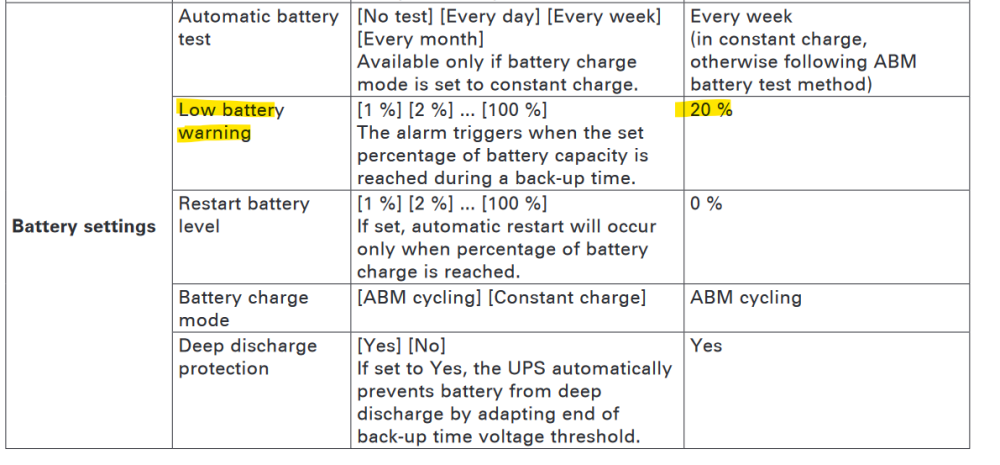
pfSense NUT and NUT in general will by default shutdown when the UPS sends the low battery signal "LOWBATT" (usually happens around 20% charge). The runtime remaining or battery percentage remaining thresholds which trigger the low battery condition are often configurable on the UPS itself. I also happen to have an Eaton 5P and you can configure this on the UPS screen here: So UNRAID also always does this as a last resort (shutting down on a low battery signal), but also has other additional shutdown conditions which act on top of that to ensure that UNRAID has sufficient time to shutdown before any such low battery signal. So setting a reasonable time for the additional shutdown condition (e.g. Time on Battery) on UNRAID while keeping the NUT defaults on the pfSense would ensure that UNRAID shuts down before the pfSense (and any other devices using basic NUT).
-
A quick search on Google returned another thing worth trying could be adding this on your pfSense: But judging from the screenshot of the original poster this shouldn't be necessary anymore. The requirement of an open TCP port 3493 for inbound/outbound on the LAN remains, so I think that's the main issue here.

-
Indeed it seems like the pfSense is dropping the incoming packets to your NUT server's port on TCP 3493. Please do report back if you managed to open the port and if it worked out for you eventually. 🙂
-
That's weird, is there anything in the UNRAID logs indicating a problem? Is it possible that pfSense (being a firewall) blocks LAN-access in/out from TCP Port 3493 (NUT)?
-
Ah, my bad, in that case you'll put the pfSense's configured Slave username and password (that'd be monslave and yourpassword in the original screenshot) into the respective NUT Monitor username and password fields on the UNRAID server. NUT Mode would, of course, be Slave on the UNRAID server. 🙂 The second credential fields were recently hidden because they were unused in NUT Mode Slave. That's also the reason it didn't matter the user from the screenshot had the same values in them.
-
You need to set NUT Mode to Netserver.
-
Hello! This is caused by the pfSense side and is the fallout of the following bug: https://github.com/networkupstools/nut/issues/2104 You cannot fix this from the UNRAID side, you need to update NUT on your pfSense to the latest version. The bug is already fixed in NUT 2.8.1 (or 2.8.2 on pfSense), so please check the pfSense's NUT version again because it looks like a version before 2.8.1. from the logs! After updating to the latest version on the pfSense, you can then test it by running a manual battery self-test on the UPS and checking if it still shuts down the pfSense (it shouldn't anymore). On UNRAID itself no changes are needed as it's already fixed there. 🙂
-
You can also try the AFP protocol if you can't get SMB to work properly, although it's deprecated some users have had better results:
-
I've just pushed an update including mergerFS-Tools, beware you need to install Python 3.x to use the mergerFS-Tools. Python 3.x. can be installed - for example - via NerdTools, if you don't already have it installed on your system for something else. 🙂
-
Not in that sense, as that's usually a hardware configuration feature directly on the UPS (APC calls them Outlet Groups, I think). Some UPS devices offer this kind of configuration through the display on the UPS itself, my Eaton device does for example. Alternatively, if your UPS has a network card you might be able to do this configuration via the UPS web interface. Did you ever try to wait when it's stuck, like what happens after say 10 or 20 minutes? It would be interesting if some kind of stuck operation eventually times out and gives an error message. That would help to narrow down what plugin (or not) causes the operation that's stuck, so we would know that... 🙂 Did you ever attempt to replicate the situation with the NVIDIA plugin disabled? It might also be worth asking here, that's the support topic for the NVIDIA driver: This report also looks interesting and a bit (but not entirely) similar to your case:
-
I just checked your diagnostics package, the next thing in line after NUT installation is the NVIDIA driver. Which returns us to your GPU, something that's happening with the GPU or GPU driver hangs your system up. When you replicated this, was your network also down - because there's some network unreachable errors in the logs. Is it possible you also have network equipment connected to the UPS that's not 100% up yet when your server reboots? It's possible one of your plugins keeps trying to pull files from the internet while the network is still down and hangs up there. That'd be the only explanation that makes sense to me, considering it only happens when recovering from power loss and not otherwise. It'd be interesting what happens after a power loss reboot not into regular UNRAID but UNRAID safe mode (no plugins), if also still happens there.
-
The NUT messages are all normal and part of the regular NUT startup process (it's checking for duplicate instances before starting up the services). In fact there seems to be some kind of transfer (not by NUT) happening after NUT startup is already completed, this CURL output before the login prompt is caused by something else that's not NUT. I'll check your diagnostics package if I can find some clues.
-
4 minutes seems reasonable considering a 20 minutes estimated runtime of your UPS. The poweroff command is fine, that command results in a graceful shutdown of your system. The powerdown script would also work, but it's deprecated now and probably should no longer be used. It's possible 60 seconds weren't enough and left your GPU drivers in an inconsistent state when forcing shutdown. Increasing it is probably a good idea, I use 120 seconds myself and factored this in when choosing the NUT on-battery timeout.
-
I agree to the advice given above about UPS Settings, enough battery reserves should be considered. But you foremost need to figure out why you're sometimes getting kernel panics and stuck when booting up. An unclean shutdown (or multiple) from a NUT/UPS misconfiguration might explain a triggered parity check, but not that. I'd stress test the GPU and memtest the memory (RAM) to figure out any hardware-side problems first. Then I'd attempt to eliminate driver-related errors by updating any driver plugins to their latest versions. If that doesn't help then I'd attempt to deactivate any driver plugins and see if that resolves the issue for you. In any case we'll need a diagnostics package as well, so we can help you identify any configuration problems.
-
No, unfortunately, it's built directly into the NUT backend (which is not developed by me).
-
It's possible the frequent blackouts before you started using a UPS with NUT fried something in your server. It seems to happen around the time normally your GPU drivers would be loaded, perhaps a memory (RAM) or GPU issue. I'd first run an extensive memtest on the system to see if your memory (RAM) is OK. Blackouts can wreak havoc on system components, so making sure everything is OK hardware-wise would be the first step. Quick google brings up a lot of NVIDIA-related results, for "Oops: 0000 [#1] PREEMPT SMP NOPTI". Do you have any custom graphic driver (plugins) installed for your GPU? GPU working normally otherwise? Please post here a diagnostics package, so we can take a look at the software-side of things in the meantime.
-
Did you change anything in the server? Is it possible there's too much dust or in a confined space with not enough airflow? It's possible your CPU maxed out under normal load due to thermal throttling.



