WowaDriver
Members
-
Joined
-
Last visited
Everything posted by WowaDriver
-
Hallo @ich777 auch dir vielen Dank für das Lesen meiner Probleme und die sehr ausführliche Antwort!! Werde alles schnellstmöglich einmal ausprobieren und anschleißend berichten! Stelle ich auch rein - Hierzu sei erwähnt, dass die Meldung nur kommt wenn ich vom Backup mit der alten config boote. Sofern ich eine Fresh installation mit der testlizenz verwende ist alles gut und ich bekomme auch in der console keine Fehlermeldungen. Sowohl als auch, hatte beides nicht funktioniert. Es ist bereits wieder auf Auto da die Umstellung nichts gebracht hat. Den HBA hatte ich selbst auf die P19 in IT geflasht - ich meinte hier eher in die Richtung ob die Mellanox-X3 Karte ebenfalls sowas wie eine IT Firmware benötigt? Denke aber eher nicht weil es ja im Forum heißt, dass diese mit 6.10rc2 out of the box laufen soll und UNraid selbst sofern ich sie nicht durchreiche erkennt und in der Netzwerk Settings anzeigt. Mein Bauchgefühl sagt mir irgendwie, dass du soeben das Problem möglicherweise gefunden hast. Tatsächlich ist mir das zwar aufgefallen aber ich habe es nicht hinterfragt. Ist die GPU in Slot 1, die Mellanox in Slot 2 und der HBA in Slot 3 so kann ich den HBA einzeln an die VIFO binden und die GPU und Mellanox entweder beider oder keine... und da ich die dann auch noch an zwei VM's druchreichen will, könnte es das sein. Wobei ich dazu sagen muss keine der VM's ging ja an ... und gestartet wurde ja immer nur eine und nicht beide zeitgleich! Ich berichte! Danke Danke Danke!
-
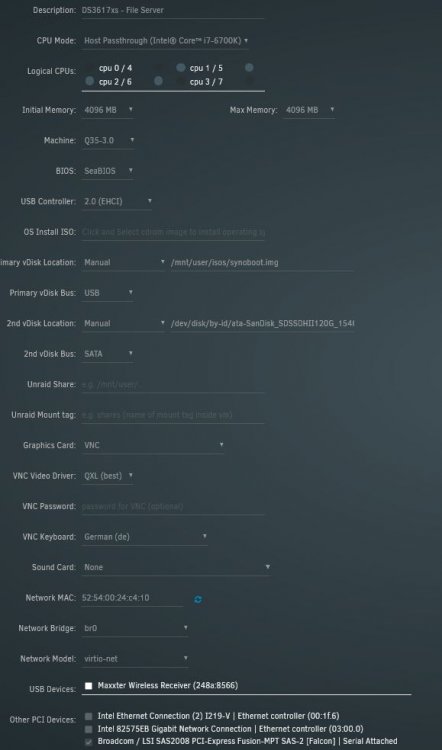
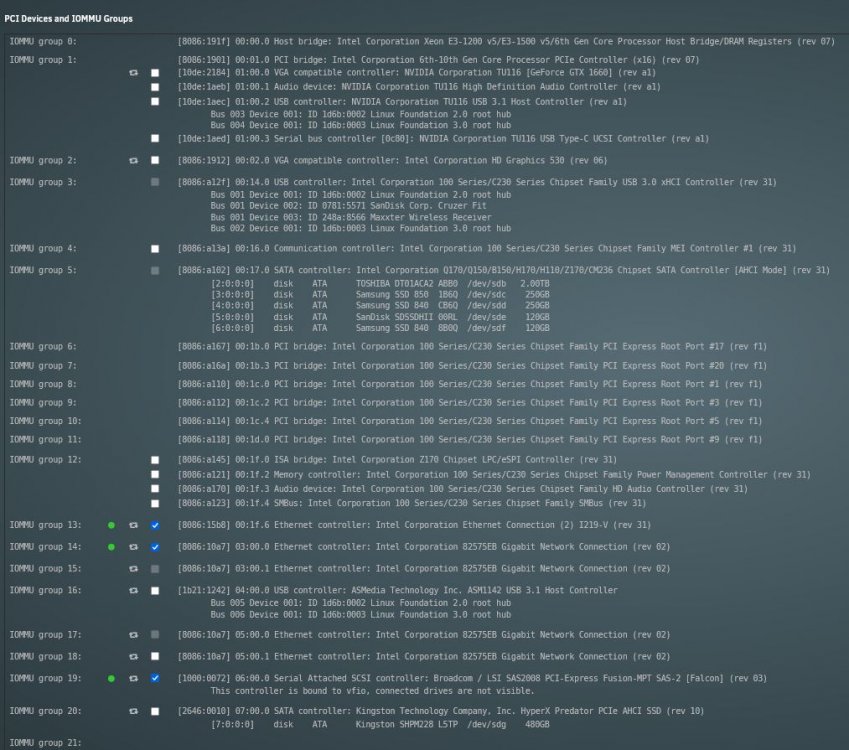
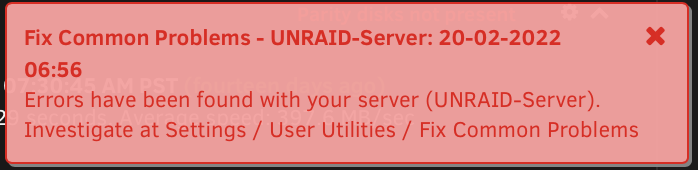
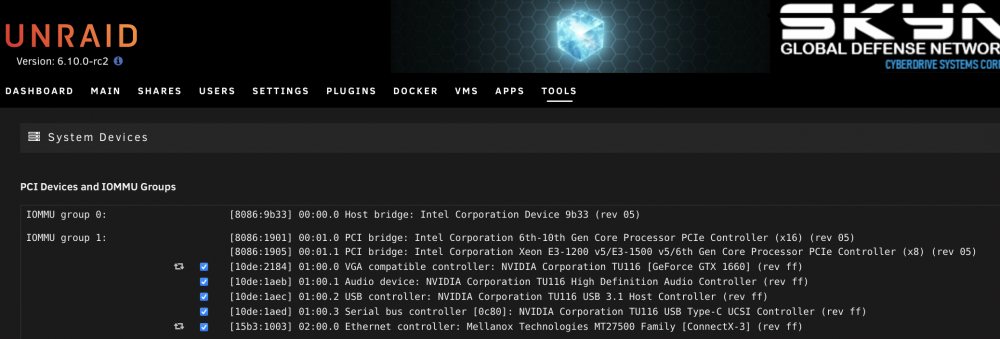
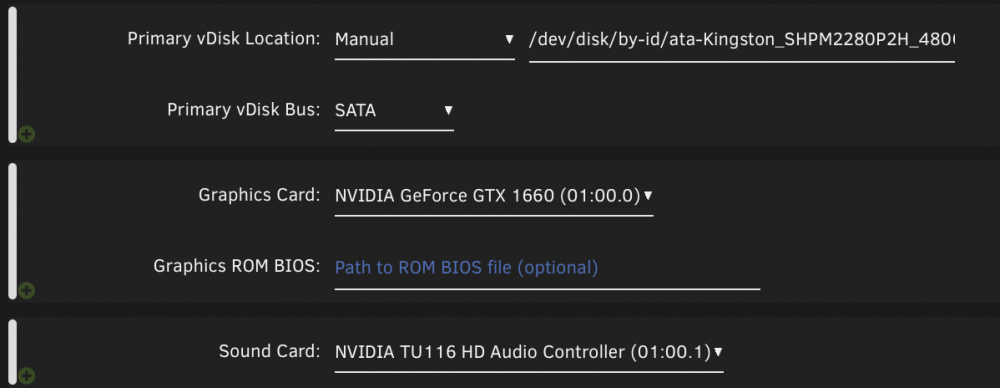
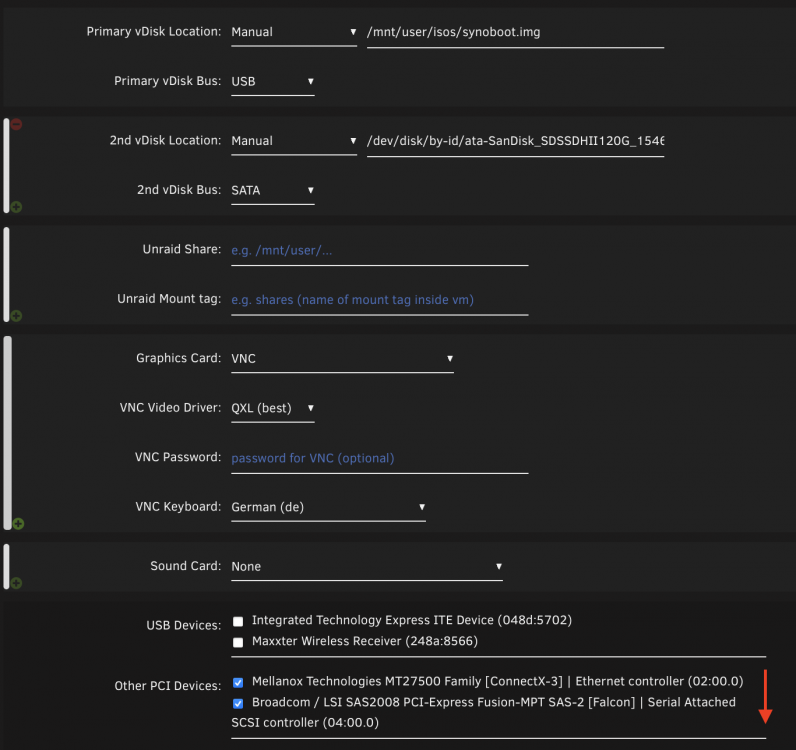
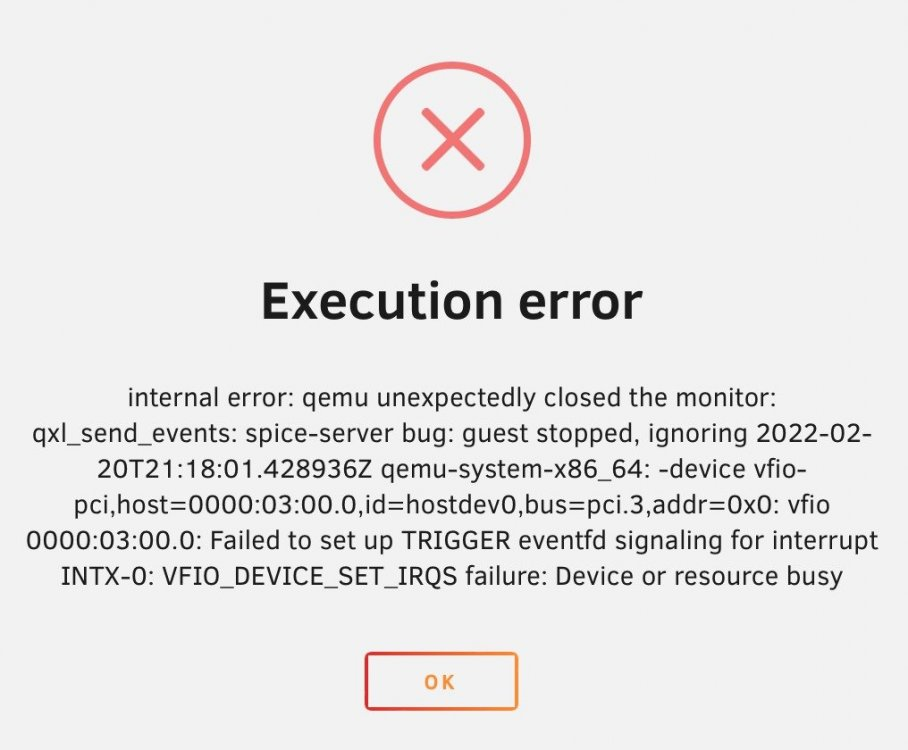
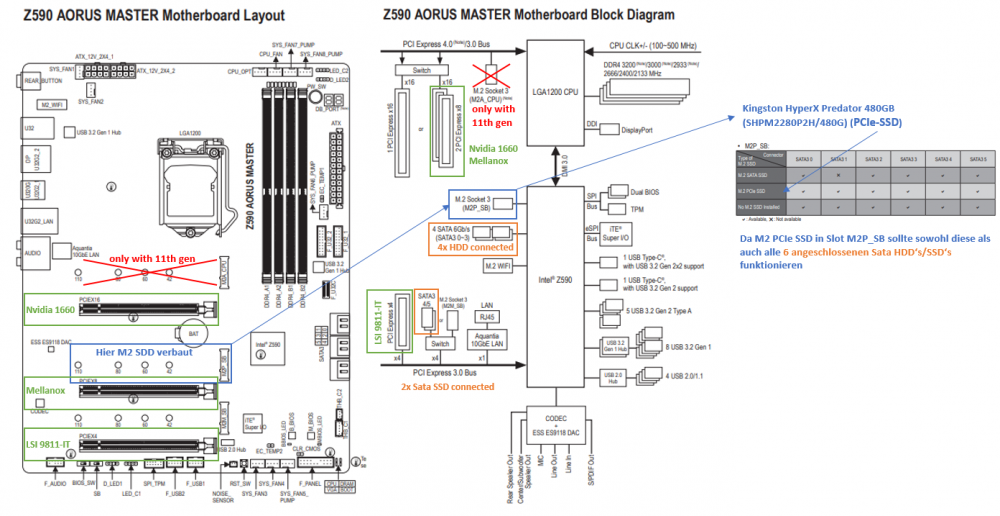
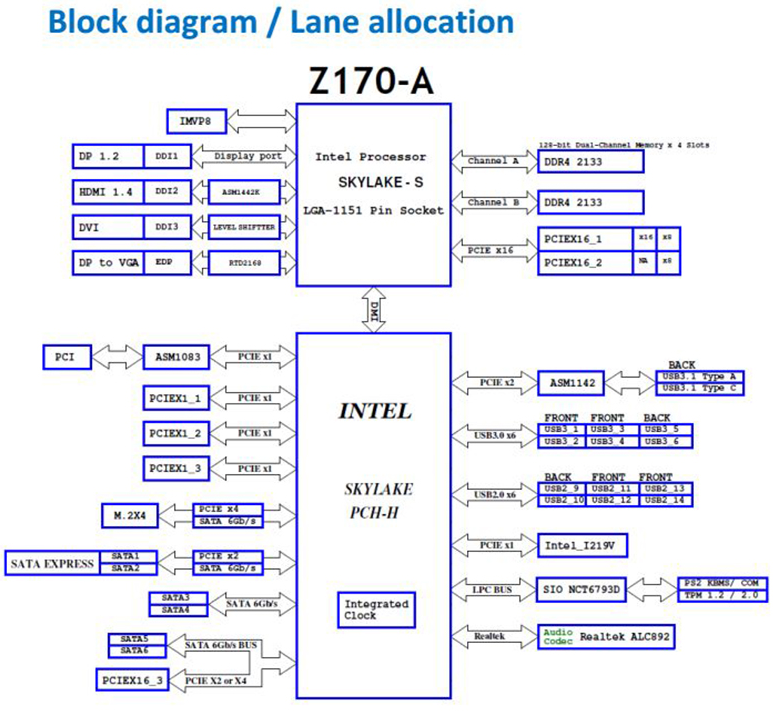
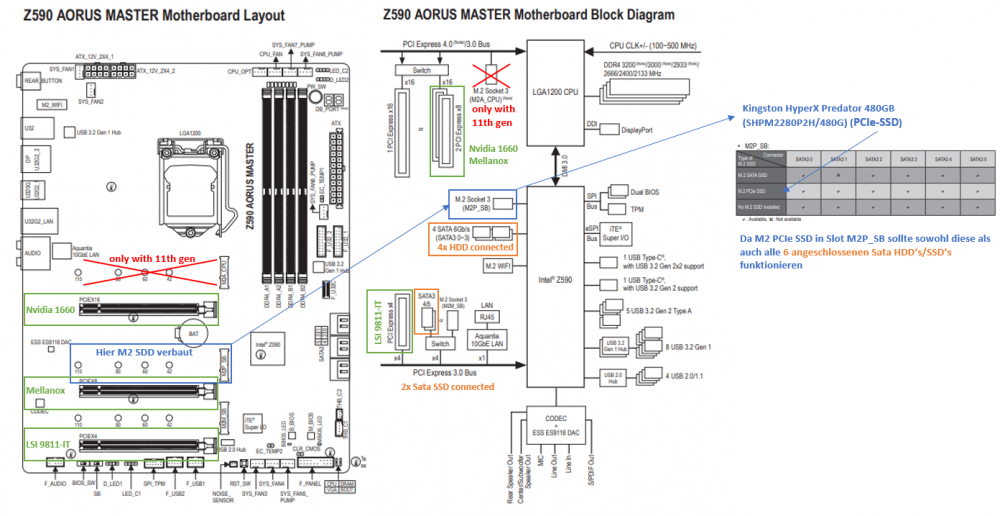
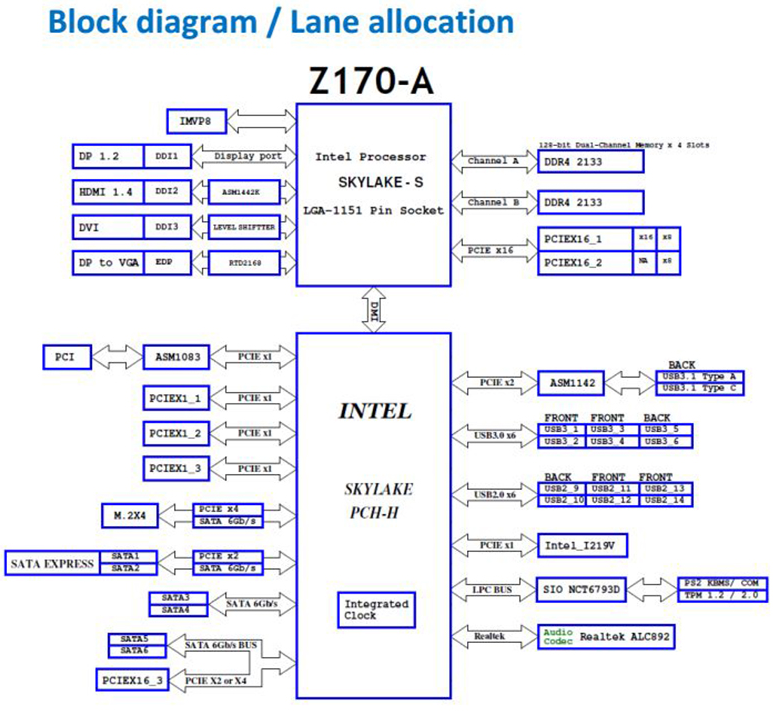
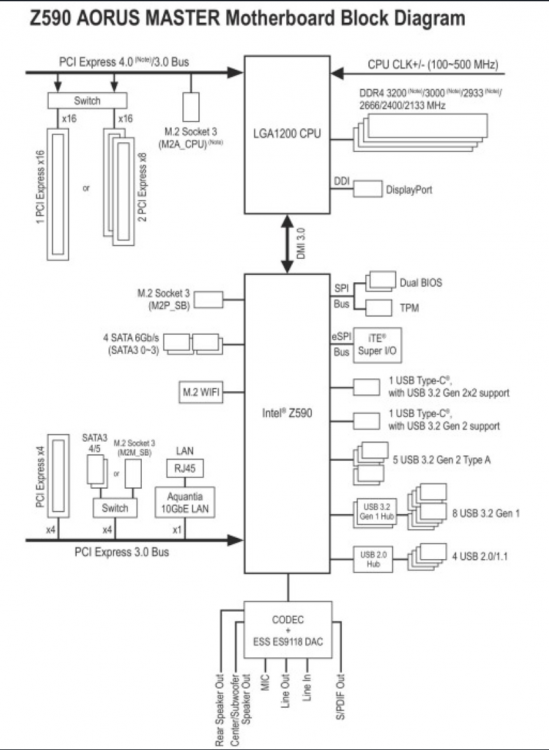
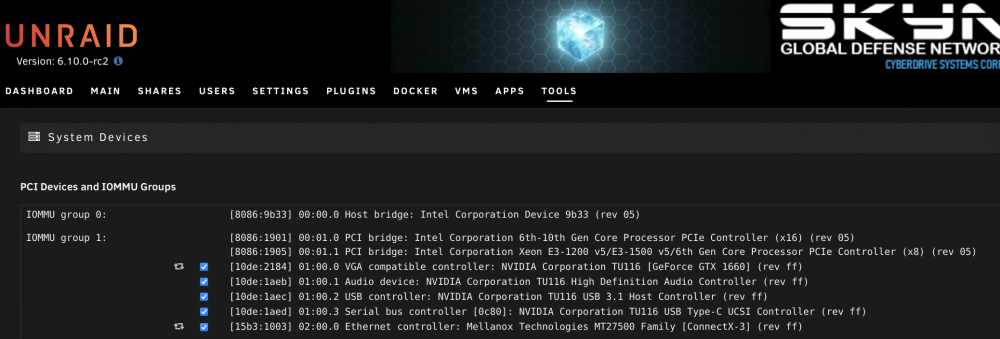
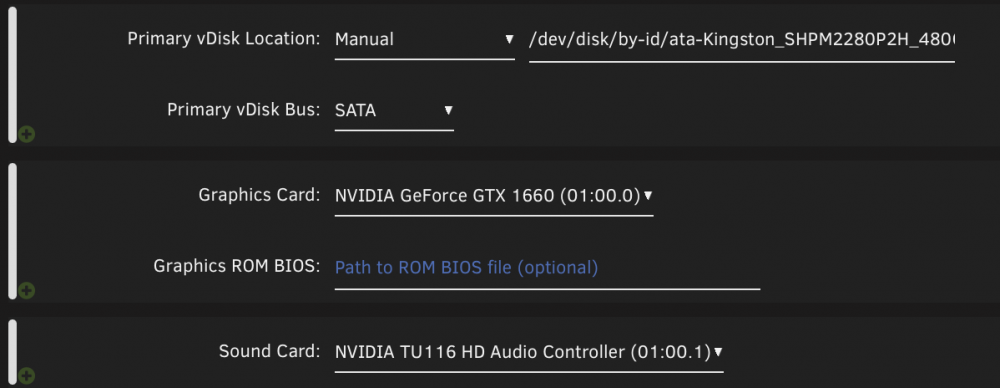
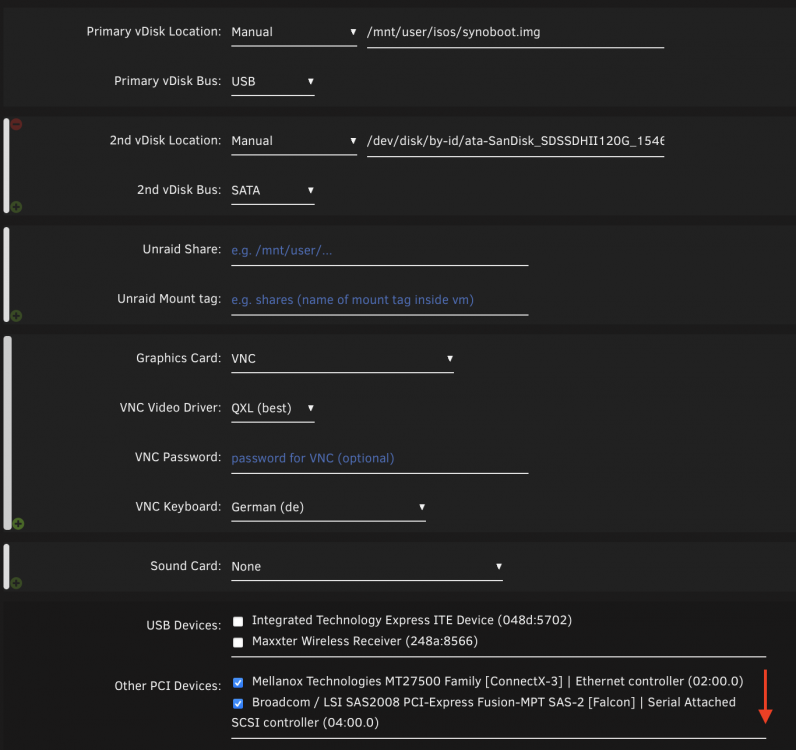
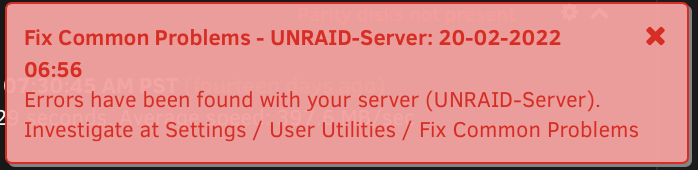
Hello @all, I copy you times my contribution from the German sub-forum into here, since you have here already experience with my new board. I have now wasted 3 days of my life trying to get the new system to work, unfortunately without success. Much I could already read about the forum but here I come no further. I have built a new server: Gigabyte Aorus Master z590 @ Bios F3 (stock); then with F7 and F8 (latest) - currently back to F7 (Hyperthreading, Intel VD-T is enabled in BIOS) Intel i9-10900K Nvidia 1660 Mellanox Connect-X3 Dual SPF+ New USB stick with UNRAID 6.10 rc2 was needed because the old one didn't boot with UEFI and in Lagency Mode - Black screen After the new stick was created, I copied the config folder from the old Unraid 6.9.2 stick and booted into UEFI. Then bought a new license for the new stick and booted the array. All good, everything there and Docker etc works. My VM's on the other hand do not. At least not the ones I pass something through via passthrough.... Every time I get the message: internal error: Unknown PCI header type '127' for device '0000:01:00.0' for the 1660 GPU in the Windows VM and internal error: Unknown PCI header type '127' for device '0000:02:00.0' for passing the Mellanox NIC to my Xpenology VM. The Linus VM boots normally. Windows and Xpenology also but only without passthrough. I had read several threads about this error and they said to use a different BIOS version... I have now 3 through s.o. and no success had. Do you guys have any advice for me? Also I get the following message on the dashboard, did I run mcelog correctly here? Stupid question: Or can't I just copy my config folder from the 6.9.2 stick to the new 6.10 rc2? VFIO are of course selected and passed through, thus excluded during UNRAID boot: In the corresponding VM's everything is actually also as it should here the Win-VM: and here the XPenology VM: What is strange is that only the two devices in PCI slot 1 and 2 cause problems. In the third slot is the Dell 310 HBA, which is passed as LSI 9811 in IT mode for the 8 HDD's without any problems... maybe this is an info with which you experts can do something. In the Bios it says that slot 1&2 run with 8x and slot 3 with 4x. That is also so planned. mgutt said to me: Have you tried it with your own GPU ROM? ->Not yet and that's the only thing I haven't tried with the Gpu. But it doesn't explain why the Mellanox card is not passed through (slot 2). I have already installed an old Intel Dual Gigabit NIC instead of the GPU (slot 1) for testing, this is also not passed through. What I still wanted to try - but is costly - all devices to be passed only in Slot3 so the last to plug after each other and see if he passes this. I have the feeling that it has to do with the two 1-2 slot. Or just redo the stick and try with a fresh installation the whole thing. mgutt said to me: Turn off CSM in the BIOS and set the primary GPU to the iGPU. Then boot unRAID in GUI mode and check if you see unRAID on the onboard HDMI and if the Nvidia HDMI stays black. ->I have had this from the beginning. iGPU is set as primary device and image only comes out there when I boot into GUI (both in UEFI and with CSM on). Currently CSM is off. I have now tried a few things yesterday evening: PCI Slot 1 - GPU removed. PCI Slot 2 - Mellanox Connect-X3 MCX312A-XCBT left in and the LSI 9811-IT in slot 3. -> problem still exists PCI Slot 1 - GPU left in. PCI Slot 2 - Mellanox Connect -X3 removed and LSI 9811-IT in Slot 3 -> Win-VM starts without error message - but black screen at VNC output (GPU1: VNC & GPU2: Nvidia 1660) bottet also not final to end, because over RDP no connection can be established - but at least no ERROR 127... I think the reason is that I boot without GPU Bios. PCI Slot 1 - GPU removed and instead of it the Mellanox Connect-X3 card plugged in and LSI 9811-IT left in Slot 3 -> Xpenology VM does not spit out 127 error anymore but still does not boot and gives the following error: PCI Slot 1 - GPU left in. PCI Slot 2 with an old 2x Port Dual Intel Nic (1 Gig) and in Slot 3 the LSI 9811-IT. -> Xpenology VM boots once with the NIC passed through but is not found on the network. Have the VM restarted and then came the error as at the beginning: internal error: Unknown PCI header type '127' for device So slowly I suspect I have a problem with the PCI lanes. I changed the settings for the bifurcation from Auto to 8x8x4 or 8x4x4 but it didn't work. Because if the Mellanox card is in slot 2 the error Unknown PCI header type '127' for device appears - or do I have to flash the Mellanox card with a certain "IT" firmware - similar to the LSI9811-IT ? I want to mention that I have completely exhausted the connections of the board and maybe there is a bottleneck somewhere that I don't know about. According to datanblatt I think however my KOnfiguration is so feasible. Have here meticulously checked everything before. From Unraid itself everything is actually recognized, even the Mellanox-X3 Dual SFP+ card. Only pass-through does not work. I have drawn the entire system structure for illustration: If you see something that is not compatible I am grateful for advice. I'm surprised that all components previously ran on my old ASUS z170 pro gaming board and there I had ncoh 2 dual Intel Nic cards to - the latter have only fallen out and have just been replaced by the Mellanox Connect-X3. Can't it be that the z590 chipset instead of the z170 can't handle the hardware... or? Here is the block diagram of z170 pro gaming for comparison: Understandably, I'm a bit frustrated now. Put a lot of money on the table last week and currently got a system that isn't even capable of passing two PCI cards.... z590 board = 300€ 10900K = 300€ Mellanox-X3 = 100€ 10 GB switch = 100€ Unraid license = 100€ I hope so much that it is only a user error on my part - as I would like to keep the board very very much. Still grateful for any tip!


-
Vielen Dank erneut für die Rückmeldung! Kann ich gerne ausprobieren. Gebe heute abend nach Feierabend Bescheid! Auch hier möchte ich mich für die Rückmeldung bedanken. Das sowohl verwendete Hersteller als auch Wahl des Boards sowie CPU nicht komplett unterschiedlich sind - beruhigt mich das ein wenig und ich hoffe ich kann das Board dann behalten. Rückgabefrist endet nämlich bald. Ich wollte die GPU schon für CAD Anwendungen und gelegentliches "Gamen" verwenden somit ist diese in Slot 1 schon gut aufgehoben. Die Mellanox-X3 muss dann in Slot 2 weil dieser ebenfalls 8x elektrisch angebunden ist und für 2x10 Gib Nic benötigt wird. Dem LSI 9811-IT mit 8 HDD's reicht der x4 Anschluss aus, da hier immer noch 2,0 GByte/s unter PCIe 2.0 geschafft werden - hier kommt das RAID 5 mit den 8 HDD's eh nicht ran. @RiDDiX@mguttwas sagt ihr zu den verlinkten beiden Thread aus dem Englischen Forum bzgl. der WIFI Bluetooth Karte?
-
Hallo @mgutt Hatte ich schon von anfang an so. iGPU ist als primary device eingestellt und Bild kommt auch nur dort raus wenn ich in die GUI boote (sowohl in UEFI als auch mit CSM on). Aktuell ist CSM aus. Ich habe jetzt einiges gestern abend noch durchprobiert: PCI Slot 1 - GPU entfernt. PCI Slot 2 - Mellanox Connect-X3 MCX312A-XCBT drin gelassen und den LSI 9811-IT in Slot 3 -> Problem weiterhin vorhanden PCI Slot 1 - GPU drin gelassen. PCI Slot 2 - Mellanox Connect -X3 entfernt und LSI 9811-IT in Slot 3 -> Win-VM startet durch ohne Fehlermeldung - jedoch schwarzer Bildschirm bei VNC Ausgabe (GPU1: VNC & GPU2: Nvidia 1660) bottet auch nicht final zu ende, da über RDP keine Verbindung aufgebaut werden kann - aber immerhin keiner ERROR 127... Denke es liegt hier nun daran das ich ohne GPU Bios boote PCI Slot 1 - GPU entfernt und anstelle dessen die Mellanox Connect-X3 Karte reingesteckt und LSI 9811-IT in Slot 3 belassen -> Xpenology VM spuckt kein 127 Error mehr aus startet aber denoch nicht durch und gibt folgenden Fehler aus: PCI Slot 1 - GPU drin gelassen. PCI Slot 2 mit einer alten 2x Port Dual Intel Nic (1 Gig) versehen und in Slot 3 die LSI 9811-IT -> Xpenology VM startet einmal durch mit den den durchgereichten NIC ist aber nicht auffindbar gewesen im Netzwerk. Habe die VM neugestartet und dann kamm der Fehler wie zu Beginn: internal error: Unknown PCI header type '127' for device So langsam vermute ich, ich habe ein Problem mit den PCI Lanes. Ich habe hier die Einstellungen für das Bifurcation von Auto auf 8x8x4 bzw 8x4x4 geändert hat auch nichts gebracht. Weil wenn die Mellanox Karte in Slot 2 ist kommt eben der Fehler Unknown PCI header type '127' for device - oder muss ich die Mellanox Karte zum durchreichen irgendwie mit einer bestimmten "IT" Firmware flashen - ähnlich dem LSI9811-IT ?? Ich will noch erwähnen, dass ich die Anschlüsse der Board komplett ausgereizt habe und vielleicht hier auch ein Bottleneck irgendwo entstehen von dem ich nichts weiß. Laut datanblatt denke ich aber ist meine KOnfiguration so machbar. Habe hier akribisch alles vorher geprüft. Von Unraid selbst wird ja alles eigentlich erkannt, auch die Mellanox-X3 Dual SFP+ Karte. Nur Durchreichen das will nicht funktionieren. Ich habe zur Veranschaulichung mal den gesamten System Aufbau mal aufgemalt: Falls ihr was seht was so nicht kompatibel ist bin ich für Ratschläge dankbar. Mich wundert es das alle Komponenten vorher auf meinem alten ASUS z170 pro gaming Board liefen und dort hatte ich ncoh 2 Dual Intel Nic Karten dazu - letzteren sind nur rausgefallen und wurden eben durch die Mellanox Connect-X3 ersetzt. Kann doch eigentlich nciht sein, dass der z590 Chipsatz anstelle des z170 nicht mit der Hardware klarkommt... oder? Hier mal das Blockdiagramm von z170 pro gaming als Vergleich: Verständlicherweise bin ich jetzt ein bisschen frustriert. Habe letzte Woche viel Geld auf den Tisch gelegt und aktuell ein System erhalten, was nichtmal in der Lage ist zwei PCI Karten urch zureichen... z590 Board = 300€ 10900K = 300€ Mellanox-X3 = 100€ 10 GB Switch = 100€ Unraid Lizenz = 100€ Ich hoffe so sehr das es nur ein Anwender Fehler ist mienerseits - da ich das Board sehr sehr gerne behalten würde. Weiterhin für jeden Tipp dankbar! //EDIT: Habe im englischen Unterforum was gefunden wo über Probleme mit dem Board in Verbindung mit der Bluetooth / Wifi Karte berichtet wird. Meint ihr das kann bei mir auch daran liegen?
-
Oh das habe ich oben übersehen, ja ich habe sowohl nur mit UEFI Settings alles durchgespielt, als auch mit CSM aktiviert. Ging beides nicht. Hab eben vom Nachbarn einen alten USB 2 Stick bekommen und mit einer Testlizenz versehen. Baue eben mal die VM's nach und schaue was da passiert. (ebenfalls alles unter 6.10 rc2) Der dritte Slot des Mainboard ist tatsächlich am Chipsatz und die anderen beiden an der CPU. Die GPU (Nvidia 1660) und Mellanox Connect-X3 sind doch beides PCI-E 3.0 somit sollte das doch Kein Thema sein wenn die direkt an der CPU hängen oder?
-
Noch nicht und das ist das einzige was ich bei der Gpu noch nicht probiert habe. Erklärt aber nicht den Grund warum die Mellanox Karte nicht durchgereicht wird (Slot 2). Habe schon zum testen eine alte Intel Dual Gigabit NIC anstelle der GPU (Slot 1) eingebaut, diese wird ebenfalls nicht durchgereicht. Was ich noch probieren wollte - ist aber aufwendig - alle durchzureichenden Geräte nur im Slot3 also den letzten zu stecken nach einander und zu schauen ob er dies durchreicht. Ich habe das Gefühl, dass es mit den beiden 1-2 Slot zu tun hat. Oder eben den Stick neu zu machen und mit einer fresh Installation das ganze zu versuchen.
-
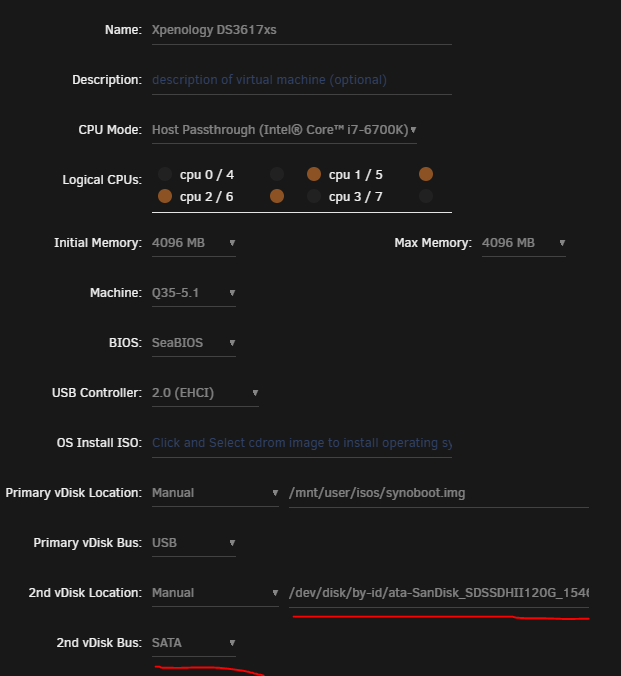
Hallo @mgutt, auf deine Rückmeldung kann man immer zählen, erstmal danke dafür! Weiß ich zu schätzen! Würdest du vorschlagen somit den Stick neu aufzusetzen, komplett? Falls ja wie mache ich das dann mit dem Key? Hab da nicht all zu viel Erfahrung, da ich das erste mal einen Stick gewechselt habe. VFIO sind natürlich angewählt und durchgereicht, somit beim UNRAID Boot ausgeschlossen: In den entsprechenden VM's ist eigentlich auch alles so wie es soll hier die Win-VM: und hier die XPenology VM: Was komisch ist, dass nur die beiden durchgereichten Geräte im PCI slot 1 und 2 Probleme machen. Im dritten Slot ist ja der Dell 310 HBA, welcher als LSI 9811 im IT Mode für die 8 HDD's ohne Probleme durchgereicht wird... vielleicht ist das ja eine Info womit ihr Experten was anfangen könnt. Im Bios steht, dass Slot 1&2 mit 8x laufen und Slot 3 mit 4x. Das ist auch so geplant gewesen.
-
Hallo @all, ich habe nun 3 Tage meiner Lebenszeit damit verschwendet, dass neue System zum laufen zu bekommen, leider erfolglos. Viel konnte ich über das Forum schon nachlesen aber hier komme ich nicht weiter. . Ich habe einen neuen Server aufgebaut: Gigabyte Aorus Master z590 @ Bios F3 (Stock); dann mit F7 und F8 (latest) - aktuell wieder auf F7 (Hyperthreading, Intel VD-T ist eingeschaltet im BIOS) Intel i9-10900K Nvidia 1660 Mellanox Connect-X3 Dual SPF+ Neuer USB Stick mit UNRAID 6.10 rc2 musste her weil der alte nicht mit UEFI booten wollte und im Lagency Mode - Black screen Nachdem der neue Stick erstellt worden ist, habe ich den config Ordner vom alten Unraid 6.9.2 Stick raufkopiert und anschließend in UEFI gebootet. Daraufhin wurde eine neue Lizenz für den neuen Stick gekauft und das Array gestartet. Alles gut, alles da und Docker usw. funktioniert. Meine VM's hingegen nicht. Zumindest die nicht, welchen ich mittels Passthrough was durchreiche... Jedesmal kommt die Meldung: internal error: Unknown PCI header type '127' for device '0000:01:00.0' für die 1660 GPU in der Windows VM und internal error: Unknown PCI header type '127' for device '0000:02:00.0' für das Durchreichen der Mellanox NIC an meine Xpenology VM Die Linus VM startet normal durch. Windows und Xpenology ebenfalls aber nur ohne passthrough. Hatte über diesen Fehler diverse Threads durchgelesen bei denen es hieß eine andere BIOS Version zu benutzen... ich habe jetzt 3 durch s.o. und keinen Erfolg gehabt. Habt ihr einen Rat für mich? Außerdem bekomme ich folgende Meldung auf dem Dashboard, habe ich hier mcelog richtig ausgeführt? Doofe Frage zum Schluss: Oder kann ich meinen config Ordner vom 6.9.2 Stick nicht einfach in den neuen 6.10 rc2 kopieren? Danke für das lesen meiner Probleme!


-
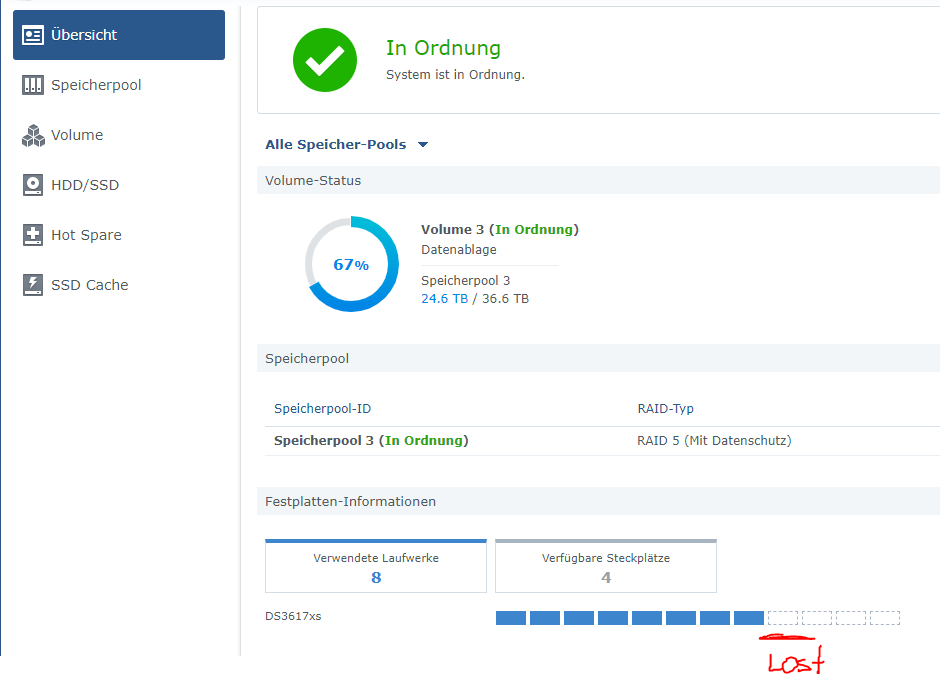
Hey kannte nur den Weg mit e1000e allgmein zum Virtualisieren einer NIC für eine Xpenology VM.... nachdem ich heute den Post gelesen habe wollte ich mal schnell eine virtuelle NIC zum testen mit "vmxnet3" erzeugen um die beschriebenen 10Gb zu testen. Anlegen und akzeptieren tut er sie, jedoch wie bei e1000e nur mit 1Gb... hab ich noch was vergessen? //Edit: Zusätzlich ist mir aufgefallen, dass meine SSD für die Synology Apps mit dem Volume 1 nicht mehr durchgereicht wird. Ich musste das RAID5 von Volume 3 rebuilden weil eine Platte abgestürzt ist. Ich hatte an der config nichts geändert und zuvor eben 8 Platten mittels Dell 310 HBA zum Raid 5 und eine SSD direkt durchgereicht. In Summe somit 9 Platten. Nach dem Neustart erscheint die SSD nicht mehr und keine andere SATA Plate die ich anstelle dieser als "SATA" durchreiche. Stelle ich die Einstellung auf USB funktiiniert der Passthrough - auf SATA eben aber nicht. Kann es mir nicht erklären. Jemand einen Rat? Wir auch nicht als Externe Quelle angezeigt. Bin ratlos... //EDIT 2: Oh man... der große Nachteil wenn man ein System bzw. eine VM konfiguriert hat und sich dann mehr als ein Jahr mit dem Thema nicht beschäftigt ist, dass man schlicht weg vergisst, was so wichtiges bei der konfiguration zu beachten war. Damit eine SSD mittels des o.g. Befehls in Xpenology erkannt wird muss anschließend nach der "grafischen" Konfiguration im Frontend in der XML Datei - ebenso wie das einstellen des e1000e NIC Typs" der Controller von "0" auf "1" geändert werden. Dies verstellt sich natürlich wieder wenn man am Frontend erneut was anpasst - so wie ich es testweise mit der "10 GB Nic - vmxnet3" versucht habe, sodass anschließend die SSD eben weg war... controller='1' <disk type='block' device='disk'> <driver name='qemu' type='raw' cache='writeback'/> <source dev='/dev/disk/by-id/ata-SanDisk_SDSSDHII120G_154682400434' index='1'/> <backingStore/> <target dev='hdd' bus='sata'/> <alias name='sata1-0-3'/> <address type='drive' controller='1' bus='0' target='0' unit='3'/> </disk>
-
Habe es unter Ubuntu mit dem Terminal Befehl "xfs_repair /dev/sdn1 -L" repariert bekommen. Danke euch!! Die Ursache bzw. den Grund dafür habe ich aber immer noch nicht ...
-
So habe eben mal das Sata Kabel getauscht. Leider kein Erfolg. Nach einbauen des Servers wieder ins Rack und dem ersten Neustart hatte ich auch das Problem, dass er den UNRAID Stick nicht akzeptieren wollte... immer wieder im BIOS gelandet bis ich den USB Port gewechselt habe. Habt ihr noch irgendwelche Vorschlaege bevor ich die SSD platt mache und neu konfiguriere? Ich wuerde halt gerne die Ursache in Erfahrung bringen wollen, damit sowas nicht noch einmal passiert. Waere es eine Option mit einem Linux Boot Stick die Daten von dieser SSD yu sichern?? Oder denkt ihr da komme ich mit Linux auch nicht weiter?? \\EDIT: Habe eben versucht die SSD unter Ubuntu zu mounten, geht ebenfalls nicht. Wie würdet ihr weiter vorangehen. Danke fuer den Support!
-
Werde ich mal testen, danke! Ja du hast sicherlich recht. Aber mein Setup ist sehr rudimentär. Damit wollte ich eigentlich nur vermitteln, das wir hier keine Operation am offenen Herzen haben im Bezug auf private Daten mit Doppel Null Priorität. Natürlich bedarf es im Fall der Fälle eine komplette Neueinrichtung! Nur hilft mir das jetzt ja bei dem Problem nicht weiter. Was sagt ihr allgemein zur Lebensdauer der SSD und der darauf geschriebenen 10TB? Overkill oder alles im Rahmen? danke euch!
-
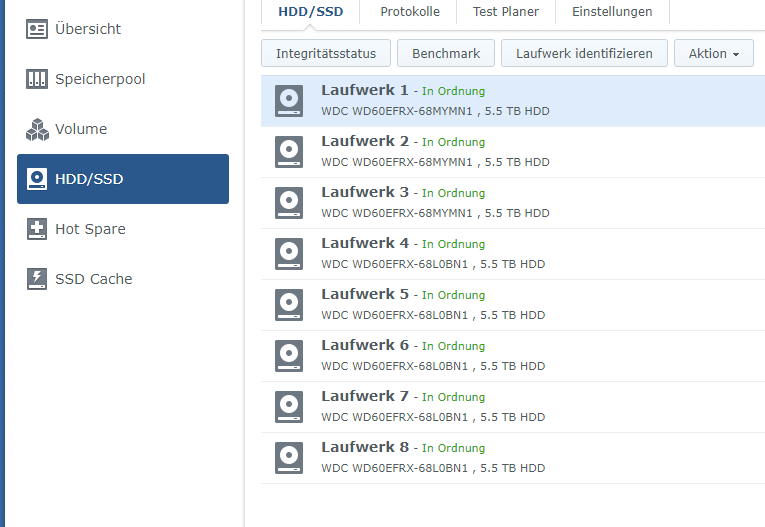
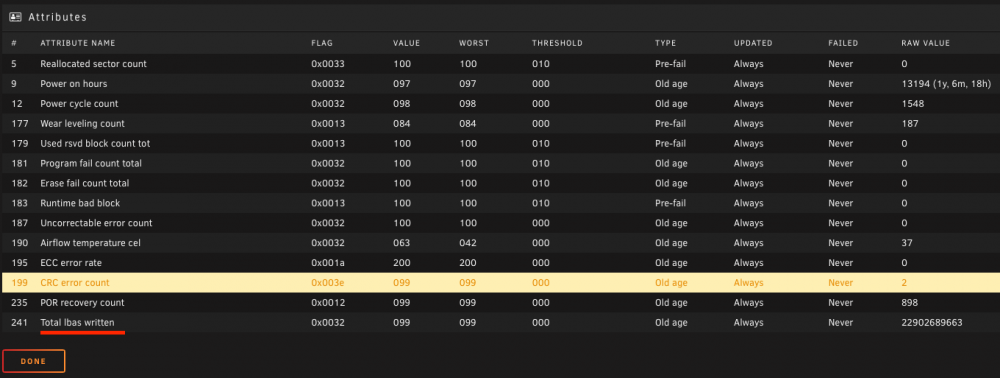
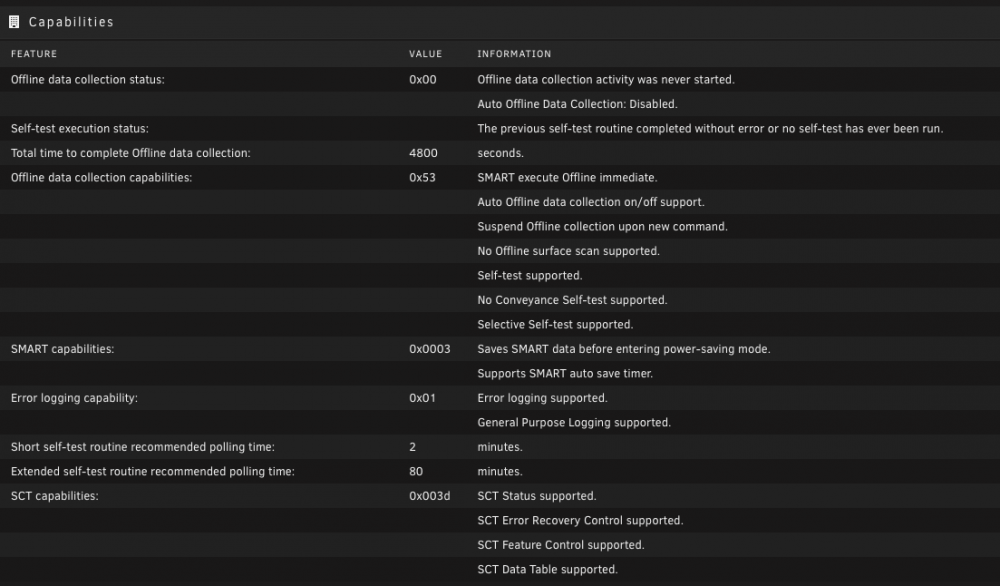
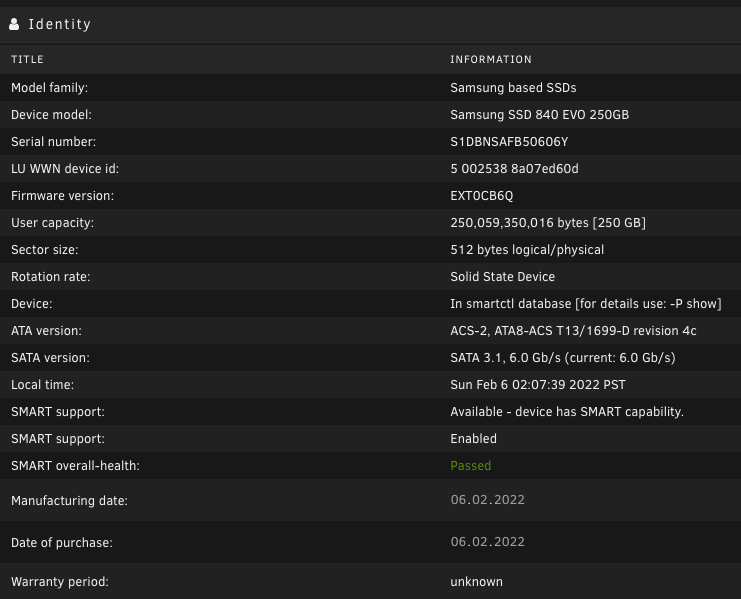
Hallo @all! Ich habe ein Problem, dass sich mein Unraid System am Donnerstag aufgefangen hat. Seit dem lässt sich die Main SSD nicht mehr mounten, was sich darin spiegelt, dass das System zwar hoch fährt, aber eben keine Docker und VM's laufen, da Daten nicht ansprechbar sind. Entgegen den meisten hier verwende ich Unraid eher als reinen Hypervisor und Docker Verwaltung. Sprich mein Array besteht nur aus der einen 250GB SSD. Es ist auch keine Parity Platte vorhanden, da eben auf dieser SDD nichts sensibles an Daten vorhanden ist, lediglich die Konfiguration der Docker und VM configs. Ich hatte beim erstellen des Systems einfach eine SDD genommen die ich noch rum liegen hatte. Die Frage ist nun was passiert sein kann, dass es zum Ausfall bzw. zu diesen nicht mountable Zustand gekommen ist? Die SDD wurde ebenfalls für emby als Trascoding und Config Ablage genutzt. Das ist so ziemlich der Hauptnutzer des freien Speicherplatzes gewesen würde ich behaupten. Somit wurde diese mit etwa 10,66TB beschrieben worden ist. Ist diese Größenordnung den schon tödlich für eine SDD? Falls ja würdet ihr mir für die Zukunft eine andere Art und Weise empfehlen für Transcoding und Emby config? Seht ihr in den Screens noch irgendetwas auffälliges? Ich bin da nicht so weit in der Materie drin. Lasse meine Datenplatten von eine Synology VM überwachen und da kommt eigentlich wenn was sein sollte immer rechtzeitig eine Fehlermeldung ohne das so ein Ausfall passieren sollte. Hatte das eigentlich von Unraid auch erwartet - oder geht das nur wenn man ein Array hat mit mehreren Platten? In jedem Fall möchte ich euch für eure Zeit danken für das Lesen meiner Probleme! Vielen Dank Gruß

-
For anyone who cares, I think I fixed this! I think it may be due to nginx not working with Websockets by default. I added these lines to the site config: proxy_set_header Upgrade $http_upgrade; proxy_set_header Connection "Upgrade"; And it worked. E.g., this is the location settings for my unRAID proxy: location / { auth_basic "Restricted"; auth_basic_user_file /config/nginx/.htpasswd; include /config/nginx/proxy.conf; proxy_set_header Host $host; proxy_set_header X-Real-IP $remote_addr; proxy_set_header X-Forwarded-For $proxy_add_x_forwarded_for; proxy_set_header X-Forwarded-Proto $scheme; proxy_pass http://192.168.1.106:8080; proxy_set_header Upgrade $http_upgrade; proxy_set_header Connection "Upgrade"; } And now the CPU stats update in real time! Fingers crossed this is the fix.
-
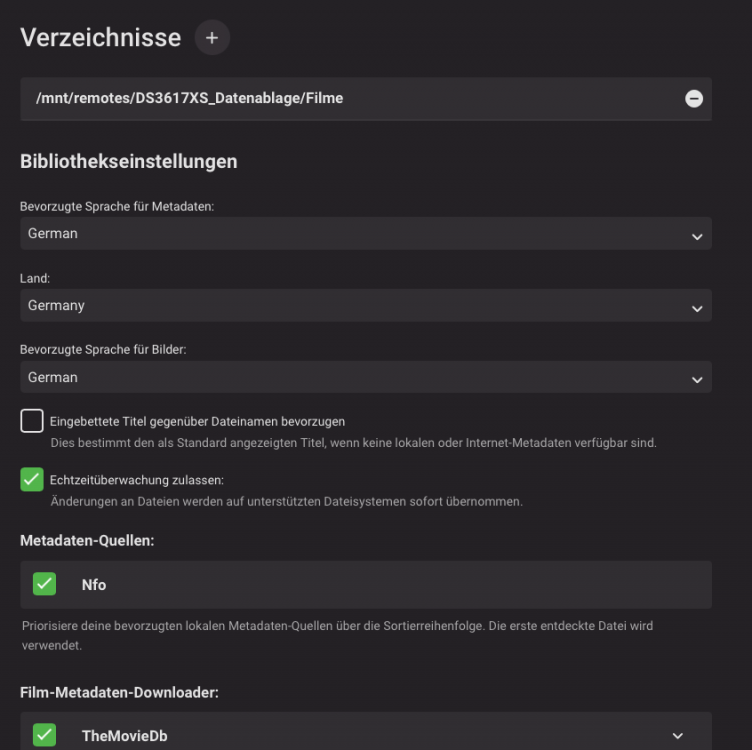
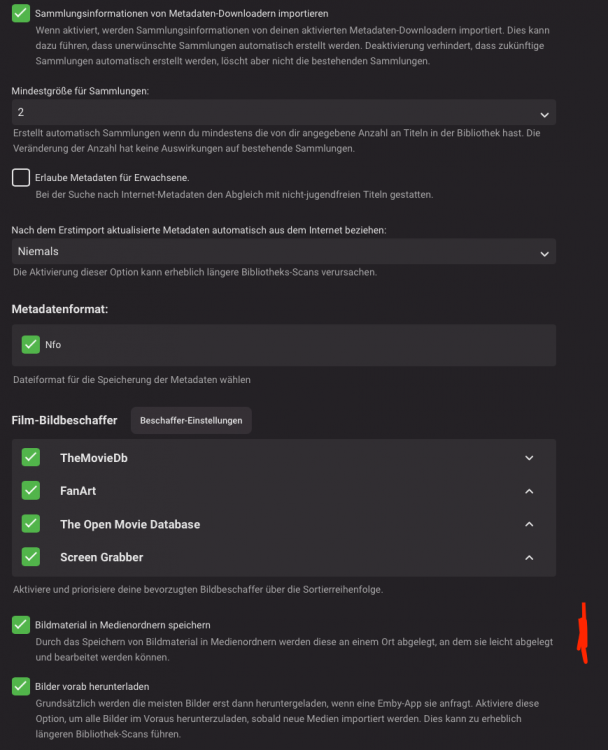
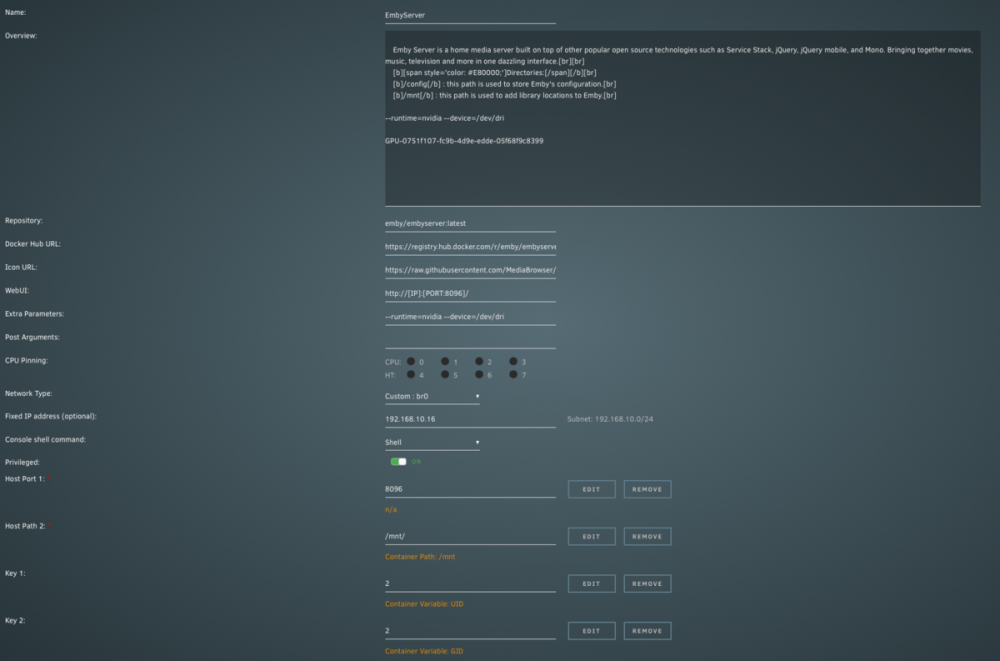
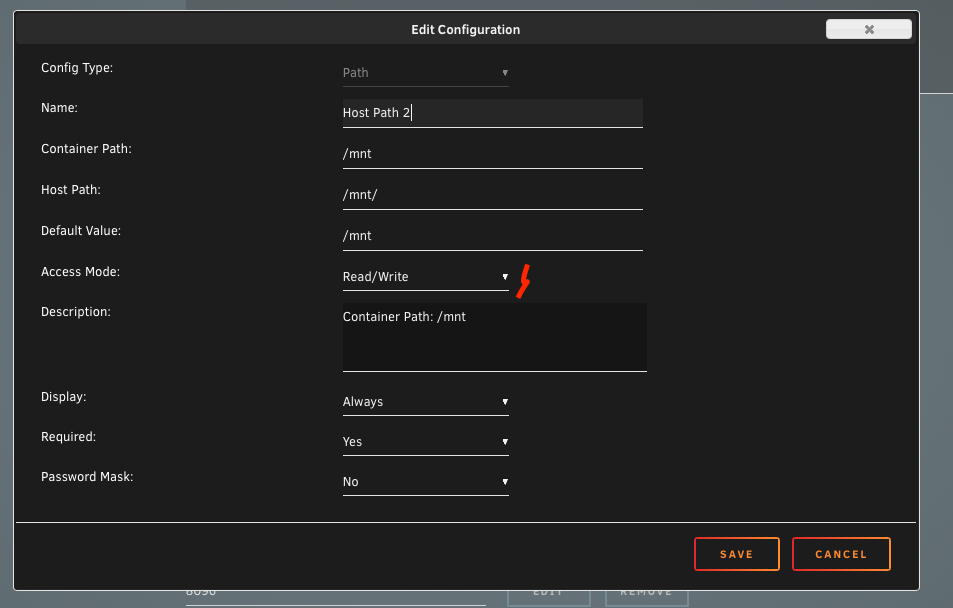
Hello @all I have the following problem. Emby does not store the meta data and images in the media folders. If I add the data manually to the folders emby loads them without problems. I suspect a permissions problem but can't solve it myself. Emby is running as a Docker container on a Unraid host system. Here also runs a virtual machine with Xpenology (Synologys DSM) which shares a SMB share with Unraid and provides emby. On it are the libraries of the movies. This SMB share is mounted via Unassigned Device Plugin and here I also looked if there are any READ WRITE permissions, but found nothing. I have made the appropriate settings in the libraries, see screens: On the Emby Dashboard page, contrary to the above settings, the paths for the meta data are not traced back to the media directories, but are located in the config folder of the emby Docker container... When I look at the path in the emby container for the media library everything is set correctly there. I created the whole "mnt" folder for all internal host hard disks from the UNraid host itself and from the SMB shares instead of just the SMB share. Everything together has read and write permissions according to the dialog. See for yourself on the screenshots: I hope you guys can help me to solve my problem. And yes in futher i will use a native unraid system where the data drives will also connected to unraid and not to a vm ...
-
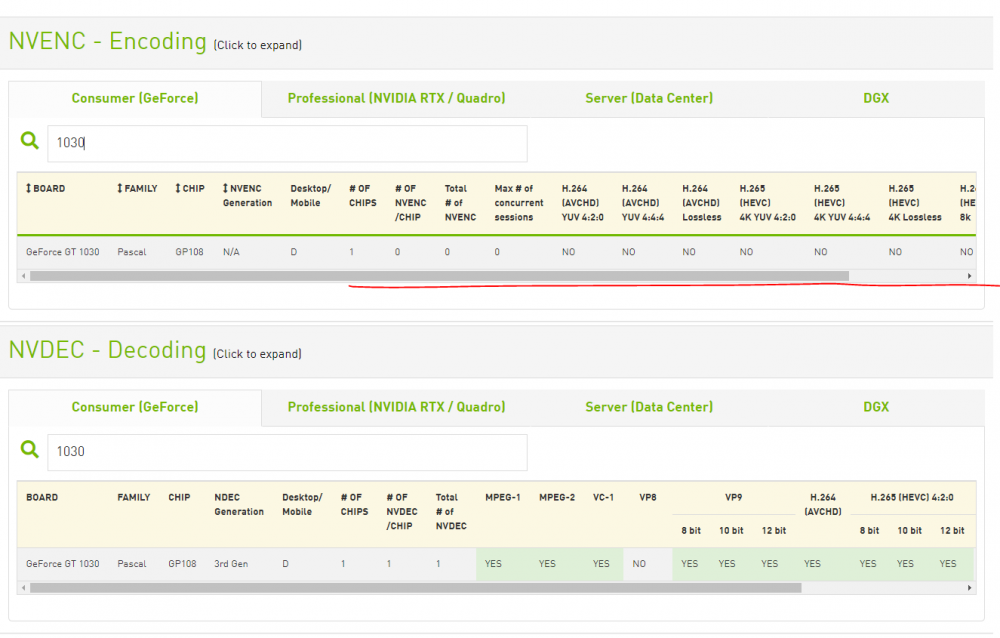
Thats because your GPU does only support decoding... on the nvidia website you can see that encoding is not supported from your gpu
-
Danke für die Antwort! Mal noch eine grundsätzliche Frage: Ich habe jetzt sowohl der NAS 2 physikalische NIC's durchgereicht. UNraid läuft ebenso auf 2 NIC's leider ja nicht im LACP, das sind erstmal die Fakten. Wenn ich nun eine z.B. Windows VM einrichte und diese sich eine virtuelle Nic zu weist, dann gehe ich ja auf das NAS über eines der Unraid Ports und somit tatsächlich über den Netzwerk Weg. Wenn ich hingegen dem NAS eine virteulle NIC zu weisen würde, dann würde diese ja intern irgendwie miteinander kommunizieren und nicht mehr über den Netzwerk Weg gehen, da beide NIC's ja virtuell wären, richtig? Ich frage weil, bei den REd Hat Adaptern für die virtuellen NIC's in Windows immer was von 10G Anbindung zu lesen ist im Status. Die Frage nun wenn alle VM's virtuelle NIC's könnten diese ja untereinander theoretisch mit 10G komunizieren. Nach außen wäre der limitierende Faktor ja die Unraid NIC... oder?
-
Alles auf 10G oder 2.5G wäre natürlich ein Traum, scheitert aber sowieso an den Endgeräten und wird da auch nicht benötigt. Ich habe auf meinem Unraid Server 2 VM's laufen, einen NGINX Proxy und eben Emby für 10 User nach außen. Zusätzlich läuft Xpenology in einer VM mit 2 dedizierten NIC's und Unraid hat eben auch 2 NIC's. Ich hatte mir erhofft das ich mittels LACP im Worst Case besser gegen einen Bottleneck ankämpfen kann. In der Zukunft ist für beides jeweils eine 10GB Karte geplant, ggf. Doppel und dann halt in LACP, wäre absolutes Overflow ich weiß. Zum Thema Doppeldosen und Vollbestückung. Selbstverständlich hast du recht. Ich habe meine Elektrik selbst gemacht und ein Twin Kabel war damals günstiger als ein Single, ebenso die Dosen. Somit war es dumm nicht auf Doppeldosen zu setzen. Da ich alle nur bis zum Patchpanel aufgelegt habe ist genauso wie von dir beschrieben. Patchen tue ich nur die wo verwendet wird. Zum Thema Fritze AP und Unifi. Ich gebe es zu, dass ich seit den ersten DSL Zeitalter 764kb noch nie was anderes als eine Fritte im Einsatz hatte. Unifi hatte ich mir angeschaut ist auch mega geil, nur habe ich halt die AVM Produkte da und WLAN ist eigentlich in Ordnung, klar besser geht immer, aber ob ich da jetzt investieren soll, ich weiß nicht. Klar Recht hast wenn man den Weg geht sollte es eben auch ein Switch von denen sein oder eben mit POE damit man später die AP's überall verteilen kann. Dein SMB Tutorial hatte ich schon mal geliebäugelt. Das bringt mir ja aber nur wenn wenn ich das Storage auch unter UNraid aufbaue oder?, Meins liegt in einer VM via durchgereichten HBA in Xpenology. Ich finde die Lösung für mich persönlich am besten und beabsichtige da nichts dran zu ändern. Dort laufen dann 8 WD Red Platte nie Raid 5 inkl. Survailance Station für die cams.
-
Kurz und Knapp danke für deine Mühe und das Aufschreiben der Informationen. Hast meinen Horizont in jedenfalls erweitert. Für mich heißt es jetzt genauer nach denken wo ich hin will, was das Budget hergibt und was ich in Zukunft will. Aktuell reicht mir sogar die aktuelle config komplett aus. Ich wollte nur gerne LACP konfigurieren und musste feststellen, dass mein Switch nur statisches LAG kann... somit bin ich erst auf die Reise gegangen. Die von dir angesprochen Switche kannte ich noch gar nicht. Ich oute mich auch als Consumer mit einer Hingabe zu freakigem Tech-Zeugs und merke gerade das ich wohl einfach mit geschlossenen Augen einen V8 Switch kaufen wollte ohne zu überlegen, dass mir ggf. auch was kleineres reicht. Außerdem hatte ich mein Augenmerk nur auf dem mir bekannten... D-Link, Netgear ... Ich muss wohl meinen Horizont erweitern. In jeden Fall erneut - DANKE!
-
Erstmal vielen Dank für die rasche Antwort!! Nope wird nicht benötigt und falls mal eine Kam noch ergänzt werden sollte wo es kein Strom gibt werde ich denke ich mit einem PPPOE Injector auskommen. Steht alles in der Kommandozentrale im Technikraum. Thema Lüfters ist somit kein Zwang, hatte mal für lau ein Dell PowerSwitch da mit fünf 40mm Lüftern... also eine Airforce Start und Landebahn will ich aber auch nicht unbedingt haben ... Das Thema mit Cloud-Zwang ist mir überhaupt neu... wie kann denn ein Switch eine Cloud Anbindung haben und welchen Sinn hat dieses? Ich denke nicht das ich auf dem Mond lebe und wir in Zukunft den ganzen Heimtraffic über irgendeine Cloud schieben müssen bevor es verarbeitet werden kann oder? Wenn ich das richtig verstanden habe, dann bezieht sich das doch nur auf ein Firmware Update welches man nur über eine Cloud einspielen kann, richtig? Update man die Switche denn so oft? Also für mein Netgear habe ich gerade einmal ein Update gefahren aber auch nur weil verfügbar war und nicht weil ich eine neue Funktion oder Bugfix benötigt habe... Verbräuche sind aus den Datenblättern und entsprechen angeblich bei vollbestückten Switchen und das wohl unter Last. Kann mir die geringen Werte nur dadurch erklären, dass die oben von mir gepusteten "neuen" Switche 4 SFP+ Port haben und die ja bekanntlich schön warm werden sollen... Eigentlich beantwortet das meine Frage 2 und 3. Alle Switche die mittels LACP verbunden werden sollen müssen dies auch unterstützen, ok! Heißt entweder ein großes neues und alle alten raus oder zwei 24 Port die LACP können. Ich denke den Netgear GS108E werde ich behalten denn die Cars machen eine Auflösung von 2046x1536 und eine 8MB Bitrate. Somit verursachen diese 48MB/s auf dem Switch welches ich auch mit nur einem RJ45 Uplink angebunden werden kann und in einem VLAN betrieben werden kann. Würdet ihr das so machen oder denke ich zu einfach! Danke für die verlinkten Switche schaue ich mir mal an. Kannte ich so noch gar nicht. Hatte aber ehrlich gesagt bei der Suche nach Switchen mit 4 SFP+ für die Zukunft geschaut... Die Reise denke ich wird eher in Richtung 2x24Port gehen. Muss nur sehen ob ich meinen JGS524Ev2 sofort aussondere oder erstmal noch behalte. Stromverbrauch technisch ist der top, sofern die Herstellerangaben mit der Realität kämen... hab leider kein Messgerät.
-
Guten Tag @All und vielen Dank im Vorfeld für das Lesen meiner Probleme! Ausgangssituation: Es muss ein neues Switch her. Zum einen weil meine 24 + 8 Ports mir mit der Zeit nicht mehr reichen werden, zum anderen weil ich unbedingt richtiges den. LACP und später auch 10 GBit Ports benötigen werde. Das ganze sollte idealerweise auch von dem Stromverbrauchsaspekt bewertet werden. Neubau wo es nicht an Ethernet Ports gespart wurde. In jedem Zimmer min. 2 Doppel dosen. In Summe also etwa 40 Ports 6x IP Kameras die im Idealfall in einem VLAN laufen sollen Server: Unraid mit Dual NIC soll via LACP ans Netz gebracht werden (später über 10GBit) Nas: ebenfalls mit Dual NIC soll via LACP ans Netz gebracht werden (später über 10GBit) Fritz!Box 7590 als DHCP Server und WLAN verteile mit 2 Accespoints Vorhandene Switche: Netgear JGS524Ev2 managed Switch (Kann leider nur LAG - also statisches Link Aggregation und kein den. LACP) - 24 Port - Verbrauch: 13,8W Netgear GS108E - 8 Port Switch via single Gigabit Uplink am JGS524Ev2 angeschlossen und verbindet alle Kameras mit den Netzwerk - Verbrauch: 4,5W Fragen: 1. Wenn das neue Switch dyn. LACP unterstützt, wäre es dann möglich mein bestehenden GS108E an dem alle Kameras hängen mit zwei Ports als Uplink im LACP Modus zu betreiben? Oder müssen hierfür beide Switch LACP unterstützen? 2. Würdet ihr lieber zwei 24 Port Switch betreiben oder lieber ein 48 Port Switch? Wenn ich einen weiteren 24 Port mit 4 SFP+ Ports verwenden würde (Bsp. D-Link DGS-1250-28x) dann würde sich der Stromverbrauch 29,6W erhöhen. Die Frage ist ob ich meine beiden bestehenden Switche mittels den. LACP verbinden kann. Als Uplink ständen bei beiden nur RJ45 Ports zu Verfügung. Wenn ich meinen bestehenden 24 Port Switch aussondere tendiere ich aktuell entweder zum D-Link DGS-1250-52X (51,2W) oder dem Zyxel XGS1930-52 (55,7W). In beiden Fällen würde ich einen höheren Stromverbrauch haben als mit zwei 24 Port Switchen wenn ich meinen bestehenden weiter verwende. Hier hätte ich nur den Vorteil in meinen Augen, dass ich alles auf einem Switch laufen habe und dieser LACP für alle Port leisten kann. Einzige Unklarheit hier wäre wie ich die Kameras betreiben soll, weiterhin am kleinen GS108E - Sofern dieser mittels LACP angebunden werden kann - oder eher direkt am 52 Port Switch. 3. Oder würdet ihr komplett alle Switche ersetzen? Ich würde ich freuen über ein paar Meinungen eurerseits - Vielen Dank!
-
Danke schaue ich mal in Ruhe an. Notfalls kann das Thema warten bis die 6.10 kommt... sofern es geplant ist gefixt zu werden. // EDIT: Aber der Link geht doch zum Nvidia Plugin. Das habe ich natürlich auch drauf zwecks emby... hat ja aber mit der iGPU nichts zu tun. Oder untermauerst du damit deine Aussage zum Thema Monitor an die GTX anzuschließen und damit dann quasi für die GUI die Treiber zu haben?? Kann ich den die GTX für GUI und zeitgleich DOCKER -> emby nutzen? Jetzt machst du mic Haber heiß... als ich die iGPU fürs Transcoding genutzt habe war ich mit round about 50-80 FPS bei emby unterwegs. Mit der GTX bei 400-500 FPS in der Regel... Willst du mir da ein wenig mehr von deinem Geheimnis verraten oder mal einen Link geben? Gerne auch per PM damit wir das Thema hier nicht zu spamen. In jedem Fall danke dir für deine Mühe!!!
-
Uff danke für die Turboschnelle Antwort. Monitor ist am Mobo VGA Port dran. (Alter Monitor und wie gesagt soll nur ein Setup sein für den Fall der Fälle wenn man mal direkt ran muss oder Netzwerk ausfällt. Somit an der iGPU. Was genau muss ich für einen Eintrag tätigen, hier hört es bei mir auf. Bzw. ein paar Keywörter wonach ich suchen soll wären gut. Ja Recht hast wohlmöglich, ich habe 40 TB an Stuff, vieles in 4K und Untouched Qualität. Meine ganze Familie streamt von meinem Server, da kommt die iGPU nicht hinterher. So Hab ich die CPU für alle anderen Docker und VM's und die GTX übernimmt voll und ganz emby. So jedenfalls mein Theoriegedanke, korrigiere mich falls ich falsch liege...
-
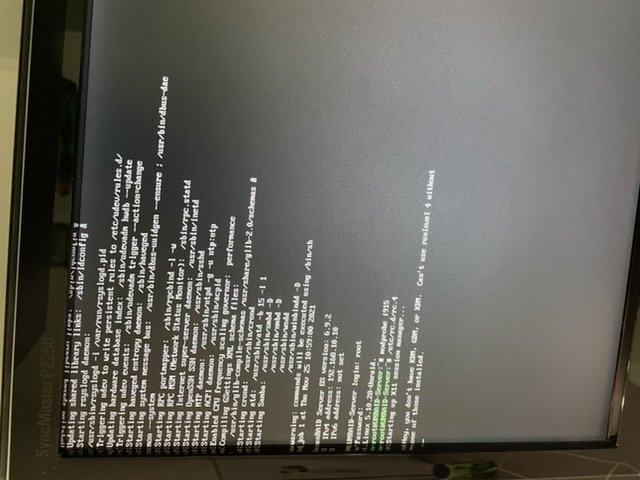
Hallo @ich777and all, habe das gleiche Problem. Komme mit den Befehlen nicht rein (sieht Screen) nur wenn ich Safe Mode Boote dann geht es, lagt aber, da ohne Treiber. Brauche die gui nur für den Fall der Fälle wenn im technikraum mal was am Server direkt gemacht werden muss. mein System: z170 pro Gaming von asus 6700k i7 mit igpu 32gb ram gtx 1660 für HW Transcoding hatte bis gestern das System knapp ein Jahr im Gange mit den igpu plugin zum passthrough an vm‘s und oben drein noch das igpu-top Plugin installiert. Hat auch nicht geholfen. anschliesend beide entfernt und ohne probiert, ebenfalls erfolglos. Dann nur den igpu-Top installiert, auch nichts. mit gui Boote kommt der black Screen mit blinking cursor. Mit Entf+Alt+F1 kann ich mich einloggen und die beiden oben genannten Kommandos bewirken rein garnichts ... wenn ich headless Boote und dann die Befehle eingebe kommt die Ausgabe auf dem Screenshot. Bitte und Hilfe, danke!
-
Big problem, need urgent help! Due to my stupidity I tried to update my Xpenology VM from the running version DSM 6.2.3-25426 to the newest DSM 6.2.4-25556. As bootimage I use 1.03b for a DS3617. The end of the story is, the VM was no longer responsive => Brick! I had under Unraid passthrough to the VM a DUAL Intel Nic and a LSI SAS2008 PCI-Express Fusion-MPT SAS-2 controller (LSI 9211-8i / Dell H310 HBA in IT-Mode) to which 6x WD 6TB hard disks are connected as RAID5. So I rebuilt the VM and reinstalled the DSM 6.2.3-25426 version, again. I now have the problem that when I passthrough the LSI controller with the 6x hard drives they show up as 6x external hard drives and no longer as RAID5. Please help me, I don't know how to get back the RAID5. A backup is unfortunately not available, I never thought that the RAID5 could be broken by the update. <?xml version='1.0' encoding='UTF-8'?> <domain type='kvm' id='9'> <name>Xpenology - VM</name> <uuid>a454f1e6-fe15-df14-0475-fceadd9fb72d</uuid> <description>DS3617xs - File Server</description> <metadata> <vmtemplate xmlns="unraid" name="CentOS" icon="default.png" os="centos"/> </metadata> <memory unit='KiB'>4194304</memory> <currentMemory unit='KiB'>4194304</currentMemory> <memoryBacking> <nosharepages/> </memoryBacking> <vcpu placement='static'>4</vcpu> <cputune> <vcpupin vcpu='0' cpuset='1'/> <vcpupin vcpu='1' cpuset='5'/> <vcpupin vcpu='2' cpuset='2'/> <vcpupin vcpu='3' cpuset='6'/> </cputune> <resource> <partition>/machine</partition> </resource> <os> <type arch='x86_64' machine='pc-q35-3.0'>hvm</type> </os> <features> <acpi/> <apic/> </features> <cpu mode='host-passthrough' check='none' migratable='on'> <topology sockets='1' dies='1' cores='2' threads='2'/> <cache mode='passthrough'/> </cpu> <clock offset='utc'> <timer name='rtc' tickpolicy='catchup'/> <timer name='pit' tickpolicy='delay'/> <timer name='hpet' present='no'/> </clock> <on_poweroff>destroy</on_poweroff> <on_reboot>restart</on_reboot> <on_crash>restart</on_crash> <devices> <emulator>/usr/local/sbin/qemu</emulator> <disk type='file' device='disk'> <driver name='qemu' type='raw' cache='writeback'/> <source file='/mnt/user/isos/synoboot.img' index='2'/> <backingStore/> <target dev='hdc' bus='usb'/> <boot order='1'/> <alias name='usb-disk2'/> <address type='usb' bus='0' port='2'/> </disk> <disk type='block' device='disk'> <driver name='qemu' type='raw' cache='writeback'/> <source dev='/dev/disk/by-id/ata-SanDisk_SDSSDHII120G_154682400434' index='1'/> <backingStore/> <target dev='hdd' bus='sata'/> <alias name='sata0-0-3'/> <address type='drive' controller='0' bus='0' target='0' unit='3'/> </disk> <controller type='usb' index='0' model='ich9-ehci1'> <alias name='usb'/> <address type='pci' domain='0x0000' bus='0x00' slot='0x07' function='0x7'/> </controller> <controller type='usb' index='0' model='ich9-uhci1'> <alias name='usb'/> <master startport='0'/> <address type='pci' domain='0x0000' bus='0x00' slot='0x07' function='0x0' multifunction='on'/> </controller> <controller type='usb' index='0' model='ich9-uhci2'> <alias name='usb'/> <master startport='2'/> <address type='pci' domain='0x0000' bus='0x00' slot='0x07' function='0x1'/> </controller> <controller type='usb' index='0' model='ich9-uhci3'> <alias name='usb'/> <master startport='4'/> <address type='pci' domain='0x0000' bus='0x00' slot='0x07' function='0x2'/> </controller> <controller type='pci' index='0' model='pcie-root'> <alias name='pcie.0'/> </controller> <controller type='pci' index='1' model='pcie-root-port'> <model name='pcie-root-port'/> <target chassis='1' port='0x10'/> <alias name='pci.1'/> <address type='pci' domain='0x0000' bus='0x00' slot='0x02' function='0x0' multifunction='on'/> </controller> <controller type='pci' index='2' model='pcie-root-port'> <model name='pcie-root-port'/> <target chassis='2' port='0x11'/> <alias name='pci.2'/> <address type='pci' domain='0x0000' bus='0x00' slot='0x02' function='0x1'/> </controller> <controller type='pci' index='3' model='pcie-root-port'> <model name='pcie-root-port'/> <target chassis='3' port='0x12'/> <alias name='pci.3'/> <address type='pci' domain='0x0000' bus='0x00' slot='0x02' function='0x2'/> </controller> <controller type='pci' index='4' model='pcie-root-port'> <model name='pcie-root-port'/> <target chassis='4' port='0x13'/> <alias name='pci.4'/> <address type='pci' domain='0x0000' bus='0x00' slot='0x02' function='0x3'/> </controller> <controller type='pci' index='5' model='pcie-root-port'> <model name='pcie-root-port'/> <target chassis='5' port='0x14'/> <alias name='pci.5'/> <address type='pci' domain='0x0000' bus='0x00' slot='0x02' function='0x4'/> </controller> <controller type='pci' index='6' model='pcie-root-port'> <model name='pcie-root-port'/> <target chassis='6' port='0x15'/> <alias name='pci.6'/> <address type='pci' domain='0x0000' bus='0x00' slot='0x02' function='0x5'/> </controller> <controller type='pci' index='7' model='pcie-root-port'> <model name='pcie-root-port'/> <target chassis='7' port='0x16'/> <alias name='pci.7'/> <address type='pci' domain='0x0000' bus='0x00' slot='0x02' function='0x6'/> </controller> <controller type='pci' index='8' model='pcie-root-port'> <model name='pcie-root-port'/> <target chassis='8' port='0x17'/> <alias name='pci.8'/> <address type='pci' domain='0x0000' bus='0x00' slot='0x02' function='0x7'/> </controller> <controller type='pci' index='9' model='pcie-root-port'> <model name='pcie-root-port'/> <target chassis='9' port='0x18'/> <alias name='pci.9'/> <address type='pci' domain='0x0000' bus='0x00' slot='0x03' function='0x0' multifunction='on'/> </controller> <controller type='pci' index='10' model='pcie-root-port'> <model name='pcie-root-port'/> <target chassis='10' port='0x19'/> <alias name='pci.10'/> <address type='pci' domain='0x0000' bus='0x00' slot='0x03' function='0x1'/> </controller> <controller type='pci' index='11' model='pcie-to-pci-bridge'> <model name='pcie-pci-bridge'/> <alias name='pci.11'/> <address type='pci' domain='0x0000' bus='0x01' slot='0x00' function='0x0'/> </controller> <controller type='virtio-serial' index='0'> <alias name='virtio-serial0'/> <address type='pci' domain='0x0000' bus='0x02' slot='0x00' function='0x0'/> </controller> <controller type='sata' index='0'> <alias name='ide'/> <address type='pci' domain='0x0000' bus='0x00' slot='0x1f' function='0x2'/> </controller> <controller type='sata' index='1'> <alias name='sata1'/> <address type='pci' domain='0x0000' bus='0x0b' slot='0x01' function='0x0'/> </controller> <interface type='bridge'> <mac address='52:54:00:24:c4:10'/> <source bridge='br0'/> <target dev='vnet0'/> <model type='e1000e'/> <alias name='net0'/> <address type='pci' domain='0x0000' bus='0x03' slot='0x00' function='0x0'/> </interface> <serial type='pty'> <source path='/dev/pts/1'/> <target type='isa-serial' port='0'> <model name='isa-serial'/> </target> <alias name='serial0'/> </serial> <console type='pty' tty='/dev/pts/1'> <source path='/dev/pts/1'/> <target type='serial' port='0'/> <alias name='serial0'/> </console> <channel type='unix'> <source mode='bind' path='/var/lib/libvirt/qemu/channel/target/domain-9-Xpenology - VM/org.qemu.guest_agent.0'/> <target type='virtio' name='org.qemu.guest_agent.0' state='disconnected'/> <alias name='channel0'/> <address type='virtio-serial' controller='0' bus='0' port='1'/> </channel> <input type='tablet' bus='usb'> <alias name='input0'/> <address type='usb' bus='0' port='1'/> </input> <input type='mouse' bus='ps2'> <alias name='input1'/> </input> <input type='keyboard' bus='ps2'> <alias name='input2'/> </input> <graphics type='vnc' port='5901' autoport='yes' websocket='5701' listen='0.0.0.0' keymap='de'> <listen type='address' address='0.0.0.0'/> </graphics> <video> <model type='qxl' ram='65536' vram='65536' vgamem='16384' heads='1' primary='yes'/> <alias name='video0'/> <address type='pci' domain='0x0000' bus='0x00' slot='0x01' function='0x0'/> </video> <hostdev mode='subsystem' type='pci' managed='yes'> <driver name='vfio'/> <source> <address domain='0x0000' bus='0x06' slot='0x00' function='0x0'/> </source> <alias name='hostdev0'/> <address type='pci' domain='0x0000' bus='0x04' slot='0x00' function='0x0'/> </hostdev> <memballoon model='none'/> </devices> <seclabel type='dynamic' model='dac' relabel='yes'> <label>+0:+100</label> <imagelabel>+0:+100</imagelabel> </seclabel> </domain> THE PROBLEM WAS FIXED!!! Since no one answers me here I have taken the matter into my own hands. Tutorials are certainly all useful, but finally the easiest way is to delete the system partitions (2.4GB Linux RAID1 members: sda1, sdb1, sdc1, ... , sdx1) of all installed hard disks, with an linux live image, if you have performed an update and the system is no longer bootable. Then simply use an unused synoboot.img and the system is migrated without touching the data partitions. Disadvantage is that all installed apps, configurations and settings have to be reinstalled of course. For my case i'm happy that no data is lost. Thanks anyway for all the information written down here. Would only wish for the future that the community would answer a bit more active.