





ogi
Members
-
Joined
-
Last visited
Everything posted by ogi
-
muahahahaha I finally got it I think. What was missing was that I was missing a few sensors from the "Display Settings/Global Available Sensors". Things started to work when I enabled the two HDD Status snesors (both read N/A) and PCH Temp; I added all those at the same time, so I'm not sure which one specifically did the trick. EDIT: thanks you dmacias for making this plugin and providing assistance in these threads! EDIT2: Rebooted the machine, still having the same problem, when I enable fan control, fans report 0 RPM, and then go full bore.... but when reporting 0 rpm, fans are actually spinning under power.... EDIT3: on another reboot, fans are spinning at 225rpm ....and not in the critical zone, so yay?
-
okay, things are weird, I decided to open up the chassis to see what's going on, turns out while the reading reports 0 RPMs, the fans are still actually spinning....so I suppose this is a problem of an incorrect fan speed reading....
-
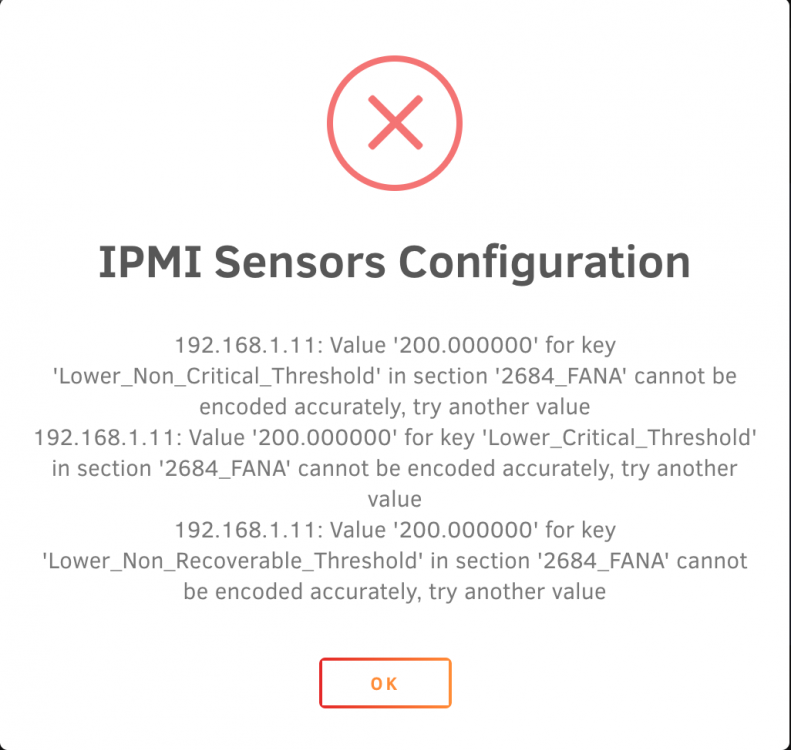
Thanks for the reply, for some reason my sensor seems to want multiples of 75, so 200 would not work: When I set to 300, I still get the same behavior described earlier. Here is the ipmi log, the log indicates the plugin is trying to do things correctly, but for some reason the fan is just going to 0, then the fan spools up again to 100% 2020-02-22 07:29:07 Starting Fan Control 2020-02-22 07:29:07 Setting fans to full speed 2020-02-22 07:29:17 Fan:Temp, FAN1234(32%):CPU1 Temp(31°C), FANA(36%):HDD Temp(0°C) 2020-02-22 07:30:17 Fan:Temp, FAN1234(31%):CPU1 Temp(24°C), FANA(36%):HDD Temp(0°C) 2020-02-22 07:30:40 Stopping Fan Control 2020-02-22 07:30:40 Setting fans to auto 2020-02-22 07:31:56 Starting Fan Control 2020-02-22 07:31:56 Setting fans to full speed 2020-02-22 07:32:06 Fan:Temp, FAN1234(31%):CPU1 Temp(24°C), FANA(36%):HDD Temp(25°C) 2020-02-22 07:32:16 fan control config file updated, reloading settings 2020-02-22 07:32:17 Fan:Temp, FAN1234(31%):CPU1 Temp(25°C), FANA(36%):HDD Temp(25°C) 2020-02-22 07:33:57 fan control config file updated, reloading settings 2020-02-22 07:33:57 Fan:Temp, FAN1234(31%):CPU1 Temp(25°C), FANA(40%):HDD Temp(25°C) 2020-02-22 07:35:58 Fan:Temp, FAN1234(35%):CPU1 Temp(33°C), FANA(40%):HDD Temp(27°C) 2020-02-22 07:36:59 Fan:Temp, FAN1234(31%):CPU1 Temp(30°C), FANA(40%):HDD Temp(27°C) 2020-02-22 07:38:09 fan control config file updated, reloading settings 2020-02-22 07:38:09 Fan:Temp, FAN1234(31%):CPU1 Temp(28°C), FANA(50%):HDD Temp(27°C)
-
See the first post about setting Supermicro critical thresholds with the sensor config editor. Screenshot above showed I modified the critical thresholds; but the original post said to put all the values between 200 and 300, which I have now done, but still have the same issue: Again, doesn't matter what I set the minimum fan speed percentage at, when I hit apply, the fans just go to 0 RPM. Also for reference, this is the relevant section of the config file: Section 2684_FANA ## Possible values: Yes/No Enable_All_Event_Messages Yes ## Possible values: Yes/No Enable_Scanning_On_This_Sensor Yes ## Possible values: Yes/No Enable_Assertion_Event_Lower_Critical_Going_Low Yes ## Possible values: Yes/No Enable_Assertion_Event_Lower_Non_Recoverable_Going_Low Yes ## Possible values: Yes/No Enable_Assertion_Event_Upper_Non_Critical_Going_High Yes ## Possible values: Yes/No Enable_Assertion_Event_Upper_Critical_Going_High Yes ## Possible values: Yes/No Enable_Assertion_Event_Upper_Non_Recoverable_Going_High Yes ## Possible values: Yes/No Enable_Deassertion_Event_Lower_Critical_Going_Low Yes ## Possible values: Yes/No Enable_Deassertion_Event_Lower_Non_Recoverable_Going_Low Yes ## Possible values: Yes/No Enable_Deassertion_Event_Upper_Non_Critical_Going_High Yes ## Possible values: Yes/No Enable_Deassertion_Event_Upper_Critical_Going_High Yes ## Possible values: Yes/No Enable_Deassertion_Event_Upper_Non_Recoverable_Going_High Yes ## Give valid input for sensor type = Fan; units = RPM Lower_Non_Critical_Threshold 225.000000 ## Give valid input for sensor type = Fan; units = RPM Lower_Critical_Threshold 225.000000 ## Give valid input for sensor type = Fan; units = RPM Lower_Non_Recoverable_Threshold 225.000000 ## Give valid input for sensor type = Fan; units = RPM Upper_Non_Critical_Threshold 3000.000000 ## Give valid input for sensor type = Fan; units = RPM Upper_Critical_Threshold 3000.000000 ## Give valid input for sensor type = Fan; units = RPM Upper_Non_Recoverable_Threshold 3000.000000 ## Give valid input for sensor type = Fan; units = RPM; 'None' to not use hysteresis Positive_Going_Threshold_Hysteresis 75.000000 ## Give valid input for sensor type = Fan; units = RPM; 'None' to not use hysteresis Negative_Going_Threshold_Hysteresis 75.000000 EndSection Section 2751_FANB ## Possible values: Yes/No Enable_All_Event_Messages Yes ## Possible values: Yes/No Enable_Scanning_On_This_Sensor Yes ## Possible values: Yes/No Enable_Assertion_Event_Lower_Critical_Going_Low Yes ## Possible values: Yes/No Enable_Assertion_Event_Lower_Non_Recoverable_Going_Low Yes ## Possible values: Yes/No Enable_Assertion_Event_Upper_Non_Critical_Going_High Yes ## Possible values: Yes/No Enable_Assertion_Event_Upper_Critical_Going_High Yes ## Possible values: Yes/No Enable_Assertion_Event_Upper_Non_Recoverable_Going_High Yes ## Possible values: Yes/No Enable_Deassertion_Event_Lower_Critical_Going_Low Yes ## Possible values: Yes/No Enable_Deassertion_Event_Lower_Non_Recoverable_Going_Low Yes ## Possible values: Yes/No Enable_Deassertion_Event_Upper_Non_Critical_Going_High Yes ## Possible values: Yes/No Enable_Deassertion_Event_Upper_Critical_Going_High Yes ## Possible values: Yes/No Enable_Deassertion_Event_Upper_Non_Recoverable_Going_High Yes ## Give valid input for sensor type = Fan; units = RPM Lower_Non_Critical_Threshold 225.000000 ## Give valid input for sensor type = Fan; units = RPM Lower_Critical_Threshold 225.000000 ## Give valid input for sensor type = Fan; units = RPM Lower_Non_Recoverable_Threshold 225.000000 ## Give valid input for sensor type = Fan; units = RPM Upper_Non_Critical_Threshold 3000.000000 ## Give valid input for sensor type = Fan; units = RPM Upper_Critical_Threshold 3000.000000 ## Give valid input for sensor type = Fan; units = RPM Upper_Non_Recoverable_Threshold 3000.000000 ## Give valid input for sensor type = Fan; units = RPM; 'None' to not use hysteresis Positive_Going_Threshold_Hysteresis 75.000000 ## Give valid input for sensor type = Fan; units = RPM; 'None' to not use hysteresis Negative_Going_Threshold_Hysteresis 75.000000 EndSection

-
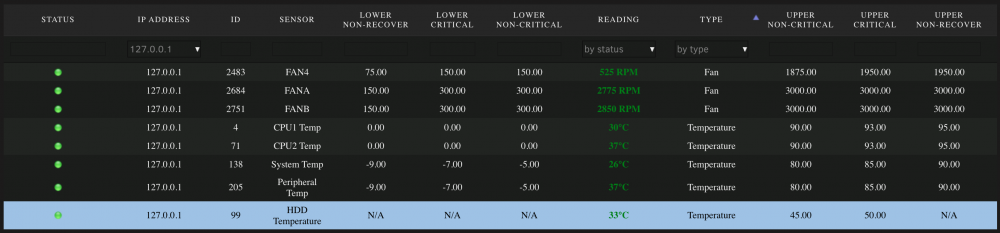
Hello, Thanks for writing this plugin dmacius. I'm having an issue with some fans spinning at 100% no matter what (do not think this is a bad threshold issue). For context, I'm running unraid 6.8.2,I have a CSE-846 chassis, with X9DRI-LN4F+ motherboard, and 3x iPPC Noctua 3000 fans for the "fanwall", as well as some fans for my CPU coolers. The CPU fans are running consistently as they should (I will +1 the earlier suggestion of adding a temperature option of having the CPU fans be driven by max(Temp_CPU1, Temp_CPU2)). The problem is with the 3x iPPC noctua fans in the fanwall. When I adjust a setting regarding, say minimum fan speed, the fans go to 0, and then the threshold limitation kicks on, and they spool up to 100%. What is odd here is that it doesn't matter what I set the minimum fan speed to, the fans will always go to 0 rpms, I've set minimum fan speeds of over 80%, doesn't matter, they go to 0 rpms, then I assume the threshold kicks in and spools them to 100% (but I can't be certain). I have tried the fan wall fans to be plugged into FAN1/2/3 headers, and I've tried them plugged in the FANA/B header (using a 2-1 splitter on one of the connectors), but I have right now the fans connected into FANA/B connectors and the CPU connectors plugged into FAN4 (using a 2-way splitter). I think the plugin is trying to set the fan speed accordingly. Here is a segment from my /var/log/ipmifan logfile: 2020-02-21 22:42:31 fan control config file updated, reloading settings 2020-02-21 22:42:32 Fan:Temp, FAN1234(38%):CPU1 Temp(35°C), FANA(32%):HDD Temp(35°C) 2020-02-21 22:44:33 Fan:Temp, FAN1234(35%):CPU1 Temp(33°C), FANA(32%):HDD Temp(35°C) 2020-02-21 22:45:33 Fan:Temp, FAN1234(31%):CPU1 Temp(30°C), FANA(32%):HDD Temp(35°C) 2020-02-21 22:47:34 Fan:Temp, FAN1234(37%):CPU1 Temp(34°C), FANA(32%):HDD Temp(35°C) 2020-02-21 22:48:34 Fan:Temp, FAN1234(38%):CPU1 Temp(35°C), FANA(32%):HDD Temp(35°C) If I look at my Readings page tho, you can see the results in the image. Is there anything else I can check/do? Thanks again.
-
I'm not sure if it's a seperate issue I'm having, but while removing a second disk, I'm having problems with 'syncing disks'. I attempted to restart a docker container (Plex Media Server) while the clear-disk script was running. The container won't stop, it appears to be stuck on [s6-finish] syncing disks ... I've been trying to kill the container with no luck. Current plan is to let the clear disk script finish on the current disk, then force a shut-down/restart (will likely have to manually umount all my disks). Anyway I don't think this issue is directly due to the script so much as the suggested setting md_write_method to reconstruct write (from auto or read/modify/write). Given that that setting is suggested, I'm going to try running through this script next time around w/ read/modify/write setting instead (full well knowing it will take longer), and see if I have sync filesystem or sync disks issues then.
-
After a little over an hour of sync-ing, I powered the machine off, let it come up, it's doing a parity check now, but the disk I was running this before is labeled as unmountable, so as soon as the parity check completes, I'll resume the shrink array procedure from step 9. https://wiki.lime-technology.com/Shrink_array
-
I just ran this script, while completed without issue, when I have gone to stop the array, the array is taking a long time to sync filesystems... is this normal (I'm currently passing 20 minutes)?
-
Did those steps, got the web gui up, but it didn't like the location of ConfigTemplate ConfigTemplate=/config/nzbget.conf Modified that line and I was back up and running
-
Since making this post, you guys have had a lot on your plate (especially w/ the reiserFS corruption issue, etc), just wondering if there is any other data I can provide relevant to enable this feature. I found some "guides" to get the shadow copy volumes setup on a linux server: http://www.linuxtopia.org/online_books/network_administration_guides/samba_reference_guide/30_VFS_13.html Here is some actual documentation on the samba module: https://www.samba.org/samba/docs/man/manpages/vfs_shadow_copy2.8.html I would be happy to seek out more information, but again, I am unaware of the technical challenges of such an implementation. Thanks, Ogi Ogi, thanks for your patience with us. I want to explore this further but we are about to go on a feature freeze for 6.0. Need to clamp down what we have first before we can add any more. That said, this sounds like something we for sure would want to look into for our windows users. Thanks for the fast reply! I know you guys are approaching the RC phase of v6.0 (and with that comes a feature freeze), don't worry, I have my expectations in check. I guess I would just like to have an idea of what kind of difficulty implementation of the volume shadow copy module would be (is this a minor undertaking, major undertaking?). From what I've read it looks like it just leverages existing snapshots (BTRFS supported feature if I understand correctly). That said, I'm glad you're able to see the value in a feature such as this, I know at work being able to quickly recover a network file (going to a "previous version") has gotten me out of a jam more than once. Thanks again Jon
-
Since making this post, you guys have had a lot on your plate (especially w/ the reiserFS corruption issue, etc), just wondering if there is any other data I can provide relevant to enable this feature. I found some "guides" to get the shadow copy volumes setup on a linux server: http://www.linuxtopia.org/online_books/network_administration_guides/samba_reference_guide/30_VFS_13.html Here is some actual documentation on the samba module: https://www.samba.org/samba/docs/man/manpages/vfs_shadow_copy2.8.html I would be happy to seek out more information, but again, I am unaware of the technical challenges of such an implementation. Thanks, Ogi
-
I hadn't thought of it that way, but that sounds about right. I'm on my phone so pardon the lack of formatting. Here is an instructional guide showing its use: http://www.engineering.uiowa.edu/ecs/support/previous-version From the wikipedia page it says this feature is available on LVM based storage (for samba servers that aren't windows) https://en.m.wikipedia.org/wiki/Shadow_Copy
-
I am far from super knowledgeable on these sorts of things, so I have no idea on the feasibility of this feature request but I am wonder if it is possible. The request is for Shadow Copies to be supported in Samba Shares. What this would allow for is that Windows users can access/restore previous versions of a file from the right click menu -> Properties -> Previous Versions Tab -> <select how far back you want to go to restore the file>. All windows users could potentially benefit from this feature. Thanks, Ogi
-
I didn't get the X9SCM-F working under ESXi, but I did get it working on bare metal using the following steps: My go file addition: modprobe w83627ehf cp /boot/custom/sensors.d/sensors.conf /etc/sensors.d cp /boot/custom/sensors.d/sensors.conf /etc/sensors3.conf My /boot/custom/sensors.d/sensors.conf file: chip "w83627ehf-*" "w83627dhg-*" "w83667hg-*" "nct6775-*" "nct6776-*" label in0 "Vcore" label in2 "AVCC" label in3 "+3.3V" label in7 "3VSB" label in8 "Vbat" label temp2 "CPU Temp" label temp1 "MB Temp" set in2_min 3.3 * 0.90 set in2_max 3.3 * 1.10 set in3_min 3.3 * 0.90 set in3_max 3.3 * 1.10 set in7_min 3.3 * 0.90 set in7_max 3.3 * 1.10 set in8_min 3.0 * 0.90 set in8_max 3.3 * 1.10
-
I posted what I did to get temperatures working on the X9SCM-F board in the webGUI thread, when at a PC I'll copy that post here, but in case anyone with that board tries to get it working, the solution is in that thread.
-
Just looked at the drive caddies and oh-lord, not sure how/why I didn't think temperature would be a problem. xxredxpandaxx, you're going to have to perform some wizardry to keep these hard drives at appropriate temperatures. As a mechanical engineer, I don't envy that task at all.
-
Wow, that's a major temperature difference, and that occurred even with the backplanes removed?
-
Just ran this utility for the first time, my parity check speeds have increased by ~15-20% ... thanks for making an awesome utility!
-
I think you may benefit if you are able to rotate the black fan so it is at an angle, going from the corner of the motherboard to the corner between the back-plane and the case (hope that makes sense). You are right though, the fan layout here is not optimum, I don't know how realistic it would be to attach the fans to the top cover of the tray (the part you have removed in these pictures) so they sit above the motherboard, but have a long enough power cables so you can connect them and then put the cover on. What mATX board are you using?
-
Worst case you have some drive bays for virtualization
-
Was just thinking, if you had a M1015 in the xserve (which has 2 SAS connectors on there) and you have one RAID expander card in each xserve RAID enclosure, the entire setup would work quite well, not to mention look amazing (and give you 28 drives of storage). You'll have to post the detailed guide for getting the LEDs working the way you want and everything
-
the only limitation it has is that it can only hold 14 drives, With the way I am setting this up it is just like plugging the drive into a sata port so if your motherboard/controller can handle 4TB drives you could use those. It isn't using any of the original RAID setup, I am just using the hardware that is there to pass the signals along. (hope this makes sense) Makes perfect sense, I wasn't sure if you were keeping the internal guts of it or using your own motherboard/cpu/etc. That's too bad the limitation is only ~14 drives, it's a gorgeous piece of hardware, probably pretty quiet as well. I suppose you could stack two of these on top of each other and link them with a SAS cable (or whatever that cable is that can link several of the boxes together without requiring redundant motherboard/CPU/memory/etc). Ogi
-
What are the limitations of this chassis? I don't imagine it can handle hard drives greater than 2TB? How noisy would you describe it? Looking forward to seeing more info for sure!
-
I would just try renaming the Windows username and certainly not have any spaces in it. With Windows 8, that's a little more difficult :-/ EDIT: actually with windows 8 it was super easy. I followed the guide here: http://www.thewindowsclub.com/user-account-name-change and rebooted the PC, and everything fired right up after.
-
Ok problem, how do I create a user when the first letter is a capitol letter for the username?


